
Meta Conversions API (CAPI): Setup, Parameters, Dedup
Meta Conversions API (CAPI) explained: four required parameters, access token, event_id deduplication, 7-day event_time limit, plus what CAPI cannot measure.

Tilen Ledic
Written by
Most guides to the Meta Conversions API stop at "install it, it fixes iOS". After running a store for 15 years and now building the sending side for other stores, I think the useful questions are more specific: which parameters are required, where the access token comes from, how deduplication actually decides, how old an event may be, and what the Conversions API still cannot tell you about your Meta spend.
This guide answers those against Meta's own documentation, opened in September 2026, and adds what we see in Enalitica's data.
Short answer. The Meta Conversions API (CAPI) is a server-to-server interface that sends conversion events (Purchase, AddToCart, Lead) from your server, shop platform or CRM to Meta, next to or instead of the browser Pixel. A website event needs four required parameters: event_name, event_time, user_data and action_source (event_source_url and client_user_agent are required for website events too), an event_id so Meta can deduplicate it against the Pixel, and an event_time no older than 7 days. CAPI feeds Meta's bidding; it does not tell you what Meta actually sold. This guide covers both.
What Is Meta Conversions API (CAPI)?
The Meta Conversions API is a server-side interface that lets you send conversion events (purchases, add-to-carts, leads, page views) from your server directly to Meta's advertising system. Meta describes it as a direct connection between your marketing data (from your server, website platform, app or CRM) and the systems that optimise targeting, lower cost per result and measure outcomes (Meta Business Help).
The difference in one sentence: the Meta Pixel asks the customer's browser to report what happened, and if an ad blocker, a consent refusal or a broken script stops it, Meta never hears about the order; CAPI reports the order from your server, so browser restrictions do not apply.
Meta recommends running both, a "redundant setup": the Pixel reports what it can, CAPI covers what the Pixel missed, and deduplication makes sure the same purchase is counted once.
| Feature | Meta Pixel | Conversions API |
|---|---|---|
| Runs in | Browser | Your server |
| Stopped by ad blockers | ✓ | ✗ |
| Stopped by iOS ATT and Safari ITP | ✓ | ✗ |
| Needs marketing consent in the EU | ✓ | ✓ |
| Can send CRM data (email, phone, order value) | ✗ | ✓ |
| Setup effort | Low (paste a snippet) | One click to several weeks, depending on the method |
Meta's own product page states that advertisers with a CAPI setup for web events saw on average a 17.8% lower cost per result than those without it (Meta, September 2026; the footnote with the method is not published on the page).
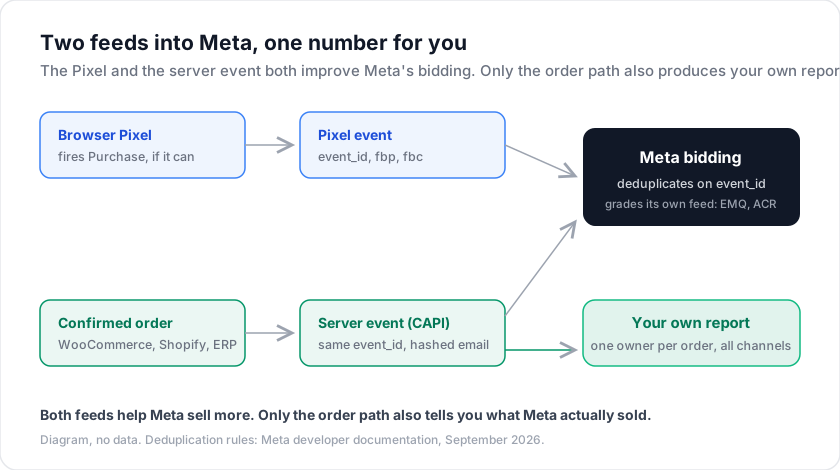
For a purchase, a CAPI integration collects the event data (value, currency, product IDs, hashed email and phone, the fbc click cookie, the fbp browser cookie, IP address, user agent), posts it to https://graph.facebook.com/{version}/{pixel_id}/events with the access token, and Meta matches the event to an account, attributes it to an ad click or view and deduplicates it against the Pixel event with the same event_id. Use Meta's standard event names (ViewContent, AddToCart, InitiateCheckout, AddPaymentInfo, Purchase), case-sensitive; Purchase requires value and currency.
What Are the Four Required Parameters of a CAPI Event?
Every Conversions API event must carry four parameters: event_name, event_time (Unix seconds, GMT, at most 7 days old), user_data (at least one customer information parameter) and action_source (website, app, physical_store, system_generated, phone_call, chat, email, other). For website events Meta also requires event_source_url and client_user_agent. event_id is optional in the spec but needed for deduplication (server event parameters).
| Parameter | Required | Note |
|---|---|---|
event_name | ✓ | Standard name, case-sensitive |
event_time | ✓ | Unix seconds in GMT, not in the future, at most 7 days old |
user_data | ✓ | At least one customer information parameter |
action_source | ✓ | website for a shop purchase |
event_source_url | ✓ website only | The page the event happened on |
client_user_agent | ✓ website only | Inside user_data, never hashed |
event_id | ✗ (recommended) | The deduplication key against the Pixel |
custom_data | ✗ | value and currency required for Purchase |
data_processing_options | ✗ | US state privacy laws only |
Meta accepts an event_time up to 7 days before you send it; if any event in a batch is older, Meta rejects the whole request and processes none of its events. Delay costs performance before it costs delivery: for sales-objective ads Meta recommends sending within 1 hour and accepts up to 7 days; for attribution in Ads Manager the recommended and maximum window are both 7 days; offline events may arrive up to 62 days late (Meta Business Help, September 2026).
Customer information parameters and hashing
The user_data object is where matching happens. Meta's customer information parameters page sets the rules: normalise, then hash with SHA-256, except for the four signals that must stay plain.
| Parameter | What it is | Hash |
|---|---|---|
em | Email, lowercase, trimmed | ✓ |
ph | Phone, digits only with country code | ✓ |
fn, ln | First and last name, lowercase | ✓ |
ct, st, zp, country | City, state, postal code, ISO country code, lowercase | ✓ |
external_id | Your own customer or order ID | ✓ recommended |
fbc | Click ID cookie, built from the fbclid in the ad URL | ✗ |
fbp | Browser ID cookie set by the Pixel | ✗ |
client_ip_address | Customer's IP address | ✗ |
client_user_agent | Browser user agent | ✗ |
Never hash fbc, fbp, the IP address or the user agent. The formats of the two cookies and the rule to refresh them are in Meta's fbp and fbc guide.
Event Deduplication With event_id: 48 Hours, First Event Wins
If you run the Pixel and CAPI together, Meta receives two copies of every event, and without deduplication your Events Manager shows double the purchases and your cost per purchase looks half of what it is. Deduplication works through event_id: you generate one ID per conversion (for example order_67890_purchase) and send it with both the Pixel event and the server event.
Meta's rules, from the deduplication documentation and Business Help: Meta deduplicates when event_name and event_id match, or, without an event_id, when event_name and the same fbp or external_id match. Both events must arrive within 48 hours of the first one, and when the two are similar Meta keeps the one received first. The purchase identifier to share on both sides is therefore event_id; order_id in custom_data is reporting data, not a deduplication key.
Pixel side:
fbq('track', 'Purchase', {
  value: 89.99,
  currency: 'EUR'
}, {eventID: 'order_67890_purchase'});
Server side:
{
  "event_name": "Purchase",
  "event_id": "order_67890_purchase",
  "event_time": 1709913600,
  "action_source": "website",
  "user_data": { "em": ["<sha256>"], "client_user_agent": "..." },
  "custom_data": { "value": 89.99, "currency": "EUR" }
}
Typical failures: an event_id missing on one side, IDs that differ by a separator, Purchase against purchase, or a server event arriving more than 48 hours after the Pixel event. Verify in Events Manager with the Test Events tool, which marks each event as received, deduplicated or dropped.
Event Match Quality and ACR: How Meta Grades Your Feed
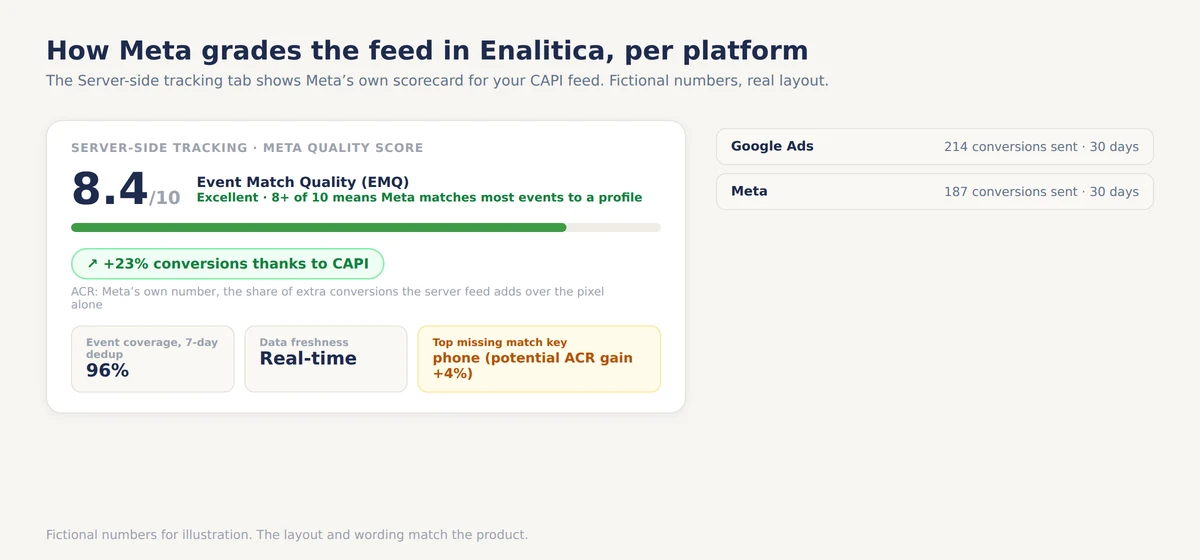
Event Match Quality (EMQ) is a 0 to 10 score Meta computes per event for website events sent through CAPI, from the customer information parameters you send and the share of event instances matched to Meta accounts, on the last 48 hours of data (About event match quality). A higher score means more purchases attributed to the right ad and, in Meta's words, lower cost per action.
Meta's priority list for matching: email and click ID (fbc) high; phone, country, birthdate, external ID, browser ID (fbp) and Facebook login ID medium; first name, last name, city and postal code low.
Match quality is a means. The number that answers "did CAPI earn its keep?" is Additional Conversions Reported (ACR): Meta's own figure for how many more conversions were reported with CAPI next to the Pixel than with the Pixel alone. Meta calculates it from the last 7 days of conversions attributed to ad sets connected to the dataset; it was previously called "additional attributed conversions" (About additional conversions reported). An ACR near zero means your server events merely duplicate the Pixel.
Enalitica reads EMQ, ACR, 7-day event coverage (the share of Pixel events that also arrived through CAPI with a deduplication key) and data freshness from Meta's Dataset Quality API and shows them in the Server-side tracking tab; the numbers are Meta's, and the tab's bands (8+ excellent, 6 to 8 good) are our reading of them.
Meta CAPI Access Token: Events Manager or System User
A Conversions API access token authenticates your server's calls to graph.facebook.com/{version}/{pixel_id}/events. Meta's get started page gives two ways to get one.
In Events Manager, choose the dataset, open Settings, find the Conversions API section and click "Generate access token"; Meta creates the app and the system user for you. Or, in Business settings, assign the dataset to a system user and generate the token there. Store it as a secret on the server, never in the browser.
WooCommerce and Shopify stores on the official apps do not need a token at all: the app sends server events after you connect the account.
Five Ways to Set Up Meta CAPI, From One Click to Direct API
Meta's comparison of setup options lists a one-click option, direct integration and partner integrations; server-side GTM and the Gateway are partner and hosted variants of the same interface.
| Method | Technical skill | Setup time | Ongoing cost | Control |
|---|---|---|---|---|
| Meta-enabled Conversions API | None | One click in Events Manager | Free | None: mirrors the Pixel's events and parameters, deduplicated automatically, web only |
| Partner app (WooCommerce, Shopify) | None | Minutes | Free (included) | Basic |
| CAPI Gateway | Low (no code) | Hours | Own AWS or GCP resources | Limited |
| Server-side GTM | Medium to high | Hours to days | Server container hosting | High |
| Direct API | High (backend developer) | Days to weeks | Your server | Full |
Meta-enabled Conversions API is the web-only option Meta added to Events Manager: one click creates a server-side connection that mirrors the events and parameters the Pixel already sends, deduplicated automatically; free, no developer, and no data the browser did not have. The partner apps are covered in the next section. Server-side GTM forwards data-layer events to Meta, Google Ads and others from one container, still depending on the browser firing them; the official template and three alternative sGTM setups for Meta CAPI are compared separately. Direct API is your backend posting to the Graph API, the only route for app, offline and CRM events, which Meta estimates at 2 to 4 weeks.
Conversions API Gateway is Meta's self-serve, no-code option: a pre-built relay you deploy in your own AWS (EKS or ECS Express) or Google Cloud account that receives what the browser Pixel fired and forwards it as server events. The software is free; you pay the cloud resources (Meta developer documentation). Because its input is the Pixel, it cannot recover a purchase the browser never reported. Costs, setup and the browser-only blind spot are in Meta CAPI Gateway: what it is and when to use it. Meta's newer Signals Gateway runs the same idea on your own infrastructure with routing to more destinations.
WooCommerce and Shopify: Meta CAPI on the Official Apps
WooCommerce. The official Meta for WooCommerce plugin implements the Conversions API out of the box: once the account is connected, server events are sent with no extra setting and no token to paste. Two limits from the plugin's documentation: Checkout on Facebook and Instagram is not supported, and caching plugins that group JavaScript (Breeze, SG Optimizer, Asset CleanUp) can stop the Pixel events from firing. The raw click ID on the order is covered in capturing the fbclid in WooCommerce order metadata, the wider setup in our WooCommerce conversion tracking guide.
Shopify. The Facebook & Instagram app sends server events depending on the customer data-sharing level (Shopify Help):
| Level | What it shares | CAPI active |
|---|---|---|
| Standard | Meta Pixel only, browsing data | ✗ |
| Enhanced | Pixel plus the Conversions API sending the purchase event server to server, with name, location, email and phone | ✓ |
| Maximum | Same as Enhanced plus "Facebook's latest advertising technology" | ✓ |
Shopify's help page gives Enhanced and Maximum the same server-side purchase event; the only stated difference is Meta's latest advertising technology.
Can a CRM Send Purchase Events to the Conversions API?
Yes. The Conversions API accepts events from a server, shop platform, app or CRM, and Meta's setup comparison lists CRM next to web, app and offline as an event source for direct integrations. Meta's CRM guide is written for lead funnels (send the 15 to 17 digit Meta lead ID, optimise for a stage reached within 28 days), but a closed deal or a purchase confirmed in an ERP goes the same way: action_source set to system_generated or physical_store, hashed email and phone, and an event_time inside the delay window.
For an online shop the most automated tool is the one that already holds the confirmed order: Shopify's and WooCommerce's official apps, or, as Enalitica does, a send from the order record itself.
Meta CAPI and GDPR Consent: What Server-Side Does Not Change
CAPI is a more resilient pipeline, not a way around consent. It helps where the browser is the obstacle and changes nothing where the law is.
Where CAPI helps. Ad blockers intercept browser requests to tracking domains; a server request is invisible to them. Safari caps every cookie written by JavaScript at seven days, which shortens the life of a Pixel-set fbp or fbc; a server event can carry the identifiers your checkout collected instead.
Where CAPI does not help. If a customer in the EU refused marketing consent, their personal data must not be sent to Meta from the server either. Meta's data_processing_options (Limited Data Use) exists for US state privacy laws only, currently 14 states including California, Colorado, Texas and Florida; it has no meaning for GDPR. For a refuser there is no "send it flagged" option: the only compliant choice is not to send the event with personal data at all. Enalitica does exactly that: an order whose visitor declined marketing consent is recorded as skipped and never sent to Meta. Country by country rules are in what you can track by region.
Server-side does not mean consent-free: an order whose visitor refused marketing consent is never sent to Meta.
What Meta CAPI Cannot Measure: Cross-Platform Attribution
CAPI fixes capture for Meta. It does not produce an independent number, for three reasons that no configuration changes. The full distinction is in server-side tracking vs order-based attribution.
Meta only sees Meta. The Conversions API tells Meta about your conversions; it cannot tell you how Meta's contribution compares with Google Ads, organic search, email or direct visits.
Both platforms claim the same sale. A customer who clicks a Meta ad on Monday and a Google ad on Wednesday and buys on Thursday is a conversion in both dashboards. CAPI deduplicates Pixel against server, never Meta against Google. The worked example is in how Meta, Google and Enalitica count conversions.
The numbers are large. In Enalitica's data, of nearly 12,000 orders analysed in the last 90 days, 12.6% carried a Meta click ID. In stores with Meta and Google Ads connected, across more than 10,000 orders and over €700,000 in revenue, Meta reported 4.6 times as many conversions as there were orders carrying its click ID. Part of that gap is real: Meta counts view-through and engaged-view conversions, and click capture misses visitors who refused consent. Part of it is a walled garden grading its own work.
CAPI improves the feed Meta grades itself on. It does not produce the independent number.
How Enalitica Sends Meta CAPI and Measures Meta Independently
Enalitica does two things with each confirmed WooCommerce, Shopify or Shopamine order: it sends the purchase to Meta through the Conversions API, and it records which channel owns the order in its own report.
What Enalitica sends to Meta. The Purchase event with hashed email and phone (collected at checkout, so present on most orders), hashed name, city, postal code and country, a stable external_id, and fbc, fbp, client IP and user agent when the order carries them, with action_source website and an event_time capped at 7 days. Of the more than 6,600 Meta Purchase events Enalitica sent in the last 90 days, about 17% carried a Meta click ID, 55% the _fbp browser ID and 8 in 10 a hashed email and phone; the click-ID share varies widely from store to store (measured 25 September 2026).
How deduplication is handled. Enalitica sends a deterministic event_id (the order ID plus _purchase). Shops on the custom-shop contract fire the same ID from their Pixel, so Meta collapses the two on event_id. On WooCommerce and Shopify the official app's Pixel uses its own ID, so Meta's fallback applies (same event_name plus the same _fbp within 48 hours), which is why Enalitica forwards _fbp whenever the checkout script captured it. Check in Events Manager that browser and server Purchase collapse into one before trusting the count.
What Enalitica sends to Google, and what happens on a return. Google has no CAPI of its own; the equivalent is a conversion upload with the click ID, hashed customer data and explicit Consent Mode v2 signals, explained in our guide to the Google conversions API question. When an order is cancelled or partly refunded, Enalitica retracts or restates the Google conversion through conversion adjustments within Google's 55-day window, in a daily job. Meta's standard events include no refund event, so Meta's books cannot be corrected after the fact; Enalitica's own reports subtract returns for both platforms, which is where the corrected numbers live (see the POAS guide).
What Enalitica measures independently. Every order gets one owner. When a customer clicks a Meta ad, returns through a Google ad two days later and buys, Meta claims the sale inside its 7-day click window and Google claims the last click; Enalitica gives the order to the most recent valid click and shows Meta as an assist, so nothing is counted twice. Meta's own attribution settings offer 1-day or 7-day click, 1-day view and engaged-view windows (Meta Business Help); the 28 days are Enalitica's rule: an fbclid counts only if captured within 28 days of the order (90 for a gclid). A refuser's order is still attributed from the landing URL the shop itself recorded, which touches no cookie; it is just never sent to Meta. Multi-touch views are in multi-touch attribution for e-commerce.
The limits are real too: past orders cannot be sent after Meta's 7-day window, and an order without any identifier matches nothing. The goal is a number you can spend against, not a bigger number. Onboarding imports your recent orders and enriches them with click IDs and ad data in minutes; to see how your Meta and Google numbers compare when measured from real orders, book a demo.
Feeding Meta well and measuring Meta independently are the same order read twice.
Meta CAPI Setup Checklist: Five Checks in Events Manager
- Source column. Open Events Manager; if every Purchase says "Browser", you have Pixel only.
- Deduplication. Send the same
event_idfrom Pixel and server; confirm in Test Events that the pair collapses to one. - Parameters. Hashed email and phone on every Purchase,
fbcandfbpin plain text,client_user_agentandevent_source_urlpresent. - Freshness. Purchases within 1 hour, nothing older than 7 days in a batch.
- Score. EMQ and ACR checked monthly, not once.
Frequently Asked Questions
Is Conversions API Gateway the same as the Conversions API?
No. The Conversions API is the interface; the Gateway is one hosted way to feed it from the browser Pixel. Direct integration, server-side GTM, partner apps and order-based senders such as Enalitica feed the same interface without the Gateway. Full comparison in Meta CAPI Gateway.
Does the Meta Pixel Helper extension detect CAPI events?
No. The Pixel Helper only shows events fired by the browser Pixel. Server events are visible in Events Manager, in the Test Events tool and in the source column of the dataset overview, where they show "Server".
Can I use Meta CAPI for offline conversions (CRM, in-store)?
Yes. Meta discontinued the standalone Offline Conversions API in May 2025 (Meta Business Help) and now takes in-store, call-centre and CRM conversions through the Conversions API with action_source set to physical_store, phone_call or system_generated, uploaded to a dataset; offline events may be up to 62 days old. Meta's comparison page notes that offline and app events through CAPI need a direct integration.
What is the minimum Graph API version for CAPI in 2026?
The current Graph API version is v26.0 (released 29 July 2026), and Graph versions live about two years: v22.0 until 20 May 2027, v25.0 until 29 July 2028 (changelog). The Marketing API surface of the same versions retires sooner (v24.0 on 6 October 2026), and Meta announced version auto-upgrade for 29 July 2026, so an old version does not fail loudly, it gets forwarded. Check the facebook-api-version response header; Enalitica pins one version in code and a weekly health check fails when Meta serves a different one.
Is CAPI GDPR-compliant?
CAPI is a pipeline, not a consent mechanism. An implementation is compliant when it sends personal data only for visitors who consented to marketing tracking, and sends nothing with identifiers for those who refused. data_processing_options does not help here: it covers US state laws only. Whether you run Pixel, CAPI or both, a consent banner that your sending logic actually reads is the requirement.
See your real numbers
Import 30 days of orders or leads during a 5-minute onboarding. Works for e-commerce and service businesses.
See plans and pricing