
How to Capture GCLID & FBCLID in WooCommerce
WooCommerce doesn't save Click IDs by default. Learn three methods to capture GCLID/FBCLID for order-level attribution, with GDPR compliance guidance.

Tilen Ledic
Written by
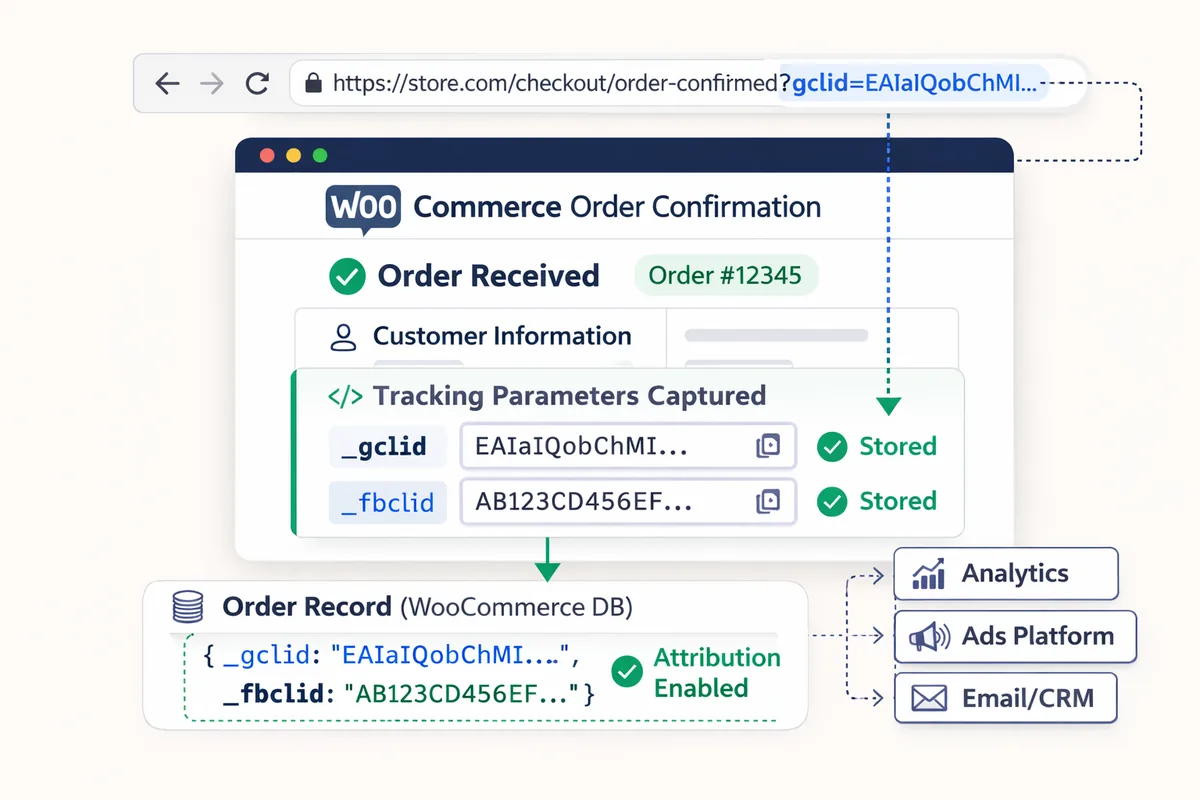
If you're running Google or Meta ads for your WooCommerce store, there's something you should know. Every ad click carries a hidden click ID, GCLID or FBCLID, that ties back to the exact campaign, ad, and keyword that brought the visitor. The catch? WooCommerce doesn't save this data with the order. So when a sale comes in, you have no idea which ad actually drove it.
I've seen this trip up a lot of store owners, so I put together this guide to walk you through what these identifiers are, why WooCommerce drops them, and three practical methods to capture GCLID and FBCLID in WooCommerce and save them to order meta.
Before we get into the how, a critical note on consent: If your store serves customers in the EU, UK, Switzerland, or Brazil, all three methods in this guide require user consent before they can run. This is not optional. You need a Consent Management Platform (CMP) in place first. I cover this in detail below, because how much data you can capture depends entirely on where your customers are.
What Is GCLID?
GCLID (Google Click Identifier) is a unique parameter that Google Ads automatically tacks onto every ad click URL. So when someone clicks your ad, they land on something like:
https://your-store.com/product?gclid=EAIaIQobChMI5_Xq...
That string of characters contains encoded data about the campaign, ad group, keyword, and click time. Google Ads counts a conversion for a click up to 90 days after it, the longest conversion window you can set (the default is 30 days), and the GCLID is the backbone of how Google Ads tracks conversions. On iOS devices where the user denies tracking via Apple's App Tracking Transparency prompt, Google sends gbraid or wbraid instead. I cover all three identifiers and how they differ in a separate comparison.
If you have auto-tagging enabled (which is the default in Google Ads), GCLID gets added to every click automatically. You don't have to do anything.
What Is FBCLID?
FBCLID (Facebook Click Identifier) is Meta's version of the same idea. When someone clicks your ad on Facebook or Instagram, Meta appends an fbclid parameter to the URL:
https://your-store.com/product?fbclid=IwAR3xB2...
Meta recommends keeping the click ID in its _fbc cookie for 90 days, while the attribution setting on most purchase ad sets counts conversions up to 7 days after a click (check your ad set). The FBCLID feeds Meta's conversion tracking and ad optimization.
Why WooCommerce Doesn't Capture Click IDs by Default
I want to be clear here: WooCommerce is a solid e-commerce platform. It just wasn't designed with ad tracking in mind. (Shopify's mechanics differ: it captures a click ID on a same-session purchase but loses it across sessions, which we broke down in our guide to Shopify attribution.) Here's what happens when a visitor lands on your site with a GCLID or FBCLID in the URL:
- The parameter is right there in the URL, but only on the landing page
- As soon as they click to another page, the parameter disappears from the URL
- By the time they place an order, WooCommerce has no record of where they came from
So you end up with an order that shows up as direct traffic, with zero information about which ad brought it. This is exactly why so many WooCommerce orders show as direct. GA4 tries to fill this gap with browser-side tracking, but it misses orders because of ad blockers, Safari's ITP, and users declining cookie consent. How much it misses is measurable. Where both GA4 and the shop are connected in Enalitica's data, GA4 caught 76.6% of the real orders over the last 90 days to 28 September 2026; the median store fared worse, with only 68.5%.
GA4 misses roughly one order in four, and in the median store we measure closer to one in three.
That's a lot of missing data if you're trying to figure out which campaigns are actually profitable.
Privacy and Consent Rules for Click ID Capture
I'm putting this section before the methods on purpose. The amount of attribution data you can capture depends entirely on where your customers are located. If you skip this section and just copy-paste the code below, you may be breaking the law in certain countries.
The Consent Rule for Storing GCLID and FBCLID
Storing GCLID or FBCLID in cookies or localStorage counts as non-essential tracking under privacy laws. In opt-in countries (most of Europe, Brazil, Quebec), you must get the user's consent before running any of the code in this guide. In opt-out countries (US, most of Canada, Australia), you can track by default but must allow users to opt out.
The European Data Protection Board (EDPB) confirmed in its Guidelines 2/2023 (final version adopted October 2024) that localStorage is treated identically to cookies under the ePrivacy Directive. Switching from cookies to localStorage does not avoid consent requirements.
Consent Rules and Realistic Attribution by Region
| Region | Consent model | Enforcement | Realistic attribution | What to watch out for |
|---|---|---|---|---|
| United States | Opt-out | Low | 95-98% | Disclose in privacy policy. Honor "Do Not Sell" (California, Colorado, etc). |
| Australia | No cookie law (yet) | Very low | 95-98% | Reforms pending for 2026-2027. Disclose in privacy policy. |
| Canada (excl. Quebec) | Opt-out | Low | 90-95% | Disclose and provide opt-out mechanism. |
| Canada (Quebec) | Opt-in (Law 25) | Moderate | 45-60% | Explicit consent required since September 2023. Penalties up to CAD 25M. |
| Slovenia, CEE | Opt-in (same EU law) | Low (for now) | 60-75% | Law is identical to DE/FR. Enforcement is catching up. |
| United Kingdom | Opt-in (PECR + UK GDPR) | Moderate (rising) | 45-60% | ICO cookie sweeps in 2025. Fines aligned to GBP 17.5M / 4% turnover. |
| Switzerland | Opt-in (high-risk profiling) | Moderate | 45-60% | Click ID tracking classified as "intensive intrusion." Criminal penalties up to CHF 250K. |
| Spain | Opt-in (LSSI-CE) | Moderate | 45-60% | Max cookie fine EUR 30K, but GDPR fines apply on top. |
| Italy | Opt-in (Art. 122 CCE) | Moderate | 40-55% | Equal Accept/Reject buttons required. Cookie walls prohibited. |
| Belgium | Opt-in (GDPR direct) | Moderate-High | 40-55% | Daily penalty model: EUR 25-40K per day per site until compliant. |
| Austria | Opt-in (TKG 2021) | Low (rising fast) | 40-55% | noyb (Europe's top privacy activist org) is based in Vienna. |
| Netherlands | Opt-in (Telecommunicatiewet) | High | 35-50% | DPA scans 10,000 websites annually. Warned 50 orgs in April 2025 alone. |
| Germany | Opt-in (TDDDG) | Very high | 30-50% | Fines up to EUR 300K. Court ruled even Google Tag Manager needs consent. |
| France | Opt-in (CNIL) | Strictest globally | 28-40% | CNIL fined Google EUR 325M, SHEIN EUR 150M in 2025 alone. |
| Brazil | Opt-in (LGPD) | Moderate | 50-65% | Over BRL 98M in fines since 2023. Consent is the only legal basis for ad cookies. |
A note on the "realistic attribution" column: These are estimates based on typical consent rates and Click ID capture rates using Method 3. Your actual numbers will depend on how your cookie banner is designed, your audience, and the product you sell. A well-designed banner with a clear value proposition can push consent rates higher. For a deeper dive into how consent laws affect attribution in each country, see our dedicated breakdown.
For US-based stores: You are in the best position globally. With no opt-in requirement and few visitors opting out, you can realistically attribute 95-98% of ad-driven orders using the methods below.
Consent Checklist Before Capturing Click IDs
- Install a CMP (like CookieBot, CookieYes, or Complianz) that blocks tracking scripts until consent is given. This applies to all EU/UK/Swiss/Brazilian visitors.
- Update your privacy policy to mention that you collect advertising click identifiers (GCLID, FBCLID) for measuring ad performance, how long you retain them, and that this data may be shared with Google, Meta, or other ad platforms.
- Set up Google Consent Mode v2 to default "denied" for EEA visitors. Google has required consent signals for EEA users since early March 2024. When consent is denied, Google's tags stop reading and writing ad cookies, and they redact the GCLID from their pings only if you also turn on
ads_data_redaction. - Accept that in opt-in countries, you will not attribute every order. The goal is to maximize coverage within legal bounds, not to track everyone regardless of consent.
Comparing Three Methods to Capture GCLID and FBCLID
Now that you understand the consent landscape, here are the three methods for capturing Click IDs. All coverage notes below assume the user has consented (or is in an opt-out country where consent is not required).
| Scenario | WooCommerce Built-in | PHP Code (Cookie) | PHP + JavaScript |
|---|---|---|---|
| Same-session purchase | ✓ | ✓ | ✓ |
| Return after 2 hours | Depends on browser | ✓ (24h cookie) | ✓ |
| Return after 3 days | ✗ | ✗ | ✓ (localStorage) |
| Return after 1 week | ✗ | ✗ | ✓ (Safari: only with a visit in the last 7 days) |
| Safari ITP (after 24h) | ✗ | ✗ | ✓ (localStorage) |
Here's the key takeaway: Without the JavaScript solution, you lose the Click ID the moment a customer closes their browser and comes back after more than 24 hours. If you sell higher-priced products where people take a few days to decide, that's a real problem. In Enalitica's data (more than 6,500 order journeys, last 90 days to 28 September 2026), 29.5% of orders with a paid ad click were placed more than a day after the click.
In Enalitica's data, 9.3% of orders with a paid ad click came more than a week after the click, past both Safari's 24-hour cookie cap and its 7-day limit on localStorage.
Method 1: WooCommerce Built-in Order Attribution
Difficulty: Easy (just a checkbox) Coverage: same-session orders (for consented users), without raw click IDs
Since WooCommerce 8.5+, there's a built-in feature called Order Attribution that captures basic attribution data like UTM parameters and referrer information.
How to Enable Order Source Tracking in WooCommerce
- Go to WooCommerce > Settings > Advanced (or Features in newer versions)
- Check "Order source tracking"
- Save settings
That's it. No code needed.
Limitations of WooCommerce Built-in Order Attribution
- Order Attribution relies on session cookies, so when the customer closes their browser, the data is gone
- Safari's ITP caps cookies written by JavaScript at 7 days, and at just 24 hours when the visitor arrived from an ad click with a click ID in the URL
- It doesn't store the raw GCLID/FBCLID values, only an interpreted traffic source like "google / cpc"
- You can't control how long the data is retained
If your store sells lower-priced items and most customers buy in the same session, this honestly might be all you need. No reason to over-engineer it.
Method 2: PHP Code for Click ID Capture
Difficulty: Medium (copy-paste some PHP) Coverage: orders from consented users placed within 24 hours of the click (the cookie's lifetime)
This method grabs GCLID, GBRAID, WBRAID, FBCLID, MSCLKID, and TTCLID from URL parameters, stores them in first-party cookies, and then writes them to order meta data when the customer checks out.
You need a CMP installed before implementing this. In opt-in countries (EU/EEA, UK, Switzerland, Brazil, Quebec), your CMP must block this code until the user consents to marketing cookies. In the US and other opt-out countries, you can run this without a consent gate, but you should still disclose it in your privacy policy.
How to Install the PHP Click ID Snippet in WordPress
I'd recommend using the WPCode plugin (it's free) to add this snippet. You can also add it to your child theme's functions.php if you're comfortable with that:
// IMPORTANT: In opt-in countries (EU/UK/CH/BR), this code must only
// run AFTER the user gives cookie consent. Your CMP should block
// this script until consent is granted.

// Capture Click IDs from URL parameters
add_action('init', function() {
    $params = ['gclid', 'gbraid', 'wbraid', 'fbclid', 'msclkid', 'ttclid'];
    foreach ($params as $param) {
        if (isset($_GET[$param]) && !empty($_GET[$param])) {
            $value = sanitize_text_field($_GET[$param]);
            setcookie(
                'enalitica_' . $param,
                $value,
                time() + 86400, // 24 hours
                '/',
                '',
                true,  // secure
                true   // httponly
            );
        }
    }
});

// Save Click IDs to order meta data
add_action('woocommerce_checkout_order_created', function($order) {
    $params = ['gclid', 'gbraid', 'wbraid', 'fbclid', 'msclkid', 'ttclid'];
    foreach ($params as $param) {
        $cookie_name = 'enalitica_' . $param;
        if (isset($_COOKIE[$cookie_name]) && !empty($_COOKIE[$cookie_name])) {
            $value = sanitize_text_field($_COOKIE[$cookie_name]);
            $order->update_meta_data('_' . $param, $value);
        }
    }
    $order->save();
});
How the PHP Code Saves Click IDs to Order Meta
- A visitor lands on your site with
?gclid=xxxin the URL - The PHP code reads that parameter and stores it in a cookie that lasts 24 hours
- When the customer places an order (even if they browsed around first), the code reads the cookie and saves the Click ID as order meta data
- Now you have the raw GCLID or FBCLID attached directly to the order
Where the PHP-Only Method Fails: Safari's 24-Hour Cookie Cap
- The snippet's cookie expires after 24 hours (
time() + 86400), the same window Safari's ITP allows for cookies that JavaScript writes after an ad click - If the customer closes their browser and comes back the next day, the cookie is already gone
- It works well for same-session purchases and quick return visits, but not for longer purchase cycles
Method 3: PHP + JavaScript for Full Click ID Coverage
Difficulty: Medium (PHP + JS, but it's still copy-paste) Coverage: return visits up to 90 days later in Chrome and Firefox; in Safari as long as the visitor comes back within 7 days
This is the most complete approach. It combines the PHP code from Method 2 with a JavaScript snippet that also stores the Click ID in localStorage. The important thing to understand: Safari's ITP caps the JavaScript cookie at 24 hours after an ad click, while WebKit deletes localStorage only after seven days of Safari use without a visit to your site.
Built-in consent detection: Unlike the PHP-only approach, this JavaScript snippet automatically detects your Consent Management Platform and waits for the user to give consent before storing any data. It supports Cookiebot, CookieYes, OneTrust, and Complianz out of the box. If no CMP is detected (e.g., US stores without a cookie banner), it runs immediately. You can also set window.enaliticaConsent = true manually if your CMP is not auto-detected.
JavaScript Snippet: Click ID Capture With Consent Detection
Add the script below to your theme's header.php or use the WPCode plugin to inject it on every page. The script handles consent automatically, no need to configure your CMP to block it separately:
(function() {
  // Auto-detect Consent Management Platform
  function hasCMP() {
    return !!(window.Cookiebot ||
      document.cookie.indexOf('cookieyes-consent') !== -1 ||
      window.OnetrustActiveGroups !== undefined ||
      document.cookie.indexOf('cmplz_') !== -1 ||
      window.enaliticaConsent !== undefined);
  }

  // Check if user has given consent
  function hasConsent() {
    if (window.Cookiebot && window.Cookiebot.consent)
      return window.Cookiebot.consent.marketing || window.Cookiebot.consent.statistics;
    if (document.cookie.indexOf('cookieyes-consent') !== -1)
      return document.cookie.indexOf('analytics:yes') !== -1;
    if (window.OnetrustActiveGroups)
      return window.OnetrustActiveGroups.indexOf('C0002') !== -1;
    if (document.cookie.indexOf('cmplz_statistics') !== -1)
      return document.cookie.indexOf('cmplz_statistics=allow') !== -1;
    if (window.enaliticaConsent === true) return true;
    if (window.enaliticaConsent === false) return false;
    return true; // No CMP detected, run immediately
  }

  // Wait for consent event, then run callback
  function onConsent(cb) {
    if (!hasCMP()) { cb(); return; }
    if (hasConsent()) { cb(); return; }
    window.addEventListener('CookiebotOnAccept', cb);
    document.addEventListener('cookieyes_consent_update', function() {
      if (hasConsent()) cb();
    });
    window.addEventListener('consent.onetrust', function() {
      if (hasConsent()) cb();
    });
    document.addEventListener('cmplz_fire_statistics', cb);
  }

  // Only capture and store Click IDs after consent
  onConsent(function() {
    var params = ['gclid', 'gbraid', 'wbraid', 'fbclid', 'msclkid', 'ttclid'];
    var urlParams = new URLSearchParams(window.location.search);

    // Capture from URL → localStorage + cookie
    params.forEach(function(p) {
      var val = urlParams.get(p);
      if (val) {
        try { localStorage.setItem('enalitica_' + p, val); } catch(e) {}
        document.cookie = 'enalitica_' + p + '=' + encodeURIComponent(val) +
          '; max-age=7776000; path=/; SameSite=Lax; Secure';
      }
    });

    // Restore cookies from localStorage (Safari ITP fallback)
    params.forEach(function(p) {
      var name = 'enalitica_' + p;
      var hasCookie = document.cookie.split(';').some(function(c) {
        return c.trim().indexOf(name + '=') === 0;
      });
      if (!hasCookie) {
        try {
          var stored = localStorage.getItem(name);
          if (stored) {
            document.cookie = name + '=' + encodeURIComponent(stored) +
              '; max-age=7776000; path=/; SameSite=Lax; Secure';
          }
        } catch(e) {}
      }
    });
  });
})();
How localStorage Restores Click IDs After Safari Deletes Cookies
Let me walk you through a real scenario:
- Customer clicks your ad > lands on your store with GCLID in the URL
- Cookie banner appears > customer accepts analytics cookies
- Script detects consent > captures GCLID into localStorage and a first-party cookie (90 days)
- Safari deletes the cookie after 24 hours > but localStorage still has the value
- Customer comes back 3 days later to buy > JavaScript restores the cookie from localStorage
- Customer places the order > PHP reads the cookie and saves the Click ID to the order
If the customer rejects cookies, the script never fires and no Click ID is captured. That's the correct, compliant behavior. In US stores without a CMP, the script detects no consent platform and runs immediately.
This really matters if you sell products where people take time to decide. Think furniture, electronics, or anything over a couple hundred euros. Those customers almost never buy on the first visit.
Running WooCommerce Order Attribution and Click ID Capture Together
You can use Methods 1 and 3 together. They don't conflict with each other. WooCommerce's built-in tracking handles session-level data, while the PHP + JS code captures the raw Click IDs. Running both gives you the best coverage.
Click ID capture is one step of a larger setup; the complete WooCommerce conversion tracking guide puts it in context, from Order Attribution to server-side sending and verification.
How Enalitica Uses Click IDs
Once the Click ID is stored with the order, here's what becomes possible:
Order-level attribution. Each order gets linked to the exact campaign, ad group, and keyword that triggered the click. For users who consented (or in opt-out countries like the US), this gives you precise, observed attribution, not statistical modeling. Once you have click IDs on your orders, you can also build multi-touch attribution models that credit every touchpoint in the customer journey, not just the last click.
Accurate ROAS. You can see actual revenue by campaign based on real orders, not GA4 estimates that are missing a significant chunk of conversions due to ad blockers, consent denial, and cookie expiration.
Server-side conversion tracking. Enalitica sends conversions back to Google Ads (Enhanced Conversions) and Meta Ads (Conversions API) from your server, bypassing browser-side ad blockers entirely. It works on the same principle as an offline conversion upload: the click ID stored on the order is the join key. This gives ad platforms better optimization signals for your actual buyers. If you also route Meta CAPI through server-side GTM, see our comparison of three setups beyond the default Meta CAPI tag.
Long-term analysis. With up to two years of stored data (one year on Starter), you can look at seasonal trends, customer lifetime value by channel, and compare year over year against real orders. GA4 standard properties keep event data for at most 14 months.
What about users who don't consent? In opt-in countries, users who decline cookie consent will not have a Click ID attached to their order. Enalitica can still show you these orders, but they will appear without ad attribution. This is the correct, legal behavior. The goal is to maximize the quality and completeness of data from consented users, and Enalitica's server-side approach eliminates the additional losses from ad blockers and cookie expiration that browser-based tools like GA4 suffer from.
What Google and Meta Do When Consent Is Denied
Understanding this helps set expectations for your attribution coverage in opt-in markets.
Google Consent Mode v2 (required for EEA traffic since March 2024): When a user denies consent, Google's tags send cookieless pings, with the GCLID redacted from them only when ads_data_redaction is on. Google then applies conversion modeling to estimate missed conversions, which requires 700 ad clicks over 7 days per country and domain grouping, so smaller advertisers do not qualify. Even with modeling, modeled data is an estimate, not observed reality.
Meta Pixel with consent revoked: With fbq('consent', 'revoke') the Meta Pixel stops sending events until the visitor grants consent, so Meta receives nothing from the browser for a visitor who declines.
The bottom line: consent denial creates a real data gap. The methods in this guide give you the best possible coverage for users who do consent, and Enalitica's server-side approach ensures you don't lose additional data to browser limitations on top of consent losses.
Frequently Asked Questions
Do I need to update my privacy policy when capturing Click IDs?
Yes, and this is something a lot of store owners overlook. If you're storing GCLID or FBCLID in cookies or localStorage, that counts as data processing under GDPR. Your privacy policy should mention that you collect advertising click identifiers for the purpose of measuring ad performance. If you're using a Consent Management Platform (CMP), make sure Click ID capture only fires after the user gives consent for marketing or analytics cookies.
Will this work with WooCommerce Blocks checkout?
If your store uses the newer WooCommerce Blocks-based checkout instead of the classic shortcode checkout, the PHP code from Methods 2 and 3 still works fine. The woocommerce_checkout_order_created hook fires regardless of which checkout type you use. Just make sure you're on WooCommerce 8.0+ where this hook is stable for both checkout flows.
What about Microsoft Ads (MSCLKID) and TikTok (TTCLID)?
The code in this guide already handles both. MSCLKID works the same way as GCLID but for Microsoft Ads (Bing), and TTCLID is TikTok's click identifier. Both get captured, stored, and saved to order meta data alongside GCLID and FBCLID. If you're running ads on these platforms too, you're covered without any extra setup.
How do I verify that Click IDs are actually being captured?
The simplest way: visit your store with ?gclid=test123 appended to the URL, place a test order, then check the order in WooCommerce admin. Go to the order details and look for a custom field called _gclid with the value test123. If it's there, everything is working. You can also check your browser's Developer Tools (Application tab > Cookies and localStorage) to confirm the values are being stored on the frontend side.
Can I use Click IDs alongside GA4?
Absolutely, and I'd actually recommend it. They serve different purposes. GA4 gives you session-level analytics like traffic source reports, page views, user behavior, and funnel analysis. Click IDs stored on orders give you hard revenue attribution at the order level. Think of GA4 as your "what happened on the site" tool, and Click ID attribution as your "which ad made money" tool. They complement each other well.
What if I'm using a caching plugin?
This is a good one. Full-page caching plugins (like WP Rocket, LiteSpeed Cache, or W3 Total Cache) can sometimes cache the landing page before the PHP code runs, which means the Click ID parameter might not get read from the URL. The fix: exclude pages with gclid, fbclid, msclkid, or ttclid query parameters from the cache. Most caching plugins let you add query string exceptions in their settings. The JavaScript part (Method 3) is unaffected by caching since it runs in the browser.
What is the difference between GCLID and UTM parameters?
UTM parameters (utm_source, utm_medium, utm_campaign) are ones you set manually and they contain general campaign info. GCLID is generated automatically by Google and contains precise click-level data including the keyword and ad group. Here's the practical difference: with UTMs, you know "this came from Google Ads, summer campaign." With GCLID, you can trace back to the exact keyword, ad variation, and time of click. If you're spending serious money on ads, that level of detail matters.
Is my US store affected by any consent requirements?
Not significantly. The US has no federal cookie consent law and no opt-in requirement. You must provide a "Do Not Sell or Share" opt-out link for California (CCPA/CPRA) and honor Global Privacy Control signals in a handful of states. In practice few visitors opt out, so you keep attribution data for the large majority of your traffic. If you sell primarily to US customers, the methods in this guide give you near-complete attribution coverage without any consent complexity.
How often should I audit my attribution setup?
I'd suggest checking at least once a quarter. Browser privacy policies change, WooCommerce updates can affect hooks, and caching plugin updates might reset your exclusion rules. A quick audit looks like this: place a test order with a fake GCLID, verify it shows up in the order meta, and check that your localStorage values persist across browser sessions. It takes 10 minutes and can save you months of lost attribution data.
Enalitica onboarding takes just a few minutes. For e-commerce stores, your last 30 days of orders are imported and enriched with click ID and Google Ads data instantly. Service businesses get all tracked events imported immediately. Want to skip the manual setup and see click ID attribution working on your real orders? Book a demo and we will show you the full picture.
Sources
The outside pages this article relies on. Links checked on 28 September 2026.
- conversion window (support.google.com)
- 90 days (developers.facebook.com)
- Guidelines 2/2023 (edpb.europa.eu)
- since early March 2024 (support.google.com)
- redact the GCLID from their pings (developers.google.com)
- just 24 hours (webkit.org)
- after seven days of Safari use without a visit to your site (webkit.org)
- at most 14 months (support.google.com)
- conversion modeling (support.google.com)
- fbq('consent', 'revoke') (developers.facebook.com)
Figures marked "in Enalitica's data" are aggregates from the real orders of the stores we measure, with no names and no individual orders. How we measure.
See your real numbers
Import 30 days of orders or leads during a 5-minute onboarding. Works for e-commerce and service businesses.
See plans and pricing