GCLID vs GBRAID vs WBRAID: Which One Google Sends and Why
gclid, gbraid and wbraid are Google Ads' three click IDs. Which one lands in your URL, why most clicks now carry two, and how to store all three.

Tilen Ledic
Written by
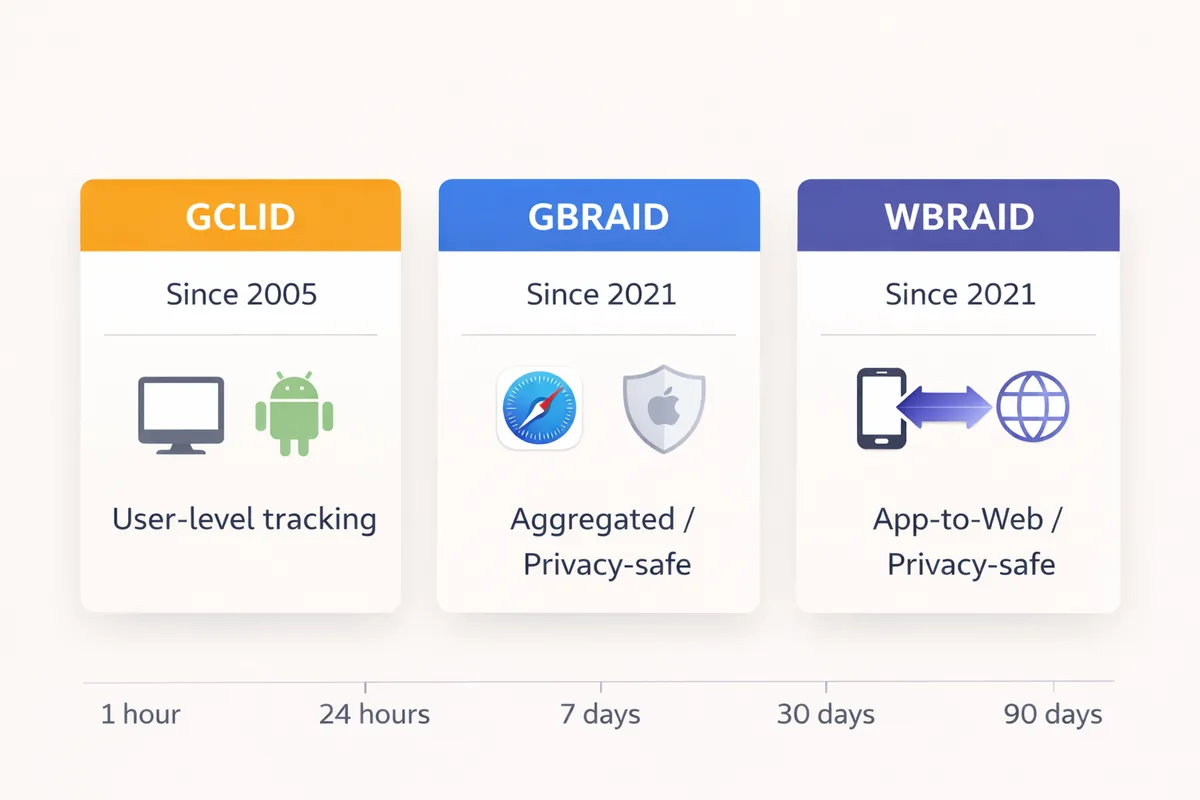
Open the landing URL of almost any Google Ads click in 2026 and you will find two click IDs, not one: a gclid and, right behind it, a gbraid. A few clicks arrive with wbraid instead. If your store keeps only the first one, you are throwing away the second ID Google sends with most clicks, and losing a small but real slice of orders outright.
I have been digging into the GCLID vs GBRAID vs WBRAID split since we started building attribution tracking at Enalitica, and the folklore around it is mostly wrong. The three parameters are not a three-way choice decided by an iPhone privacy prompt. They are two companions and one rare cousin, and the job is to keep all of them.
This article explains what Google says each parameter is, what we measure across the stores Enalitica tracks, what happens if you only capture gclid, and how all three go back to Google through offline conversion uploads. Every factual claim links to Google's or Apple's own documentation.
GCLID vs GBRAID vs WBRAID: Quick Comparison
Before the details, here is the overview of all three Google Ads click IDs. The measured rows come from nearly 12,000 orders in Enalitica's data (last 90 days to 25 September 2026), specifically the ones that came from a Google Ads click.
| GCLID | GBRAID | WBRAID | |
|---|---|---|---|
| Introduced | With auto-tagging, long before 2021 | May 2021 | March 2021 |
| Google's definition | The Google click ID | Parameter for clicks tied to app conversions | Parameter for clicks tied to web conversions from an iOS app |
| Identifies one click | ✓ | ✗ (non-unique, like a campaign ID) | ✗ |
| Where Google documents it | Every auto-tagged click except ads in a few Google iOS apps | All iOS 14.5+ clicks, next to gclid | Ads clicked inside Google's iOS apps |
| Share of Google orders carrying it (Enalitica, 90 days) | 98.9% | 87.8% | 0.2% |
| Typical length (Enalitica, all stored values) | 91 characters (max 92) | 34 characters | about 115 (the few we have seen) |
| Google keeps it for | 90 days | 90 days | 90 days |
| Safari JS cookie after an ad click | 24 hours | 24 hours | 24 hours |
| Chrome cookie cap | 400 days | 400 days | 400 days |
| Conversion processing | Under 12 hours | Up to 72 hours | Up to 72 hours |
| Custom conversion variables on upload | ✓ | ✗ | ✗ |
| Campaign types (per Google) | All | Search, Shopping, Display, Performance Max | Ads shown inside Google iOS apps |
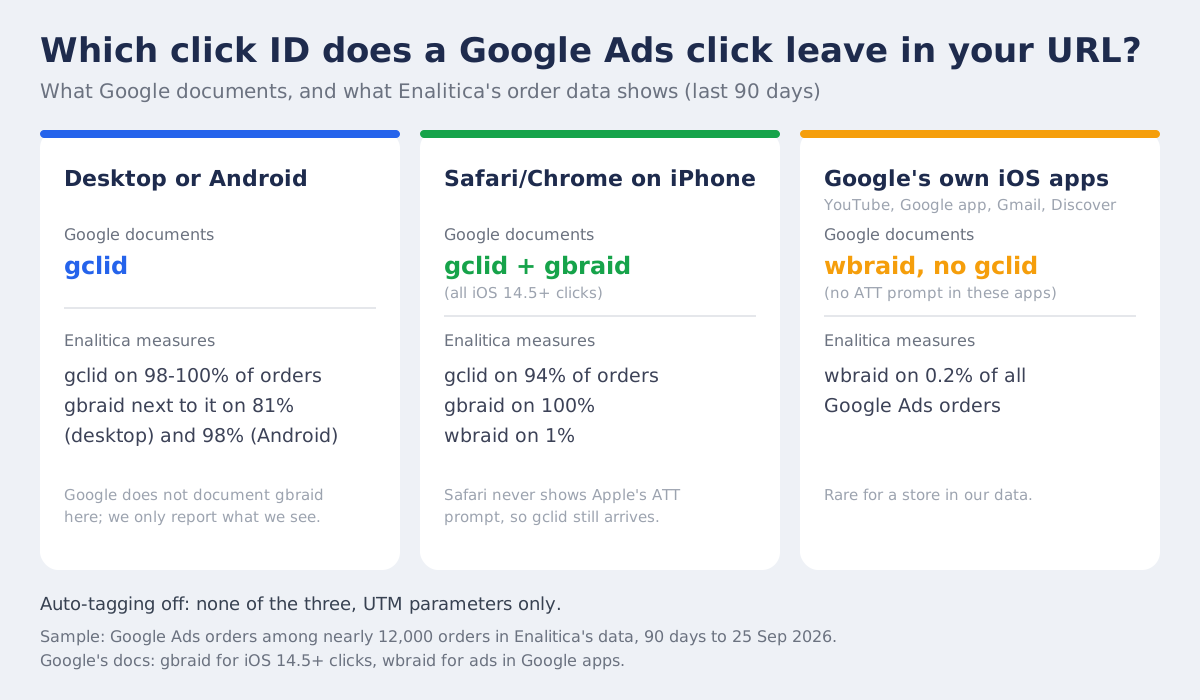
The pattern is simpler than the folklore: desktop and Android clicks carry gclid. Most clicks we measure carry gclid and gbraid side by side (Google documents the pair for iOS 14.5+ clicks, we see it on 87.8% of Google orders). Clicks on ads inside Google's own iOS apps (YouTube, the Google app, Gmail, Discover) carry wbraid and no gclid, because Google chose not to show Apple's tracking prompt in those apps at all.
What Is GCLID?
GCLID (Google Click Identifier) is the URL parameter Google Ads appends to your landing page when auto-tagging is on, and Google's own definition says it "identifies the campaign along with other attributes of the click" and is required for website conversion tracking (Google Ads Help: GCLID definition). Auto-tagging is on by default for new accounts (About auto-tagging).
https://your-store.com/product?gclid=EAIaIQobChMI5_Xq8pL2...
You cannot decode that string; only Google's servers can. When you send the gclid back through conversion tracking or an offline upload, Google matches it to the original click and returns campaign, ad group, keyword and match type. That is the click-level attribution every Google Ads report is built on.
Where GCLID works
GCLID arrives on desktop browsers, on Android, and on iPhones and iPads too. In Enalitica's order data for the last 90 days, among the orders where the device is known (about a third), 99.7% of Android orders, 97.6% of desktop orders and 93.9% of iPhone and iPad orders from a Google Ads click carried a gclid.
Where GCLID stops
Since April 26, 2021, when Apple's App Tracking Transparency rules took effect, Google no longer appends gclid to iOS 14 traffic coming from ads in a handful of Google's own apps. Google's help page is explicit that traffic from other Google sources keeps its gclid (Updates to iOS 14 campaign measurement).
The ATT prompt is an app permission (Apple: user privacy and data use). Safari never shows it, so a Search ad clicked in Safari on an iPhone still carries gclid today. What changed is that Google's iOS apps do not ask for the permission, so every ad click inside them leaves without gclid, whatever the user would have answered.
In our data the
gclidis not fading: 98.9% of Google Ads orders in the last 90 days carried one. What grows is the number of IDs per click, and a setup that keeps only one of them is the thing that ages badly.
What Is GBRAID?
GBRAID is Google's privacy-preserving click parameter, introduced in May 2021. Google's glossary describes it as an identifier that "measures conversions in a non-unique fashion (like Campaign ID) without linking them to individual users or events" and adds one operational rule: it is case sensitive and must never be upper- or lower-cased (GBRAID URL parameter).
https://your-store.com/product?gad_source=1&gbraid=0AAAAADw7i1pQwFjZGE1YmU4...&gclid=EAIaIQobChMI...
Note the shape of that URL: gbraid sits next to the gclid, not instead of it. That is the normal case in every store we track.
How GBRAID differs from GCLID
With gclid, you get one click, one unique ID, one conversion path. With gbraid, Google attributes at cohort level: it can still tell you which campaign, ad group and keyword drove the conversion and calculate your ROAS, but it does not resolve one person's exact path. The Google Ads API describes it as "the URL parameter for clicks associated with app conversions" (ClickConversion reference).
For a store, this difference rarely matters. You care about which campaigns are profitable and which keywords convert, and gbraid gives you that. What you lose is the individual journey, which is exactly what gclid next to it still provides.
When Google sends GBRAID
Google adds gbraid to the landing page URL of every iOS 14.5+ click when auto-tagging is on, and its help page limits it to Search, Shopping, Display and Performance Max campaigns (Google Ads Help). Google defines it as the parameter for app conversions: a click on the web that ends in your iOS app (Google Ads API guide). A store with no app still receives the value, usually right next to a gclid, which is why the same guide says to upload both when you have both.
In the same 90 days, gbraid sat next to a gclid on 87.8% of Google Ads orders, and the pattern held store by store: in almost every store we measure, between 80% and 98% of Google orders carried both. That is far more than any market's iPhone share. Among the orders where we know the device, gbraid was present on 98.0% of Android orders and 80.6% of desktop orders, next to the gclid, and on 100% of iPhone and iPad orders.
Google documents gbraid for iOS 14.5+ clicks and nowhere says it appends it elsewhere, so treat the Android and desktop figures as what we observe, not as a documented rule. The practical conclusion does not depend on the explanation: gbraid is a companion to gclid, and Google's API already assumes the pair.
In our data the share of Google orders carrying a gbraid climbed from 5-25% in late 2025 to 92% in August and 87% in September 2026, while orders without any gclid fell from 16-20% to about 1% over the same months. Part of that is our own capture rollout across those stores, so read the direction, not the exact curve. That click ID is also the only way to provably tie an order to a Performance Max campaign, because Google discloses no search terms for it.
What Is WBRAID?
WBRAID was introduced slightly earlier than gbraid, in March 2021, as Google's first answer to Apple's ATT policy (Google Ads Help). The API defines it as "the URL parameter for clicks associated with web conversions", and the upload guide is more concrete: it is present "when a user clicks on an ad in an iOS app and is directed to your webpage" (Google Ads API guide).
The scenario: a user is in the YouTube app, the Google app, Gmail or Discover on an iPhone. They tap your ad, the page opens in a browser, and the URL carries wbraid with no gclid:
https://your-store.com/product?wbraid=CjkKCwjw8pu...
Google's own test for it is exactly that: click an ad in a Google app and look for ?wbraid= in the address bar (FAQs about iOS 14 changes).
How WBRAID differs from GBRAID
wbraid is the parameter for web conversions from an ad clicked inside an iOS app. gbraid runs the other way, from the web towards an app, and on a normal store visit it simply rides along with gclid. Google rejects a conversion that carries both gbraid and wbraid (GBRAID_WBRAID_BOTH_SET in the API error list), so the two never describe the same click.
gbraid is common because it rides along with gclid; wbraid is rare for a store (0.2% of Google orders in our 90-day sample) because it only comes from ads clicked inside Google's iOS apps. If you run YouTube, Demand Gen or Discover placements, expect more of it.
GBRAID and WBRAID conversion processing time
Google states that conversion processing "typically takes less than 12 hours, but can take up to 72 hours if you use GBRAID and WBRAID-keyed conversions" (Fix discrepancies in offline conversion imports). So do not panic if weekend ROAS looks thin on Monday morning; give the braid-keyed uploads three days.
What Does gad_source Mean Next to the Click ID?
gad_source is a Google Ads URL parameter that names the surface the ad click came from; it is not a click ID and it cannot be switched off. Google's help page says it "identifies the source of your ad traffic (e.g., Google Search, Display Network)", and its newer sibling gad_campaignid "identifies the specific campaign that drove the click" (About gad_* URL parameters). The Search Ads 360 twin of that page adds that these parameters "are not controlled by auto-tagging" (SA360 Help), so they arrive even where auto-tagging is off.
Google documents that the parameters exist, but not what each gad_source number stands for. The mapping below is what advertisers consistently observe in their own landing URLs, so treat it as field knowledge rather than a published contract:
| Value | Observed source |
|---|---|
gad_source=1 | Google Search ads (standard and AI Max Search campaigns) |
gad_source=2 | Google Display Network |
gad_source=3 | YouTube |
gad_source=5 | Shopping ads, including Performance Max |
gad_source=7 | Seen in the wild on automated campaign types, not confirmed by Google |
For attribution the practical rule is simple: store the click ID, and keep gad_source and gad_campaignid as free extra context, never as a substitute. A conversion uploaded with only gad_source matches nothing in Google Ads, while gad_campaignid lets you read the campaign straight from the landing URL without an API call, which is how Enalitica names the campaign behind a service enquiry from the page it landed on.
What Happens If You Only Capture GCLID?
A gclid-only setup loses about one Google Ads order in a hundred and throws away the second ID on most of the rest. In our data, orders from the last 90 days tell a calmer story than the folklore: of the orders that came from a Google Ads click, 98.9% carried a gclid, 87.8% also carried a gbraid, and only 0.2% carried a wbraid.
Just 1.1% had a gbraid or wbraid with no gclid at all, so a gclid-only setup would have lost about one Google order in a hundred in this sample, not forty percent of mobile. Those orders still show up in your store, but your tracking files them as direct or organic, and if you upload conversions back to Google, they never reach the campaign that earned them.
In Enalitica's data, 98.9% of Google Ads orders in the last 90 days carried a gclid and 87.8% carried a gbraid next to it. The three-way choice the name suggests barely exists; the job is to keep both.
The second cost is quieter. Since October 2025 Google wants both IDs on the same uploaded conversion (details below), and Google Analytics can show "(not set)" for campaign and ad group on sessions that arrived with only a braid parameter (Clicks and sessions discrepancy). A capture that drops gbraid hands Google less to match on than the click actually carried.
| Where the click happened | Click IDs in the landing URL |
|---|---|
| Desktop browser, Android | gclid, and in our data usually gbraid next to it |
| Safari or Chrome on iOS 14.5+ | gclid + gbraid |
| Ad inside a Google iOS app (YouTube, Google app, Gmail, Discover) | wbraid |
| Any of the above with auto-tagging off | none, UTMs only |
How much wbraid you see depends on your inventory and, to a lesser degree, your market. The iOS share tells you how much of your YouTube and Discover inventory arrives as wbraid only (StatCounter, August 2026):
| Market | iOS share of mobile (StatCounter, Aug 2026) |
|---|---|
| United States | 60.7% |
| Australia | 65.2% |
| United Kingdom | 51.5% |
| Slovenia | 34.8% |
| Germany | 27.5% |
A multi-touch attribution approach that reads all three click IDs gives a fuller picture than last click alone, and if you also run Meta ads, the gap between Google's click-based ROAS and Meta's view-through-inflated ROAS misleads spend decisions in a different way, see How Meta, Google, and Enalitica Count Conversions.
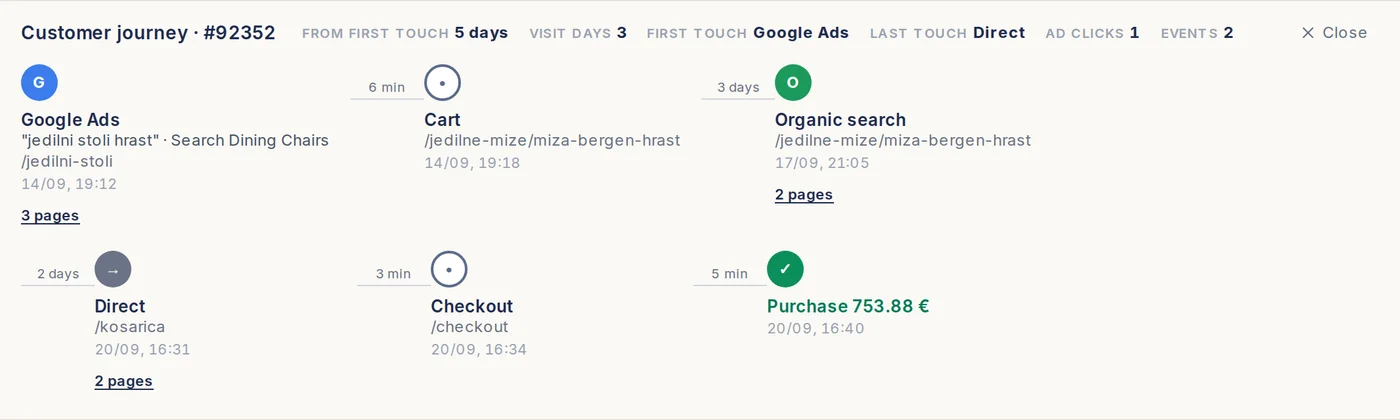
This is what a kept click ID buys you. The order below (from our demo store) started with a Google Ads click on the keyword "jedilni stoli hrast", came back through organic search three days later and was placed on a direct visit. A shop without the click ID records it as Direct; with it, the order keeps its Google Ads first touch, campaign and keyword.
How to Capture All Three Click IDs
The good news: capturing gbraid and wbraid works exactly the same way as capturing gclid. They are all URL parameters, and your tracking code needs to read all three, keep every one it finds (not the first one), and persist them in first-party cookies and localStorage.
If you are running a WooCommerce store, we wrote a complete guide to capturing click IDs in WooCommerce that covers three methods from simple to comprehensive. The JavaScript approach in that guide already handles gclid, fbclid, msclkid, and ttclid. Here is how you extend it to include gbraid and wbraid:
// Capture all Google Ads click IDs (gclid, gbraid, wbraid)
// plus Meta (fbclid), Microsoft (msclkid), TikTok (ttclid)
//
// IMPORTANT: In opt-in countries (EU/UK/CH/BR), this code must only
// run AFTER the user gives cookie consent.

(function() {
    var params = ['gclid', 'gbraid', 'wbraid', 'fbclid', 'msclkid', 'ttclid'];
    var url = new URL(window.location.href);

    params.forEach(function(param) {
        var value = url.searchParams.get(param);
        if (value) {
            localStorage.setItem('enalitica_' + param, JSON.stringify({
                value: value,
                timestamp: Date.now(),
                expiry: Date.now() + (90 * 24 * 60 * 60 * 1000)
            }));
            document.cookie = 'enalitica_' + param + '=' + value +
                '; path=/; max-age=86400; SameSite=Lax; Secure';
        }
    });

    // Re-set the cookie from localStorage (Safari keeps this for 7 days at most)
    params.forEach(function(param) {
        var stored = localStorage.getItem('enalitica_' + param);
        if (stored) {
            try {
                var data = JSON.parse(stored);
                if (data.expiry > Date.now()) {
                    if (!document.cookie.includes('enalitica_' + param)) {
                        document.cookie = 'enalitica_' + param + '=' + data.value +
                            '; path=/; max-age=86400; SameSite=Lax; Secure';
                    }
                } else {
                    localStorage.removeItem('enalitica_' + param);
                }
            } catch(e) {}
        }
    });
})();
And the corresponding PHP to save all three to WooCommerce orders:
// Save all click IDs (including gbraid, wbraid) to order meta
add_action('woocommerce_checkout_order_created', function($order) {
    $params = ['gclid', 'gbraid', 'wbraid', 'fbclid', 'msclkid', 'ttclid'];
    foreach ($params as $param) {
        $cookie_name = 'enalitica_' . $param;
        if (isset($_COOKIE[$cookie_name]) && !empty($_COOKIE[$cookie_name])) {
            $value = sanitize_text_field($_COOKIE[$cookie_name]);
            $order->update_meta_data('_' . $param, $value);
        }
    }
    $order->save();
});
For Shopify stores, the approach is different. Shopify uses cart attributes written via JavaScript. The same principle applies: read all three parameters from the URL and store them as cart attributes so they persist through checkout.
Safari limits on click ID cookies and localStorage
Safari's ITP does not care what the parameter is called. When a domain Safari classifies as a tracker (google.com qualifies) sends a visitor to a URL with any query string, cookies set by JavaScript on that page live 24 hours, for gclid, gbraid and wbraid alike (WebKit: ITP 2.2).
localStorage is not the escape hatch it looks like: Safari deletes all script-written storage after seven days of Safari use without a visit to your site (WebKit: full third-party cookie blocking and more). Chrome is generous by comparison, capping any cookie at 400 days (Chrome for Developers).
The honest budget on an iPhone is one day for the cookie and one week for the fallback, which is why the click ID belongs on the order (or, for Enalitica stores, on the server) and not in the browser.
Database field sizes for click IDs
Google has never published maximum lengths, so the safe design is a field that cannot truncate. Measured on every value Enalitica has stored: gclid is typically 91 characters (maximum 92), gbraid is 34 characters almost without exception, and the few wbraid values we have seen run to about 115.
| Parameter | Measured length (Enalitica) | Recommended field size |
|---|---|---|
| gclid | 91 typical, 92 max | VARCHAR(255) |
| gbraid | 34 | VARCHAR(255) |
| wbraid | about 115 (few samples) | VARCHAR(255) |
| fbclid | varies | VARCHAR(255) |
Three rules follow. Never truncate a value, never validate it against a fixed length, and never change its case: Google says gbraid is case sensitive, and a gclid that has been lowercased fails with UNPARSEABLE_GCLID on upload. Separate columns (_gclid, _gbraid, _wbraid) are simpler than one field with a type column, and two of them are usually filled for the same order.
Sending Click IDs Back to Google Ads (Offline Conversions)
All three click IDs can be sent back to Google Ads for offline or server-side conversion tracking. This is how you close the attribution loop: capture the click ID at landing, store it with the order, then upload it back to Google with the conversion value inside the 90 days Google keeps the click ("We only keep the GCLID for 90 days", Google Ads Help). The upload product itself, enhanced conversions, consent signals and the move to the Data Manager API are covered in our guide to what Google Ads has instead of a conversions API.
Uploading click ID conversions with the Google Ads API
When uploading a ClickConversion, you set the click identifiers you have:
gclidfor the click itselfgbraidfor the companion parameter Google ties to app conversionswbraidfor clicks from ads inside Google's iOS apps
Since 3 October 2025 Google accepts gclid and gbraid on the same ClickConversion; before that, setting both returned FieldError.VALUE_MUST_BE_UNSET (Google Ads Developer Blog). Google's guide is explicit: "In some cases you may be able to associate both a gclid and a gbraid with a conversion. In such cases we recommend setting both" (upload click conversions). gbraid and wbraid together are still rejected.
If you are wiring a new upload in 2026, the Google Ads API path is closed to you: since 15 June 2026 UploadClickConversion only accepts developer tokens that already uploaded before, and new integrations go through the Data Manager API (same guide), which is the path Enalitica uses.
What you cannot do with GBRAID and WBRAID
| Feature | GCLID | GBRAID | WBRAID |
|---|---|---|---|
| Upload offline conversions | ✓ | ✓ | ✓ |
| Custom conversion variables | ✓ | ✗ | ✗ |
Together with gclid on one conversion | ✓ (since 3 Oct 2025) | ✓ | |
gbraid and wbraid on one conversion | ✗ | ✗ |
The one documented restriction: "Google Ads does not support custom conversion variables in combination with wbraid or gbraid" (Google Ads API guide). For e-commerce stores the standard upload works with all three: you send the click IDs, conversion timestamp, value and currency, and Google handles the attribution.
One setup detail decides whether the upload helps or double-counts. Google counts every primary conversion action separately, so a server-side purchase upload created next to an existing website purchase tag would report the same order twice and let Smart Bidding optimize on an inflated number. Enalitica therefore checks the account first: when a primary purchase conversion already exists, the Enalitica upload is created as a secondary action, visible in the All conversions column and harmless to bidding. Once the uploaded orders have run for a few weeks and the coverage is clearly fuller than the browser tag, you decide together with us which signal becomes primary and we make the switch; the account never bids on two copies of the same purchase.
Privacy and Consent Rules for Click IDs
The consent requirements for click ID tracking vary dramatically by country. In the EU, UK, Switzerland, and Brazil, all three click IDs require user consent before you can store or process them. In the US, Australia, and most of Canada, you can track by default with an opt-out option.
One important nuance: even though gbraid and wbraid are privacy-preserving from Apple's perspective, they still count as non-essential tracking under the ePrivacy Directive. Storing any click ID in cookies or localStorage requires consent in opt-in countries. The "privacy-safe" label refers to how Google handles the data on their side, not whether you need consent to collect it.
Google Consent Mode v2
When a visitor denies ad storage, Google's tags stop setting cookies; whether the click ID itself is also stripped from the tag's requests depends on the optional ads_data_redaction setting, and a separate URL passthrough option can carry the click ID from page to page without consent (Google tag platform: consent). In either case your own script must not store it before consent.
Google then models the missing conversions, but only once a domain and country pair has at least 700 ad clicks over 7 days (About consent mode modeling).
What Safari Strips: Link Tracking Protection Since iOS 17
Safari has removed known tracking parameters from links opened out of Mail, Messages and Private Browsing since iOS 17 in 2023 (Apple newsroom, June 2023). Safari 26 did not extend that to regular browsing: its new privacy work targets known fingerprinting scripts, which it blocks from reading query parameters and from setting long-lived cookies or localStorage (WebKit features in Safari 26.0).
Apple does not publish the parameter list, so do not take anyone's word (including ours) on whether gbraid and wbraid are on it: open your own ad in a Private Browsing tab and read the address bar. UTM parameters are untouched, and a click ID that reaches your server on the first page load is beyond Safari's reach either way.
The click ID that survives is the one written to the order on the first page load. Anything that waits in a cookie or in localStorage is living on Safari's clock.
Frequently Asked Questions
What is gbraid in a Google Ads URL?
Google adds gbraid to landing URLs of iOS 14.5+ ad clicks when auto-tagging is on, usually next to the gclid; across the stores Enalitica measures it is present on 87.8% of Google Ads orders. It is a non-unique, privacy-preserving identifier (Google compares it to a campaign ID), it is case sensitive, and Google accepts it in conversion uploads on its own or together with gclid. Google does not spell the acronym out.
What is the difference between gbraid and wbraid?
The difference is the direction of the click. gbraid is Google's parameter for clicks tied to app conversions (web towards app) and arrives next to gclid on a normal store visit. wbraid is the parameter for web conversions from an ad clicked inside an iOS app (YouTube, the Google app, Gmail, Discover) and arrives without a gclid. For a store gbraid is the common one because it arrives with the gclid; wbraid shows up on 0.2% of Google orders in our data.
Can I use gbraid and wbraid with offline conversion tracking?
Yes. Both can be uploaded as ClickConversion entries with the conversion timestamp, value and currency. Since 3 October 2025 you can send gclid and gbraid on the same conversion, and Google recommends doing so when you have both. gbraid and wbraid on the same conversion are rejected, and custom conversion variables are not supported with either.
Does Google Analytics 4 recognize gbraid and wbraid?
GA4 reads both when assigning a session's traffic source, but Google warns that campaign, ad group and source/medium can display as "(not set)" for sessions that arrived with only WBRAID or GBRAID, and recommends adding UTM parameters as a fallback next to auto-tagging (Google Ads Help). Google Ads reporting on that traffic uses modeled conversions (Analytics Help).
What does a gbraid value look like in a URL?
A typical URL with gbraid looks like this:
https://your-store.com/product?gad_source=1&gbraid=0AAAAADw7i1pQwFjZGE1YmU4LTRhODktNGRmZS05ZjZhLWVjZmU4NzE3YmZmZQ&gclid=EAIaIQobChMI...
The value is an opaque string Google generates, 34 characters in every case we have measured. You cannot decode it or extract anything meaningful from it; it is meant to be stored unchanged and sent back to Google.
Why are click IDs missing from some of my orders?
If a portion of your Google Ads orders arrive with no click ID at all, work through this list in order: auto-tagging is disabled in your Google Ads account settings (the most common cause), a redirect between the ad click and your landing page strips query parameters (URL shorteners, http-to-https hops, geo redirects), your consent banner blocks the script that stores the ID before consent is given, or the customer simply returned days later through a different channel after the browser cleared the original parameter. Each of these has a different fix, but the first step is the same: open a few affected orders and check what the landing URL actually looked like.
Do I still need UTM parameters if I have GCLID?
Yes, they solve different problems. A click ID is machine-readable only. Google can decode it, you cannot, and it only exists for ad clicks. UTM parameters are human-readable, work for every channel (email, social, affiliates), and land directly in your analytics without an API call; Google itself recommends them as the fallback for braid-only sessions that GA4 shows as "(not set)". The practical setup for a store: keep auto-tagging on for click IDs, add UTMs on top for campaign naming you can read (our UTM naming convention guide covers the byte-exact campaign-name trap this creates), and never let a URL builder strip the click ID while adding UTMs.
Is GCLID only for Google Ads?
Yes. GCLID is generated exclusively by Google Ads auto-tagging. Google's display and video products bought through Display & Video 360 use a different parameter (dclid), and other ad platforms have their own equivalents (fbclid for Meta, msclkid for Microsoft, ttclid for TikTok). One nuance for B2B: GCLID works the same for lead-gen campaigns as for e-commerce, but if your conversion happens weeks later in a CRM, you need to store the GCLID with the lead at form submission, otherwise the offline conversion upload has nothing to match on.
Should I store gclid, gbraid, and wbraid in separate database fields?
Separate fields are simpler and more common: _gclid, _gbraid and _wbraid, each VARCHAR(255). Two are usually populated: gclid and gbraid together on most clicks, wbraid on its own for clicks inside Google's iOS apps. Google rejects gbraid and wbraid on the same conversion (GBRAID_WBRAID_BOTH_SET) and accepts gclid with gbraid since 3 October 2025, so send whatever pair the order holds.
I only see gclid in my data. Does that mean gbraid is not working?
If you see gclid on every Google order and gbraid on almost none, check your capture: in almost every store Enalitica measures, 80-98% of Google orders carry both. Open a few landing URLs from your ad clicks; if gbraid= is in the URL but not in your order data, the tracking code is dropping the second parameter, not the traffic.
What is the difference between dclid and gclid?
dclid is the DoubleClick click ID that Campaign Manager 360 and Display & Video 360 append to landing URLs, while gclid comes only from Google Ads auto-tagging. GA4 reads both to assign a session source, but they belong to different systems: a dclid cannot be uploaded to Google Ads as a click conversion, and a gclid means nothing to a Floodlight tag. If your store only buys media through Google Ads, you will never see a dclid; if an agency runs display through DV360 for you, capture both fields separately.
What does the "unparseable gclid" error mean?
UNPARSEABLE_GCLID means "the imported gclid could not be decoded", and the API has the same error for the braids: UNPARSEABLE_GBRAID and UNPARSEABLE_WBRAID tell you to "check if your gbraid parameter was not modified" (API error list). None of them means the click was too old; that is EXPIRED_EVENT. The usual culprits are a redirect that lowercases the whole URL, a form or CRM field that truncates the value, a spreadsheet that trimmed characters or added spaces, and a click ID stored after being URL-decoded twice. Compare the uploaded value with the original landing URL character by character; every one of these IDs is case-sensitive and survives only when stored exactly as received, which is why Enalitica writes it to the order untouched.
Enalitica onboarding takes just a few minutes. For e-commerce stores, your last 30 days of orders are imported and enriched with click ID and Google Ads data instantly. Service businesses get all tracked events imported immediately. Want to see how GCLID, GBRAID, and WBRAID translate into real revenue per keyword for your store? Book a demo and we will show you the full click ID to order to revenue chain.
Sources
The outside pages this article relies on. Links checked on 25 September 2026.
- Google Ads Help: GCLID definition (support.google.com)
- About auto-tagging (support.google.com)
- Updates to iOS 14 campaign measurement (support.google.com)
- Apple: user privacy and data use (developer.apple.com)
- GBRAID URL parameter (support.google.com)
- ClickConversion reference (developers.google.com)
- Google Ads API guide (developers.google.com)
- FAQs about iOS 14 changes (support.google.com)
- API error list (developers.google.com)
- Fix discrepancies in offline conversion imports (support.google.com)
- About gad_* URL parameters (support.google.com)
- SA360 Help (support.google.com)
- Clicks and sessions discrepancy (support.google.com)
- StatCounter, August 2026 (gs.statcounter.com)
- United States (gs.statcounter.com)
- Australia (gs.statcounter.com)
- United Kingdom (gs.statcounter.com)
- Slovenia (gs.statcounter.com)
- Germany (gs.statcounter.com)
- WebKit: ITP 2.2 (webkit.org)
- WebKit: full third-party cookie blocking and more (webkit.org)
- Chrome for Developers (developer.chrome.com)
- Google Ads Developer Blog (ads-developers.googleblog.com)
- Google tag platform: consent (developers.google.com)
- About consent mode modeling (support.google.com)
- Apple newsroom, June 2023 (apple.com)
- WebKit features in Safari 26.0 (webkit.org)
- Analytics Help (support.google.com)
Figures marked "in Enalitica's data" are aggregates from the real orders of the stores we measure, with no names and no individual orders. How we measure.
See your real numbers
Import 30 days of orders or leads during a 5-minute onboarding. Works for e-commerce and service businesses.
See plans and pricing