
First-Touch Attribution for E-commerce
Learn what first-touch attribution is, when it works, where it fails, and how order-based attribution gives you accurate first-touch data per order.

Tilen Ledic
Written by

You launched a Meta awareness campaign last quarter. Impressions were strong. Over the next six weeks, organic traffic to your store jumped 40% and branded Google searches nearly doubled. When you pull your attribution reports, Meta shows almost zero conversions. Direct traffic and organic search take the credit.
So the campaign that introduced hundreds of new customers to your brand looks like it accomplished nothing. If you make budget decisions based on these numbers, you cut the awareness spend. Three months later, the organic traffic spike fades, branded searches drop, and nobody connects the two.
This is the problem that first-touch attribution tries to solve. The first-touch model shifts 100% of the conversion credit from the channel that closed the sale to the channel that started the entire journey. Both perspectives matter. Both have blind spots. And in 2026, both face the same core challenge: getting accurate data in a privacy-first world. For the full map of how every model and tracking approach fits together, see our complete guide to ecommerce attribution.
What Is First-Touch Attribution?
First-touch attribution is a single-touch attribution model that assigns 100% of the conversion credit to the very first marketing interaction a customer has with your brand before purchasing.
The logic is straightforward. Without that initial touchpoint, the customer would never have entered your funnel. The first ad they clicked, the first social post they engaged with, the first organic search result they found. That is the interaction that created the opportunity. Everything that followed was nurturing someone who already knew your brand existed.
In marketing attribution terminology, first-touch attribution is also called "first-click attribution" or "first-interaction attribution." The terms are interchangeable.
How First-Click Attribution Works (With Example)
Here is a practical example. A customer discovers your store through this five-step conversion path before placing a €100 order:
- Clicks a Google Ad (Day 1)
- Visits from organic search (Day 5)
- Clicks a Facebook ad (Day 8)
- Opens an email (Day 12)
- Visits directly and purchases (Day 14)
Under first-touch attribution, Google Ads receives 100% of the credit because it was the first interaction:
| Attribution model | Google Ads | Organic | Direct | ||
|---|---|---|---|---|---|
| First-touch | €100 | €0 | €0 | €0 | €0 |
| Last-touch | €0 | €0 | €0 | €0 | €100 |
| Linear | €20 | €20 | €20 | €20 | €20 |
| Multi-touch (U-shaped) | €40 | €7 | €7 | €7 | €40 |
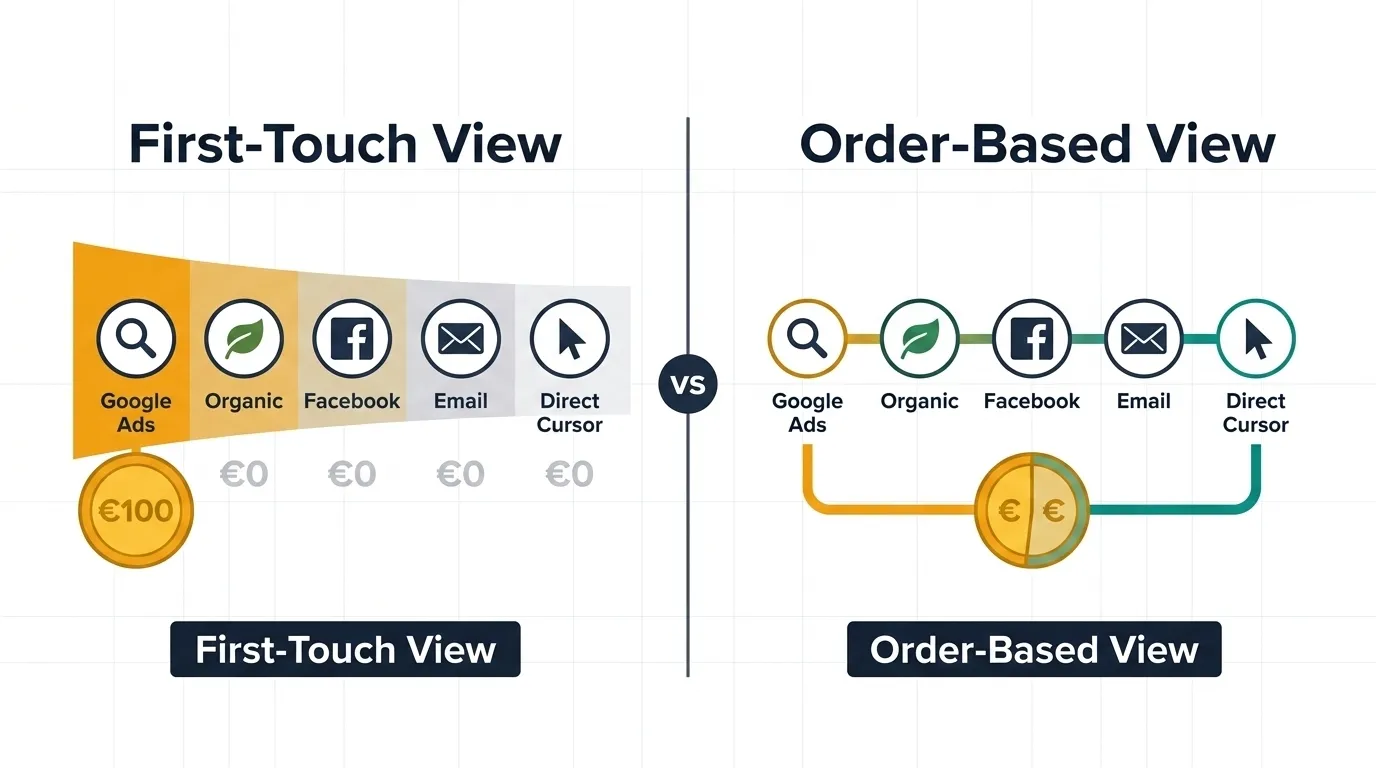
The contrast is striking. First-touch says Google Ads drove the entire sale. Last-touch says it was worthless. Both are looking at the same customer journey and reaching opposite conclusions.
This is why understanding what each model actually measures matters more than picking the "right" one. These are fundamentally different questions.
First-touch attribution answers "What introduced this customer to our brand?" Last-touch attribution answers "What convinced them to buy right now?"
First-Touch Data in Google Analytics 4
If you are looking for a first-touch attribution model in Google Analytics 4, you will not find one as a selectable option. Google removed first-click, linear, time-decay, and position-based models in November 2023. Only data-driven attribution and two last-click variants remain.
However, GA4 still tracks first-touch data through specific dimensions that you can use in your reports:
First user source/medium: Shows the source and medium of the user's very first visit. If a customer first arrived via google/cpc and later returned through organic search to buy, the "First user source/medium" will still show google/cpc.
First user default channel group: Groups the first visit into standard channels (Paid Search, Organic Search, Social, etc.). This is effectively your first-touch channel per user.
How to see first-touch data in GA4
- Open Explore > Create a new Free-form exploration
- Add First user default channel group as a row dimension
- Add Session default channel group as a second row dimension
- Add metrics: Transactions, Purchase revenue, Total users
- Now you can see both the first-touch and last-touch channel for every transaction side by side
For standard reports, go to Acquisition > User acquisition. This report already uses "First user" dimensions by default, showing you how customers first discovered your store.
The GA4 consent limitation on first-touch data
GA4 only tracks users who accept cookies. In strict EU markets where fewer than 25% of visitors accept tracking cookies, your GA4 first-touch data only covers a fraction of actual customer journeys. The users who decline consent? GA4 cannot determine their first touchpoint. Their purchase appears as a single-session direct visit, even if they originally arrived from a paid ad weeks ago.
An EMARKETER/Snap survey found that 78% of marketers still rely on last-click analytics, partly because first-touch requires cross-session tracking that privacy regulations undermine. This is where order-based attribution changes the equation, because click IDs captured at order creation survive cookie expiration.
First-Touch vs Last-Touch Attribution
Both first-touch and last-touch attribution are single-touch models. They each give 100% credit to one interaction and ignore everything else. The difference is which interaction they prioritize.
| Aspect | First-touch attribution | Last-touch attribution |
|---|---|---|
| Credits | First interaction before conversion | Final interaction before conversion |
| Answers | "What introduced this customer?" | "What made them buy?" |
| Values | Top-of-funnel: ads, content, social, SEO | Bottom-of-funnel: retargeting, email, direct |
| Ignores | Middle and bottom of funnel | Top and middle of funnel |
| Best for | Brand awareness campaigns | Direct response campaigns |
| GA4 dimension | "First user default channel group" | "Session default channel group" |
| Risk | Over-investing in awareness, under-investing in conversion | Cutting awareness spend that feeds your funnel |
| Privacy impact | High (needs cross-session tracking) | Moderate (only needs converting session) |
The core trade-off: First-touch measures demand generation, where new demand originates. Last-touch measures demand capture, where existing demand converts. Neither tells you the full story. For models that distribute credit across the entire journey, see our guide to multi-touch attribution.
In practice, the best approach depends on what decisions you need to make. If you are debating whether to increase your YouTube or Display budget, first-touch data helps. If you are deciding between retargeting and email for closing sales, last-touch data is more relevant.
When the First-Touch Model Makes Sense
First-touch attribution is not always wrong. There are specific situations where it provides genuinely useful insight.
| Your situation | Why first-touch helps |
|---|---|
| Heavy brand awareness investment (YouTube, Display, TikTok) | Shows which awareness channels actually create new customers, not just impressions |
| Entering new markets or launching new products | Identifies the channels that introduce your brand to audiences who have never heard of you |
| Long purchase cycles (>14 days) | Credits the channel that started a journey weeks or months before the sale |
| Content marketing ROI justification | Proves that blog posts, guides, and videos create customers, even if email or retargeting closes them |
| High percentage of "direct" conversions | Reveals what originally brought those "direct" visitors to your site |
| Social media budget decisions | Shows whether Instagram, TikTok, or Facebook introduce paying customers, even if they buy later through another channel |
The social media insight: Social media platforms are frequently first-touch channels that another channel later closes. In Enalitica's data, last 90 days to 28 September 2026, across more than 6,500 order journeys, one of the most common cross-channel paths was an Instagram visit first and a Meta ad click last, and of the orders whose first touch was a Meta ad, 13.0% were closed by a different channel. A customer sees your Instagram post, visits your site, leaves, and returns via Google search a week later to buy. Under last-touch, Instagram gets nothing. Under first-touch, it gets full credit. The truth is somewhere in between, but without first-touch data, social media's contribution to your revenue is completely invisible.
The 5 Limitations of First-Touch Tracking
First-touch attribution has real value for understanding demand creation, but it comes with significant blind spots.
1. First-touch ignores everything after the introduction
A customer who clicked your Google Ad (first touch) and then needed three retargeting ads, two emails, and a price drop notification before buying? First-touch gives 100% credit to the Google Ad and zero to the six touchpoints that actually convinced them to purchase. The entire middle and bottom of the funnel is invisible.
2. Privacy regulations destroy first-touch accuracy
First-touch attribution depends on tracking a user's very first visit and connecting it to a later purchase. This requires persistent, cross-session tracking. In EU markets with strict GDPR enforcement a large share of users decline tracking cookies (in the Advance Metrics 2023 study only about a quarter accepted all cookies at the first layer, with Germany and France rejecting most often). For these users, GA4 cannot determine their first touchpoint. Safari's ITP also caps first-party cookies set via JavaScript at 7 days, so even consenting users lose their first-touch connection if they take more than a week to buy.
3. Multi-device journeys break the first-touch chain
A customer discovers your store on their phone via Instagram, researches the product on their laptop via Google, and buys on their tablet via a bookmark. Unless they are logged into the same Google account across all devices (and accepted tracking), these appear as three unrelated visitors. First-touch attribution cannot connect them.
4. First-touch overvalues channels with low-quality traffic
Not all first touches are equal. A viral TikTok might introduce 10,000 visitors to your store, but if only 5 of them ever buy, the first-touch model still credits TikTok for those 5 sales at full value. Meanwhile, a targeted Google Ads campaign that introduced 500 high-intent visitors who converted at 5% gets the same per-order credit, despite being far more efficient at creating qualified demand.
5. First-touch is misleading for impulse purchases
For low-price items where customers see an ad and buy immediately in the same session, the first touch and the last touch are the same interaction. First-touch attribution adds no additional insight over last-touch in these single-session, single-touch scenarios.
First-Touch vs Multi-Touch Attribution Models
If first-touch attribution is too narrow for your needs, here is how it compares to multi-touch models that distribute conversion credit across the full customer journey:
| Model | How it works | First-touch credit | Last-touch credit | Middle touches |
|---|---|---|---|---|
| First-touch | 100% to first interaction | 100% | 0% | 0% |
| Last-touch | 100% to last interaction | 0% | 100% | 0% |
| Linear | Equal split across all | Equal share | Equal share | Equal share |
| Time-decay | More credit to recent touches | Least credit | Most credit | Graduated |
| U-shaped | 40/20/40 split | 40% | 40% | 20% split |
| Data-driven | ML-based, varies by patterns | Varies | Varies | Varies |
For most e-commerce stores, multi-touch attribution provides a more complete picture than any single-touch model. Google recommends at least 200 conversions and 2,000 ad interactions in 30 days for data-driven attribution to work best, although every conversion action is eligible.
The multi-touch attribution market is projected to grow from $2.4 billion in 2025 to $5.2 billion by 2031, reflecting a clear industry shift away from single-touch models.
The attribution model you choose matters far less than the data quality underneath it. A perfect multi-touch model running on incomplete GA4 data still gives a distorted picture.
This is where starting from actual orders changes everything.
How Enalitica Captures First-Touch Data Per Order
Traditional first-touch attribution depends entirely on browser cookies surviving long enough to connect a customer's first visit to their purchase. In 2026, that assumption fails for a large share of customer journeys, depending on your market: declined consent, Safari's 7-day cap and ad blockers each cut the chain.
Enalitica takes a fundamentally different approach. Instead of tracking sessions and hoping they lead to orders, it starts from confirmed orders in your WooCommerce or Shopify store and attributes backwards. Every order is a fact. No ad blocker, cookie consent banner, or browser restriction can make that order disappear.
First-touch and last-touch data on the same screen
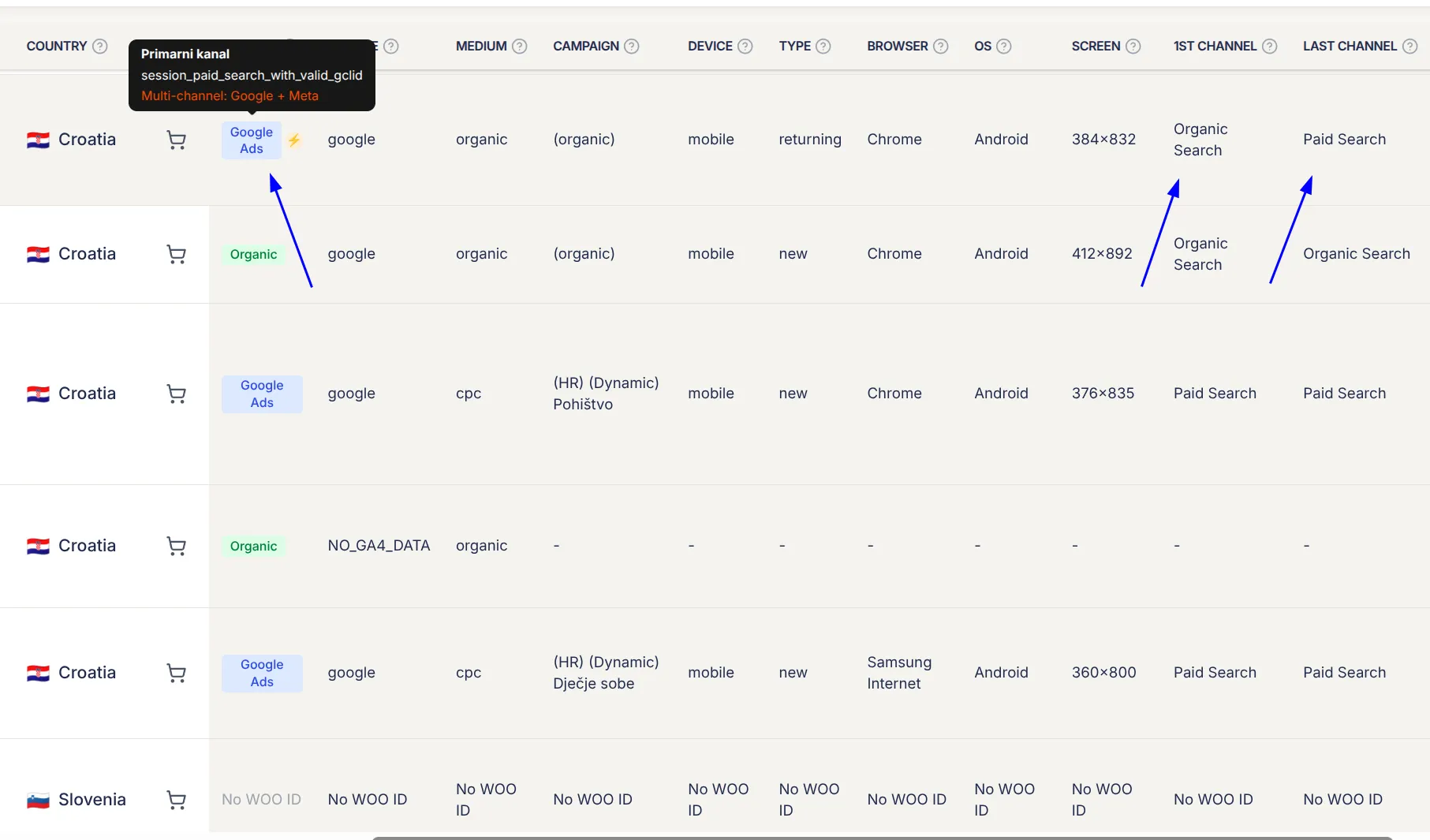
For every order that syncs into Enalitica, the GA4 enrichment layer retrieves:
- First user channel group: How this customer first discovered your store (Paid Search, Organic Search, Social, Direct, etc.)
- Session channel group: The channel the customer used for the purchasing session (last touch)
- Click IDs: If the customer clicked a Google Ad or Meta Ad at any point, the GCLID or FBCLID is stored in the order metadata with the exact timestamp
This means for every single order, you can see both how the customer was introduced to your brand and what channel closed the sale.
For every order, Enalitica shows both the channel that introduced the customer and the channel that closed the sale. Not modeled, not estimated, actual data per actual order.
Seeing first-touch value in your reports
The Porocila (Reports) tab shows every marketing channel with two revenue figures side by side. Here is what the Google Ads tab looks like (screenshot from February 2026):
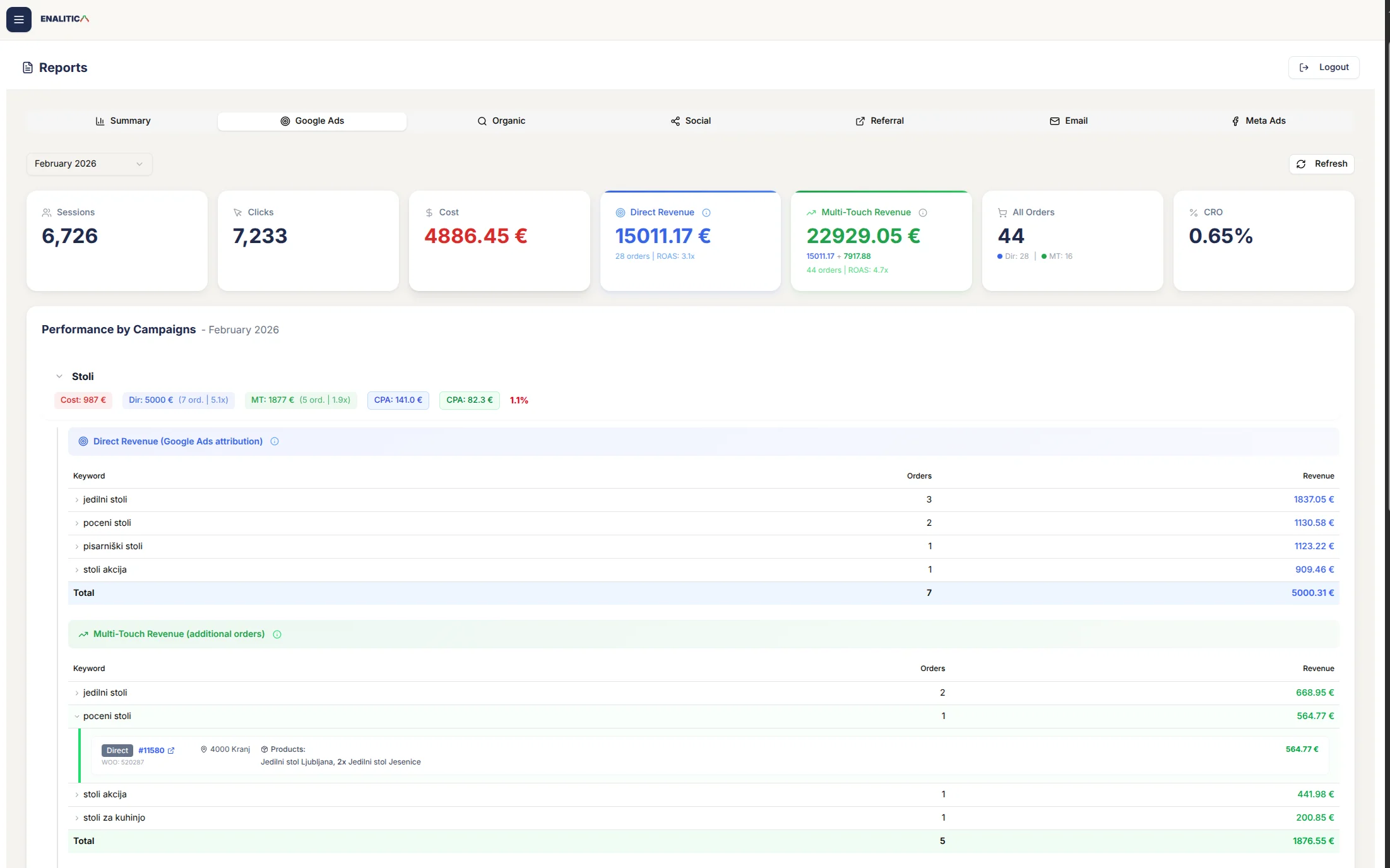
Direct Revenue counts the orders where Google Ads was the last-touch channel that closed the sale.
Multi-Touch Revenue counts every order where a Google Ad click appeared anywhere in the customer journey, including as the first touchpoint.
The difference is the orders Google Ads introduced but organic search, email or a direct visit closed. Under last-touch attribution those orders show zero Google Ads contribution, and in the screenshot they lift the campaign's ROAS from 3.1x to 4.7x. In Enalitica's data, when a Google Ads click appeared in a journey it was not the last touch 26.7% of the time: roughly one Google Ads touch in four is credited to another channel in a last-click report.
Drill into a single campaign and the picture gets sharper. Direct Revenue lists the keywords that closed orders; Multi-Touch Revenue adds the orders where those same keywords were the first touch. Click any order and you see the products, the customer's location and the amount: Google Ads introduced that customer, another channel closed the sale.
The same direct-plus-multi-touch pair now exists for profit. Enalitica imports what each product costs you (from Shopify, WooCommerce, your price lists or your ERP), adds shipping, payment fees and packaging, and shows POAS (profit on ad spend) next to ROAS: direct POAS counts only the orders the campaign closed, MT POAS adds the profit of every order it assisted, first touches included. A campaign that introduces customers but rarely closes them can sit below 1.0 on direct POAS and above it on MT POAS, and that pair is exactly why you should not pause it.
Keyword-level first-touch insight from Google Ads
For orders with a GCLID, Enalitica queries the Google Ads API to retrieve the exact keyword, campaign, ad group, and cost-per-click for the click. You can answer questions like:
- "Which keywords introduce customers who go on to purchase within 30 days?"
- "What is the true ROAS of my brand awareness keywords when I include orders they influenced but did not directly close?"
- "Which campaigns create the most first-touch value that other channels later convert?"
You can drill down to individual orders. Click any revenue number and see the order ID, products purchased, customer location, first-touch channel, last-touch channel, and the full click history. An illustrative example: Order #4521 for €127. First touch: Google Ads (keyword: "ergonomic office chair"). Last touch: Direct (bookmarked the product page). Without first-touch tracking, this order shows as "Direct" and your Google Ads campaign gets zero credit for creating that customer.
Attribution that survives privacy restrictions
Because Enalitica starts from the order database, the core attribution data exists regardless of browser-side tracking:
| Factor | GA4 first-touch tracking | Enalitica order-based |
|---|---|---|
| Ad blocker active | First visit invisible, no first-touch data | Order captured. Click IDs from order metadata still link to the introducing ad |
| Cookie consent declined (EU) | No cross-session tracking possible | Click IDs stored in WooCommerce/Shopify database at order creation |
| Safari ITP (7-day purge) | First-touch cookie lost if purchase is 8+ days later | Click IDs persisted in order metadata, not in browser cookies |
| Revenue accuracy | GA4 purchase events undercount: across more than 10,000 orders in Enalitica's data (90 days to 28 September 2026), GA4 saw only 76.6% of them | Actual order totals from your e-commerce platform |
| Order drill-down | Not possible in GA4 | Click any metric to see the individual orders behind it |
For orders with GA4 data available, you get the full picture. For orders without GA4 data (blocked users), you still have the order value and any click IDs. This partial data is still infinitely more useful than the zero data GA4 provides for these visitors.
Enalitica onboarding takes just a few minutes. For e-commerce stores, your last 30 days of orders are imported and enriched with click ID and Google Ads data instantly. Service businesses get all tracked events imported immediately. Want to see first-touch and last-touch attribution for your actual orders, with keyword-level detail? Book a demo and we will show you exactly which channels introduce your most valuable customers.
How to Implement First-Touch Tracking Today
Whether you use Enalitica or not, here are concrete steps to improve your first-touch attribution:
Enforce UTM discipline across all campaigns. Every ad, every social post, every email link needs consistent UTM parameters. Inconsistent tagging is the top reason first-touch data shows as "(not set)" in reports.
Capture click IDs in order metadata. Make sure GCLID, FBCLID, GBRAID, and WBRAID are stored with every order. WooCommerce's built-in order attribution records the source, medium and UTM parameters of each order, but not the click IDs, so those need their own capture. For step-by-step setup, see our guide to capturing click IDs in WooCommerce.
Use GA4 "First user" dimensions in your reports. In GA4 Explorations, add "First user default channel group" alongside "Session default channel group" to see both first-touch and last-touch data in the same report.
Track first-touch alongside last-touch, always. Never look at first-touch data in isolation. Compare it with last-touch data for the same period. The gap between them reveals your "hidden influence" channels, the ones driving assisted conversions that last-touch reports never show.
Set appropriate lookback windows. First-touch attribution is only meaningful if the window is long enough. Google Ads lets you set a conversion window from 1 to 90 days (default 30). In Enalitica's data, of the orders with a paid ad click in the journey, 29.5% were placed more than a day after that click, 9.3% more than 7 days after and 1.4% more than 30 days after, so a 30-day window catches nearly every journey we see. For more on how click IDs work across different time windows, see our guide to GCLID, GBRAID, and WBRAID.
Audit your GA4 vs order gap. Compare GA4 purchase event count to actual orders last month. If the gap is over 15%, you have significant tracking loss that affects all attribution models, especially first-touch since it requires the longest tracking chain.
Frequently Asked Questions
In the _____ attribution model, the first touchpoint receives less credit and the last touchpoint receives the most credit.
The answer is time-decay. In the time-decay attribution model, touchpoints closer to the conversion receive more credit, while earlier touchpoints (including the first touch) receive progressively less. This model favors recent interactions and works best for short purchase cycles or promotional campaigns where urgency drives the final decision.
How long should my first-touch attribution lookback window be?
The ideal lookback window depends on your average purchase cycle. For impulse products (under €30), a 7-14 day window captures most journeys. For mid-range products (€30-200), 30 days is typical. For high-value or B2B purchases, 60-90 days may be necessary. Google Ads conversion windows go up to 90 days. The practical step: check your GA4 "Days to conversion" report to see how long your customers actually take from first visit to purchase, then set your lookback window slightly longer than the 90th percentile of that distribution.
Does iOS App Tracking Transparency affect first-touch attribution?
Yes, significantly. Since iOS 14.5, Apple requires apps to request permission before tracking across apps and websites, and most iOS users opt out. For mobile-first audiences, this means Meta, TikTok, and other in-app ad platforms lose most of their first-touch tracking chain. The initial click on an in-app ad often cannot connect to a later website purchase. This is one reason server-side click ID capture (storing GCLID/FBCLID in order metadata) has become essential for stores with significant iOS traffic.
What percentage of e-commerce orders have a different first-touch and last-touch channel?
In Enalitica's data, last 90 days to 28 September 2026, across more than 6,500 order journeys, 23.2% of orders had a different first-touch and last-touch channel, and 25.5% touched two or more channels. The share depends on price and purchase cycle: impulse purchases are mostly single-session, considered purchases much less so. The higher this percentage is for your store, the more important multi-touch visibility becomes, because single-touch models are giving you contradictory answers for a large share of your revenue.
How does first-touch attribution handle returning customers who make multiple purchases?
Standard first-touch attribution assigns the same first-touch channel to every purchase by the same customer. If a user originally found your store via Google Ads and makes 5 purchases over the next year, Google Ads gets first-touch credit for all 5 orders. This can be misleading. The second, third, and fifth purchases were influenced by product quality, email marketing, and loyalty, not the original ad. Enalitica captures both the customer's original first touch and the session channel for each individual order, so you can distinguish between new customer acquisition and repeat purchase behavior.
Can I use first-touch attribution in CRM platforms like Marketo or HubSpot?
Yes. Most CRM and marketing automation platforms track first-touch attribution natively. Marketo records the program that generated a lead as the first-touch program. HubSpot tracks "Original source" for every contact. These work well for B2B lead generation. For e-commerce, the limitation is that CRM first-touch data does not connect directly to order revenue, product details, or keyword-level ad performance the way order-based attribution does.
Is first-touch attribution relevant for stores that only use one marketing channel?
If you genuinely run a single paid channel (e.g., only Google Ads), first-touch and last-touch are often the same interaction. First-touch attribution adds little value in this scenario. However, most stores underestimate their channel count. Organic search, direct visits, email newsletters, and social referrals are all channels even if you do not actively spend on them. The moment you have two or more traffic sources, first-touch data reveals which one actually creates customers versus which one captures demand that was created elsewhere.
Sources
The outside pages this article relies on. Links checked on 28 September 2026.
- removed first-click, linear, time-decay, and position-based models (support.google.com)
- EMARKETER/Snap survey (emarketer.com)
- Advance Metrics 2023 study (advance-metrics.com)
- caps first-party cookies set via JavaScript at 7 days (webkit.org)
- recommends at least 200 conversions and 2,000 ad interactions in 30 days (support.google.com)
- multi-touch attribution market is projected to grow from $2.4 billion in 2025 to $5.2 billion by 2031 (mordorintelligence.com)
- records the source, medium and UTM parameters of each order (woocommerce.com)
- conversion window from 1 to 90 days (support.google.com)
- requires apps to request permission before tracking across apps and websites (developer.apple.com)
Figures marked "in Enalitica's data" are aggregates from the real orders of the stores we measure, with no names and no individual orders. How we measure.
See your real numbers
Import 30 days of orders or leads during a 5-minute onboarding. Works for e-commerce and service businesses.
See plans and pricing