
Last-Touch Attribution for E-commerce
Learn what last-touch attribution is, why ad platforms default to it, where it misleads, and how order-based attribution reveals the full story behind every sale.

Tilen Ledic
Written by
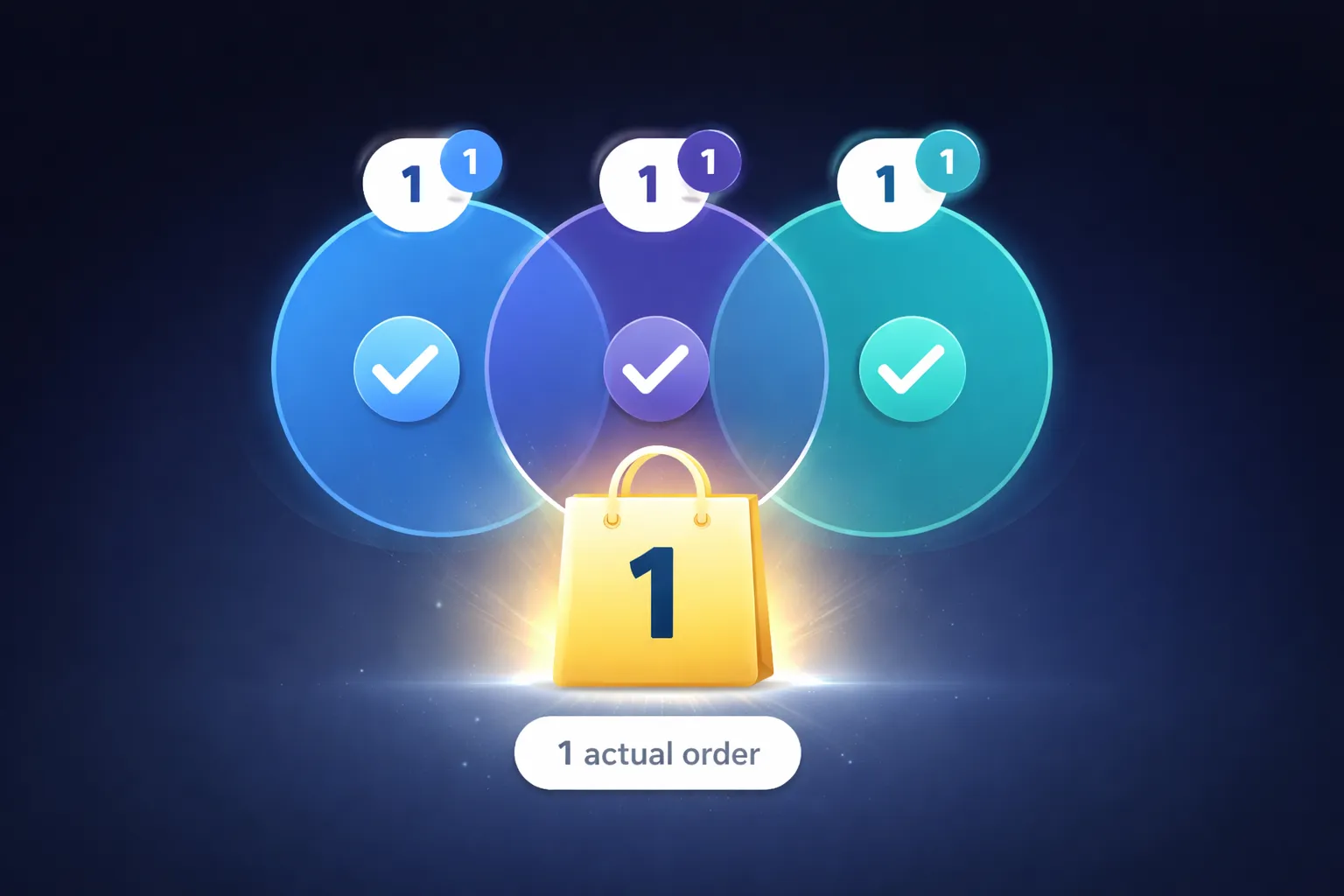
You check Google Ads: 45 conversions last week. You check Meta Ads Manager: 30 conversions. Your WooCommerce dashboard shows 52 actual orders. Together, the platforms claim 75 conversions for 52 real orders.
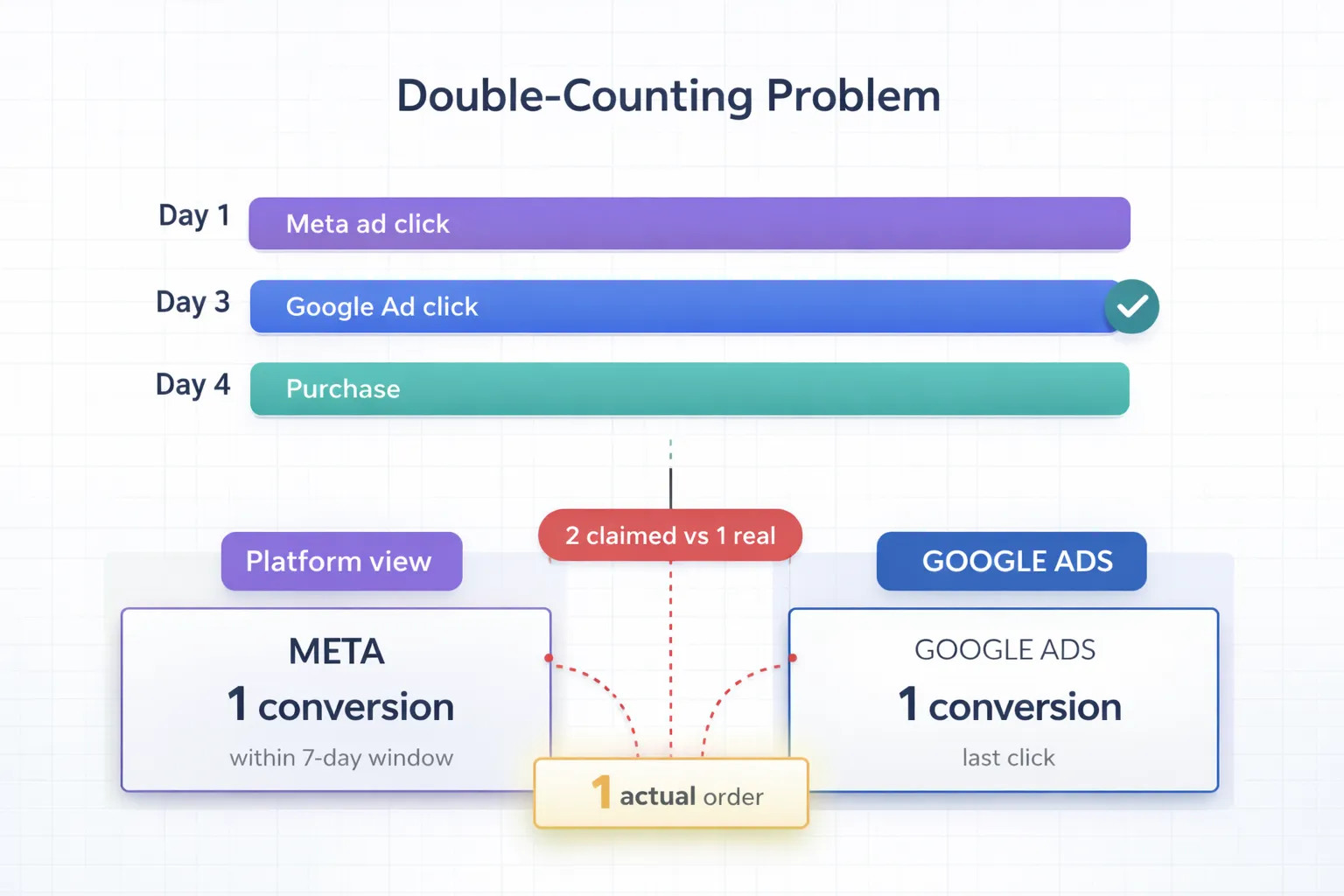
This is not a tracking error. Both platforms use their own version of last-touch attribution, and both claim credit for the same customers. A user who clicked your Facebook ad on Tuesday and your Google Ad on Thursday before buying? Meta says it was their ad. Google says it was theirs. The order only happened once.
Last-touch attribution, the single-touch model that gives 100% of the conversion credit to the final touchpoint before purchase, is the most widely used attribution model in digital marketing. An EMARKETER/Snap survey found that 78% of marketers still rely on it. Yet only 21% are confident it accurately reflects long-term business impact. It is popular because it is simple and available everywhere, not because it gives you the full picture.
This article explains exactly how last-touch attribution works, where it leads you astray, and what you can do about it. For the full map of how every model and tracking approach fits together, see our complete guide to ecommerce attribution.
What Is Last-Touch Attribution?
Last-touch attribution is a single-touch attribution model that assigns 100% of the conversion credit to the final marketing touchpoint a customer interacts with before purchasing.
The logic: the last interaction is what tipped the customer over the edge. Whatever happened before was background context. The retargeting ad that brought them back, the email with the discount code, the branded Google search right before checkout. That is what closed the sale.
Last-touch attribution is closely related to "last-click attribution." Most marketers use the terms interchangeably, though there is a technical distinction (covered in the last-click vs last-touch section below).
How the Last-Touch Model Works (With Example)
Using the same customer journey:
- Clicks a Google Ad (Day 1)
- Visits from organic search (Day 5)
- Clicks a Facebook ad (Day 8)
- Opens an email (Day 12)
- Visits directly and purchases (Day 14)
Under last-touch attribution, the direct visit gets 100% credit because it was the final interaction:
| Attribution model | Google Ads | Organic | Direct | ||
|---|---|---|---|---|---|
| Last-touch | €0 | €0 | €0 | €0 | €100 |
| First-touch | €100 | €0 | €0 | €0 | €0 |
| Linear | €20 | €20 | €20 | €20 | €20 |
| Multi-touch (U-shaped) | €40 | €7 | €7 | €7 | €40 |
In this example, last-touch credits "Direct" with the entire €100 sale. The Google Ad that introduced the customer, the organic visit that built familiarity, the Facebook ad that retargeted them, the email that nudged them. All get zero credit.
Google Analytics 4 addresses this partially with "Paid and organic last click," which ignores Direct as a last touch and instead credits the last non-direct channel. In this case, the email would get credit. But the core problem remains: one channel gets everything, the rest get nothing.
Last-Touch Defaults in Google Ads, Meta, and GA4
Understanding how each platform handles last-touch attribution is critical. Their default settings directly shape what you see in your reports and what decisions you make.
Google Ads default attribution model
Google Ads switched its default from last-click to data-driven attribution in 2023. New conversion actions now use data-driven attribution by default. However, older accounts and campaigns may still use last-click. If you have not checked your attribution settings recently, you might still be on last-click without realizing it.
How to check: Go to Google Ads > Goals > Conversions > Settings. Look at the "Attribution model" column for each conversion action. If it says "Last click," your reports are using pure last-touch. Switch to "Data-driven" for better accuracy.
Last-touch data in Google Analytics 4
GA4 uses "Data-driven" attribution as its default reporting model. The only alternative you can select is "Paid and organic last click" (essentially last non-direct touch).
How to see last-touch data in GA4:
- Go to Acquisition > Traffic acquisition. This report shows "Session" dimensions, which represent the last-touch channel for each session.
- In Explore, use the "Session default channel group" dimension to see last-touch attribution per transaction.
- Compare with "First user default channel group" to see first-touch alongside last-touch for the same users.
Key distinction: GA4's "Traffic acquisition" report = last-touch perspective. "User acquisition" report = first-touch perspective. Looking at both gives you a more complete picture than either alone.
Meta Ads attribution windows (7-day click, 1-day view)
Meta Ads Manager uses last-touch attribution by default with a 7-day click, 1-day view attribution window. If someone clicks your ad and converts within 7 days, Meta claims the conversion. If they only viewed the ad (no click), they must convert within 24 hours for Meta to take credit.
This means Meta will attribute conversions that happened up to a week after a click, even if the customer interacted with other channels in between. A customer who clicked your Meta ad on Monday and then clicked a Google Ad on Wednesday before buying on Thursday? Meta claims it (within 7-day window). Google Ads also claims it (data-driven or last-click). Double-counting happens silently.
Why Meta and Google claim the same conversion
Each ad platform runs its own last-touch model in isolation. They do not see each other's data. The result: if a customer touches multiple paid channels before buying, every platform with a touchpoint inside its attribution window claims the conversion.
| Customer action | Meta claims? | Google Ads claims? | Actual orders |
|---|---|---|---|
| Clicks Meta ad Monday, buys Monday | ✓ | ✗ | 1 |
| Clicks Meta ad Monday, clicks Google Ad Wednesday, buys Thursday | ✓ (7-day window) | ✓ (last click) | 1 |
| Views Meta ad Monday, clicks Google Ad Tuesday, buys Tuesday | ✓ (1-day view) | ✓ (last click) | 1 |
| Platform-reported total | 3 | 2 | 3 |
Three actual orders, but the platforms collectively report 5 conversions. This is why your ad platform numbers always add up to more than your actual order count. You need a single source of truth that starts from real orders, not from each platform's self-reported numbers.
First-Touch vs Last-Touch: Key Differences
Both models are single-touch, both are simple, and both have significant blind spots. Here is how they compare:
| Aspect | First-touch attribution | Last-touch attribution |
|---|---|---|
| Credits | First interaction before conversion | Final interaction before conversion |
| Answers | "What introduced this customer?" | "What made them buy?" |
| Values | Awareness channels: display, social, content, SEO | Conversion channels: retargeting, email, branded search, direct |
| Ignores | Middle and bottom of funnel | Top and middle of funnel |
| Best for | Justifying awareness budgets | Optimizing conversion campaigns |
| GA4 report | Acquisition > User acquisition | Acquisition > Traffic acquisition |
| GA4 dimension | "First user default channel group" | "Session default channel group" |
| Risk | Over-investing in awareness, under-investing in closing | Cutting awareness spend that feeds the funnel |
| Platform default | None of the major platforms | Meta Ads (7d click/1d view), Google Ads (was default until 2023) |
The core trade-off: Last-touch measures demand capture, the channels that convert existing purchase intent. First-touch measures demand generation, the channels that create that intent. Cutting awareness channels because last-touch shows them at zero conversions is one of the most common budget mistakes in e-commerce. For models that credit both the introduction and the close, see our guide to multi-touch attribution.
When the Last-Touch Model Makes Sense
Despite its limitations, last-touch attribution provides useful signal in specific scenarios:
| Your situation | Why last-touch helps |
|---|---|
| Direct response campaigns (single session, buy now) | The last (and only) touch IS the full journey |
| Simple funnel with 1-2 channels | Limited touchpoints mean last-touch is reasonably accurate |
| Promotional campaigns (flash sales, limited stock) | Recent interaction drives urgency, last-touch captures this |
| Small store with limited budget | Simple to implement, no additional tooling needed |
| Conversion rate optimization | Identifies which landing pages and creatives close the most sales |
| Low-price impulse products (<€30) | Customers often buy in a single session, so last touch = only touch |
The honest take: For stores with under €2,000/month in ad spend and primarily US traffic (high consent rates), last-touch attribution through GA4 is often sufficient. The data gaps are manageable at this scale. The problems compound as you grow, add channels, and sell into privacy-conscious markets.
The 6 Drawbacks of Last-Touch Reporting
1. Last-touch systematically overvalues closing channels
Branded search, retargeting, and email are common bottom-of-funnel "closers." They catch customers at the end of their journey. Under last-touch, they get all the credit. But they are only effective because awareness and consideration channels filled the funnel. If nobody had heard of your brand, nobody would search for it.
2. Last-touch creates a dangerous budget spiral
Here is the pattern that plays out repeatedly. Last-touch shows display ads driving zero conversions. You cut display spend. Branded search conversions drop two months later because fewer people discover your brand. Last-touch says branded search is declining, so you increase spend there. Meanwhile, the actual problem (no new customers entering the funnel) goes undiagnosed.
Forrester estimates that companies using advanced attribution models beyond last-click achieve 15-30% improvement in marketing ROI. Much of this improvement comes from properly valuing awareness channels that last-touch ignores.
3. Last-touch ignores the full customer journey
Modern e-commerce customers interact with brands across multiple channels and touchpoints before purchasing. For products above €50, customers typically visit 3-5 times across different channels before buying. Last-touch reduces this entire journey to a single data point. You see the finish line but not the race.
4. Privacy gaps make last-touch less accurate than it appears
Last-touch seems simpler to track because you "only" need the converting session. But even this has problems. Ad blockers affect 31-42% of users, meaning the converting session itself may not fire a GA4 event. The order happens, the customer pays, but GA4 never records the purchase. That last-touch data point simply does not exist for those users.
5. Every platform claims to be the last touch
As shown in the double-counting section above, Meta, Google, and TikTok all run independent last-touch attribution. Without a unified, order-level view across platforms, you cannot reconcile their claims. You are left adding up platform-reported conversions that exceed your actual order count, with no way to untangle which platform actually deserves credit.
6. Last-touch penalizes long customer journeys
For higher-priced products where customers take 2-4 weeks to decide, the final touchpoint is often a branded search or direct visit. The customer already decided to buy. They just navigated to your site. Last-touch credits that navigation as if it caused the sale, while the ad campaign that spent weeks building their intent gets nothing.
Last-Click vs Last-Touch: Are They the Same?
These terms are often used interchangeably, but there is a technical distinction in credit assignment worth understanding.
Last-click attribution credits the last clicked interaction. If a customer clicked a Google Ad, then saw (but did not click) a Facebook ad, then clicked an email link and purchased, the email gets credit.
Last-touch attribution credits the last interaction of any kind, including ad impressions and views. In the same scenario, if the Facebook ad impression was the most recent interaction before purchase, Facebook could claim credit under a last-touch model with view-through attribution.
In practice: Meta Ads uses last-touch with view-through (1-day view window). Google Ads uses last-click by default (now data-driven). GA4 uses "Paid and organic last click" which ignores Direct visits. The terminology matters because view-through attribution lets Meta claim conversions even when the customer never clicked a Meta ad. This is one reason Meta often reports higher conversion numbers than Google Ads for the same traffic.
Last-Touch vs Multi-Touch Attribution
If last-touch is too narrow for your needs, here is how it compares to multi-touch models that distribute conversion credit across the full customer journey:
| Model | How credit works | Awareness channels | Closing channels | Accuracy for multi-channel |
|---|---|---|---|---|
| Last-touch | 100% to final interaction | Invisible (0%) | Over-credited (100%) | Low |
| First-touch | 100% to first interaction | Over-credited (100%) | Invisible (0%) | Low |
| Linear | Equal split | Fair share | Fair share | Medium |
| Time-decay | More credit to recent | Under-credited | Over-credited | Medium |
| U-shaped | 40/20/40 first-last-middle | 40% (fair) | 40% (fair) | Good |
| Data-driven | ML-based | Varies by data | Varies by data | Best (with enough data) |
For most e-commerce stores, multi-touch attribution provides a more complete picture. Google recommends data-driven attribution for accounts with 200+ conversions and 2,000+ ad interactions per month. Below that threshold, U-shaped is a strong default.
The multi-touch attribution market is projected to grow from $2.4 billion to $5.2 billion by 2031, reflecting a clear shift. But regardless of model, the underlying challenge remains: your attribution is only as accurate as the data feeding it. If 40% of customer journeys are invisible to GA4, even the best model produces incomplete results.
How Enalitica Reveals What Last-Touch Hides
The problem with last-touch attribution is not that closing channels do not matter. They absolutely do. The problem is that last-touch is the only thing most reporting shows you. You see what closed the sale but not what started it, what influenced it, or how many other channels were involved.
Enalitica solves this by starting from your actual orders, not from analytics events that can be blocked, sampled, or double-counted by competing platforms.
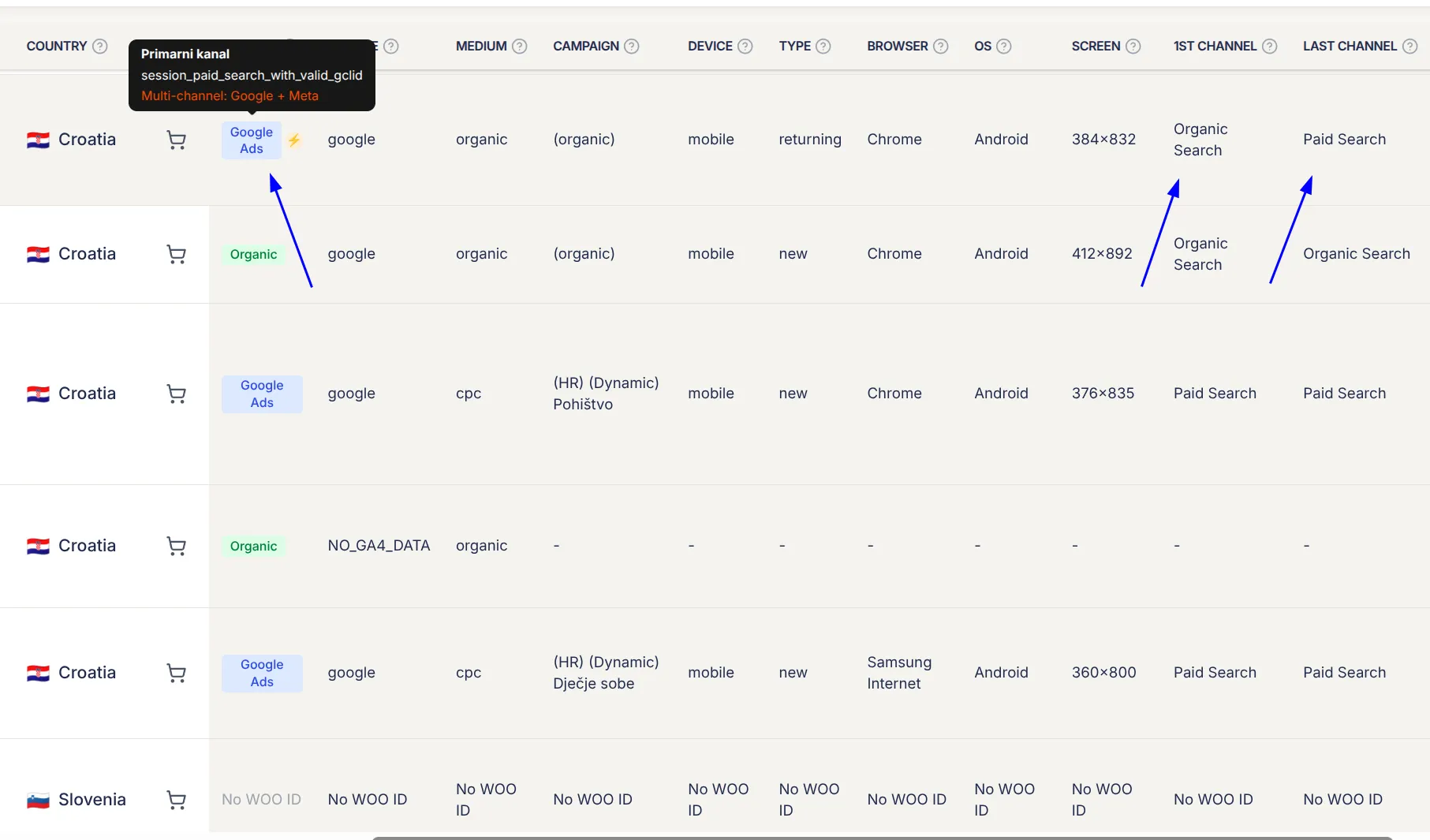
First-touch, last-touch, and click IDs on every order
When an order syncs from your WooCommerce or Shopify store into Enalitica, it captures:
- The last-touch channel: Which channel the customer used in the purchasing session (session channel group from GA4)
- The first-touch channel: How this customer originally discovered your store (first user channel group from GA4)
- Click IDs with timestamps: Any GCLID (Google Ads) or FBCLID (Meta Ads) associated with the order, including when the click happened
For every single order, you know both how the customer was introduced and what closed the sale. Not modeled. Not estimated. Actual data tied to an actual order you can click through and verify.
Direct vs influenced revenue: seeing the full picture
The Porocila (Reports) tab shows every channel with two revenue numbers side by side. Here is a real Google Ads view from February 2026:
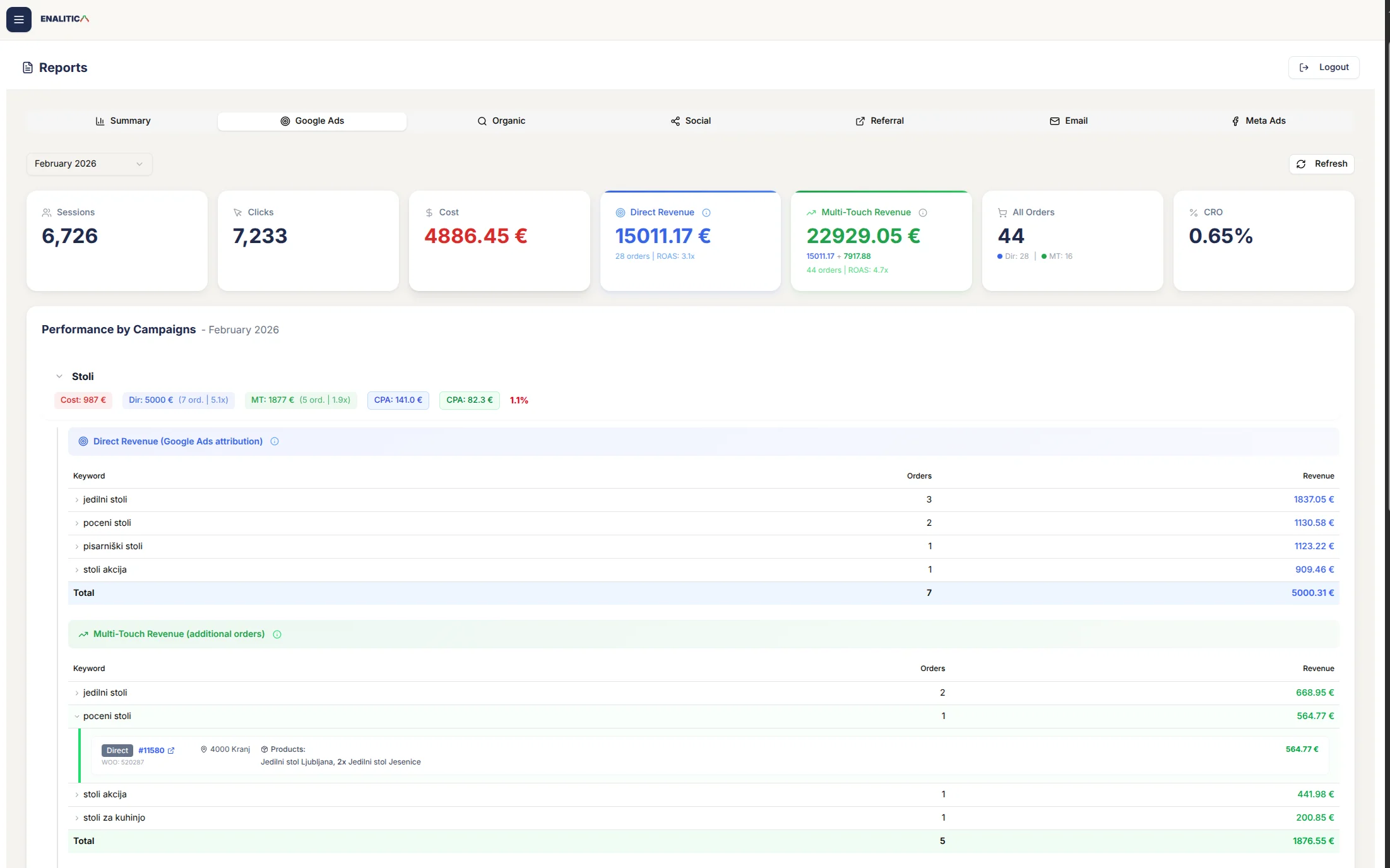
Direct Revenue: €15,011 from 28 orders at ROAS 3.1x. This is your last-touch number. It approximately matches what Google Ads self-reports.
Multi-Touch Revenue: €22,929 from 44 orders at ROAS 4.7x. This includes every order where a Google Ad click appeared at any point in the customer journey, whether it closed the sale or just introduced the customer.
The gap: 16 additional orders worth €7,918 where Google Ads contributed to the sale but another channel got the last touch. Under standard last-touch reporting, those 16 orders are invisible. Your ROAS looks like 3.1x when the true picture is 4.7x. If you are making budget decisions on the 3.1x number, you are undervaluing Google Ads by over 50%.
Drill into the "Stoli" campaign and it gets concrete. Last-touch shows 7 orders worth €5,000 (ROAS 5.1x) across keywords like "jedilni stoli" and "poceni stoli." But Multi-Touch reveals 5 more orders worth €1,877 where these keywords introduced the customer. Click one and you see: Order #11580 from Kranj, products "Jedilni stol Ljubljana, 2x Jedilni stol Jesenice" for €565. The customer first clicked on "poceni stoli," but came back later through a different channel to buy. Last-touch gives this keyword zero credit for that sale.
The same direct-plus-multi-touch pair now exists for profit. Enalitica imports what each product costs you (from Shopify, WooCommerce, your price lists or your ERP), adds shipping, payment fees and packaging, and shows POAS (profit on ad spend) next to ROAS: direct POAS is the last-touch profit number, MT POAS adds the profit of every order the campaign assisted. Last-touch reporting undervalues assist campaigns on revenue and profit alike, so the pause rule is: act only when both POAS figures sit below 1.0.
Keyword-level Google Ads data for every order
For orders attributed to Google Ads (whether last-touch or influenced), Enalitica queries the Google Ads API to retrieve:
- The exact keyword that triggered the ad
- The campaign and ad group
- The cost-per-click for that keyword
- The ad headline that was displayed
This lets you answer: "Which keywords close sales directly (last-touch), and which keywords introduce customers who buy later through other channels (first-touch influence)?" This question is impossible to answer with Google Ads or GA4 reporting alone.
How Enalitica resolves platform double-counting
Because Enalitica starts from the actual order, each order is attributed to exactly one primary channel using a transparent, deterministic rules engine:
- Purchase session was Paid Search + valid GCLID → Google Ads (direct)
- Purchase session was Paid Social + valid FBCLID → Meta Ads (direct)
- Valid GCLID exists but from a different session → Google Ads (influenced)
- Valid FBCLID exists but from a different session → Meta Ads (influenced)
- Both GCLID and FBCLID exist → Most recent click gets primary attribution
- No valid click IDs → Session channel (last-touch)
- Fallback → First channel (first-touch)
No double-counting. No inflated numbers. One order, one primary attribution, with full visibility into every channel that touched the journey. You can click into any order and see exactly why it was attributed the way it was.
Attribution that works when cookies do not
| Factor | GA4/Platform last-touch | Enalitica order-based |
|---|---|---|
| Ad blocker active | Purchase event never fires, order invisible | Order captured from WooCommerce/Shopify database |
| Cookie consent declined | No session data, no attribution | Click IDs in order metadata still attribute the sale |
| Safari ITP purge | Cookie-based attribution breaks after 7 days | Click IDs persisted in order metadata indefinitely |
| Revenue accuracy | GA4 undercounts by 15-30% | Actual order totals from your store |
| Platform double-counting | Cannot detect or resolve | One order = one primary channel, always |
| Keyword-level ROAS | Not available in GA4 | Exact keyword → order → revenue chain via GCLID |
Enalitica onboarding takes just a few minutes. For e-commerce stores, your last 30 days of orders are imported and enriched with click ID and Google Ads data instantly. Service businesses get all tracked events imported immediately. Want to see exactly which channels close your sales and which channels silently fill your funnel, backed by your real orders? Book a demo and we will show you the full picture.
How to Move Beyond Last-Touch Measurement
Whether or not you use Enalitica, here are practical steps to reduce your dependence on last-touch:
Compare platform conversions to actual orders. Run this check monthly: total Google Ads conversions + Meta conversions vs actual orders. If platform totals exceed orders by 20%+, you have significant double-counting. This is the simplest proof that last-touch across multiple platforms is misleading.
Use GA4's two acquisition reports together. The "User acquisition" report shows first-touch data. The "Traffic acquisition" report shows last-touch data. Looking at both in the same analysis reveals which channels create demand vs which channels convert it. The gap between them is where budget insights hide.
Capture click IDs for every order. This is the foundation of order-based attribution. See our step-by-step guide to capturing GCLID and FBCLID in WooCommerce. Also make sure you capture GBRAID and WBRAID for iOS traffic.
Run a simple holdout test. Pause a channel for 2-4 weeks that last-touch says drives zero conversions. If other channels' performance drops, the paused channel was contributing to the top of your funnel. This is basic incrementality testing and it often reveals that "zero-conversion" channels were actually essential.
Look at GA4 Conversion Paths. Go to Advertising > Attribution > Conversion paths. This report shows which channels appear in multi-step conversion paths without being the last touch. It is the closest GA4 gets to multi-touch insight without additional tooling.
Audit your attribution windows by market. If you sell into EU markets, check how much data you are actually losing. Our country-by-country attribution guide shows consent rates and realistic tracking coverage for every major market.
Frequently Asked Questions
In the _____ attribution model, the first touchpoint receives less credit and the last touchpoint receives the most credit.
The answer is time-decay. In the time-decay attribution model, credit increases as touchpoints get closer to the conversion. The first touchpoint receives the least credit, and the final touchpoint receives the most. This model is useful for short purchase cycles or promotional campaigns where recent interactions are most influential in driving the purchase decision.
How do I calculate true ROAS when ad platforms double-count conversions?
Start by comparing total platform-reported conversions to actual orders for the same period. If Google reports 40 conversions and Meta reports 25 but you only had 50 orders, there are at least 15 orders claimed by both. To calculate true ROAS per platform, you need a single source of truth (like your e-commerce order database) that attributes each order to exactly one primary channel. Without this, any ROAS calculation using platform-reported numbers is inflated, and you cannot reliably compare platform performance.
Should I trust Google Ads or Meta Ads conversion numbers?
Neither, exclusively. Each platform reports from its own perspective using its own attribution window and model. Google Ads (data-driven) and Meta (7-day click/1-day view) will both claim conversions that the other also claims. The only reliable number is your actual order count from WooCommerce or Shopify. Use platform data for relative performance trends (which campaigns improved, which declined), but always reconcile total conversions against your order database before making budget decisions.
What attribution window should I set in Meta Ads Manager?
Meta defaults to 7-day click, 1-day view. For most e-commerce stores, the 7-day click window is reasonable since most purchases happen within a week of the ad click. The 1-day view window is more controversial because it counts conversions from people who only saw your ad but never clicked it. If your Meta conversion numbers seem inflated compared to Google Ads, try switching to "7-day click only" (removing view-through) for a more conservative baseline. You can change this in any campaign report by clicking "Compare attribution settings."
Does last-touch attribution work differently for subscription vs one-time products?
For subscriptions, last-touch only attributes the initial signup, not recurring revenue. A customer who signed up via a Google Ad and pays €29/month for 12 months shows as one €29 conversion under last-touch, even though the lifetime value is €348. This makes subscription acquisition channels appear far less valuable than they are. If you sell subscriptions, tracking customer lifetime value alongside last-touch attribution is essential. Enalitica does this with LTV cohorts: customers are grouped by their acquisition month, so you see what a new customer cost, what they buy again in the following months, and when they pay back their acquisition cost. Otherwise you will consistently under-invest in acquisition because the model only sees the first payment.
What are the best last-touch attribution alternatives?
The most common alternatives are: U-shaped attribution (40% first touch, 40% last touch, 20% middle), which is a strong default for most e-commerce stores. Data-driven attribution in GA4 or Google Ads, which uses machine learning to assign credit based on actual patterns in your data. Order-based attribution, which starts from actual orders and enriches them with channel data from GA4 and ad platform APIs, giving you both first-touch and last-touch data per order without relying on browser-side tracking. The best choice depends on your data volume, the markets you sell into, and what budget decisions you need to make.
How do I explain attribution double-counting to non-technical stakeholders?
Use this framework: "We had 100 orders this month. Google Ads claims 70 conversions, Meta claims 50. That is 120 claimed conversions for 100 actual orders. Neither platform is lying. They each see the customer journey from their own perspective, and 20 orders were touched by both platforms. Each one claims full credit for those 20 shared orders. To set accurate budgets, we need to deduplicate by starting from actual orders and assigning each one to one primary channel."
See your real numbers
Import 30 days of orders or leads instantly during 5-minute onboarding. Works for e-commerce and service businesses.
Start free