
Demand Gen Campaigns: Where They Serve, What You Measure
Demand Gen campaigns run on YouTube, Discover and Gmail. Where Display hides in the settings, how Google counts engaged views and what real orders prove.

Tilen Ledic
Written by
Demand Gen campaigns are Google's answer to TikTok and Meta: visual ads in feeds where nobody searched for anything. They serve on YouTube (In-Stream, In-Feed, Shorts), in Google's Discover feed and in Gmail, and since April 2025 they can also serve on the Google Display Network, which many advertisers never notice.
Because the buyer does not arrive from a search, conversions are counted differently too: besides clicks, Google also counts views without a click.
This guide explains where the ads really serve, which settings decide that, how to read the reports and what you can prove with orders from your own store. Verified August 16, 2026, sources rechecked September 28, 2026.
What Demand Gen campaigns are and where they serve
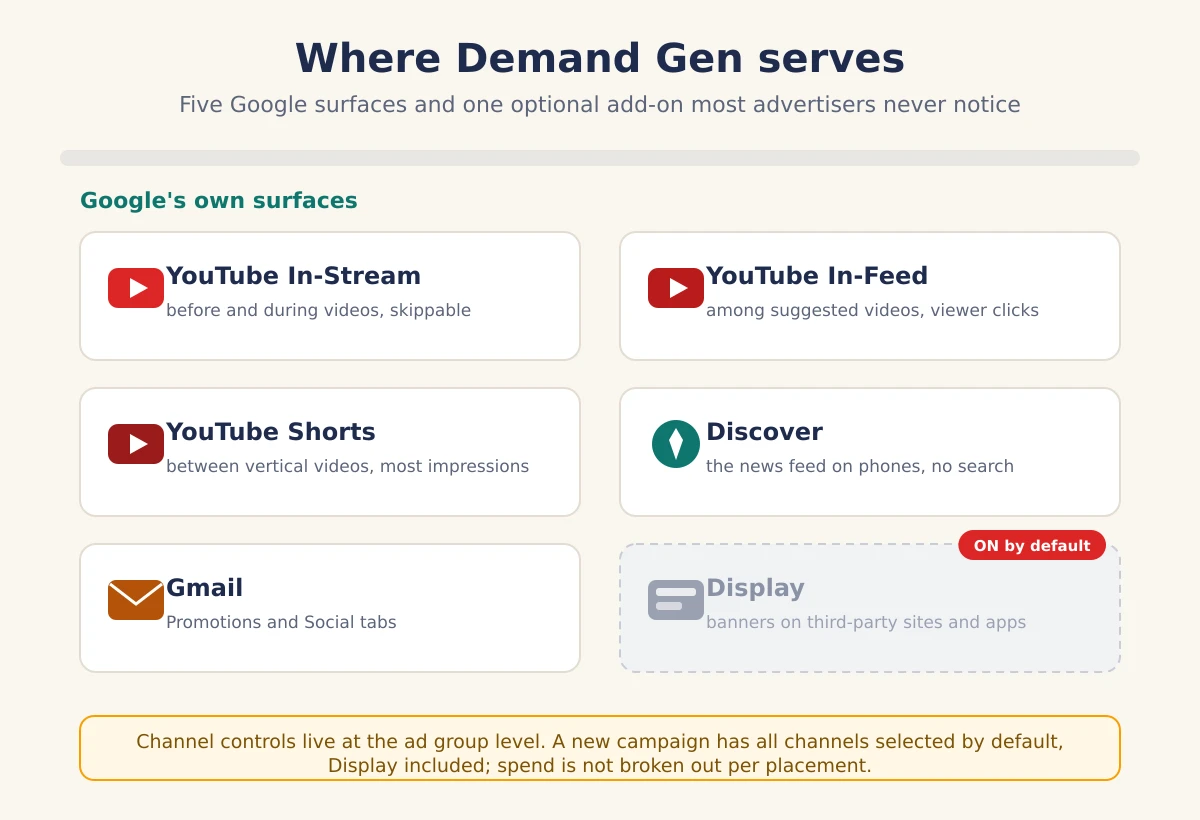
Demand Gen campaigns are Google's visual campaign type for feeds: YouTube In-Stream (before and during videos), YouTube In-Feed (among suggested videos), YouTube Shorts, the Discover feed on phones, and the Promotions and Social tabs in Gmail. Google quotes more than 3 billion monthly active users for these surfaces.
In early 2024 they fully replaced the previous Discovery campaigns; if you ever advertised in the Discover feed, Demand Gen is the successor with more surfaces and more control.
One fundamental thing separates them from Search campaigns: intent. In Search, a buyer types "kids bike 20 inch" and the ad answers a question. In the Discover feed and between Shorts there is no question; the ad has to create its own reason to click, which is why Google sells this type as "demand generation".
There are three ad formats: single or multi-image ads (multi-asset), carousels and video; stores with a product feed can add product ads. Bidding supports Maximize Clicks, Maximize Conversions, target CPA and target ROAS, which means Demand Gen is not just an awareness campaign: Google also drives it toward purchases.
Do Demand Gen ads also serve on the Display network?
They can. In April 2025 Google added the Google Display Network to Demand Gen, meaning banners on millions of third-party websites and apps, and Google recommends the automatic "All Google channels" selection, which includes Display, for most advertisers. Whoever never opens that setting is also advertising on surfaces that have nothing to do with YouTube, Discover or Gmail.
The setting hides at the ad group level under "Channels" (channel controls): you either keep "All Google channels" or pick "Let me choose" and tick individual channels, namely YouTube, Discover, Gmail, Maps and the Google Display Network.
Why this matters: Display spend is hard to follow from a single placement to a result in your store. A click from a banner on a third-party site is usually far cheaper and far less valuable than a click from the Discover feed, and in the campaign's blended average the two melt together.
Campaigns created through Enalitica therefore have Display off by default: the campaign runs only on Google's own surfaces, where the context is known.
If you want the Display network in Demand Gen, switch it on deliberately, as a separate test with its own budget, not as a default you never noticed.
Display is also moving in the other direction. Google has announced that standalone Display campaigns are migrating into Demand Gen, with voluntary moves of existing campaigns from June 2026 and the migration expected to complete by 2027, so the channel setting will matter to more accounts, not fewer.
In-Stream, In-Feed and Shorts: what Google breaks out
Google can split a Demand Gen campaign's spend by ad format, but only for YouTube: In-Stream (skippable and non-skippable), In-Feed and Shorts each get their own row with impressions, clicks and conversions. Impressions in the Discover feed and Gmail, however, are reported without a format label in that breakdown; you see that they happened, not which feed they happened in.
That is enough to spot patterns the blended average hides. A typical case: Shorts collect the most impressions and clicks at a low cost, while orders come from the In-Feed format, where the user chooses the video themselves. Or the reverse: In-Stream eats half the budget on impressions before videos that viewers skip, with almost no clicks.
Without the format split you make decisions about the campaign as a whole; with it you see which feed works and which one merely spends. Where to find this split in Enalitica is described below.
How does Demand Gen count conversions: click or view?
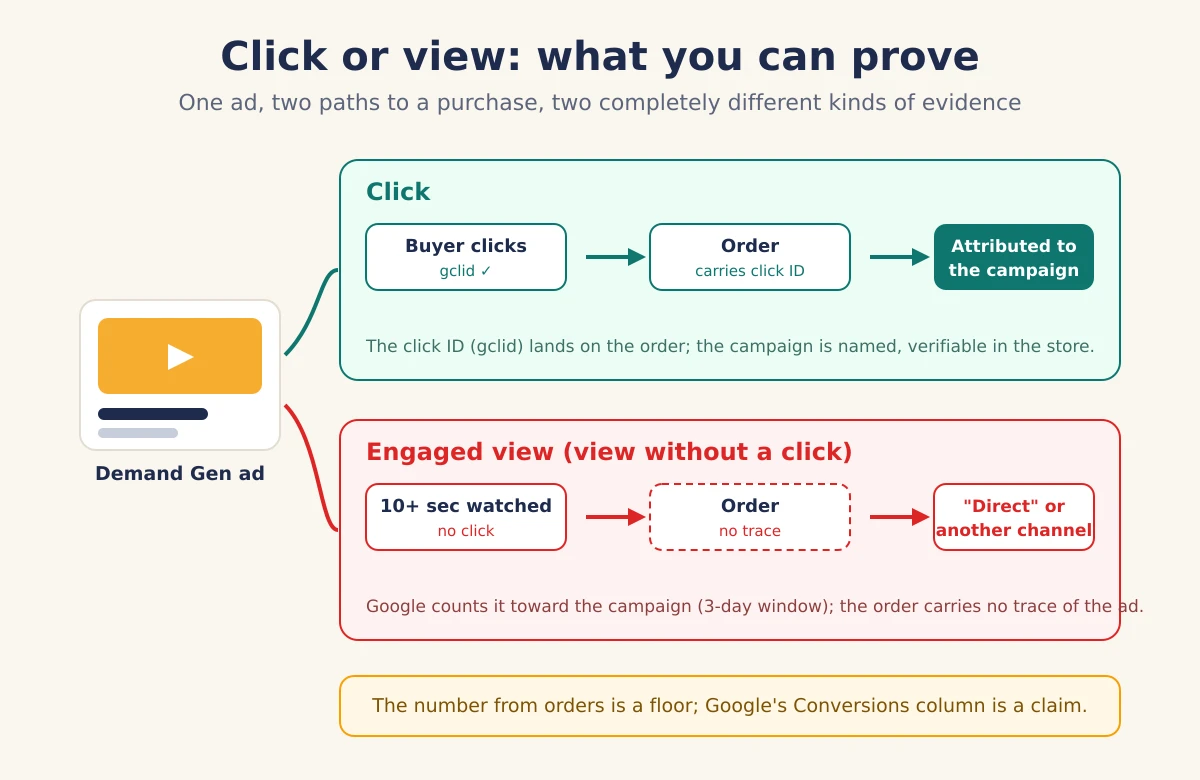
Demand Gen counts conversions along three paths. The first is a click: the buyer clicks the ad, Google tags the click with a gclid, gbraid or wbraid click ID, and the purchase is traceable to the campaign.
The second is an engaged view: the viewer watches at least 10 seconds of a skippable in-stream ad (the whole ad if it is shorter) or at least 5 seconds of an in-feed or Shorts ad, clicks nothing, but buys within the window, which is 3 days by default for web conversions. Google counts that conversion in both the Conversions and the All conversions columns.
The third is classic view-through: a mere impression, a later purchase, which Google keeps in a separate column.
The difference is not academic. A click leaves evidence you can verify in your own store: the order carries a click ID and the campaign is named. An engaged view leaves nothing; a purchase after a view arrives in the store as a direct visit, a brand search or a click from another channel.
Google's Conversions column for Demand Gen adds up two kinds of evidence: verifiable clicks and views nobody outside Google can confirm.
How much view-based conversions can inflate the numbers is measured in our article on how view-through conversions inflate ROAS; with Demand Gen that share is typically higher than in Search campaigns, simply because feeds produce fewer clicks.
Demand Gen ROAS vs orders in your store
Google's ROAS for Demand Gen will typically be higher than what you can prove with orders, for structural reasons, not fraud.
Google counts engaged view conversions that are not traceable in the store; it claims purchases inside its window even when another channel touched the buyer in between; and it models conversions where tracking is incomplete. Your store, on the other side, can only prove orders with a click: the ones carrying a click ID or the campaign's UTM tag.
Honest reading therefore uses two numbers. Google's number says what the campaign claims under its own rules; the number from orders says what is proven, and it is a floor.
If Google's ROAS is 6 and the proven ROAS is 1.5, the truth lies in between, and the useful question is not "which number is right" but "does the proven number move when I change the campaign".
Proven Demand Gen orders growing at stable spend is a signal you can trust; growth in Google's column alone is not.
We apply the same logic to Performance Max campaigns, where Google likewise grades its own work.
GA4 will not separate the two for you, because its Cross-network channel group includes Demand Gen, Performance Max and Smart Shopping. In Enalitica's data (more than 1 million GA4 sessions, last 90 days to 28 September 2026), Cross-network carried 12.9% of all sessions, more than Paid Search at 11.4%, and Performance Max alone delivered 30.5% of Google Ads orders in the same window.
How Enalitica reads Demand Gen in Campaign Health
Campaign Health in Enalitica shows four things for every Demand Gen campaign that the Google Ads interface scatters across several tabs.
First, the allowed channels: the card says whether the campaign runs only on Google's own surfaces (YouTube, Discover, Gmail) or also on Display, and if Display is on, it flags that as a warning, because part of the budget drains to surfaces with no per-placement breakdown.
Second, spend by format over the last 30 days: In-Stream, In-Feed and Shorts, each with its own spend, impressions, clicks and Google conversions, so you see which feed works.
Third, the proven side: ROAS and POAS from your store's real orders, with the share of first-time buyers next to them, because the new customer is exactly the promise Google sells Demand Gen on. And fourth, an honest measurement note: the card itself says that a click carries a gclid and is traceable while a view without a click is not, so our number is a floor.
The weekly verdicts (scale, keep, improve, stop) apply to Demand Gen the same as to every other campaign type, because they are computed from orders, not from Google's columns. To see this view for your own store, see plans and pricing or book a live demo.
When Demand Gen makes sense for a small store
Demand Gen is an upgrade, not a foundation. Search campaigns and Performance Max harvest existing demand and are almost always the first two steps for a small store; Demand Gen makes sense once those two run profitably and you want to reach people who are not searching for you yet.
The entry ticket is creative: you need at least a quality landscape image (1.91:1), a square image and a logo, and Shorts only really work with vertical video; a campaign with one tired image creates nothing in the feeds.
Three rules protect the budget. First, start small and scale the campaign only on proven orders, not on a pretty Google column.
Second, write down a kill criterion in advance, for example "if 200 clicks produce no proven order, the campaign stops", and stick to it.
Third, measure the new-customer share: if Demand Gen brings the same orders as your Search campaigns, only at a higher price, you are paying more for demand you already had.
All three numbers sit on the campaign card in Enalitica, computed from the orders your store already records.
Frequently Asked Questions
Did Demand Gen replace Google Discovery campaigns?
Yes. Google automatically upgraded Discovery campaigns to Demand Gen in early 2024. Demand Gen kept Discover and Gmail and added YouTube In-Stream, In-Feed and Shorts, video formats, carousels, lookalike segments and bidding on clicks, conversions, target CPA or target ROAS.
How do I turn off the Display network in Demand Gen?
The setting lives at the ad group level, not the campaign level. In Google Ads open the ad group, find the Channels section (channel controls) and switch from "All Google channels" to "Let me choose", then untick the Google Display Network. Campaigns created through Enalitica ship with Display off by default.
Does Demand Gen steal conversions from Performance Max?
Usually not. Performance Max works mostly on existing demand (Shopping, search, remarketing) while Demand Gen works in feeds before the demand exists; Google positions them as complementary types. Overlap appears in remarketing audiences and on YouTube; the new-customer share on the campaign card tells you whether Demand Gen really brings new people or just intercepts existing ones.
Are engaged view conversions real conversions?
The purchases are real; the question is the credit. An engaged view means at least 10 seconds of watch time on a skippable in-stream ad (5 seconds on in-feed and Shorts) and a purchase within the window, 3 days by default for web conversions, with no click and no trace in your store; whether the ad caused the purchase or merely preceded it cannot be verified from outside. Read them as a signal of influence, and demand proof from orders with a click.
What does the "Total: Demand Gen" row mean in Google Ads reports?
"Total: Demand Gen" is the subtotal row Google Ads shows in the campaigns table when you group or filter by campaign type: it adds up spend, clicks and conversions of every Demand Gen campaign in the account, next to similar rows for Search, Shopping and Performance Max. Two cautions when reading it: its conversions include engaged-view conversions by default, and the subtotal mixes campaigns with very different goals. Compare it with the Demand Gen orders in your store before treating the row as a result.
Sources
The outside pages this article relies on. Links checked on 28 September 2026.
- April 2025 they can also serve on the Google Display Network (support.google.com)
- more than 3 billion monthly active users (support.google.com)
- channel controls (support.google.com)
- standalone Display campaigns are migrating into Demand Gen (blog.google)
- engaged view (support.google.com)
- Cross-network channel group (support.google.com)
Figures marked "in Enalitica's data" are aggregates from the real orders of the stores we measure, with no names and no individual orders. How we measure.
See your real numbers
Import 30 days of orders or leads during a 5-minute onboarding. Works for e-commerce and service businesses.
See plans and pricing