
How to Scale Ads: Raise Budgets Without Scaling Losses
How to scale ads step by step: three conditions before raising budgets, the 20 percent rule, the learning phase and when to stop. Written for directors.

Tilen Ledic
Written by
Knowing how to scale ads means knowing how to raise your advertising budget, and most stores get it wrong in the same way: a campaign performs well, the budget doubles overnight, and two weeks later the numbers are worse than before. This guide explains how to raise budgets safely: which three conditions must hold before any increase, why ads perform worse for a week after every major change, and when to stop a campaign. It is written in plain language, without marketing jargon, because the decision to spend more is ultimately signed off by a director, not by the person running the ads.
How to scale ads: what a bigger budget multiplies
Scaling ads is increasing ad spend with the goal of growing sales along with it. The key is understanding what a bigger budget really does: it multiplies the economics you already have. A campaign that makes a profit on 1,000 euros will probably make a profit on 2,000, just slightly less per euro. A campaign that loses money on 1,000 euros will lose twice as much on 2,000.
One uncomfortable truth belongs in every director's head: each additional euro returns a little less than the previous one. Ad platforms show your ads to the most likely buyers first; with a bigger budget they reach ever less likely ones. This is called diminishing returns, and we covered it in detail in our guide on why ecommerce growth stalls. For this guide one conclusion is enough: scaling is not a way out of bad numbers, it is a reward for good ones.
Three conditions before you raise your ad budget
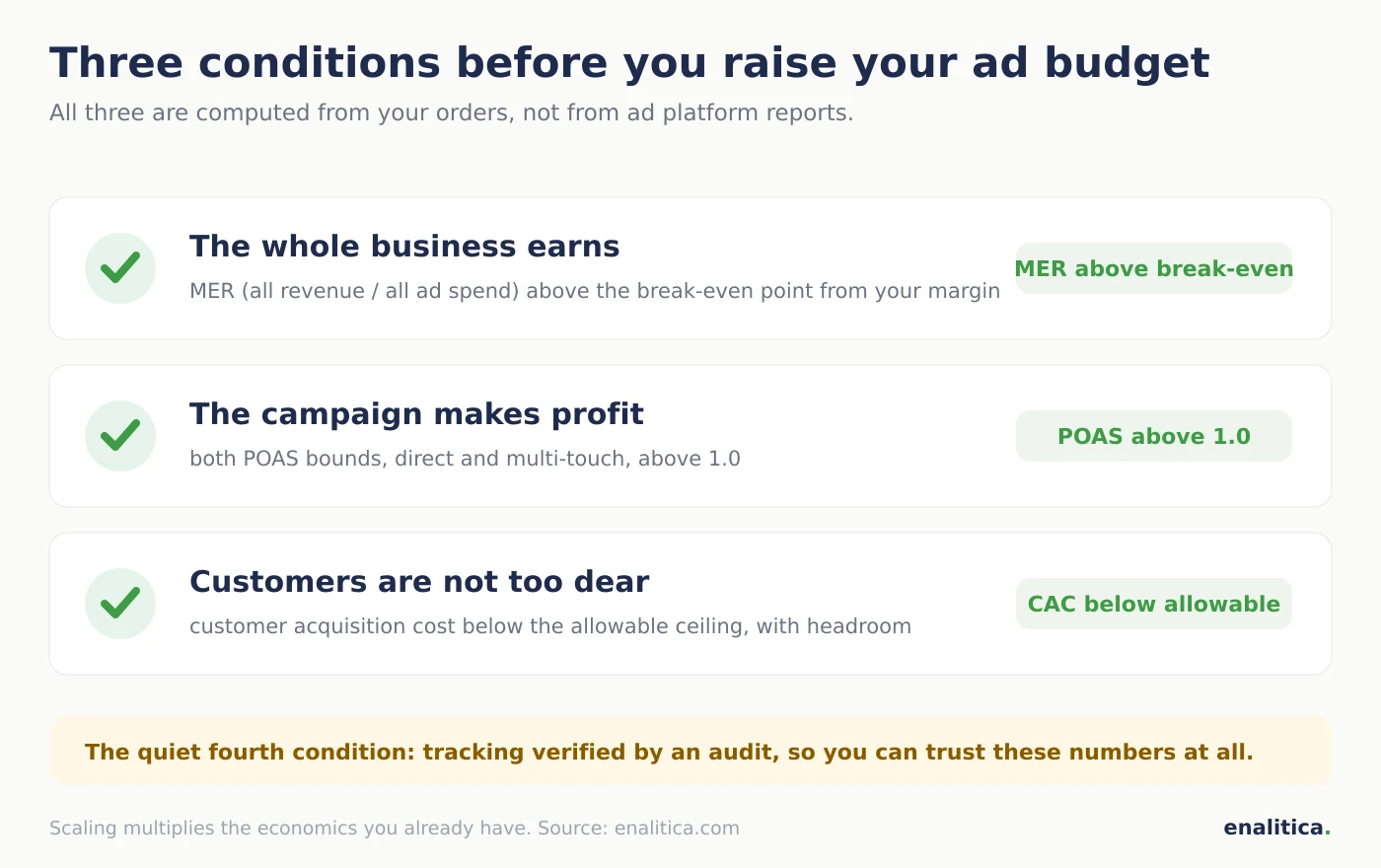
An ad budget is safe to raise only when three numbers hold, and all three are computed from your orders, not from ad platform reports. Each has its own full article, so here is just the essence:
- The whole business earns. MER, meaning all revenue divided by all ad spend, must sit above your break-even point, which is computed from your margin. The formula and a calculator are in the MER guide. If the whole does not earn, a bigger budget only speeds up the loss.
- The campaign you scale makes a profit. Profit, not revenue. That is what POAS tells you: at Enalitica we look at two numbers, a lower bound (only orders where the campaign was the sole channel) and an upper bound (every order it participated in). Scale what sits above 1.0 on both.
- A new customer does not cost too much. Your customer acquisition cost must stay below the allowable one, meaning below what a new customer brings you in their first months. While there is headroom, there is room to grow; without it, you are buying growth on credit.
The fourth, quiet condition is that you can trust these numbers at all. If you do not know how many orders your tracking really sees, run that 30-minute audit first and move budgets after.
Why do ads perform worse for a week after a budget increase?
Ads perform worse after a budget increase because every major change resets the ad platform's learning. Google and Meta continuously work out who should see each campaign's ads; when the budget changes sharply, they have to learn again, and while they do, ads are shown to the wrong people too. Picture a new driver: he has just mastered the route, and overnight you swap his truck and double the load.
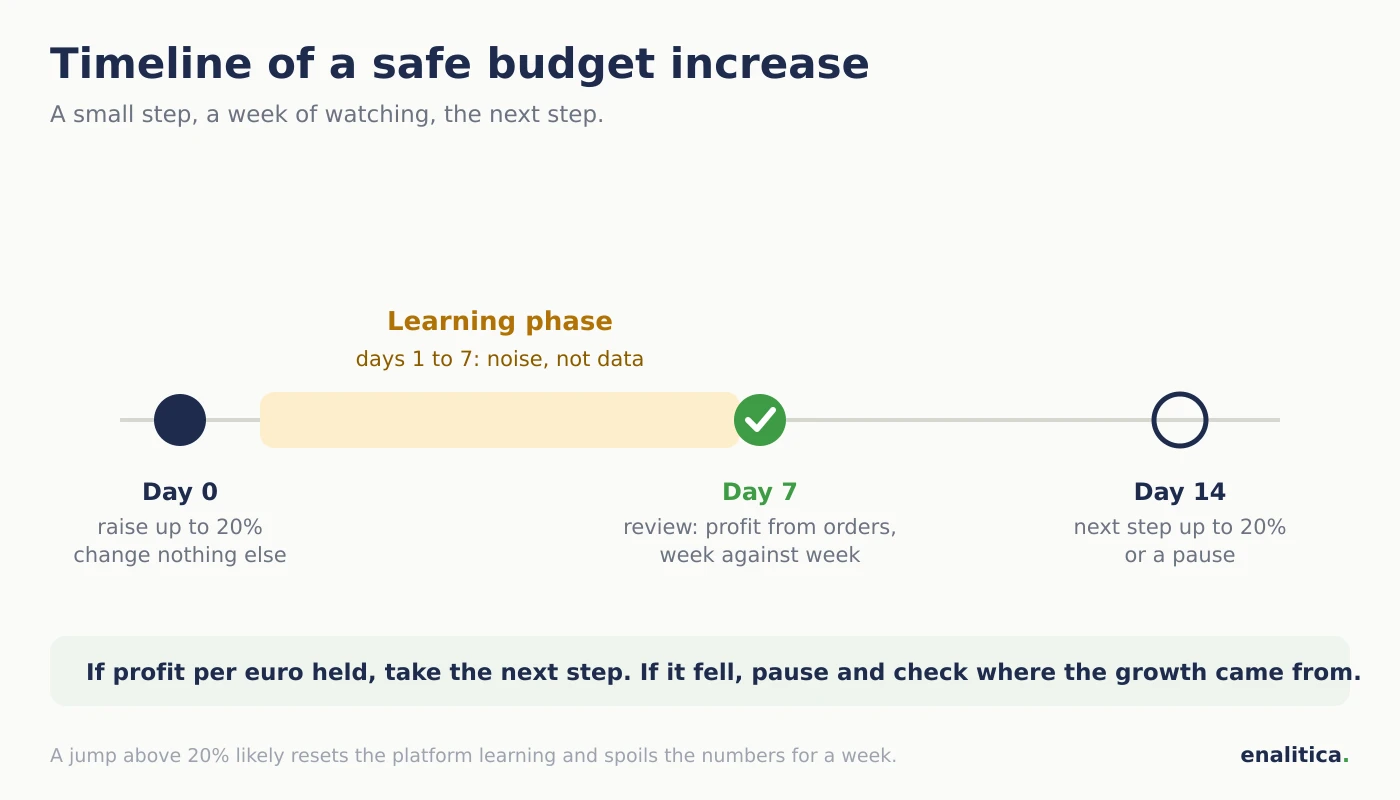
The concrete numbers the platforms publish: Meta considers a campaign "learned" at roughly 50 purchases per week per ad set, and Google Smart Bidding needs about 7 days or at least 30 conversions to settle. What counts as a major change that resets learning: a budget increase above roughly 20 percent, but also swapping the audience, the creative or the optimization goal. The practical consequence for you: after any change, wait 7 days before judging the numbers at all. The first days after an increase are not data, they are noise, which is also why a morning glance at the ads is never the moment to decide about budgets.
The 20 percent rule for raising ad budgets
Raise budgets in steps of up to roughly 20 percent at a time, and after each step wait a week to check whether the profit held. The rule has two reasons: steps below that line usually do not reset the platform's learning, and the weekly pause shows you where diminishing returns begin before they cost serious money.
An example: a campaign at 25 euros per day with healthy profit goes to 30 euros per day in the first step. If after a week the profit per euro held, the next step is 36 euros. If it fell, you stop and wait another week. That way 25 euros becomes double within two months, without a single risky jump. An honest note: 20 percent is an orientation from research and practice, not a law of nature. The point of the rule is not the exact number but the rhythm: small step, a week of watching, next step.
Four ways to scale: budget, targets, audiences, new campaigns
Raising the budget on an existing campaign is only one of four directions, and often not the first worth choosing. For a director, here they are from least to most risky:
| Direction | What it means | When to pick it |
|---|---|---|
| Higher budget | same campaign, more money | a winner with profit to spare |
| Softer target | you lower Google's target return so it buys more | the campaign beats its target easily |
| New audiences and markets | same products, new people or countries | the home audience is saturated |
| New campaigns | a new campaign type or product group | existing ones are at their ceiling |
The second row deserves a plain-language note: with Google's automated bidding you give a campaign a target return (how much revenue it must make per euro). If you soften that target slightly, Google buys more traffic; this is often a gentler way to scale than a budget raise, because it does not reset learning as roughly. And one caution across all four directions: check that the growth is not coming from ads on your own brand name, because there you are buying customers who would have come anyway. And on Meta, expansion usually means Advantage+; before raising its budget, check where an Advantage+ budget goes without exclusions. And from September 2026 expansion on Google can happen on its own: check whether the automatic AI Max upgrade catches your Search campaigns. And for the "new campaigns" direction in feeds, check where Demand Gen campaigns serve and what you can measure. And before crediting growth to the ads, check what would have sold without them.
How do you recognize a failed budget increase?
You recognize a failed budget increase by comparing two equally long periods, before and after the change, a week after it, and by profit from orders, not by the platform's numbers. One bad day means nothing; a week against a week says almost everything.
At Enalitica we use a simple rule you can apply by hand too: a change counts as working when the return after it is at least 15 percent better, and as not working when it is at least 15 percent worse; anything in between is mixed and calls for patience, not panic. Two more things deserve a look before judging. First, assisted conversions: a campaign that looks worse on last click after an increase may be opening buying journeys that other channels close. Second, returns: an increase that brings customers who return a lot succeeds on paper and fails in reality.
When to stop a campaign, when to fix it, when to wait
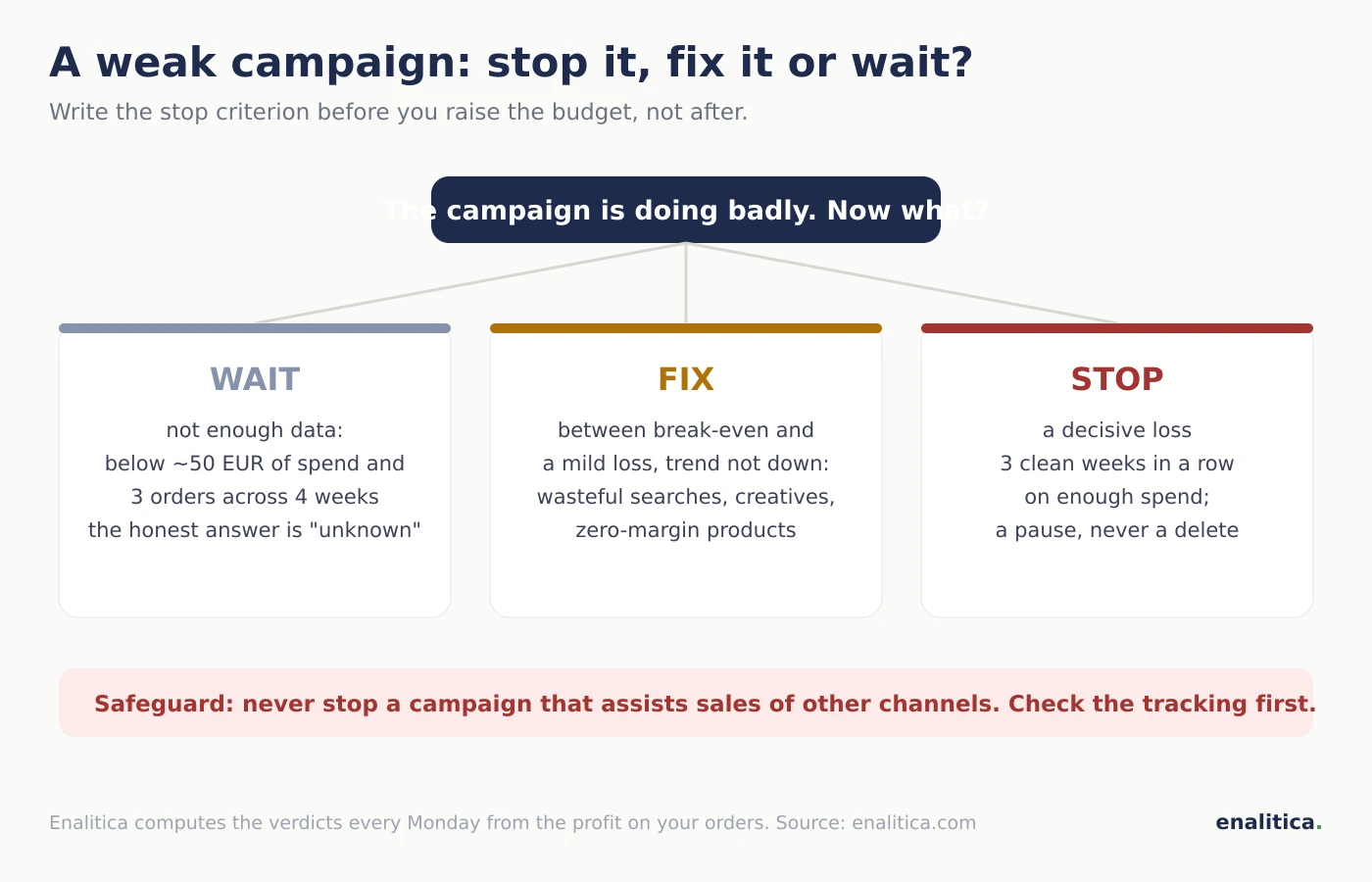
The decision about a weak campaign is not binary; in practice there are three options, each with its own condition. Write your stop criterion down before you raise the budget, not after it already hurts.
Wait when there is too little data to judge. Our internal rule: below roughly 50 euros of spend and three orders across four weeks, an honest verdict is not possible. A spreadsheet will always spit out a number; an honest system knows how to say "not enough data".
Fix when the campaign sits between break-even and a mild loss and the trend is not clearly down. This is where cleaning wasteful searches, better creatives and cutting zero-margin products belong, not a bigger budget.
Stop only when all three conditions hold at once: the campaign is losing decisively (our threshold is profit below half of spend), it has lasted at least three "clean" weeks without major settings changes, and it has spent enough that the number is not chance. Even then, two safeguards apply: check the upper POAS bound (if the campaign assists other channels, do not kill it) and check the tracking first, because a campaign that looks dead on paper is often just broken measurement. A stop should always be a pause, never a delete; you can reverse a pause, not deleted history.
How to cut a budget without collapsing the account
Cutting budgets follows the same rules as raising them, just in the other direction: steps of up to 20 percent with a week in between, because a cut resets the platform's learning too. A budget halved overnight often does not halve the cost; it also breaks what was working.
The practical order when you must cut: first pause the campaigns that lose on both POAS bounds (that is not cutting, that is hygiene), then lower the weakest performers one step per week, and touch the winners last. And the December lesson every store knows: after a seasonal peak, do not cut everything at once, because re-learning in January costs more than the quick cut saves.
Scaling is one direction of the same decision; the opposite one, when to stop, has its own rulebook in when to pause a Google Ads campaign.
How Enalitica guides scaling with weekly verdicts
Enalitica runs the rules from this guide automatically, every Monday, for each Google Ads campaign separately. The Campaign health section (AI Campaigns tab, available on the Growth, Agency and Enterprise plans) gives every campaign one of four verdicts: scale, keep, improve or stop, computed from the profit on your orders, not from the platform's numbers.
A "scale" verdict arrives with a concrete proposal in euros, for example "raise the budget from 25 to 30 euros per day, plus 20 percent, and repeat in a week if the profit holds". A "stop" verdict fires only after three clean weeks of decisive loss and never while the campaign assists sales of other channels; in that case the system holds the stop back itself. When a budget changes by more than 20 percent, Enalitica warns you that the jump has likely reset the platform's learning, stays silent for the first seven days, and then checks every week whether your decision worked. Nothing happens automatically: Enalitica proposes, a human clicks and signs. If you want this weekly review on your own campaigns, see plans and pricing or book a live demo and we will look together at which of your campaigns can carry a bigger budget.
Checklist before every budget increase
- MER sits above the break-even point from your margin (check it in the MER guide).
- The campaign has both POAS bounds above 1.0 and orders attributed to it, not just clicks.
- The cost of a new customer is below the allowable one, with headroom.
- Tracking has passed an audit within the last quarter.
- The raise is at most 20 percent and the review date, 7 days out, is in the calendar.
- The stop criterion is written in advance ("if profit per euro is below X after two weeks, I return to the previous budget").
- Nothing else on the campaign changes during the first week after the raise.
- You judge by profit from orders over equal periods, not by the platform and not by a single day.
Frequently Asked Questions
How fast can I increase my ad budget?
By roughly 20 percent per week per campaign, with a weekly pause to review. Faster is possible, but every jump beyond that line likely resets the platform's learning and spoils the numbers for a week, so speed is paid for with periods of worse returns. On a healthy campaign, the 20-percent-per-week rhythm doubles the budget within about two months.
Why does ROAS drop when I increase the budget?
ROAS drops after a budget increase for two reasons: the platform needs a few days to learn again, and each additional euro reaches slightly less likely buyers. The first reason fades within a week; the second is permanent and is called diminishing returns. That is why you should always compare a full week against a full week after a raise, and watch profit per euro rather than ROAS.
Should I duplicate the campaign or raise its budget?
For most stores a gradual raise on the existing campaign is better, because it keeps the accumulated learning history. Duplicating a campaign with a higher budget is an advertiser's trick for aggressive testing that also doubles the risk and can send both campaigns into competition with each other. If your advertiser proposes duplication, they should say exactly what they are testing and when the duplicate will be switched off.
How many conversions do I need before scaling?
As orientation: Google Smart Bidding settles at roughly 30 conversions per month per campaign, and Meta talks about 50 purchases per week per ad set. Below those numbers the platform is still guessing, and your own judgment stands on thin data too. For smaller stores it is therefore often wiser to consolidate campaigns into fewer larger ones than to scale five tiny ones.
When is it safe to switch a campaign off?
A campaign is safe to switch off when it has been losing decisively for at least three weeks without major settings changes, on enough spend, and after you have checked two things: that it does not assist sales of other channels and that broken tracking is not faking the numbers. Switching off should be a pause, not a delete, and always with the reason written down, so that half a year later everyone knows why.
Why does POAS fall when ad spend rises?
POAS falls with rising spend because the extra euros buy the marginal buyers: people who needed more impressions, a discount or a longer journey to convert, so each additional order costs more than the average order did. Revenue still grows, which is why ROAS hides the slide for a while, but profit per euro drops first and fastest. The number to watch is therefore marginal POAS, the profit of the last budget step alone rather than the campaign average, and the raise stops at the step where it crosses 1.0. Enalitica's weekly verdicts compare each budget change against the week before it for exactly this reason.
See your real numbers
Import 30 days of orders or leads during a 5-minute onboarding. Works for e-commerce and service businesses.
See plans and pricing