
Meta Advantage+ Sales Campaigns: Where the Budget Goes
Meta Advantage+ sales campaigns lost the existing customer budget cap. How to exclude past buyers, when the automation works and how to verify real profit.

Tilen Ledic
Written by
Meta Advantage+ sales campaigns are Meta's automated way of advertising: you provide the budget and the creatives, and the algorithm decides who sees the ads. For many stores they work brilliantly, but they carry a trait too few people talk about: Meta removed the existing customer budget cap, so a campaign can spend a large share of its money on customers who would have come back anyway. This guide explains what changed, which settings you still control, how to exclude existing customers, and which numbers tell you whether the automation truly buys new customers. Facts verified on 8 August 2026; Meta changes its settings often.
What Meta Advantage+ sales campaigns are and what changed
Meta Advantage+ sales campaigns are campaigns with full automation switched on: budget, audience and placements are steered by the algorithm, and classic interest or demographic targeting does not exist. In February 2025 Meta reshaped the old Advantage+ Shopping format into "Advantage+ sales campaigns" and changed three things:
- Ad sets are back. Old Advantage+ Shopping had none; you can again structure a campaign and give each ad set its own creatives and exclusions.
- One structure instead of two. "Advantage+" is no longer a separate campaign type but a state: with all three automations on (budget, audience, placements) Meta labels the campaign Advantage+; switch any one off and it becomes a manual sales campaign with Advantage features.
- The existing customer budget cap is removed. This is the change with the biggest consequences for stores, and most of this guide is about it.
Old Advantage+ Shopping campaigns keep running, but new ones can no longer be created in that shape; Meta shut down the legacy programmatic paths for good in early 2026.
The Advantage+ settings you still control
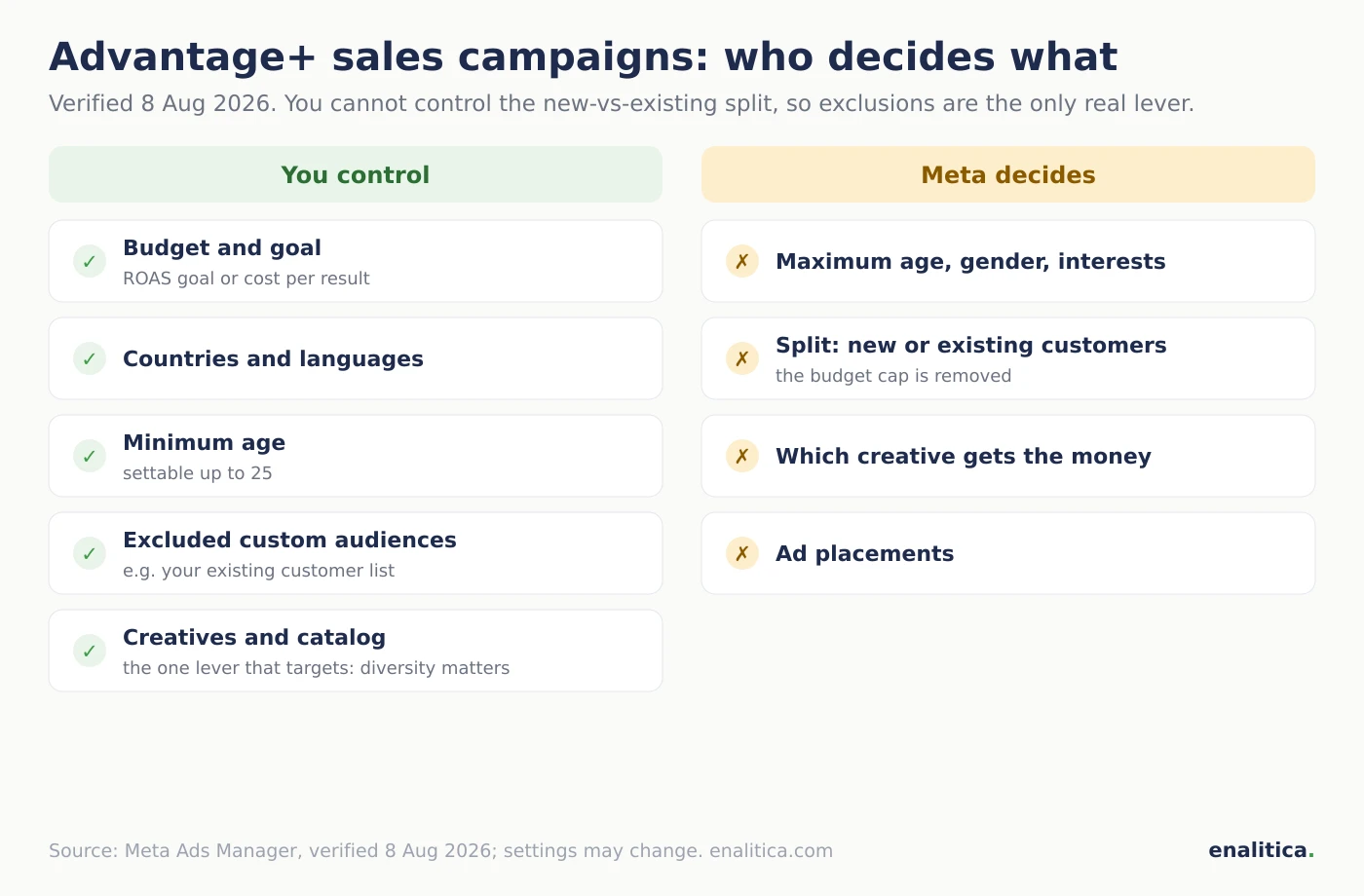
In an Advantage+ sales campaign you control the budget, bid strategy, countries, languages, minimum age, excluded custom audiences and creatives; Meta decides gender, maximum age, interests, and how much budget goes to new versus existing customers. The overview (verified 8 Aug 2026):
| Setting | Who decides |
|---|---|
| Budget and goal (ROAS goal or cost per result) | ✓ you |
| Countries and languages | ✓ you |
| Minimum age (up to 25) | ✓ you |
| Excluded custom audiences (e.g. customer list) | ✓ you |
| Creatives and catalog | ✓ you |
| Maximum age, gender, interests | ✗ Meta |
| Budget split between new and existing customers | ✗ Meta |
| Which creative and placement gets the money | ✗ Meta |
Two rows in the table decide everything else. Because you cannot control the split between new and existing customers, the only real lever is the "excluded audiences" row: how to use it is covered below. On the campaign goal you choose between highest volume and highest value; the latter buys fewer but larger purchases and needs reliable order value tracking.
The removed existing customer budget cap, explained
The existing customer budget cap let an advertiser define the maximum share of an Advantage+ budget that could go to people who had already bought. Meta removed it in early 2025, citing an internal study in which campaigns without the cap reached a 13 percent lower cost per purchase; at our check on 8 August 2026 it is gone from Ads Manager with no sign of returning.
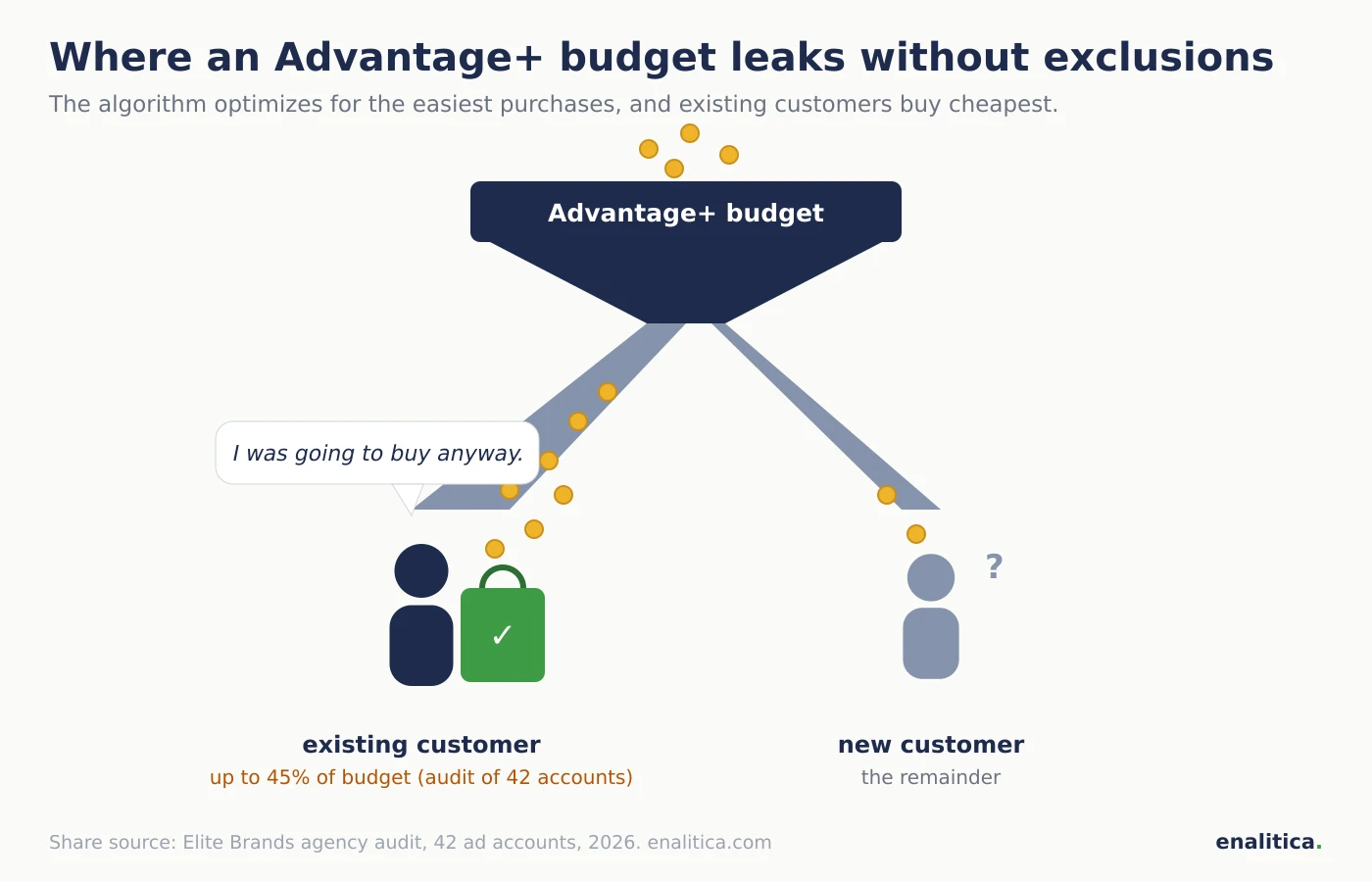
The problem: the algorithm optimizes for the easiest purchases, and existing customers convert cheapest. An audit by the US agency Elite Brands across 42 ad accounts found that on 38 of them Advantage+ spent up to 45 percent of the daily budget on returning customers, people the store could have reached with a free email. Meta's cost per purchase looks great, ROAS looks great, only the new customers are missing. The inflation is a close cousin of the one you know from view-through conversions: the number grows, the increment does not.
To be fair to the other side: selling to existing customers is not bad, as long as you know about it and want it. It is bad when the budget meant for growth quietly buys purchases that would have happened anyway, and when you decide based on a ROAS number that cannot tell the difference. Google's version of the same story is Performance Max campaigns, which without exclusions harvest searches for your own brand, and in Google's feeds it is Demand Gen campaigns, where the same questions start at how views are counted.
How do you exclude existing customers from Advantage+ campaigns?
You exclude existing customers in two steps: in the ad account settings define who counts as an "existing customer" (with a custom audience built from your customer list), then exclude that audience in the campaign. Meta's official replacement for the removed cap is a manual sales campaign that excludes existing customers entirely, or two ad sets: one without existing customers for prospecting, one targeting the customer list for retention, each with its own budget.
The exclusion is not watertight, and you should know that upfront:
- Lists shrink. iOS users who opted out of tracking fall off the lists even though they are your customers.
- Matching is imperfect. A list with emails only matches Meta profiles poorly; add phone, name and city and the match rate rises considerably.
- Lists go stale. Yesterday's buyer is not on the list you uploaded last month; refresh exclusions regularly or sync them automatically.
So even with clean exclusions, part of the budget always reaches existing customers. The goal is not perfection; it is bringing the leak down from up to 45 percent to a few percent, and seeing the remainder in your numbers.
When does Advantage+ work and when does it not?
Advantage+ works when the algorithm has enough signal to learn from: as orientation around 50 purchases per week per ad set, a working pixel plus server-side conversion sending (CAPI), a clean catalog, and at least ten genuinely different creatives. Meta quotes on average 22 percent higher ROAS for Advantage+ sales campaigns versus manual ones; that is Meta's own number, but it matches practice: on broad products with a simple buying decision, the automation usually beats manual steering.
Since late 2024 Meta's delivery runs on a system called Andromeda, which selects ads by the meaning of the creative, not by account structure. The practical consequence: creative has become the new targeting. Ten variations of the same image do not help the algorithm; it needs conceptually different ads (a demo video, a static product shot, a customer review, a comparison), because through them it finds different groups of buyers.
Advantage+ does NOT work: on small budgets and niche products where 50 purchases a week never happen (the algorithm gets stuck in the learning phase you know from our guide to scaling ads); on new accounts with no purchase history; in B2B with a narrow audience; and anywhere margins or stock require control over which products get advertised. And without clean tracking every automation is blind: if Meta sees only part of your orders, it learns from the wrong picture, so run a conversion tracking audit before switching it on.
How do you verify that Advantage+ brings new customers?
You verify that Advantage+ brings new customers by comparing the campaign's purchases against your own order history: a buyer is new if their email appears in no earlier order. Meta's numbers in Ads Manager are not enough for this, because Meta defines a "new" customer by its own segments and grades its own work.
The manual routine any store can run once a month: export the last 30 days of orders you attribute to Meta, and for each email check whether an older order exists. A new-customer share below half of revenue means the campaign mostly "sells" to people who already know you; that is when the exclusions from the previous section come in, and when first-purchase discounts quickly become an expensive way to reward old customers.
For decisions you need two more numbers next to the new-customer share: the cost of acquiring a new customer (CAC) and what a new customer brings you in the first months (LTV cohorts). Only that pair tells you whether the "more expensive" new customer is actually a good deal.
How Enalitica measures Advantage+ campaign profit
Enalitica measures every Meta campaign, Advantage+ included, from your actual orders, and shows numbers next to Meta's ROAS that Ads Manager does not have:
- POAS per campaign: profit after cost prices, shipping and fees per euro spent, with a lower and an upper bound (direct and multi-touch attribution). A campaign with ROAS 4 and POAS 0.9 is losing money even though it looks like a star in Ads Manager.
- New-customer share on every campaign: for each Meta campaign you see what share of its revenue came from first-time buyers. The exact question of this guide, answered without an Excel export. When too few orders carry an email, we hide the share rather than show an unreliable one.
- Our ROAS next to Meta's: revenue from orders with click evidence, shown in the same column as Meta's own number, together with the share of purchases Meta credits to a mere impression. The gap between the two is the fastest inflation indicator; why conversions differ across platforms is explained separately.
- Returns on every campaign: a campaign whose buyers return a lot carries a returns-share chip next to its name, because ROAS without returns lies.
- At account level: the share of revenue from new customers, aMER and CAC with an allowable acquisition cost, computed from orders, not from platform promises. And the LTV cohorts show the other side per channel: what share of customers acquired through Meta buy again within 3 and 12 months.
If you want to know how much of your Advantage+ budget really goes to new customers, see plans and pricing or book a live demo; your last 30 days of orders import on day one.
Checklist before switching on Advantage+
- Tracking is verified: pixel and CAPI send every order, the audit is done.
- The account settings define who an existing customer is (a customer list with email, phone and name, not emails alone).
- The existing-customer list is excluded, or you knowingly accept blended delivery.
- The campaign can realistically reach 50 purchases per week; otherwise start with a manual campaign.
- At least 10 conceptually different creatives are ready, not 10 variations of one.
- The judging number is set in advance: profit per euro and new-customer share, not Meta's ROAS.
- No judging during the first week after launch or any major budget change (learning phase).
- After 30 days you compare: new-customer share, CAC against the allowable one, profit against a manual campaign.
Frequently Asked Questions
Are Advantage+ sales campaigns worth it for smaller stores?
Advantage+ sales campaigns pay off for smaller stores only once there are enough purchases for the algorithm to learn, as orientation around 50 per week. Below that line the algorithm guesses and scatters the budget; most smaller stores do better with one manual sales campaign, excluded existing customers and a few genuinely different creatives.
How is Advantage+ sales different from Advantage+ Shopping?
Advantage+ sales campaigns replaced Advantage+ Shopping in February 2025. The main differences: ad sets are available again, the campaign can optimize for leads as well as sales, each automation can be switched off individually, and the existing customer budget cap is removed. Old Shopping campaigns can no longer be created.
Can I exclude existing customers from an Advantage+ campaign?
Yes. In the ad account settings define existing customers with a custom audience (an uploaded or auto-synced customer list), then exclude that audience in the campaign. The exclusion is imperfect, because lists go stale and not every profile matches, but it cuts the budget leak considerably.
Does Advantage+ replace retargeting campaigns?
In practice it often does: Advantage+ merges prospecting and retargeting into one budget and decides the ratio itself. If you want to control retargeting separately, exclude existing customers from Advantage+ and run a separate campaign for them with its own budget; that way you see the price of each part on its own.
How long is the learning phase for Advantage+ campaigns?
Meta considers a campaign learned at roughly 50 purchases per week per ad set; on typical budgets that means a few days to two weeks. Every major change (budget by more than about 20 percent, new creatives, a changed goal) resets the learning, so avoid judging the numbers for the first week after a change.
See your real numbers
Import 30 days of orders or leads during a 5-minute onboarding. Works for e-commerce and service businesses.
See plans and pricing