
Which Ads Drive Sales? See the Campaign Behind Every Order
Which ads drive sales: what WooCommerce and Shopify show natively, why it is half the story, and how to see the campaign and keyword behind each order.

Tilen Ledic
Written by
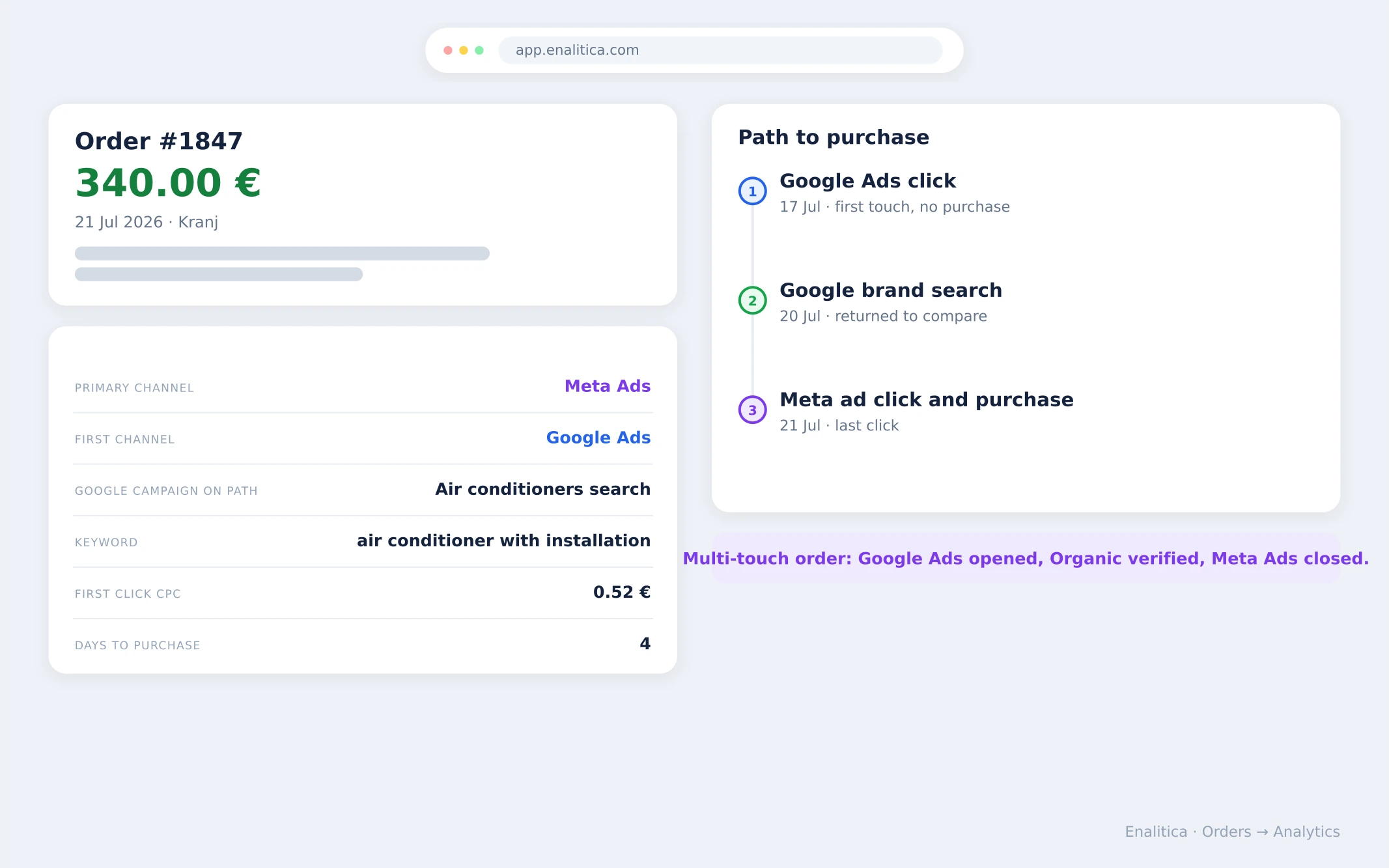
You are packing order #1847, worth 340 EUR, and a simple question crosses your mind: where did this one come from? Not "how is marketing doing this month". This exact order, this exact customer: which channel brought them, and if an ad was involved, which campaign and which keyword.
Which ads drive sales is the question every store owner asks and almost no order screen answers. This guide covers what WooCommerce and Shopify show about an order's origin out of the box, why that answer is only half true, and what it looks like when every order carries its full story: campaign, keyword, click price and the journey that led to checkout.
What WooCommerce and Shopify show about an order's origin
Both platforms ship a native answer, and both are worth switching on. WooCommerce added Order Attribution in version 8.5 (January 2024): every order gets an origin box with source, medium, campaign, device and pages visited, plus a summary in WooCommerce Analytics. Shopify shows a conversion summary on the order page: the customer's visits in the last 30 days, the source of their first visit and the landing page.
If you have never opened these, start there today. Then read on, because what they show is the last page of a longer story.
Why the order screen still cannot answer which ads drive sales
The native origin box records the last click of the last session, nothing more. WooCommerce's tracking cookies are session-bound (a session lasts 30 minutes by default), so a buyer who clicked your ad on Tuesday and bought on Friday shows up as Direct or Organic; the full mechanism is in why WooCommerce orders say Direct. Versions from 8.9 on also had a documented bug that recorded "Unknown" even with valid UTM parameters, fixed in WooCommerce 10.5 (February 2026), so keep the store updated.
And even when the box is filled in, it stops at campaign level: no ad, no keyword, no click cost, and no trace of the visits that came before.
Shopify's conversion summary reaches back further (30 days of visits), but it lists visits, not attribution: it will not tell you which campaign should get the credit, and orders from other sales channels often show no conversion details at all.
The practical consequence: the ads that open journeys get invisible on the order screen, and the "sources" you see over-credit whatever happened to be last.
The journey a native order screen never shows
A typical 340 EUR order (an illustrative example) looks like this in reality: the customer clicks a Google ad on the 17th and leaves without buying. Three days later they search your brand on Google and compare. On the 21st a Meta remarketing ad brings them back and they buy.
The native WooCommerce origin box credits the whole order to the final Meta click; the Google ad that opened the journey and the brand search that confirmed it are not part of the record.
Journeys like this are common, not exotic. In Enalitica's data, across more than 6,500 order journeys in the last 90 days to 28 September 2026, a third of orders (33.3%) had a paid ad click somewhere in the journey and 25.5% touched two or more channels. Of the orders with an ad click, 29.5% were placed more than a day after it, exactly the gap a session-bound origin box cannot bridge.
Multiply that by a month of orders and Google Ads looks like it sells nothing while Meta looks unbeatable, so budget drifts toward the channel that closes and away from the one that opens. This is the same last-click blindness that multi-touch attribution exists to fix, seen from the humblest possible angle: one order, one question.
How Enalitica shows the campaign behind every order
Enalitica enriches each order with its marketing origin and keeps the whole journey, so the order list answers the packing-table question directly. For every order you see:
- The primary channel with a plain-language reason. Not just a label, but a sentence: "Last channel before purchase: Meta Ads. A Google Ads click was part of the journey but not the last touch." You always know why an order is credited the way it is.
- Campaign, keyword, click price and even the ad headline. For Google Ads orders, the exact campaign, the keyword that matched the buyer's search, what that click cost and which headline they clicked; for Meta orders, the campaign and ad set. "Which ad sold this?" becomes a column, not a mystery.
- First channel and last channel, side by side. The Google-Ads-first, brand-search-later, Meta-checkout journey from the example above is visible on the order row, with days from first click to purchase.
- The reverse direction too. In the reports, every campaign row expands into the actual orders it produced, with order numbers, amounts, cities and products, split into orders it closed alone and orders where it was one of several touches. From campaign to orders and from order to campaign, the same two clicks.
- The same view for service businesses: every enquiry and call carries its channel and keyword, so "where did this lead come from" has an answer even when the buyer never fills in a survey.
In Enalitica's data (more than 1,700 Google Ads orders, 90 days to 28 September 2026), the campaign was known for 95.8% of Google Ads orders and the exact keyword for 54.3%.
The keyword gap is structural, not a tracking fault. Performance Max, which runs across Google's inventory without keywords, delivered 30.5% of those Google Ads orders, so for them the campaign is the finest level Google provides.
None of this needs a developer: connect the store and the ad accounts, and orders start carrying their origin automatically, on the order-based attribution foundation the rest of Enalitica runs on.
Book a demo and bring one order number you have always wondered about; we will show you its story.
Frequently Asked Questions
Does WooCommerce track which campaign an order came from?
Since WooCommerce 8.5, yes, partially: the built-in Order Attribution box stores source, medium and campaign for the last session before purchase. It loses the origin when the buyer returns later or on another device, which is why so many orders read Direct or Unknown.
Why does my WooCommerce order attribution say Direct or Unknown?
Because the tracking cookie only survives a single session, and on versions before WooCommerce 10.5 (February 2026) a known bug could drop valid UTM values. The full explanation and the setup check are in why half your WooCommerce orders say Direct.
Does Shopify show which ad brought an order?
Shopify's conversion summary shows the customer's recent visits and their sources, which is useful context, but it does not attribute the order to a specific campaign or ad, and orders from non-web channels often carry no conversion details.
Can I see which keyword sold a specific order?
In Enalitica, yes, for Google Ads orders that came through a keyword: the order row shows the matched keyword, the click's cost and the ad headline the buyer clicked, and the keyword report shows how many orders each keyword produced. Performance Max orders carry their campaign but no keyword, because Performance Max does not use keywords.
Sources
The outside pages this article relies on. Links checked on 28 September 2026.
- Order Attribution (woocommerce.com)
- version 8.5 (January 2024) (developer.woocommerce.com)
- conversion summary (help.shopify.com)
- documented bug that recorded "Unknown" even with valid UTM parameters (github.com)
- keyword that matched the buyer's search (support.google.com)
- runs across Google's inventory without keywords (support.google.com)
Figures marked "in Enalitica's data" are aggregates from the real orders of the stores we measure, with no names and no individual orders. How we measure.
See your real numbers
Import 30 days of orders or leads during a 5-minute onboarding. Works for e-commerce and service businesses.
See plans and pricing