
Ecommerce Attribution: The Complete Guide
What ecommerce attribution is, why pixel-based tracking breaks, how Google and Meta count differently, and why order-based attribution gives one number you can defend.

Tilen Ledic
Written by

You spent €4,000 on ads last month. Meta Ads Manager says it drove €38,000. Google Ads says €19,000. GA4 shows something lower than both, and your email tool is somewhere in the mix claiming its own slice. Then you open your bank statement: the store did €52,000 in total revenue across every channel.
Add Meta and Google alone and you are already at €57,000. That is more than the entire store made, before you even count organic, email, and direct. Every order happened exactly once. So why does every platform claim it?
This is the ecommerce attribution problem, and if you run an online store with real ad spend, you have lived it. I ran an online store for 15 years before I started building Enalitica, and reconciling these dashboards against the actual order export was the single most frustrating recurring task I had. Three tools, three numbers, none of them matching the money in the account.
This guide is the map. It explains what ecommerce attribution actually is, how the dominant approach (pixel-based tracking) works and where it breaks, how Google and Meta count differently on purpose, and why starting from the order instead of the click changes the whole picture. Each section links to a deeper guide if you want to go further. Read it top to bottom and you will understand why your numbers never add up, and what to do about it. For the single P&L-level number that survives all of this, see blended ROAS and MER.
What Is Ecommerce Attribution?
Ecommerce attribution is the practice of assigning credit for a sale to the marketing touchpoints that led to it. It is marketing attribution applied to an online store: a customer sees an ad, clicks a link, reads an email, searches your brand, and eventually buys. Attribution answers a deceptively simple question: which of those touchpoints earned the order?
It matters because every budget decision depends on the answer. If you believe Google Ads drove €19,000 last month, you keep funding it. If you believe it drove €6,000, you cut it. The number determines where the next €4,000 goes. Get attribution wrong and you systematically defund the channels that quietly drive revenue while overfunding the ones that take the last click.
The complication is that attribution is not one thing. It is two separate problems that usually get tangled together:
- The model problem. When a journey has several touchpoints, how do you split the credit? All to the first click? All to the last? Spread evenly? This is the part most articles obsess over.
- The data problem. Before you can split credit, you need to know the touchpoints happened at all. In 2026, with ad blockers, cookie consent, and browser privacy, a large share of journeys are partially or fully invisible. This is the part most articles ignore, and it is the one that actually determines whether your numbers are usable.
The biggest lesson from years of doing this: the model matters far less than the data underneath it. A perfectly tuned attribution model running on data that is missing 40% of journeys is precise nonsense. The same is true in reverse: when bot traffic inflates your GA4 sessions, you are modeling an audience that was never there. We will cover both, but keep that hierarchy in mind.
The Attribution Models, in One Place
When a customer touches five channels before buying a €100 product, the attribution model decides which touchpoint on the conversion path gets the credit. Here is the same journey scored by each common model, so you can see the difference at a glance.
The journey: Google Ad (Day 1), organic search (Day 5), Facebook ad (Day 8), email open (Day 12), direct visit and purchase (Day 14).
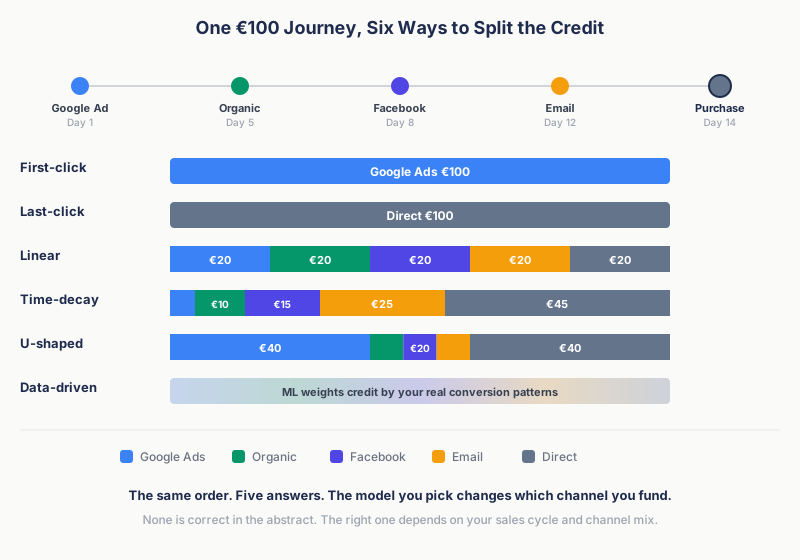
| Model | How credit is split | Google Ads | Organic | Direct | ||
|---|---|---|---|---|---|---|
| First-click | 100% to first touch | €100 | €0 | €0 | €0 | €0 |
| Last-click | 100% to last touch | €0 | €0 | €0 | €0 | €100 |
| Linear | Equal across all | €20 | €20 | €20 | €20 | €20 |
| Time-decay | More to recent touches | €5 | €10 | €15 | €25 | €45 |
| U-shaped | 40% first, 40% last, 20% middle | €40 | €7 | €7 | €7 | €40 |
| Data-driven | ML weights by pattern | Varies | Varies | Varies | Varies | Varies |
Each model has a job. First-click attribution tells you which channels introduce new customers. Last-click attribution, still the default in most reporting (often as last non-direct click, which skips direct visits), tells you which channels close. Linear attribution refuses to play favorites. Time-decay favors recency, useful for short promotional cycles. U-shaped (position-based) attribution rewards the introduction and the close. Data-driven attribution hands the weighting to a machine learning model, which is now the default in both GA4 and Google Ads.
The honest take: no model is correct in the abstract. The right one depends on your sales cycle, your channel mix, and what decision you are trying to make. If you want the full breakdown of each model and when it earns its keep, the deep dive is multi-touch attribution for ecommerce. For this guide, the point is simpler. All of these models assume you can see the touchpoints. That assumption is where everything falls apart.
Pixel-Based Attribution: How It Works and Where It Breaks
Almost every attribution tool you have used is pixel-based, which is really a form of event-based attribution. A tracking pixel records events (page viewed, product added, purchase completed), the tool stitches those events into sessions, sessions into journeys, and runs a model over the journey to decide which touch earned the order.
Pixels come in two flavors, and the distinction runs through this whole guide:
- Client-side (browser) pixels. GA4 and the Meta Pixel fire JavaScript in the customer's browser. This is the lossy kind.
- Server-side pixels. Meta's Conversions API, server-side GTM, and tools like Hyros send events from your server instead of the browser. They sidestep most of the technical loss below.
When everyone accepted cookies and no one blocked scripts, the browser pixel worked well enough. That world is gone. Here is what eats client-side pixel data in 2026, and none of these are edge cases.
Ad blockers. Between roughly 31% and 42% of visitors run an ad blocker that kills GA4 and the Meta Pixel before they fire. Those customers browse, buy, and never appear in your analytics. The order is in your shop database; the journey is not.
Cookie consent. Under GDPR you must ask before setting analytics and advertising cookies. In strict-enforcement markets, fewer than 25% of visitors accept. A declined banner means the pixel never sets its cookie, so there is no cross-visit journey to attribute. Consent rates swing hard by country, which is why the same campaign looks completely different in Germany versus the US. The country-by-country breakdown shows just how wide the gap gets.
Safari ITP. Safari's Intelligent Tracking Prevention deletes JavaScript-set first-party cookies after 7 days. A customer who clicks Monday and buys the next Wednesday has already lost the cookie linking those two visits. Safari is around 23% of mobile browsing worldwide and over half in the US.
iOS App Tracking Transparency. Since iOS 14.5, apps must ask before tracking, and roughly 65% of users decline. This strips the data Meta relies on and forces Google to fall back from the full GCLID to privacy-safe identifiers like GBRAID and WBRAID, which most pixels never capture.
These do not happen one at a time. A single shopper can be on Safari, on an iPhone, with consent declined. The losses stack. For a European store, a browser pixel realistically sees only 30 to 50% of actual customer journeys. You are running attribution models on a third of reality and treating the output as truth.
So why not just move server-side? Partly, you should. A server-side pixel is not blocked by an ad blocker and is not purged by Safari ITP, so it recovers most of the technical loss a browser pixel suffers. If ad blockers were your whole problem, server-side tracking would mostly solve it. Consent is the exception: no compliant pixel, browser or server, captures a customer who declined. For the full comparison of where server-side helps and where it still falls short, see server-side tracking vs order-based attribution.
But going server-side does not change the deeper thing. Whether the pixel fires in the browser or on your server, an event-based tool still ends up with a pile of events and has to stitch them into a journey and model which event drove which order. It reconstructs the order from events and infers the link. That modeling step, not the ad blocker, is the real structural difference, and it is the step order-based attribution removes. And modeling means estimating. However good the model, a pixel's answer to "which channel drove this order" is an informed guess, not a measurement.
How Google Attributes (and Why Its Number Is What It Is)
Google sees your store through three overlapping systems, and they do not all count the same way.
GA4 uses data-driven attribution by default. It applies machine learning across up to 50 touchpoints in the 90 days before a conversion, weighting each by how much it actually moved the outcome. It is genuinely better than the last-click default it replaced. But GA4 attributes events, not orders. If the purchase event does not fire (blocker, consent, a JavaScript error), the order is simply absent from the model. Your shop shows 100 orders, GA4 shows 70 purchase events, and the missing 30 never enter the attribution math at all.
Google Ads conversion tracking counts conversions inside Google's own walls. Enhanced Conversions recovers some of the loss by sending hashed customer data server-side, and the GCLID ties a conversion back to the exact click. This is the cleanest of the three numbers, but it only sees Google. Organic, email, social, and direct are invisible to it.
The click IDs are the part worth understanding, because they are what make Google attribution recoverable. The GCLID is stamped on the ad click and can live for 90 days. On iOS, when a user denies tracking, Google switches to GBRAID (app to web) and WBRAID (web to web) instead. If your tracking captures only the GCLID, every iOS-denied click silently reclassifies as organic or direct, and Google Ads looks worse than it is. The full guide to GCLID, GBRAID, and WBRAID covers exactly which one fires when, and how to capture them in WooCommerce covers storing them on the order.
Google's number is generally the most conservative of the big platforms. It still over-credits itself relative to reality, because it cannot see what Meta or your email did, but it is closer to the truth than the Meta dashboard.
How Meta Attributes (and Why Its Number Is Always the Highest)
Meta is not lying to you. It is reporting what it can see, under settings that are deliberately generous.
The default attribution setting is 7-day click and 1-day view. The click part is reasonable: someone clicked your ad and bought within 7 days. The view part is where the inflation comes from. View-through attribution credits Meta with a conversion when someone merely saw your ad in the last 24 hours, without clicking, and then bought. They might have been heading to your store anyway, from a Google search or a bookmark. Meta saw an impression and claims the sale.
There is a structural reason the Meta number runs highest. Meta has no idea what Google Ads did. Google has no idea what Meta did. Neither can see your email. So when a customer touches all three before buying, all three claim the order independently. None of them is double-counting within its own walls. The double-counting happens across the walls, in your spreadsheet, when you add the dashboards together and get a number larger than your revenue.
Meta's server-side Conversions API (CAPI) makes this more accurate, not less inflated. CAPI sends order events from your server, bypassing ad blockers and recovering iOS conversions the browser pixel misses. That is a real improvement to signal quality and bidding. It does nothing about view-through inflation or the fact that Meta still only sees Meta. If you are routing CAPI through server-side GTM, the three setup options compared here are worth reading before you build a container.
Bad reporting and good optimization signal can coexist. Meta knows perfectly well which of its own creatives drive engagement, and CAPI helps it bid. It just cannot tell you what share of your total revenue it truly caused, because it is structurally blind to every other channel.
Why Meta, Google, and GA4 Numbers Never Reconcile
Put the three platforms side by side and the problem is obvious. The same orders get claimed multiple times, and the totals balloon past what the store actually made.
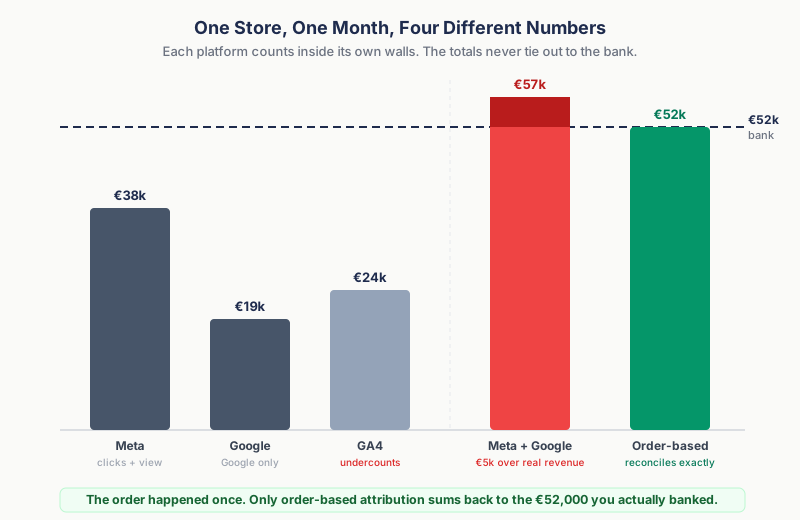
Here is the same store from four angles in a single month:
| Source | What it reports | What it is actually measuring |
|---|---|---|
| Meta Ads Manager | €38,000 | Clicks plus 1-day view-through, Meta only, no idea what Google did |
| Google Ads | €19,000 | Clicks within Google only, blind to Meta and email |
| GA4 | €24,000 | Tracked purchase events only, missing blocked and non-consented orders |
| Bank deposit | €52,000 | Every order that actually happened, every channel |
Meta and Google together claim €57,000. The store made €52,000. The €5,000 gap is not fraud, it is the same orders counted twice by platforms that cannot see each other. Meanwhile GA4 undercounts the real total because blocked and non-consented purchases never fired an event. You have one set of numbers that is too high and another that is too low, and neither matches the bank.
For a line-by-line walkthrough of how each platform arrives at its figure for the same orders, see how Meta, Google, and Enalitica count conversions. The short version: as long as every tool counts in its own walled garden, with no cross-channel view, the totals will never sum to your revenue. To fix that, you have to count somewhere the walls do not reach. That place is the order.
Order-Based Attribution: Start From the Sale, Not the Session
Pixel-based attribution, whether the pixel runs in the browser or on your server, starts from tracked events and tries to model its way forward to an order it believes happened. Order-based attribution flips the direction. It starts from the order (a fact in your WooCommerce or Shopify database that no ad blocker, consent banner, or browser can erase) and works backward to the marketing that drove it.
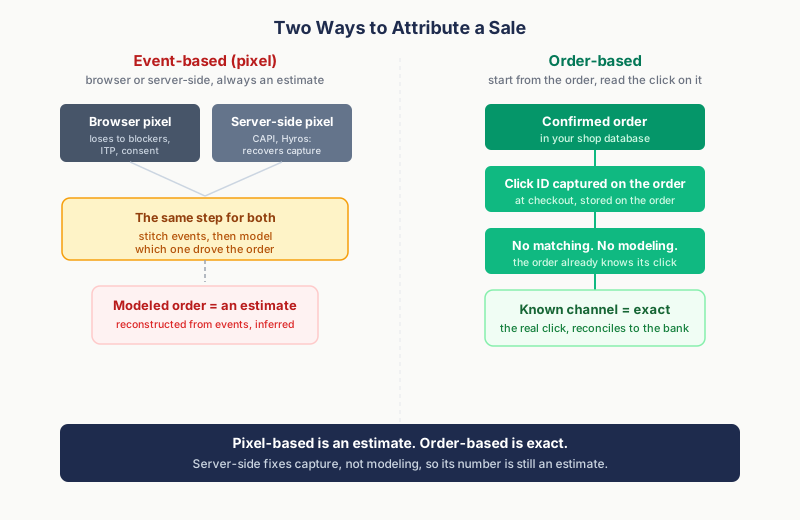
The mechanics, in order:
- The order is the source of truth. It exists because the customer paid and you shipped. The question is never "did a conversion happen," only "what drove this specific order."
- Click IDs ride along on the order. When the customer lands, the tracking script reads every click ID in the URL (GCLID, GBRAID, WBRAID, FBCLID, and more) and persists it. At checkout it gets written into the order's own metadata, so the attribution is stored with the sale, not in a fragile browser cookie that Safari deletes in 7 days.
- The order gets enriched. APIs to GA4, Google Ads, and Meta layer on the session journey, the exact keyword and CPC, and the campaign behind the click.
- A deterministic rule picks the primary channel. One order, one owner, last-click priority among valid click IDs. No two channels claim the same order in the summary.
The payoff is reconciliation. Because every channel's primary credit is mutually exclusive, the totals across channels sum to your actual shop revenue. Not 110% of it. Not 70% of it. The exact number in the bank. That is the thing pixel dashboards cannot do, because they were never counting the same thing you were.
Here is the whole difference in one sentence. Pixel-based attribution is an estimate. Order-based attribution is exact: for every consented order it reads the actual click that drove it, and for the orders it cannot see it says Unknown rather than guess. No modeling, no inference, no rounded approximation of a journey.
Order-based attribution is not magic and it is not consent evasion. If a customer declines marketing cookies, the script does not set them and the click ID is not captured, the same as every compliant tool. Against a browser pixel it recovers the technical loss (ad blockers, Safari ITP, JavaScript that never loaded). Against a server-side pixel, which recovers that loss too, the difference is the one that survives: there is no event-to-order matching and no modeling, because the click is stored on the order itself. The honest framing is not "we see what others cannot." It is "we never have to guess our way back to an order, because the click is already on it."
For stores on WooCommerce, the platform-specific half of this story, what Woo records by itself and how to capture the rest, has its own complete WooCommerce conversion tracking guide.
The same silo problem repeats wherever a channel grades itself, and nowhere more expensively than with partner programs, where the network that measures the sale also invoices the commission; affiliate attribution without double counting applies the order-based approach there.
How Enalitica Makes Attribution Accurate
This is what I spent the last few years building, after years of doing the reconciliation by hand. Enalitica is order-based attribution for WooCommerce and Shopify stores; for Shopify we broke down separately what the order already knows about attribution and what it never will. Here is what that gives you in practice, not in marketing terms.
Every order carries its click ID. The tracking script captures all six major click IDs (GCLID, GBRAID, WBRAID, FBCLID, MSCLKID, TTCLID) and writes them onto the order. The two iOS identifiers (GBRAID and WBRAID) matter most here: capture them and your iOS Google Ads clicks land in Google Ads instead of leaking into organic. Most pixels capture one or two click IDs. Order-based capture gets all six, on the order, where they survive.
WooCommerce's silent attribution gap gets closed. WooCommerce 8.5's native attribution is per-session and resets to "(direct)" after about 30 minutes. A customer who arrives from a Meta ad on Day 1 and returns directly on Day 5 loses the Meta credit. Enalitica persists the real marketing source in a 90-day first-party cookie and overrides the empty value at checkout, so the order keeps the campaign that earned it.
Direct and influenced revenue, side by side. For every channel you see two numbers. Direct revenue is orders where the channel was in the converting session, comparable to what the platform reports. Influenced (multi-touch) revenue is orders where the channel appeared anywhere in the customer journey, even if another channel closed. These are assisted conversions, counted on real orders. This is where budget decisions get real:
| Channel | Direct revenue | Influenced revenue | What you would miss with last-click only |
|---|---|---|---|
| Google Ads | €15,000 | €28,000 | €13,000 in orders Google introduced but another channel closed |
| Organic | €22,000 | €35,000 | €13,000 in orders organic supported |
| €8,000 | €12,000 | €4,000 where email was one of several touches |
Look only at Google Ads' €15,000 direct and you might cut the budget. See that it touched €28,000 in orders and cutting it would quietly damage the channels that looked self-sufficient.
Profit joins the pair: POAS and MT POAS. The same two-column logic now applies to profit. Enalitica imports product costs (from Shopify, WooCommerce, your price lists or your ERP), adds shipping, payment fees and packaging, and shows POAS (profit on ad spend) next to ROAS in every campaign table: direct POAS for orders the campaign closed, MT POAS for every order it assisted. Break-even is 1.0, and the rule is to pause a campaign only when both numbers sit below it.
Keyword-level revenue, per order. Because the GCLID is on the order, Enalitica queries the Google Ads API and attaches the exact keyword, match type, and CPC. You can see that the keyword "lekarna mackovec" drove 12 orders for €5,400 at an €0.08 average CPC, then click through to the individual orders behind it. GA4 cannot tell you which keyword drove which order. This can.
Privacy resilience where it is real. Against a browser pixel, order-based attribution survives the technical losses that flatten the data:
| Factor | Client-side pixel (GA4 / Meta Pixel) | Order-based (Enalitica) |
|---|---|---|
| Ad blockers | 30-40% of sessions lost | Order exists regardless; click ID survives on a hosted script |
| Safari ITP | Attribution breaks after 7 days | 90-day first-party cookie plus checkout override |
| WooCommerce per-session reset | Silently lost to "(direct)" | Recovered at checkout from the persisted cookie |
| iOS ATT (Google clicks) | GCLID missing, shows as organic | GBRAID / WBRAID captured |
| Revenue accuracy | Purchase events undercount | Actual order totals from the shop |
| Non-consented orders | Lost | Also lost (we do not bypass consent) |
A server-side pixel (Meta CAPI, server-side GTM, Hyros) recovers the technical rows above, too. What it cannot shortcut is the step underneath all of them: it still has to match events to orders and model which one drove the sale. Order-based stores the click on the order, so there is nothing to match and nothing to model.
That last row is the honest boundary, and it stays in every comparison. Enalitica does not fabricate attribution for customers who declined tracking. They show as Direct or Unknown, the same as they would anywhere. What "accurate" means here is precise: perfect attribution on the data you are allowed to capture, with no view-through inflation and no cross-platform double-counting. One number per channel, sourced from real orders, that you can defend in a meeting.
If you have ever wondered why your reported ROAS never matches your bank account, book a demo and I will show you the gap on your own orders. The first 30 days import and enrich in a few minutes, so you see your real channel breakdown before the call ends. If you are comparing platforms, the Triple Whale alternatives guide lays out where order-based attribution fits against pixel-based attribution software, and the Northbeam alternatives guide covers the enterprise end, including MMM and incrementality tools.
How to Choose Your Attribution Approach
The right attribution setup depends on where you sell and how much you spend. When the question becomes which vendor rather than which approach, our best ecommerce attribution software guide compares ten tools on EU criteria.
Mostly US, Canada, or Australia. Consent rates are high and ad blocking skews lower in older demographics. GA4 data-driven attribution captures most of your data and is a reasonable starting point. Move to order-based when your GA4 purchase count drifts below your real order count, or when you need keyword-level ROAS.
Selling into Europe. You need order-based or server-side attribution. With fewer than 25% consent in strict markets, GA4 is missing too much to trust for budget decisions. Check the country-by-country guide to see your exposure per market.
Spending €5,000+ per month on ads. At this level a 10% swing in attribution accuracy moves real money toward or away from the right channels every month. Better data pays for itself fast.
Long or multi-session journeys. If customers visit 2-3 times before buying (normal above €50), single-touch attribution actively misleads. You need multi-touch attribution, fed by data that survives across sessions, which means click IDs on the order rather than cookies in the browser.
Attribution Implementation Checklist: 7 Steps
Concrete steps, ordered by impact:
- Compare GA4 purchase events to actual orders. Count last month's orders in your shop. Count GA4 purchase events. A gap over 15% means your pixel data is too lossy to drive budget decisions, full stop.
- Capture all the click IDs on the order. GCLID, GBRAID, WBRAID, and FBCLID at minimum, stored in order metadata. The two iOS identifiers are the ones most setups miss. Here is how to capture them in WooCommerce.
- Audit your UTM tagging. Inconsistent UTMs are the top cause of revenue landing in "(not set)." Pick a naming convention and enforce it across every campaign and email.
- Match lookback windows to reality. Google Ads uses 90 days for GCLID, Meta 28 for FBCLID. If you sell high-consideration products, do not run a 7-day window.
- Read direct and influenced revenue together. A channel with weak last-click numbers may be the top-of-funnel engine feeding everything else. Cutting it on direct alone is how you break a working funnel.
- Review monthly, not daily. Journeys take days to weeks to complete. Daily attribution is noise. Monthly is signal.
- Accept directional, reject fabricated. No tool attributes 100% of orders, because consent makes some genuinely untrackable. The goal is an honest, reconciled picture of the orders you can see, not a fantasy number that ties out to nothing.
Frequently Asked Questions
What is the difference between pixel-based and order-based attribution?
Pixel-based (event-based) attribution reconstructs the journey from tracking events and models which event drove the order. The browser version (GA4, Meta Pixel) also loses data to ad blockers, consent, and Safari ITP. A server-side version (Meta CAPI, server-side GTM, Hyros) recovers most of that technical loss, but it still has to match events to orders and model the credit. Order-based attribution starts from the confirmed order and reads the click ID captured on it at checkout, so there is no event-to-order matching and no modeling step. The order already knows its click. That is the structural difference, independent of whether the pixel runs in the browser or on the server. In one line: pixel-based attribution is an estimate, order-based attribution is exact.
Why is my Meta ROAS so much higher than my actual revenue?
Two reasons. First, Meta's default setting includes 1-day view-through, which credits Meta when someone saw an ad without clicking and then bought, even if another channel actually drove the visit. Second, Meta only sees Meta. It cannot know the customer also clicked a Google ad and opened your email, so it claims the full order while those channels claim it too. Add the dashboards and you exceed real revenue. To see the true contribution, you need a source that counts each order once across all channels.
Can I do ecommerce attribution without cookies?
Partly. Order-based attribution captures the click ID at the moment of purchase and stores it on the order, so the attribution chain is server-side and survives cookie expiration. But the initial capture still needs some client-side mechanism (a URL parameter read into a hidden field or first-party cookie) and still respects consent. There is no compliant way to attribute a customer who declined tracking. The win is recovering the consented traffic that pixels lose to technical failures, not bypassing consent.
Does GA4 give accurate ecommerce attribution?
GA4 data-driven attribution is a solid model, and for US-heavy stores with high consent it is often enough. But it attributes events, not orders. When the purchase event does not fire (blocker, consent, error), that order is missing from the model entirely, and GA4 revenue runs consistently below your real total. If your GA4 purchase count is more than 15% under your shop's order count, GA4 is too incomplete to base budget decisions on by itself.
How does Enalitica reach "100% accurate" attribution?
The precise claim is perfect accuracy on the data we are allowed to capture, not attribution of every single order. For consented orders, Enalitica knows the exact click ID, keyword, campaign, and full journey, and assigns each order to one primary channel with no double-counting and no view-through inflation. For non-consented orders, it shows Direct or Unknown rather than inventing a source. Because primary credit is mutually exclusive across channels, the totals reconcile to your actual shop revenue. "100% accurate" means the numbers tie out to the bank, not that every order is magically attributed.
Which attribution model should an ecommerce store use?
For most stores, U-shaped (position-based) is a sensible default: it credits both the channel that introduced the customer and the one that closed the sale. If you process 200+ conversions a month, data-driven attribution will outperform any fixed rule because it learns from your actual patterns. But the model choice is secondary. Fix your data coverage first. The best model on incomplete data still produces unreliable numbers. The multi-touch attribution guide covers model selection in depth.
How much revenue am I misattributing right now?
For a European store running pixel-based tracking, expect 30 to 50% of customer journeys to be partially or fully invisible, split between non-consented users (genuinely untrackable) and technical losses (ad blockers, Safari ITP, WooCommerce resets, iOS ATT) that order-based attribution recovers. The fastest way to size your own gap is step one of the checklist: compare your GA4 purchase events to your real order count for last month. The difference is the revenue your current setup cannot explain.
See your real numbers
Import 30 days of orders or leads instantly during 5-minute onboarding. Works for e-commerce and service businesses.
Start free