
Meta CAPI in Server-Side GTM: Three Setups Compared
Meta CAPI in server-side GTM: three setups compared (custom HTTP tag, partner plugin, order-based capture), with trade-offs, costs, and where each fits.

Tilen Ledic
Written by
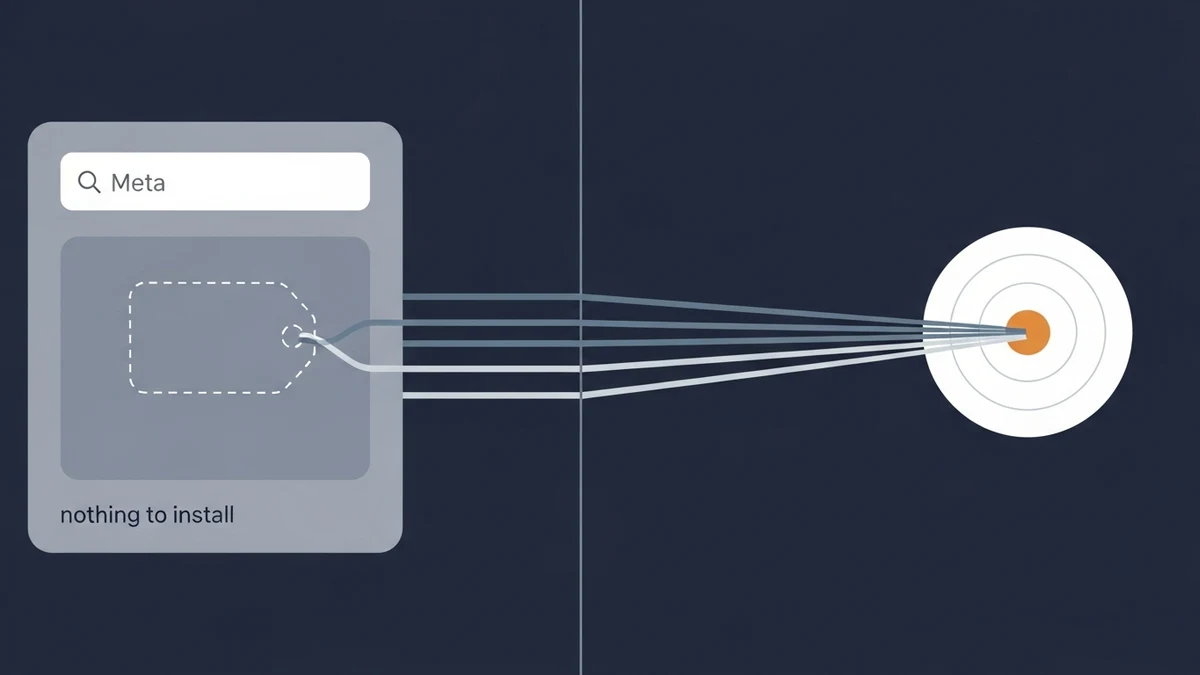
Most stores running Meta Conversions API through server-side GTM in 2026 install the official Meta Conversions API tag (written and maintained by Meta) from the sGTM Community Template Gallery, wire up the access token, and call it done. For a single-platform store with light traffic, that is often enough.
It is also one of four ways to get a Meta Conversions API event to Graph API. The default template gives you the shortest path from event to Meta, but it caps what you can do with the payload, and it depends on the browser firing the upstream dataLayer event first. Stores that have outgrown those limits usually move to one of three alternatives: a custom HTTP Request tag they fully control, a partner plugin that skips sGTM entirely, or an order-based pipeline that sends from the order record after the purchase completes and also gives the store its own count of orders by source.
This post compares those three setups against the default Meta CAPI tag, with the trade-offs of each.
Where the Official Meta CAPI Template Falls Short
The official Meta CAPI template covers the standard Purchase, AddToCart, and InitiateCheckout events with a clean UI inside sGTM. It hashes PII for you, manages the Graph API version, and handles the basic deduplication signal. For a store with one paid channel and predictable traffic, that is the right starting point.
Where the default tag becomes a constraint:
- Custom payload fields. Meta's Graph API accepts parameters that the template UI does not expose. If you want to send a custom
order_statusor pass a loyalty tier intocustom_data, the template makes that harder than it should be. - Consent applies upstream. The template sends what sGTM receives, and sGTM receives what the browser fires. EU shoppers who decline marketing cookies do not generate the upstream event, so the CAPI feed gets nothing for them. That is correct behaviour, and it applies to every CAPI route in this post, order-based ones included.
- Browser-dependent reliability. Ad blockers, late-loading consent banners, broken dataLayer pushes, and iOS in-app browsers all break the upstream side before sGTM ever sees the event. That is signal loss the server container cannot recover.
- Single-purpose pipeline. The Meta CAPI tag does Meta CAPI. It does not produce a multi-channel revenue ledger, attribute by keyword, or surface direct-vs-influenced revenue. You build that elsewhere.
If none of those constraints bite, the default tag is fine. The rest of this post is for stores where one or more of them do.
How Server-Side GTM Routes Meta CAPI Events
Before picking an alternative, it helps to know what the default tag is actually doing under the hood. The standard server-side tagging flow for a Meta CAPI event through sGTM looks like this:
- Browser fires a
Purchaseevent through the web GTM container. The web container sends the event to your sGTM endpoint (typicallysgtm.yourdomain.com) instead of directly to Meta. - sGTM receives the event as a data layer payload with the order value, currency, hashed PII (email, phone),
fbcandfbpcookies, IP, and user agent. - The Meta CAPI tag in sGTM maps those fields to Meta's expected parameter names and packages a JSON request body.
- sGTM sends an HTTPS POST to
https://graph.facebook.com/v25.0/{pixel_id}/eventswith your access token. - Meta returns a response that includes the number of events received and any validation warnings.
- Meta deduplicates the CAPI event against the Pixel event using the
event_idparameter, on a 48-hour window.
That fifth step (the actual HTTP request to Graph API) is what the default tag handles with one checkbox. The three alternatives below either replace the tag, replace the entire sGTM hop, or move the conversion event out of the browser path completely. They differ mainly in who writes and maintains step 5 and where the event originates.
Three Alternatives to the Default Meta CAPI Tag
Each option gets the event to Meta. They differ on cost, who owns deduplication, who hashes PII, and how often you have to touch the integration when Meta bumps the Graph API version.
| Setup | Setup time | Ongoing cost | EMQ fidelity | Dedup handled | Who maintains it |
|---|---|---|---|---|---|
| Custom HTTP Request tag | 4-12 hours | sGTM hosting only | Depends on your config | ✗ you wire it | You |
| Partner plugin (bypasses sGTM) | 5-15 min | Free (included with plugin) | Depends on plugin settings | ✓ plugin handles | Plugin vendor |
| Order-based capture (Enalitica) | 15-30 min | Subscription | High (customer data from the order) | ✓ built in | Enalitica |
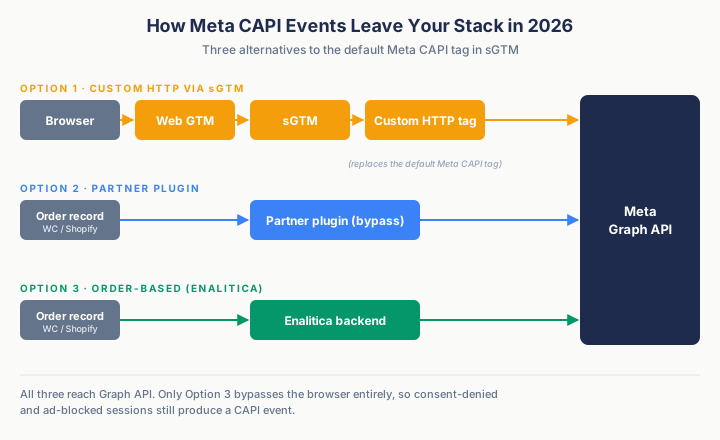
Option 1: Custom HTTP Request Tag to Graph API
If you do not want any template in your pipeline (the official one included), sGTM ships with a generic HTTP Request tag you can configure to hit Graph API directly. You write the JSON body yourself, manage the access token yourself, and own every detail of the request.
A minimal Purchase request body looks like this:
{
  "data": [{
    "event_name": "Purchase",
    "event_time": 1747820400,
    "event_id": "order_4521_purchase",
    "action_source": "website",
    "event_source_url": "https://store.example.com/thank-you",
    "user_data": {
      "em": ["e3b0c44298fc1c149afbf4c8996fb92427ae41e4649b934ca495991b7852b855"],
      "ph": ["a9f5...redacted"],
      "fbc": "fb.1.1747800000.AbCdEf123",
      "fbp": "fb.1.1747800000.1234567890",
      "client_ip_address": "203.0.113.42",
      "client_user_agent": "Mozilla/5.0 ..."
    },
    "custom_data": {
      "currency": "EUR",
      "value": 127.00,
      "content_ids": ["SKU-4521"],
      "content_type": "product"
    }
  }]
}
What you get:
- Full control. No template, no community dependency, no surprise update.
- You can extend the payload with custom parameters Meta accepts but no template exposes.
- The only moving piece you depend on is Meta's documented Graph API.
What you take on:
- Wiring deduplication is your job. Meta does the actual dedupe, but only if you generate one
event_id, send the same value through both Pixel and CAPI, and match them exactly (same case, no trailing space). Get it wrong and Meta treats them as separate events and double-counts. - PII hashing is your job. SHA-256, lowercase email before hashing, strip non-numeric characters from phone, never hash
fbc,fbp, IP, or user agent. - Graph API version pinning is your job. Meta retires versions on a rolling schedule: per the Marketing API changelog, v25.0 is current in September 2026 and v24.0, the oldest still accepted, expires on 6 October 2026. If you hardcode an old version in your URL and forget to update it, your pipeline silently dies one morning.
- Error handling is your job. Graph API returns
200 OKwith a body that may still contain validation warnings. Your sGTM tag needs to log those or you will not notice EMQ drops until ROAS craters.
This is the right pick for in-house engineering teams who want zero third-party templates in production, including Meta's. It is the wrong pick if you do not have someone who can be paged when Meta bumps the API version.
Option 2: Partner Plugin That Bypasses sGTM
The second option is to skip sGTM for Meta CAPI entirely and let your e-commerce platform send events directly. WooCommerce has the official Meta for WooCommerce plugin. Shopify has the native Facebook & Instagram app, which turns on the Conversions API at the "Enhanced" or "Maximum" data-sharing level.
What this gives you:
- Fastest setup. The plugin handles Pixel, CAPI, and deduplication out of the box.
- No GTM expertise required to keep it running. The vendor publishes plugin updates when Meta changes the API.
- Less control over the payload. Which customer parameters reach Meta depends on the plugin and its settings, so check the Event Match Quality the plugin achieves in Events Manager.
What you give up:
- Your unified sGTM pipeline. If you set up sGTM specifically to route Meta + Google + TikTok through one server container, the partner plugin breaks that pattern by sending Meta events through a separate path.
- Extensibility. Adding custom data layer fields to Meta events requires plugin code changes or filter hooks, not just a sGTM tag update.
This is the right pick if Meta is your only paid channel and sGTM was overkill to begin with. It is the wrong pick if you are running ads on three platforms and built sGTM to consolidate.
Option 3: Skip sGTM, Capture CAPI From the Order Layer
One answer to "how do I get a reliable CAPI feed?" is "you do not need a browser-fired tag at all." All the data Meta wants in a CAPI event already exists in your order record: the value, currency, customer email and phone (for hashing), the fbclid from the original ad click, and the order timestamp. The reason sGTM became the standard handoff point is historical. It is where event-based tracking pipelines centralize. It is not the only place a CAPI event can originate.
Enalitica reads the order from your WooCommerce or Shopify database the moment it is created. It pulls the click IDs captured at checkout (fbclid, plus gclid, gbraid, wbraid, msclkid, ttclid), stored at checkout-time, attaches hashed email and phone, name, city, postal code, country and a stable external_id, plus the fbp/fbc cookies, client IP and user agent when present, and posts a Purchase event to Graph API directly from our backend. In Enalitica's data, of more than 6,600 Meta Purchase events sent this way in the 90 days to 25 September 2026, 8 in 10 carried a hashed email and phone, 55% the _fbp browser ID and about 17% a Meta click ID (fbc). Customer data from the order, not the click ID, carries most of the matching. The deduplication key matches the Pixel event ID on your site, so Meta does not double-count.
What that changes compared to the two sGTM options above:
- No browser dependency on the outbound side. The conversion event leaves your stack from the order record, not from a data layer push. Ad blockers, late-loading consent banners, and broken dataLayer initialization do not affect the CAPI send.
- Consent is respected on the send. When a visitor in an opt-in country declined marketing consent, Enalitica does not send that purchase to Meta. The order still appears in your own order-based report, so your revenue total stays complete.
- ROAS from orders, not modeled conversions. The order is the source of truth. Revenue credited to Meta is revenue from real orders in your store, not a 7-day-click-or-1-day-view modeled estimate. For every order carrying a Meta click ID in Enalitica's data, Meta reported 4.6 conversions (stores with Meta and Google Ads connected, more than 10,000 orders and over €700,000 in revenue, 90 days to 25 September 2026).
- Multi-touch and keyword-level credit come along. The same pipeline that sends CAPI events also gives you direct vs influenced revenue per channel, keyword-level credit on Google Ads, and a single ledger across WooCommerce + Shopify.
What you give up:
- It is a paid subscription, not a free template.
- It assumes your store is on WooCommerce or Shopify. Custom checkouts need additional integration.
This is the right pick if "make Meta CAPI in sGTM more reliable" was really a stand-in for "I want clean numbers I can trust for budget decisions." The sGTM setup is the plumbing question. The order layer is the truth question. For deeper detail on Meta's CAPI mechanics regardless of which option you pick, see our full Meta Conversions API guide.
How to Choose Between the Three CAPI Routing Setups
The right choice depends less on tooling preference and more on who maintains the integration the day after launch.
| Profile | Recommended setup | Why |
|---|---|---|
| DIY founder, 1-2 paid channels | Partner plugin | Fastest, no GTM debt, vendor maintains |
| In-house dev team, multi-platform ads | Custom HTTP Request | Full control, no third-party dependency |
| Enterprise with security review | Custom HTTP Request | Passes vendor audits, no external template |
| Agency managing many client containers | Order-based (Enalitica) | One ledger across clients, attribution included |
| Store that needs accurate ROAS, not just CAPI | Order-based (Enalitica) | Solves the truth problem, not just the plumbing |
There is no "best" answer in the abstract. The cheapest setup to launch is rarely the cheapest setup to run for two years. A custom HTTP tag is cheap if you already have a backend developer on call and expensive if you do not. The partner plugin is free, but you live with its settings. Order-based capture is a subscription, but it also replaces the question "is my CAPI feed accurate?" with "which campaign actually drove the order?", which is the question your finance director is going to ask anyway.
Attribution Limits That Survive Every CAPI Setup
All three CAPI routing setups solve the plumbing problem at different layers: getting the conversion event to Meta's servers. None of them, on their own, solve the truth problem: knowing whether the event Meta credits is actually the click that drove the sale.
The structural limits that survive every CAPI setup, sGTM-based or otherwise:
- Meta's match-quality ceiling is fixed. Even with perfect implementation, Meta can only match events to users it already knows. If a customer logged out of Facebook, deleted their account, or only ever used your store from an unmatched device, EMQ stops at what user_data signals you can send.
- Double-counting between Pixel and CAPI if dedup is off. This is fixable, but the failure mode is silent. Mismatched
event_idformats, missing IDs on one side, or different event names (case-sensitive) all produce inflated numbers that look like good news until you reconcile against your store's orders. We walk through that reconciliation in detail in How Meta, Google, and Enalitica Count Conversions. - Cross-platform double-counting is not fixable by CAPI. Meta deduplicates Meta events. Google deduplicates Google events. Neither deduplicates against the other. If a customer clicks a Meta ad on Monday and a Google ad on Wednesday before buying on Thursday, both platforms will claim the conversion, and your reported revenue will exceed your real revenue. In the same stores in Enalitica's data, Meta and Google Ads together reported as many conversions as the stores had orders in total, email, organic and direct included.
And two more to plan for:
- Consent-denied users are out of reach for every CAPI route. If a customer in the EU declines marketing cookies, no route should send that purchase to Meta: not the default tag, not a plugin, not an order-based pipeline. What an order-based setup keeps is the order itself in your own report. We cover consent rules by country in our ad attribution by country guide.
- sGTM still depends on the browser firing something. sGTM is a relay. If the upstream dataLayer push never happens, sGTM has nothing to forward, whether the cause is a blocked script or broken JavaScript. A partner plugin and an order-based pipeline both send from the order record after the purchase completes, independent of whether the browser fired an event.
Every CAPI route improves the data Meta sees. None of them changes what Meta is structurally allowed to conclude from that data, and none gives you an independent count of orders by source.
Where Order-Based Attribution Changes the Equation
Option 3 above shows the mechanic. This section shows what that mechanic unlocks once the CAPI event is no longer the most interesting thing the pipeline produces.
A CAPI feed gives Meta a binary view: this event happened, or it did not. The most you can ask of it is "did this purchase get matched to a Meta click?" That answer is useful for Meta's bidding algorithm. It is not enough to answer the questions you actually have at the end of the month: which campaign drove revenue, which keyword drove revenue, which channel is Meta taking credit for that Google deserves.
Once the click IDs are written to the order record (Option 3's setup), the same pipeline that sends CAPI also produces a single source-of-truth ledger that the ad platforms can't produce on their own.
Direct vs influenced revenue
CAPI tells Meta a sale happened. Order-based attribution tells you both the primary channel that closed the sale and every other channel that touched the customer on the way there.
Illustrative figures for one store and one month:
| Channel | Direct revenue (last click) | Influenced revenue (touched the order) |
|---|---|---|
| Google Ads (brand) | €18,450 | €27,200 |
| Meta Ads | €9,800 | €22,400 |
| Organic search | €11,300 | €15,800 |
| €4,200 | €9,900 | |
| Direct | €6,500 | n/a |
Direct revenue sums to your store's actual order revenue. Influenced revenue is intentionally additive and labeled as such. The two columns answer two different questions, and the table makes it impossible to confuse them.
The gap between the columns is real. In Enalitica's data, across more than 6,500 order journeys in the 90 days to 28 September 2026, 25.5% of orders touched two or more channels, and email helped without closing in 35.6% of the orders it touched, against 16.3% for Meta Ads.
What Pixel, CAPI and order-based attribution each answer
| Question | Meta Pixel only | Pixel + CAPI via sGTM | Order-based attribution |
|---|---|---|---|
| Feeds Meta's bidding with purchases | ✓ | ✓ | ✓ sent from the order |
| Independent count of orders by source | ✗ | ✗ | ✓ every order, with its channel |
| One order counted once across Meta and Google | ✗ | ✗ | ✓ |
| Keyword-level credit | ✗ | ✗ (Meta does not expose) | ✓ via Google Ads enrichment |
Meta CAPI for Bidding, Order-Based Attribution for Decisions
Meta CAPI is for Meta's bidding signal. The platform needs a clean conversion feed to optimize campaigns inside its own walled garden. Without CAPI, Meta's algorithm trains on a smaller dataset of purchases.
Order-based attribution is for your own decisions. Where to allocate next month's budget. Which keywords actually drive revenue. Which campaigns Meta is taking credit for that Google deserves. The two jobs do not conflict, they complement each other.
Run Meta CAPI for the bidding signal, whichever route you pick. Run order-based attribution for an independent count of what sold and from where.
Want to see what your CAPI feed isn't telling you about which campaigns drove revenue? Book a demo and we will pull your last 30 days of orders, enrich them with click ID and Google Ads data, and show you the gap between what Meta reports and what your orders actually say.
Conversions API Implementation Checklist: Six Health Checks
Whether you stick with the default Meta CAPI tag or move to one of the three alternatives above, the same six things determine whether your CAPI setup is healthy or quietly broken.
- Test events with the Test Events tool. In Events Manager → Data Sources → your Pixel → Test Events, paste the test event code into sGTM and confirm CAPI events appear with "Server" as the source. If they don't, your sGTM container isn't reaching Graph API. Fix this before anything else.
- Match deduplication keys exactly. The
event_idyou send via Pixel must match theevent_idyou send via CAPI, character for character. Same case, no trailing spaces, same separator. Verify in Events Manager that the "Deduplicated" label appears on your Purchase events. - Send hashed PII the right way. SHA-256 only. Lowercase before hashing. Strip non-numeric characters from phone numbers. Never hash
fbc,fbp,client_ip_address, orclient_user_agent. These hashed fields are Meta's advanced matching signals and the biggest lever on your Event Match Quality score. Check the score Events Manager shows for Purchase and work on the parameters it flags as missing. - Capture
fbcandfbpcookies before the customer reaches checkout. They often go missing when the visitor returns later from an email or on another device. The fix is usually a server-side cookie fallback that persists thefbclidURL parameter into a first-party cookie. See our click ID capture guide for the implementation pattern. - Log server-to-server responses. Graph API returns
200 OKeven when individual events fail validation. Pipe sGTM's response body into a log sink (BigQuery, Cloud Logging, anywhere) and alert onmessagesarray entries that contain "Invalid Parameter" or "Missing Required Field." - Pin the Graph API version explicitly. Use
v25.0in your endpoint URL today (September 2026) and set a calendar reminder to review every 6 months. Meta retires versions on a rolling schedule. A silent failure on a pinned version is recoverable, a silent failure onv0.0is not.
Frequently Asked Questions
Is the official Meta CAPI tag still available in the sGTM Template Gallery?
As of September 2026, yes. Meta's Conversions API template is installable from the sGTM Community Template Gallery and remains the fastest path for stores with light traffic and a single paid channel. The three alternatives in this post exist for stores that have outgrown what the default tag offers: custom payload extension, control over the request, or a CAPI feed that does not depend on the browser firing the upstream event.
What other community templates exist for Meta CAPI in sGTM?
Besides Meta's official template, several community-built CAPI templates appear in the sGTM Template Gallery. None of the third-party templates carry Meta's stamp of approval. If you go with one of those instead of the official template, treat it like any third-party code in your tracking pipeline: review the template source in the GTM template editor before installing, version-pin it, and audit each update before applying. For stores that want to skip the third-party-template question entirely, Options 1 and 3 above do not depend on one.
Do I still need the Meta Pixel if I run CAPI through sGTM?
Meta recommends a redundant setup: the same events from both the Pixel and the Conversions API, with the same event_name and a shared event_id. The Pixel reports browsing events such as view content and add to cart in real time, and CAPI adds a Purchase signal with richer user_data.
How do I deduplicate Pixel + CAPI events with a custom HTTP tag?
Generate a single event_id value (e.g., order_{order_id}_purchase) at the point of conversion. Send it to the Pixel via the eventID field on the fbq('track', ...) call. Send the same value to CAPI as the event_id field. Meta deduplicates on the combination of event_id + event_name for 48 hours. Mismatches are silent, so verify in Events Manager that your Purchase events show "Deduplicated."
What is the minimum Graph API version for Meta CAPI in 2026?
In September 2026 the current version is v25.0, and v24.0 is the oldest Marketing API version still accepted until it expires on 6 October 2026, according to the Marketing API changelog. Marketing API versions now expire roughly a year after release, much sooner than general Graph API versions. Pin your version explicitly in the endpoint URL and set a recurring calendar check to upgrade before the deprecation window closes.
Can I use CAPI Gateway instead of sGTM entirely?
Yes. CAPI Gateway is Meta's no-code option that deploys a pre-built stack into your own AWS or Google Cloud account and relays Pixel events server-side without requiring sGTM (we break down its costs and limits in our Meta CAPI Gateway guide). It works as a CAPI-only solution if your only goal is the Meta data feed; for the Google side there is no Gateway, only the upload paths in our Google conversions API guide. It does not consolidate multiple ad platforms the way sGTM does. If you advertise on Meta, Google, and TikTok, sGTM with a custom tag for each platform is usually more flexible.
How does Meta's Signals Gateway compare to running CAPI through sGTM?
Signals Gateway is Meta's newer gateway product: you provision it in your own cloud account, and it receives events and sends them server to server to the destinations you configure. It does not require sGTM. For stores that want a Meta-built pipeline instead of a GTM container, it is a cleaner path than running a custom tag. For stores that standardized on sGTM for multi-platform tag management, the three options in this post are still the right call.
Sources
The outside pages this article relies on. Links checked on 28 September 2026.
- Meta Conversions API tag (developers.facebook.com)
- Marketing API changelog (developers.facebook.com)
- Meta for WooCommerce (wordpress.org)
- turns on the Conversions API at the "Enhanced" or "Maximum" data-sharing level (help.shopify.com)
- deduplicates (developers.facebook.com)
- Signals Gateway (developers.facebook.com)
Figures marked "in Enalitica's data" are aggregates from the real orders of the stores we measure, with no names and no individual orders. How we measure.
See your real numbers
Import 30 days of orders or leads during a 5-minute onboarding. Works for e-commerce and service businesses.
See plans and pricing