
Meta CAPI Gateway: What It Is and When to Use It
Meta CAPI Gateway explained: how Meta's no-code Conversions API option works, what it costs, its browser-only blind spot, and when direct CAPI setup wins.

Tilen Ledic
Written by
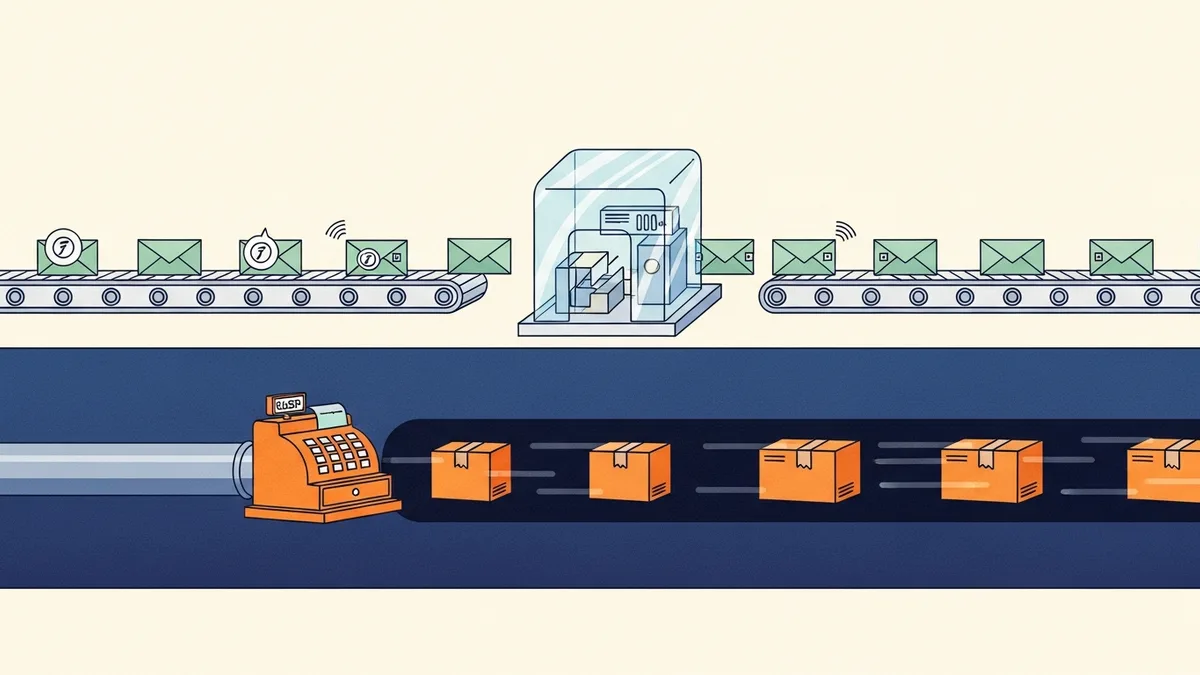
You open Events Manager to finally set up the Conversions API, and Meta offers you a shortcut: "Set up with Conversions API Gateway. No code required." Thirty minutes later you have a CloudFormation stack running in your AWS account and events flowing. It feels like you just implemented server-side tracking.
You implemented half of it. Meta CAPI Gateway is a real product with a real use case, but most store owners who click that button do not know what it actually does, what it cannot do, and what they will pay AWS for every month. Here is the whole picture.
What Is Meta CAPI Gateway?
Conversions API Gateway is Meta's self-serve, no-code way to run the Conversions API. Instead of writing server code that sends events to Meta, you deploy a pre-built Meta application into your own cloud account. Meta's stated goal is cutting integration time "from weeks to hours or even minutes."
Technically it is two modules running on your infrastructure:
- A middleware module that receives events from your visitors' browsers (sent by the Meta Pixel to your Gateway's endpoint instead of only to Meta) and transforms them into Conversions API events.
- An admin portal, a web interface where you monitor event volume, manage domains and pixels, and maintain the instance.
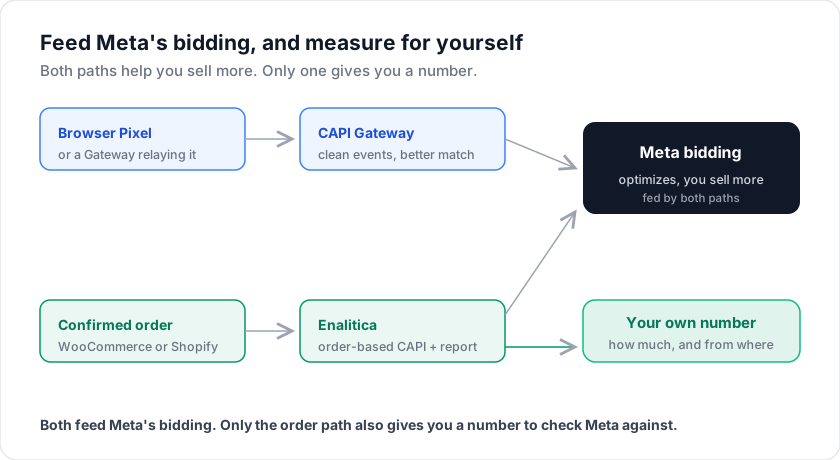
Read that first module again, because it is the key architectural fact: the Gateway's input is the browser Pixel. It does not connect to your store's database, your payment processor, or your CRM. It relays and enriches what the browser fired, over a first-party connection.
CAPI Gateway Setup and Real Hosting Costs
Setup starts in Events Manager: Settings, then "Set up with Conversions API Gateway." The flow launches a stack in your own cloud account. Supported hosts are AWS (EKS or ECS Express) and Google Cloud. Stack creation takes 30 to 40 minutes, and event verification anywhere from 5 minutes to 2 hours. Meta recommends a custom subdomain (something like capig.your-store.com), so events travel to your own domain.
The software itself is free. Meta is explicit that "the only cost of the Conversions API Gateway is the associated cloud resource or partner fees." What that means in practice:
| Option | Who runs it | Typical cost |
|---|---|---|
| Self-hosted (AWS/GCP) | You | Cloud resources, commonly tens of dollars per month, scaling with traffic |
| Managed host (e.g. Stape) | Provider | From $10/month per pixel, $100/month for unlimited pixels (September 2026) |
| Direct CAPI integration | Your developer or platform | No Gateway infra at all |
Maintenance is light: the Gateway updates itself, with the host admin's consent, whenever Meta ships new features. But "light" is not "none". It is a piece of infrastructure in your cloud account, and when event volume drops to zero on a Tuesday, you are the one who notices or does not.
There is also a multi-account version aimed at agencies and platforms: one Gateway instance can serve Conversions API integrations for many client ad accounts, pixels, and domains, which beats deploying and paying for one stack per client.
What CAPI Gateway Fixes, and Where It Stops
The Gateway earns its keep in one scenario: your Pixel fires, but the event does not reach Meta reliably. Routing events through your own first-party subdomain gets more of them past network-level blocking, because they go to your domain, not facebook.com. The Gateway also automatically generates event_id values, so deduplication between Pixel and server events works out of the box: Meta matches events on event_id plus event_name within a 48-hour window and generally keeps the one that arrived first.
For recovering browser-side signal loss and getting more of your Pixel events to Meta, the Gateway does the job well, and so do server-side GTM and direct integrations. Capture is not where the routes differ much any more.
Where it stops is built into the architecture. The Gateway converts browser events into server events, so anything the browser never fired is out of reach:
- Server-only events. A phone order entered in your backoffice, a subscription renewal, a payment that confirms after the thank-you page: none of these happen in a browser, so a Gateway cannot send them.
- CRM enrichment. A direct integration can attach whatever your server knows (customer lifetime value, hashed CRM identifiers). The Gateway works with what the Pixel collected on the page.
And the bigger one, the reason this post exists: everything the Gateway does is in service of Meta's algorithm bidding better. Once it is running, your only report of which campaign made money is still Meta's own dashboard.
Meta CAPI Gateway feeds Meta better data. It does not give you an independent number for how much you sold and from where.
That is the honest comparison with the other CAPI setup routes: direct API integration gives full control and true server-side events at development cost; a server-side GTM container sits in the middle; the Gateway is the fastest route but stays tethered to the browser. Meta's own positioning matches: the Gateway targets "performance marketers with some technical expertise" and no developer resources.
Whichever route you take, the event payload rules are the same. Every event needs event_name, event_time, action_source, and user_data; website events additionally need client_user_agent and event_source_url. Your Event Match Quality score rises with hashed email (em) and phone (ph), plus client_ip_address and name fields. Hash emails and phones; never hash IP address, user agent, fbc or fbp.
Why the customer identifiers matter more than the click ID: in Enalitica's data, of more than 6,600 Meta Purchase events sent by CAPI from confirmed orders in the 90 days to 25 September 2026, about 17% carried a Meta click ID (fbc) and 55% the _fbp browser ID, while 8 in 10 carried a hashed email and phone, because checkout asks for them. Most purchases reach Meta without a click ID, so matching leans on the order's customer data.
How Enalitica Sends Meta CAPI From Confirmed Orders
Enalitica sits on the measurement side, and it does not compete with feeding Meta. It sends order-based conversions to Meta CAPI server-side from the confirmed WooCommerce or Shopify order (value, currency, hashed email, fbclid, fbp/fbc, with a deterministic event_id so nothing double-counts against your Pixel), so Meta's algorithm gets clean data the same way a Gateway would. The Google half has no Gateway at all; what replaces it is explained in our guide to what Google Ads has instead of a conversions API. Better data in, more sales out. That part helps everyone.
The difference is the second half. A Gateway improves how many events reach Meta, but it still leaves your only scoreboard as Meta's own dashboard, the one that counts view-through conversions and cannot see what Google did. How far that scoreboard drifts is in Enalitica's data. In stores running both Meta and Google Ads, over €700,000 in revenue from more than 10,000 orders in the 90 days to 25 September 2026, Meta reported 4.6 times as many conversions as there were orders carrying its click ID.
Order-based attribution gives you an independent number: every euro of revenue traced to a real order in your store, with the campaign and keyword behind it. You sell more, and you can see how much more, and from where.
Signal for the algorithm, orders for the truth. A store wants both, and the Gateway and order-based attribution are not the same job.
If you run WooCommerce or Shopify and want CAPI feeding Meta from your actual orders plus a number you can check Meta against, book a demo and we will show the event flow end to end on your store's data.
Frequently Asked Questions
Do I still need the Meta Pixel if I run CAPI Gateway?
Yes. The Gateway is fed by the Pixel; without the browser script it has nothing to relay. This is different from a direct server integration, which can send events with no Pixel at all. Meta's recommended setup in all cases is redundant: Pixel plus server events, deduplicated via event_id.
Does CAPI Gateway improve my Event Match Quality score?
It can, moderately. The Gateway forwards richer, first-party-collected browser parameters (like fbp and page context) more reliably than a blocked or throttled Pixel would. But EMQ is driven hardest by hashed customer identifiers like email and phone, Meta's advanced matching parameters, and the Gateway can only send what the visitor's browser session exposed. Server integrations that pull identifiers from your order or CRM data have a higher ceiling.
Can I run CAPI Gateway for multiple stores or clients?
Yes. The multi-account version of the Gateway is built exactly for this: agencies and platforms can serve multiple ad accounts, pixels, and domains from one deployed instance, with per-client management in the admin portal. Costs stay roughly flat while client count grows, which changes the economics compared to one stack per store.
What happened to the Offline Conversions API?
Meta now calls the standalone Offline Conversions API its legacy API and sends offline events (in-store purchases, phone orders) through the standard Conversions API, with action_source set to physical_store for store sales. This is worth knowing in the Gateway context: offline events by definition never touch a browser, so they are another category the Gateway cannot carry and a direct integration can.
Is the Gateway GDPR-compliant by default?
The Gateway runs in your cloud account and relays events your Pixel was permitted to fire, so consent is enforced upstream: if your consent banner blocks the Pixel until opt-in, the Gateway receives nothing for non-consented visitors. Deploying a Gateway changes where events travel, not what you are allowed to collect. Your consent mode and privacy policy do the compliance work, same as with every other CAPI route.
Sources
The outside pages this article relies on. Links checked on 28 September 2026.
- Conversions API Gateway (developers.facebook.com)
- Events Manager (developers.facebook.com)
- Stape (stape.io)
- multi-account version (facebook.com)
- deduplication (developers.facebook.com)
- Event Match Quality (developers.facebook.com)
- calls the standalone Offline Conversions API its legacy API (developers.facebook.com)
Figures marked "in Enalitica's data" are aggregates from the real orders of the stores we measure, with no names and no individual orders. How we measure.
See your real numbers
Import 30 days of orders or leads during a 5-minute onboarding. Works for e-commerce and service businesses.
See plans and pricing