
Google Conversions API: What Google Ads Has Instead of CAPI
No Google conversions API exists. What Google Ads offers instead of CAPI: click uploads, enhanced conversions, Data Manager API and one rule against double counting.

Tilen Ledic
Written by
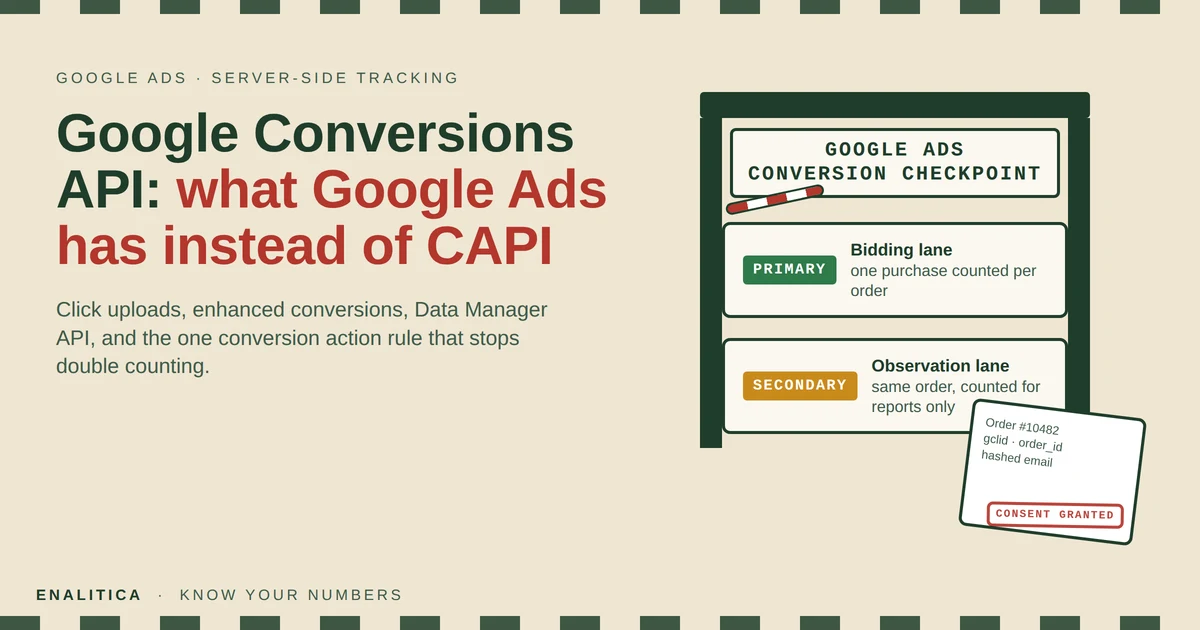
You finished the Meta Conversions API setup, purchases flow server-side, Event Match Quality is green, and now you search for the Google conversions API to do the same on the other half of your ad budget. The results are vendor pages that promise a "Google CAPI" and then sell you a server container. There is no such product, and that is the first thing worth knowing.
What Google Ads has instead is a set of four separate features that together do what Meta bundles into CAPI: a click conversion upload, enhanced conversions, a new Data Manager API and, for people who insist, the GA4 Measurement Protocol. This guide maps each Meta CAPI part onto its Google Ads name, walks through one upload step by step, and explains the single conversion action rule that decides whether server-side sending helps your bidding or quietly counts every order twice.
Is There a Google Conversions API?
No. Google Ads has no product called Conversions API, and "Google CAPI" is a name vendors use for their own connectors. What Google offers is the Google Ads API conversion upload, which accepts a click ID, a value and hashed customer data for each purchase, plus enhanced conversions, which is the hashed-customer-data part sent from your tag or your server. Since 2025 both are being folded into the Data Manager API, Google's one endpoint for conversions and audiences across Google Ads, Analytics and the Marketing Platform.
The confusion is understandable, because the job is the same. Meta CAPI exists so that a purchase reaches Meta even when the browser pixel is blocked, and Google's upload exists so that a purchase reaches Google Ads even when the Google tag never fired. The mechanics differ in one important way: Meta matches on many signals at once, while Google matches primarily on the click ID and uses hashed customer data as a second key.
There is no Google conversions API. There is a click conversion upload, enhanced conversions and the Data Manager API, and the decisions live in how you combine them.
Meta CAPI Parts and Their Google Ads Names
Every field you already send to Meta has a counterpart in Google Ads, usually with a different name and sometimes with a different rule attached. The table below is the translation layer most guides skip.
| Meta CAPI | Google Ads equivalent | What changes |
|---|---|---|
event_name (Purchase, Lead) | Conversion action | Google needs an action created in the account first; the upload names it by resource name |
event_id deduplication | order_id (transaction ID) | Google deduplicates only inside one conversion action, never across two |
fbc / fbclid | gclid, gbraid, wbraid | One click ID per conversion; iOS clicks arrive as gbraid or wbraid |
user_data (hashed email, phone, name) | user_identifiers (enhanced conversions) | Same SHA-256 hashing, stricter address rules, customer data terms must be accepted |
| Event Match Quality score | Match rate in the conversion action diagnostics | Google shows a percentage per action, no 0 to 10 score |
action_source = website | Consent Mode v2 signals (ad_user_data, ad_personalization) | In the EEA an unspecified signal means the conversion is not used |
| CAPI Gateway (no-code relay) | Data Manager or server-side GTM | Google has no self-hosted relay; Data Manager is an API, sGTM a tag server |
| No return handling | Conversion adjustments (retraction, restatement) | Google can subtract a returned order; Meta cannot |
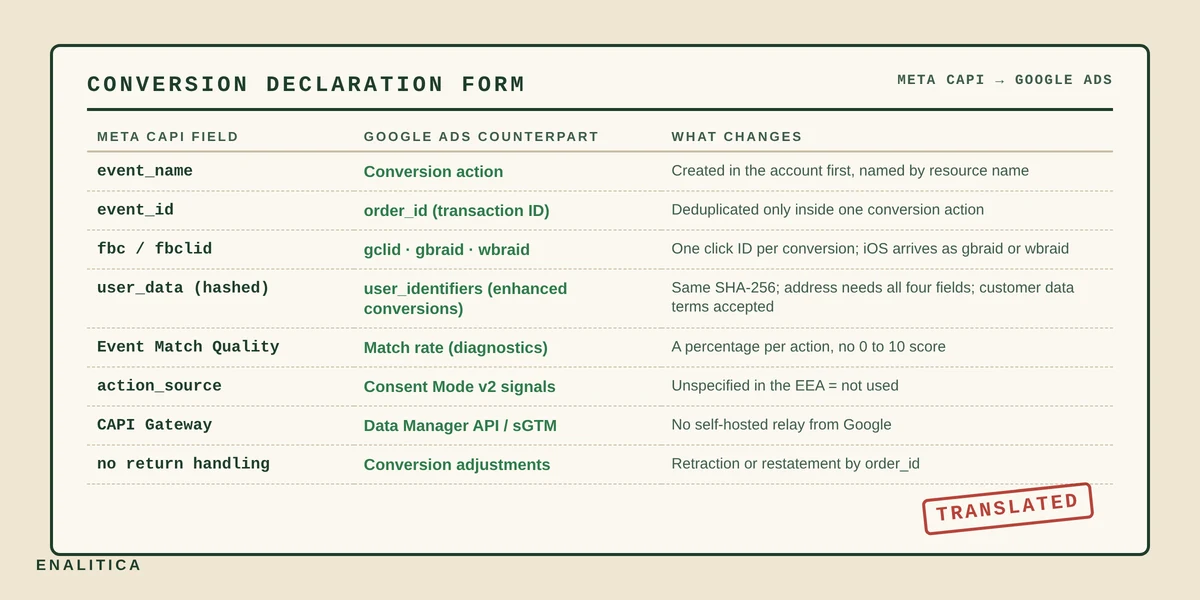
The last row is the one to remember. Google Ads is the only platform that lets you take a conversion back, which turns returns from a reporting footnote into a bidding signal, something we come back to below.
Which Google Ads Server-Side Path Should Your Store Use?
For a store the right path is the click conversion upload with enhanced conversion data attached, sent from the system that knows the order is real. The other three paths each stop short of that.
- Enhanced conversions for web (tag-based). The Google tag on your thank-you page hashes the customer's email and sends it with the browser conversion. Cheap to switch on and worth having, but it depends on the tag firing, so it recovers matching, not lost events. When the visitor declined cookies or an ad blocker ate the tag, nothing is sent.
- Click conversion upload (Google Ads API). Your server sends the click ID, the order value, an order ID and hashed customer data within 90 days of the click. Nothing in the browser has to survive; the order in your database is the source. This is the closest thing to CAPI and the path Enalitica uses.
- Data Manager API. The same upload through Google's newer endpoint, which also serves Customer Match audiences and the Marketing Platform. Since June 15, 2026 it is the only door open to new integrations; existing ones keep the old door for a transition period.
- GA4 Measurement Protocol. Sending a purchase to GA4 from the server and letting the Google Ads link import it. It works only when the server event carries the same client and session IDs as the browser session, otherwise GA4 files it as
(not set)and Google Ads sees no click. A click ID sent as a parameter does not restore attribution.
The difference between the second path and the first is the whole reason server-side sending exists. A tag-based enhanced conversion improves matching for events you already recorded; an upload from the order layer adds the events the browser never recorded, which in strict EU markets is a large share of all purchases, as our WooCommerce conversion tracking guide shows on real stores.
How Does a Click Conversion Upload Work Step by Step?
A click conversion upload takes the click ID that Google appended to the landing URL, stores it with the order, and sends it back with the conversion inside the click's 90-day window. Five steps, each with a failure mode worth knowing.
- Capture the click ID at landing. Google auto-tagging appends
gclidon most clicks andgbraidorwbraidon iOS clicks where tracking was denied. The ID has to be saved in a first-party cookie or storage before the visitor navigates away, and only after the consent banner allows it. Our guide to GCLID, GBRAID and WBRAID covers the parameters themselves. - Write it onto the order. At checkout the stored ID becomes order metadata, next to the customer's email, phone, name and address. WooCommerce and Shopify both store the landing URL of the purchase session by themselves, but a purchase two days after the click needs the cookie.
- Upload within the window. The conversion carries the click ID, the conversion time (after the click, never before it), the value, the currency, an
order_idand the consent signals. A click older than 90 days is rejected; agclidfrom a free Shopping listing (prefixEAIa) is rejected as unpaid. - Match and count. Google attributes the conversion to the campaign, ad group and keyword behind the click and adds it to the conversion action. Expect it in reports within about a day, up to 72 hours for
gbraidandwbraid, and note that a brand-new conversion action needs a few hours before Google accepts uploads at all. - Correct it later if the order changes. A cancellation becomes a retraction, a partial refund a restatement, both identified by the same
order_id. More on that below.
Steps one and two are where most setups fail, not step three. If the click ID never reached the order, there is nothing to upload, which is why a conversion tracking audit starts by counting click IDs on paid orders before touching any API.
Enhanced Conversions: What Hashed Customer Data Adds
Enhanced conversions add a second matching key next to the click ID: the customer's email, phone number, first and last name, postal code and country, each normalized and hashed with SHA-256 before it leaves your server. Google compares the hashes with signed-in accounts, which lets it attribute a purchase whose click ID was lost, or which happened on another device, and it lets Google count conversions in the EEA that consent rules would otherwise leave uncounted.
Three rules decide whether that data helps or gets thrown away. Normalization has to match Google's exactly: lowercase and trimmed for email and names, E.164 with the plus sign for phone numbers, and accents kept in names, because Google hashes the name as the account holder typed it. Address data is all or nothing: first name, last name, country code and postal code must all be present or the address identifier is invalid. And the account must have accepted Google's customer data terms in Conversions settings, a checkbox no API can tick for you; until it is accepted every upload with customer data fails with the same terms message.
Industry write-ups put typical match rates between 55 and 70 percent for US traffic and lower in the EU, where fewer visitors pass the consent gate, and report a 5 to 25 percent lift in attributed conversions after enhanced conversions go live. Treat both as vendor ranges rather than promises. What you can verify yourself is the match rate Google shows per conversion action in its diagnostics, and on the Enalitica side how many orders were sent, failed or skipped in the last 30 days, so a broken setup shows up as a number, not as a hunch.
Primary or Secondary Conversion Action: Stop Double Counting
Google counts every primary conversion action separately, so a server-side purchase upload created next to an existing website purchase tag reports the same order twice and hands Smart Bidding a conversion count that is too high. The order_id does not save you, because Google deduplicates a transaction ID only inside one conversion action. Two actions, two counts.
There are two honest ways out, and only one of them is safe on day one. Demoting the website tag to secondary and bidding on the upload sounds clean, but the upload covers only the orders with a usable click ID, so on day one it is a subset of what the tag sees and bidding on it would shrink the signal. Demoting the upload instead keeps the account's bidding untouched while the new action fills up in the All conversions column, where you can compare both counts side by side.
Enalitica creates its purchase upload as a secondary conversion action whenever the account already has a primary purchase action. The switch to primary happens later, together with you, once the upload is the fuller signal.
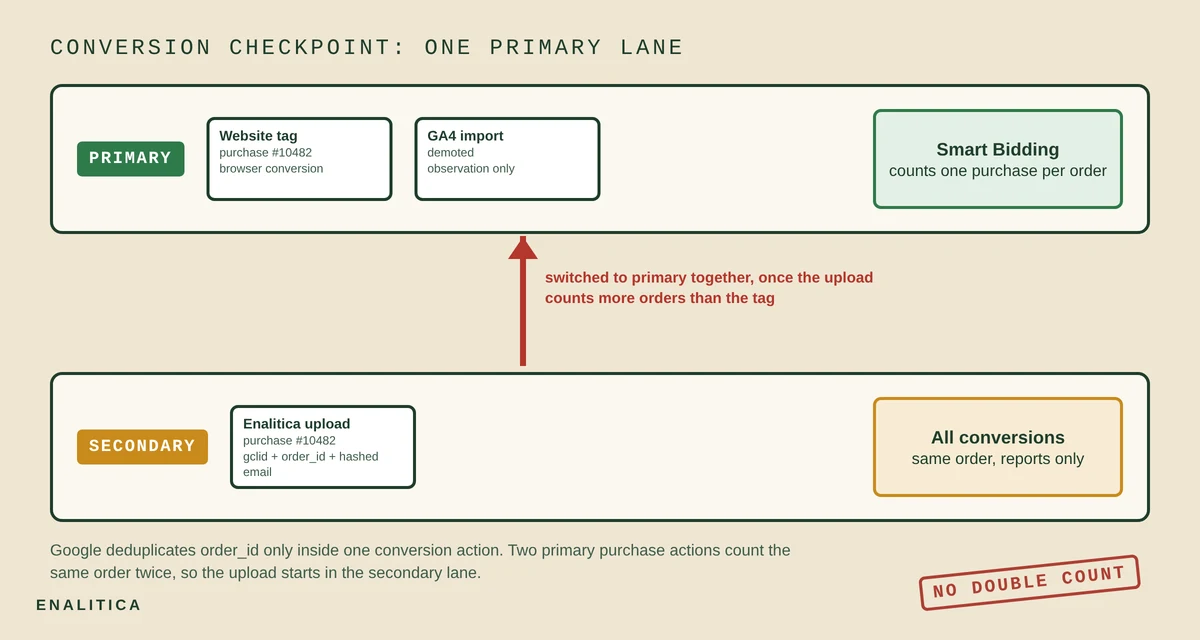
The switch itself is a five-minute change in the Conversion actions list, but the decision needs a few weeks of data: when the uploaded action counts more purchases than the tag over the same period, with the same order IDs, it has become the better bidding signal and the tag becomes the observer. Funnel steps such as add to cart and begin checkout stay secondary forever; they are context for reports, never a bidding target.
Consent Mode v2 in the EEA: What Unspecified Costs
Every conversion uploaded to Google Ads carries two consent fields, ad_user_data and ad_personalization, and for visitors in the European Economic Area Google acts on them. A conversion marked granted is used in full, including its hashed customer data. A conversion marked denied should not be sent at all. A conversion left unspecified is the expensive case: Google does not use the customer data for matching and, for EEA traffic, does not count it toward your reported conversions.
The temptation is obvious and wrong: mark everything granted, because the customer handed over an address at checkout anyway. A delivery address is permission to deliver a parcel, not permission for Google to personalize ads, and once the shop platform records attribution server-side the click IDs of refusers are in your database too. The honest implementation records what the visitor actually answered on the banner and sends that answer; where nobody asked, in opt-out markets such as the US, granted is accurate because no consent was required.
Enalitica stores the banner state with every order and resolves it per order, by the customer's country, so a Slovenian shop selling to a US buyer reports that order under US rules. Where the state is unknown in an opt-in market the upload goes out as unspecified and Google counts nothing, which is the correct price for not knowing. Our post on whether cookieless tracking is legal explains why the shortcut is not worth it.
Returns: Conversion Adjustments Teach Smart Bidding Kept Revenue
A returned order is not a conversion, yet almost every Google Ads account still carries it as one, because uploads are one-directional in most setups. Google's conversion adjustments fix that: a retraction removes a conversion entirely (cancellation, full return) and a restatement changes its value (partial refund), both addressed by the order_id of the original upload, within roughly 54 days.
The bidding effect is the point. Smart Bidding optimizes toward the conversion value it sees, so a campaign that sells products which come back at twice the average rate looks better than it is until the adjustments arrive. With them, target ROAS bids on revenue you kept. Our post on POAS versus ROAS with returns works through two campaigns with identical ROAS and opposite decisions once returns enter the math.
Two limits apply. The original conversion must already be processed by Google, typically a day after upload, or the adjustment is rejected as too recent and has to be retried. And a retraction is final: a retracted conversion cannot be restated later, so a full return should be sent as a retraction only when the order really is fully returned.
Data Manager API in 2026: What Changes for Conversion Uploads
The Data Manager API is Google's replacement for conversion uploads through the Google Ads API. Since June 15, 2026 the old upload service accepts no new adopters: a developer token that had not uploaded conversions between December 2025 and May 2026 gets an allowlist error, and existing integrations keep a transition window while they migrate. Two months earlier, in April 2026, Google merged the separate enhanced conversions for web and for leads settings into one switch that accepts customer data from the tag, from Data Manager and from the API at the same time.
For a store owner the change is mostly invisible, but it is a fair question to ask any tool you pay for: which Google endpoint does your upload use, and what is your migration date? A tool that cannot answer will stop sending conversions when its window closes. Enalitica uploads through the Google Ads conversion upload service that Google keeps open for existing integrations, and the move to Data Manager is planned as a like-for-like change: same click IDs, same hashed data, same consent signals, same order IDs.
The endpoint matters less than the four things it carries. Whatever Google renames next, a conversion that arrives with a click ID, a transaction ID, correctly hashed customer data and an honest consent signal will be counted, and one that arrives without them will not.
How Enalitica Sends Google Ads Conversions From Confirmed Orders
Enalitica sends each confirmed order to Google Ads from the order record, not from the browser: the click ID captured at landing and stored for 90 days in a first-party cookie, the order value and currency, the shop's order number as order_id, hashed email, phone, name and address for enhanced matching, and the consent state the visitor gave on the banner. Orders without a Google click ID are not sent and are shown as skipped, because an upload without a click matches nothing.
Setup takes minutes rather than a developer sprint. Connecting Google Ads through OAuth is enough: on the first send Enalitica finds or creates a conversion action named "Enalitica Purchase API", checks whether the account already bids on another purchase action, and creates its own as secondary in that case. The Strežniško sledenje tab then shows per platform whether sending works, how many purchases, leads and funnel events went out in the last 30 days, how many were skipped and why, and a fix guide when Google blocks uploads, most often because the customer data terms were never accepted.
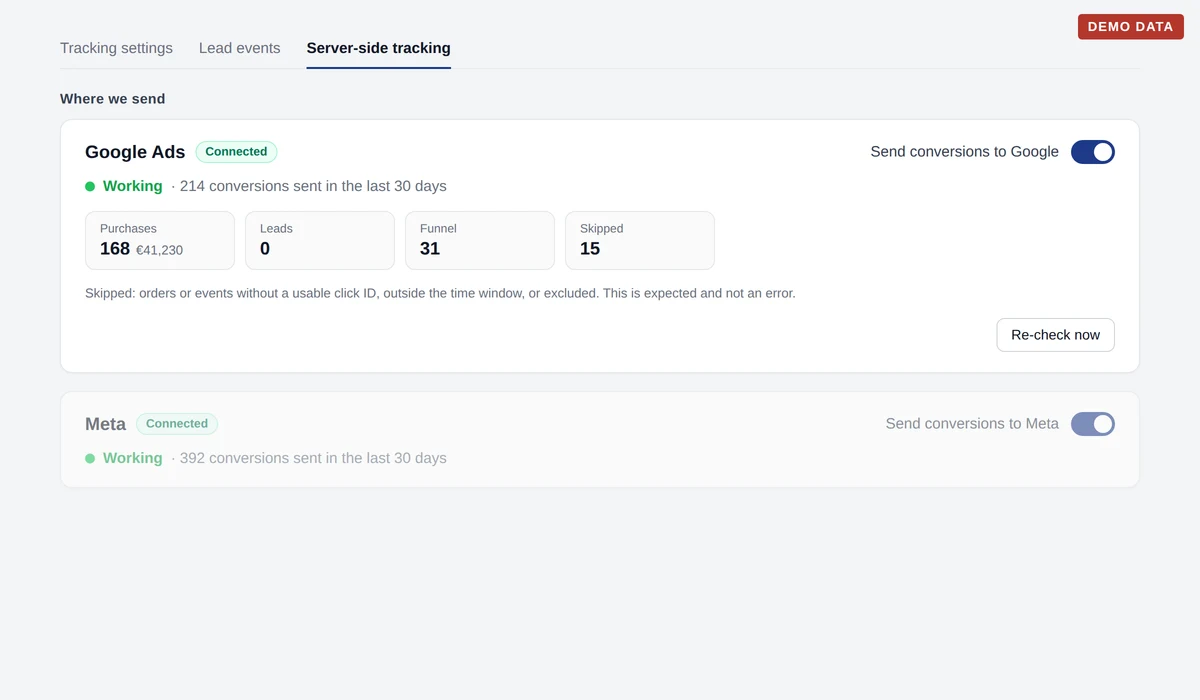
The same path serves service businesses: an enquiry with a Google click ID is uploaded to a separate "Enalitica Events API" action with the lead's hashed email, so Google Ads learns which keywords bring enquiries and not only clicks. Every night a catch-up run retries anything Google rejected as too recent, and a second run uploads retractions and restatements for orders that were cancelled or refunded. And because the same orders feed the attribution report, you see the platform's count and your own order count on one screen, the comparison our post on modeled conversions versus real orders argues every owner should have open.
Google Ads Server-Side Conversion Checklist
Eight checks, in the order a store should run them, before trusting a Google Ads server-side setup.
- Auto-tagging is on in Google Ads, and the landing page keeps
gclid,gbraidandwbraidthrough every redirect. - The click ID is stored first-party after consent and lives at least 90 days, not only for the session.
- Every paid order carries a click ID in its metadata; the share that does is your real coverage.
- Uploads carry an
order_id, the conversion time after the click, value, currency and hashed customer data normalized Google's way. - Customer data terms are accepted in Conversions settings; without them enhanced data is rejected.
- Exactly one purchase conversion action is primary; the upload starts secondary when a website tag already bids.
- Consent signals reflect the banner answer per order; nothing is marked granted by default in opt-in markets.
- Returns and cancellations go back as adjustments, and the tool you use has named its Data Manager migration date.
Frequently Asked Questions
Is there a Google CAPI like Meta CAPI?
No. Google Ads has no product named Conversions API. The equivalent is the Google Ads conversion upload (a click ID, a value, an order ID and hashed customer data sent from your server), enhanced conversions for the hashed data, and since 2026 the Data Manager API as the single endpoint. Tools that advertise a "Google CAPI" are describing their connector to one of those.
What is CAPI in marketing?
CAPI stands for Conversions API, Meta's server-to-server way of reporting events such as purchases and leads to Facebook and Instagram ads without relying on the browser pixel. In marketing the word has become shorthand for any server-side conversion sending, including the Google Ads equivalents in this guide, which is why "Google CAPI" is searched even though the product does not exist.
Can I send purchases to Google Ads from a CRM?
Yes, as long as the CRM record holds a Google click ID captured when the lead arrived, or the customer's email for enhanced conversions for leads. The upload carries the click ID or the hashed email, the conversion time and value, and lands within 90 days of the click. Enalitica does this for service businesses automatically: an enquiry with a click ID is uploaded to a dedicated conversion action with the value you assigned to that event type.
Do I still need the Google Ads tag with uploads?
Keep it. The tag provides the browser-side conversion that bids on day one, feeds remarketing lists and covers orders where the click ID was lost but the tag still fired. The upload adds the orders the tag never saw. Run both, keep exactly one of them primary, and compare their counts in the All conversions column before deciding which one bids.
Does server-side sending bypass cookie consent?
No, and a tool that says it does is making a legal claim, not a technical one. The click ID is read from the visitor's device, which needs consent in opt-in markets, and the upload carries Consent Mode signals that Google acts on for EEA users. Server-side sending changes where the data leaves from, not whether you were allowed to collect it.
Offline conversion import or enhanced conversions for leads?
Offline conversion import matches on the click ID you stored with the lead; enhanced conversions for leads matches on the hashed email or phone number the lead typed into your form, so it works even when no click ID was captured, and it also recovers cross-device and engaged-view conversions. Google recommends the second for new lead setups; the first remains available. Enhanced conversions for leads does not work with gbraid or wbraid, only with gclid or customer data.
How long until an uploaded conversion appears in Google Ads?
Usually within a day for gclid conversions and up to 72 hours for gbraid and wbraid. A newly created conversion action needs several hours before Google accepts its first uploads, and an adjustment can only be applied once the original conversion has been processed, so an upload followed by an immediate retraction fails and has to be retried the next day.
Do I need the Data Manager API now?
If you are building a new integration, yes: since June 15, 2026 the Google Ads API upload service rejects developer tokens without prior conversion uploads. If you use an existing tool, ask it which endpoint it uses and when it migrates. Nothing changes in what a conversion has to contain; the click ID, order ID, hashed customer data and consent signals are the same on both endpoints.
See your real numbers
Import 30 days of orders or leads during a 5-minute onboarding. Works for e-commerce and service businesses.
See plans and pricing