Server-Side Tracking for E-commerce: What Changes in Month One
Server-side tracking for online shops, measured on real orders: what changed in the first month, why Google and Meta bidding need it, and what it cannot fix.
 Tilen Ledic Written by
 On this page

You open the shop on Monday and count 60 orders from last week. Google Analytics shows 44. Google Ads claims 31 of them, Meta claims 22, and for a fifth of the orders nobody can say where the customer came from. You set budgets on those numbers anyway, because they are the only numbers you have.
That gap is what server-side tracking closes. We measured what actually changed in shops that added it in September 2026, and the result is less about prettier reports and more about what Google and Meta learn from you every day.
What is server-side tracking for an online shop?
Server-side tracking means the purchase is recorded by a server, not only by a script in the customer's browser. When an order is placed, the shop itself (or a service connected to it) knows the order, its value, the products, and the click that brought the customer, and sends that to Google Ads and Meta directly.
The browser-only setup loses orders for ordinary reasons: an ad blocker stops the pixel, Safari shortens how long a click is remembered, the customer pays on a bank page and never returns to the thank-you page, or declines cookies. In Enalitica's data, 90 days to 28 September 2026, Google Analytics recorded a purchase for 76.6% of orders; in the median shop, 68.5%. One order in four did not exist for the tools the budget was set on.
Server-side tracking is not one product. A server-side Google Tag Manager container, Meta's Conversions API and Google's enhanced conversions are all versions of it. What they share: the order is reported from a place the browser cannot block. The comparison with order-based attribution explains where the two differ.
What changed in the first month
In early September 2026 several shops on Enalitica added our tracker, which stores the click id on the order the moment the order is placed. We compared each shop's 90 days before with the weeks after (measured 26 October 2026, averaged per shop so no single large shop carries the result).
| Per shop, on average | Before | After |
|---|---|---|
| Orders credited to a channel | 82% | 93% |
| Orders carrying a Google or Meta click id | 9% | 39% |
| Orders with an unknown source | 18% | 7% |
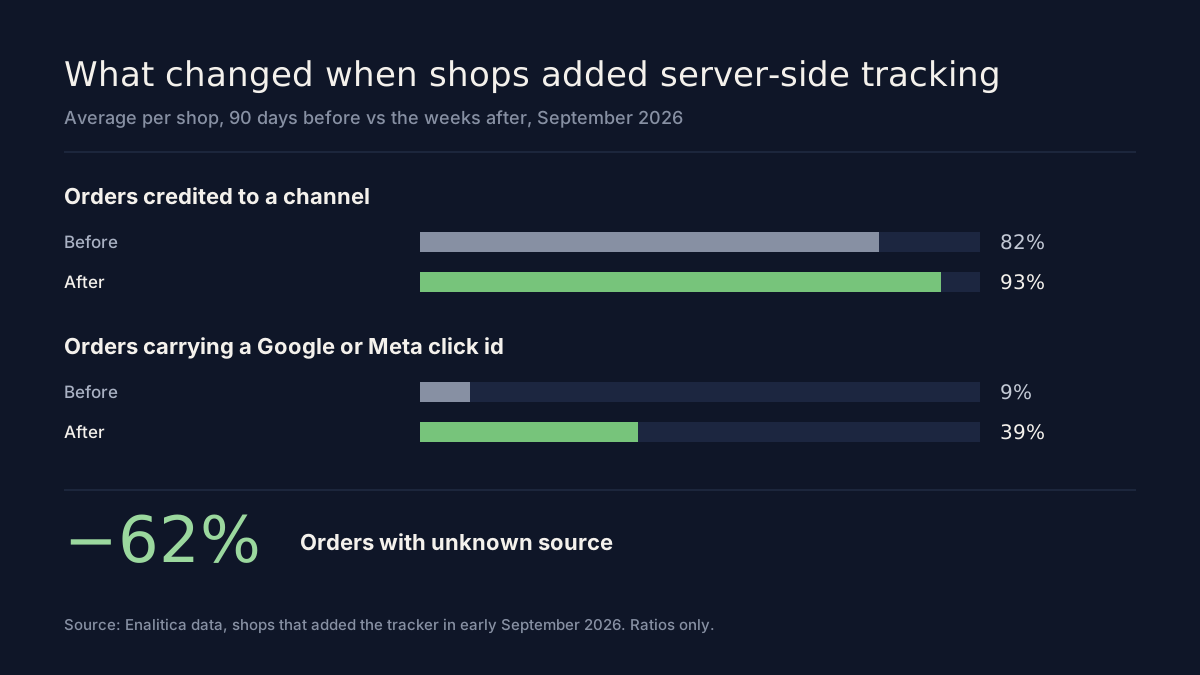
Orders with an unknown source fell by 62%. The click id share quadrupled, which matters more than it looks: a click id is the proof that a specific ad brought a specific order. Without it, an order can be credited to Google or Meta only by modelling. With it, the order goes back to the exact campaign and, for Google, often the keyword.
Two things did not change, and it is fair to say so. Customers who decline cookies still decline them, and server-side tracking respects that. And an ad someone only saw, without clicking, still leaves no proof on the order; the Meta halo article is about that blind spot.
Why Google and Meta need it more than you do
The bigger win is not in your report. It is in what the ad platforms learn.
Google's Smart Bidding and Meta's Advantage+ campaigns decide every day whom to show your ads to, based on the purchases you report back. If a quarter of your sales never reach them, they optimise towards the buyers who happen to be easy to track, not towards your best customers. Meta says it plainly in its Conversions API documentation: you can use only matched events for ads attribution and ad delivery optimization, and higher matching quality produces better results (Meta, Conversions API best practices).
Matching is where a server helps. A purchase sent from the server can carry the click id, the event id that prevents double counting with the pixel, and hashed customer details such as email and phone, which Meta scores as Event Match Quality out of 10. Google's enhanced conversions work the same way for Google Ads.
The platforms will still over-claim. In Enalitica's data, Google Ads reported 2.97 conversions for every order that actually carried a Google click, and Meta 4.6. Server-side tracking does not fix their counting; it fixes what they learn from. The conversion counting comparison shows both numbers side by side.
Refunds: the part most setups skip
A returned sofa was a conversion on Tuesday and a refund on Friday. If nobody tells Google, its bidding keeps counting the full order value, and it learns to find more customers like the one who sent the sofa back.
Google Ads accepts corrections. A retraction removes a conversion entirely, a restatement changes its value but not its count, and Google notes that restatements affect ROAS bid strategies while retractions affect both CPA and ROAS strategies (Google Ads Help, about conversion adjustments).
Meta is different. Its standard events have Purchase but no refund or return event (Meta Pixel reference), and we have found no way in the Conversions API to reduce a purchase Meta already counted. Meta's figures stay gross, so the honest place to see Meta's return after refunds is your own order data.
What server-side tracking needs
- A connection to the shop's orders. WooCommerce, Shopify, Shopamine or a custom shop. The order is the source of truth, so the system must read it, including later status changes.
- A small tracker on the site that keeps the click id (gclid, gbraid, wbraid, fbclid) with the visitor until the order is placed, and attaches it to the order.
- Consent handled correctly. Server-side does not mean consent-free. If the customer declined marketing cookies, the purchase is not sent with their identifiers. In the EU this is the law, not a preference.
- A conversion action in Google Ads that accepts uploaded purchases, set as primary so bidding uses it.
- A Meta dataset (your pixel) with access for server events, and deduplication against the browser pixel through a shared event id.
- Somebody who checks it. Match quality, rejected uploads and duplicate purchases drift quietly. A weekly look catches them before they cost a month of bad bidding.
How Enalitica does it
We set it up with you, not for you to figure out. The shop connection reads every order and its later changes. Our tracker stores the click ids on the order at the moment of purchase, so the proof travels with the order instead of being reconstructed later.
Every order is then sent from our server to Google Ads and Meta: the click id when there is one, the order id, the value, and hashed email and phone where the customer's consent allows it. The same event id the browser pixel uses is attached, so Meta counts the purchase once. In the app you see Meta's own match quality score for those events and how many purchases each platform received, per day.
Refunds are handled every day for Google. Orders that became a full return or cancellation are retracted, partially refunded orders are restated to the value you kept, for orders we sent, within roughly 50 days of the order. Smart Bidding then learns from revenue that stayed in your account. For Meta, which offers no such correction, the Enalitica reports show Meta's profit after refunds from your own orders, next to the gross figure Meta shows.
None of this changes your campaigns. We only report what happened in the shop; what to do with it stays your decision. If you want to see it on your own data, start free or book a demo.
First-week checklist
- Count last month's orders in the shop and the purchases Google Analytics recorded. The difference is what your bidding never saw.
- Check whether your Google Ads purchase conversion is a website tag only, or also receives uploaded orders.
- In Meta Events Manager, open your Purchase event and read the Event Match Quality score.
- Ask who sends refunds back to Google today. If the answer is nobody, Smart Bidding is learning from revenue you gave back.
- Make sure your cookie banner and the server send the same consent decision.
Frequently Asked Questions
Is server-side tracking legal under GDPR?
Yes, when it follows the customer's consent choice. Moving tracking to a server does not remove the need for consent for marketing purposes; it only changes where the data is sent from. A setup that still sends identifiers after the customer declined breaks the rules, wherever the request leaves from. Our privacy-safe attribution guide covers what is allowed without consent.
Do I still need the browser pixel?
For Meta, yes, in most shops. The pixel sees browsing events and helps Meta build audiences; the server sends the purchase reliably. Both send the same event id, so Meta deduplicates them. The Meta Conversions API guide explains the setup.
How long until bidding improves?
Bidding adjusts only after it has received enough new purchases, so the first days say little. Our numbers above compare whole weeks for that reason. Read the results after four to six weeks.
What if my shop takes orders by phone or in a showroom?
Those orders have no click id unless they started as an online enquiry. If the customer first sent a form from an ad click and later bought by phone or in store, the sale can be matched to that enquiry and reported to Google with its final value.
Does server-side tracking slow down my site?
Not in a way a customer notices. Our tracker is one small script, and the sending to Google and Meta happens on the server after the order, not in the customer's browser. Server-side setups can even speed a page up when they let you remove vendor tags from it.
Sources
The outside pages this article relies on. Links checked on 26 October 2026.
- Meta, Conversions API best practices (developers.facebook.com)
- Google Ads Help, about conversion adjustments (support.google.com)
- Meta Pixel reference (developers.facebook.com)
Figures marked "in Enalitica's data" are aggregates from the real orders of the stores we measure, with no names and no individual orders. How we measure.

See your real numbers
Import 30 days of orders or leads during a 5-minute onboarding. Works for e-commerce and service businesses.
See plans and pricing