
WooCommerce Conversion Tracking: The Complete Guide
WooCommerce conversion tracking end to end: what Woo records by itself, where the click trail tears, plugins compared, and numbers from real stores.

Tilen Ledic
Written by
WooCommerce conversion tracking is the difference between knowing that you sold and knowing why you sold. Out of the box, WooCommerce records every order perfectly and the order's origin only partially: the built-in Order Attribution feature covers one session, and everything longer than one session quietly falls apart.
This guide walks the whole pipeline, from the ad click to the report line. We run order-level tracking on WooCommerce stores in production every day, so alongside the theory you will get the numbers we actually measure: what share of orders carries a paid click ID at all, how many orders arrive days after the click, and how wide the Direct share runs from one store to the next on the same platform.
If you only remember one idea, make it this one:
A conversion is not lost in one place. It is lost at one of five stations, and each station has a different fix.
The journey of one click through a WooCommerce store
Every attributed order is a click that survived five stations: the ad click carrying a click ID in the URL, the landing page where a cookie is written, the return visit days later, the checkout where hidden fields are filled, and the order meta that your reports read. Break the chain at any station and the order still exists, but its origin does not.
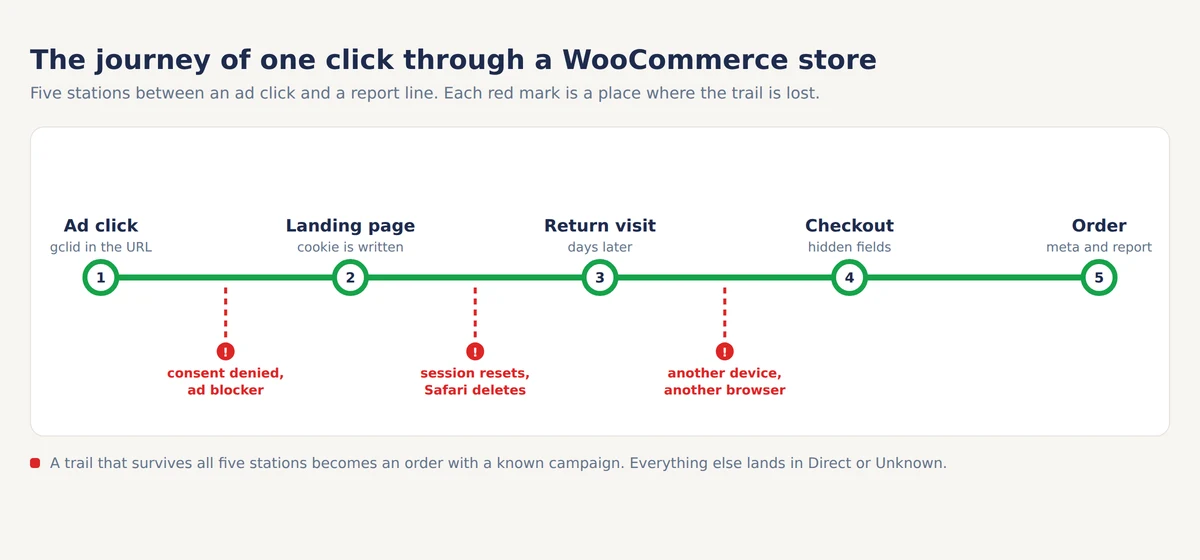
Station one is the click itself. Google appends a gclid to your landing URL, Meta appends an fbclid, Microsoft an msclkid, TikTok a ttclid. On iOS, when the user has declined app tracking, Google sends gbraid or wbraid instead; our guide to Google's click IDs covers the differences.
Station two is storage. Someone has to write that URL parameter somewhere durable, because the buyer rarely purchases in the same visit. This is where consent banners and ad blockers intervene, and where the biggest differences between tools live.
Stations three to five are survival: the value must outlive the return visit, get copied into the checkout form, and land in order meta. WooCommerce itself only guarantees the last step, and only for data that reached it.
What WooCommerce Order Attribution tracks by itself
WooCommerce 8.5 shipped Order Attribution in January 2024, on by default for new and existing stores. It uses the sourcebuster.js library to record UTM parameters, the referrer, the device and the session's entry URL, and it writes them into order meta fields with the _wc_order_attribution_ prefix. For a feature that costs nothing and requires no setup, that is genuinely useful.
The catch is scope. Order Attribution is session-based: WooCommerce treats a session as lasting 30 minutes, so a buyer who clicks your ad on Monday and returns directly on Friday is recorded as Direct. That is not a corner case: in Enalitica's data, last 90 days to 28 September 2026, 12.4 percent of more than 6,500 order journeys were spread over two or more visit days, and among orders with an ad click in the journey, 29.5 percent were placed more than a day after that click. The mechanism, the exact cookie lifetime and the fixes have their own article, why half your WooCommerce orders say Direct.
One detail matters more than most store owners realise: the stored session entry URL often still contains the click ID as a query parameter. Even with no tracking plugin at all, a same-session purchase leaves a recoverable gclid inside _wc_order_attribution_session_entry. Tools that parse it, ours included, get attribution that WooCommerce's own reports never show.
Why do WooCommerce orders lose their source?
WooCommerce orders lose their source for five reasons: the visitor declined marketing cookies, an ad blocker stopped the tracking script, Safari deleted the cookie early, the session reset between click and purchase, or the buyer switched devices. The first reason is a legal boundary. The other four are technical, and technical losses can be engineered away.
That split matters because it decides what a tool may honestly promise. Consent loss applies to every compliant tool equally: a visitor who refused marketing cookies leaves no click ID for anyone, and a vendor claiming otherwise is describing a consent bypass, not a feature. Technical loss is the recoverable part, and it is large.
How large is measurable on your own store in half an hour; our conversion tracking audit walks the five numbers. For a typical EU store, GA4 alone misses 10 to 30 percent of real orders; our own figure for the last 90 days to 28 September 2026 sits inside that band, with GA4 catching 76.6 percent of the orders that the stores in Enalitica's data actually had. On the order side the spread between stores is the story. In the same window, 26.4 percent of nearly 12,000 orders carried any paid click ID at all (14.7 percent a gclid, 12.4 percent an fbclid), and the Direct share ran from 13 to 48 percent of orders per store, with the median store near 19 percent. The illustration below shows the two ends of that range:
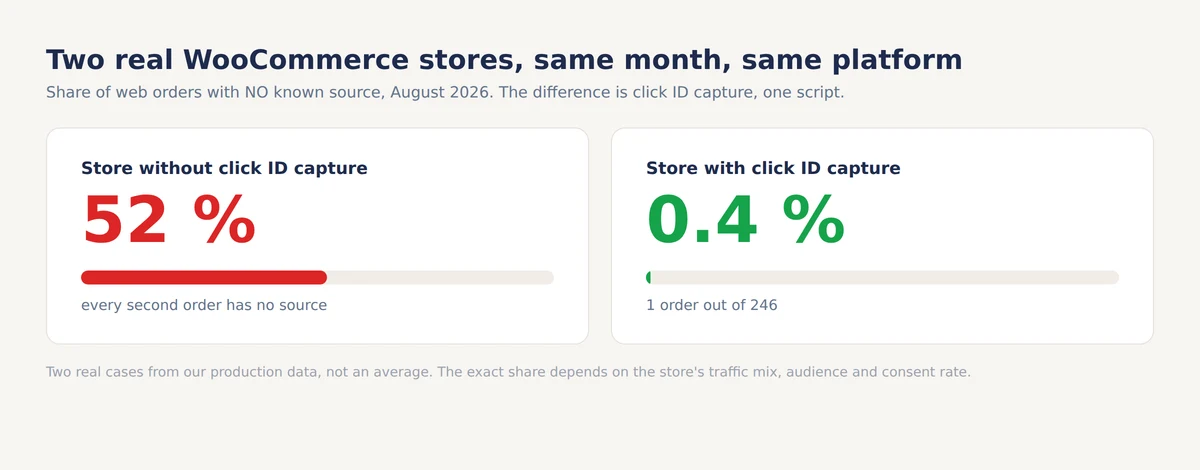
Neither end is a promise. The store at the bad end of the range has no click ID capture installed, so every returning buyer becomes invisible; the store at the good end captures click IDs and keeps them for 90 days. Your exact share depends on your traffic mix, your audience's ad blocker habits and your consent rate; the point is that most of the gap between those two numbers is technical, not legal.
PixelYourSite, Pixel Manager and GTM4WP compared
Tracking plugins differ less in which pixels they fire and more in what ends up written on the order. A pixel event is gone the moment it fires; order meta is queryable forever. So the comparison that matters is: which click IDs does each tool persist to the order?
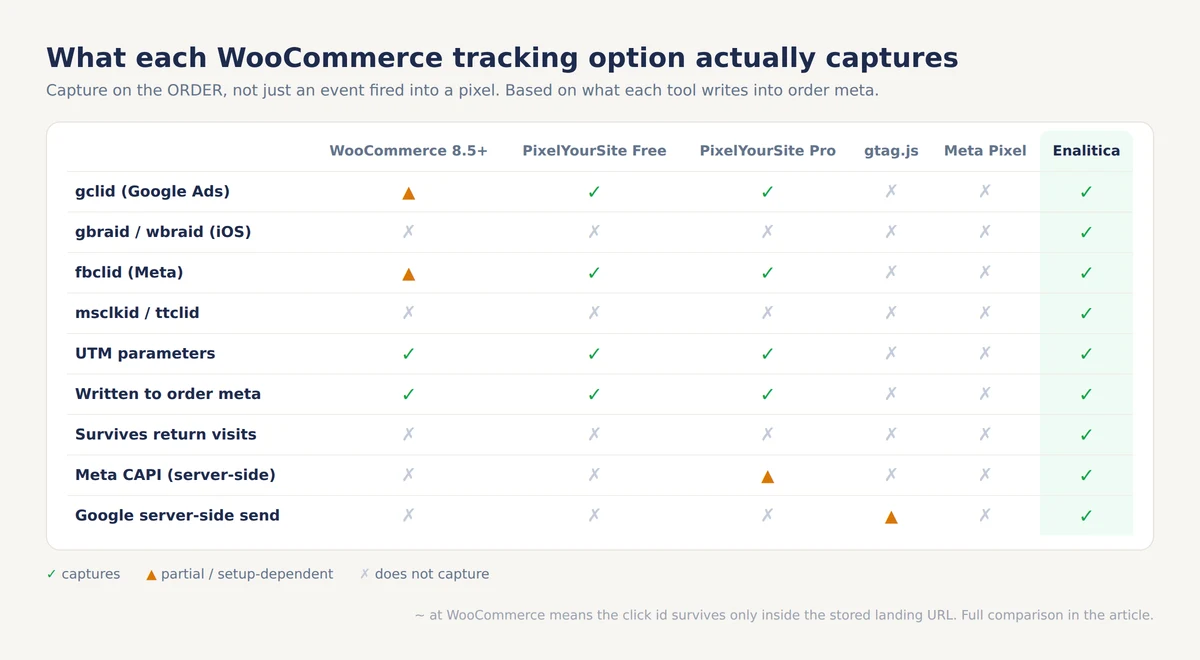
PixelYourSite is the most popular choice, with good reason. Choose it if you want browser pixels for Meta, Google and GA4 configured in one place, and its pys_enrich_data order meta gives you gclid and fbclid on orders. Skip it if iOS traffic matters to you: it captures neither gbraid nor wbraid, so iOS Google Ads buyers land as organic or direct, and the free version sends nothing server-side.
Pixel Manager for WooCommerce is the engineering-minded alternative. Choose it for clean pixel implementations across many platforms and solid dynamic remarketing tags. Skip it if your goal is order-level attribution history: its focus is firing events correctly, not building a queryable record on each order.
GTM4WP puts a proper dataLayer into WooCommerce and hands everything to Google Tag Manager. Choose it if you have someone who lives in GTM and wants full control over every tag. Skip it if you do not, because with GTM the capture quality is exactly as good as the container someone builds, and the failure mode is silent.
The rest in short. The official Google for WooCommerce and Meta plugins fire their own platform's pixel correctly but write no click IDs to order meta. Conversios bundles pixels with GA4 ecommerce reporting. All of them share the same two ceilings: browser-only capture, and no memory across sessions.
Do you need server-side tracking for WooCommerce?
Server-side tracking is worth having, for a different reason than the one usually sold. Meta's Conversions API and Google's server-side endpoints do not see customers that browser tracking legally cannot see; what they fix is delivery. A purchase event sent from your server is not eaten by an ad blocker, and the platform's bidding algorithm learns from more complete data.
Two implementation details decide whether server-side helps or double-counts. Every event needs a shared event_id so the platform can deduplicate the browser copy against the server copy, and conversions should be sent only for orders whose click is still inside the platform's attribution window; Google, for example, expects a click-to-conversion cycle under 90 days, and its upload has to start as a secondary conversion action when a website tag already bids, as our Google conversions API guide explains. Our Meta CAPI guide for e-commerce covers the full setup.
What server-side tracking is not is a consent workaround. The visitor who declined marketing cookies has declined exactly this kind of processing, and a compliant setup does not forward their purchase; the reasoning is laid out in server-side tracking vs order-based attribution. From our own pipeline: even with a clean, deduplicated setup, 60 to 70 percent of gclid conversions import into Google Ads successfully, because Google rejects expired clicks and clicks from free listings.
Any vendor quoting 100 percent is quoting a number the platform itself makes impossible.
Setting up complete WooCommerce conversion tracking step by step
Complete WooCommerce conversion tracking takes four steps: keep Order Attribution on, add persistent click ID capture, add server-side sending with deduplication, and verify each link of the chain on a real order. The order of steps matters less than actually finishing the last one, because most broken setups fail silently.
Step 1: keep the built-in Order Attribution enabled. It is your floor. Even alone, it classifies same-session purchases and stores the session entry URL that a better tool can mine later.
Step 2: add persistent capture for all click IDs. This is the single highest-impact step, and the one no popular plugin fully covers: the capture must include gbraid and wbraid, persist in a first-party cookie for around 90 days to match Google's attribution window, and write into order meta at checkout. The three practical methods, from a PHP snippet to a full script, are compared in how to capture GCLID and FBCLID in WooCommerce.
Step 3: add server-side sending with an event_id. Send purchases to Meta CAPI and Google, deduplicated against the browser pixel, gated by consent.
Step 4: verify on a real order. Open your store with ?gclid=TEST123 appended to the URL, accept the cookie banner, place a test order, then check the order's meta in the admin (or the database) for the stored value.
Then check a real paid order a few days old. If the click ID is there, the chain holds; if not, work backwards station by station. In Enalitica this whole check is one panel: the script's heartbeat, checkout confirmations and the click ID capture rate per store are visible without touching the database.
Four WooCommerce tracking traps from real stores
The traps below all come from production stores we monitor. None of them shows up as an error anywhere; each one quietly bends your numbers until someone asks why the report disagrees with the bank account.
Google Shopping's free srsltid parameter poses as paid traffic
Google's Merchant Center appends an srsltid parameter to clicks on free product listings. GA4 reports much of this traffic as google / cpc, which credits paid campaigns with revenue that cost nothing. The volume is not trivial: in Enalitica's data, last 90 days to 28 September 2026, 2.4 percent of orders carried an srsltid, more than all Microsoft, TikTok and ChatGPT click IDs put together. The fix is to treat srsltid as its own signal and never let it imply an ad click.
Payment gateway referrals steal the last click
A buyer who pays through PayPal, Klarna or a bank's 3D Secure page returns to your store from that domain, and naive attribution hands the whole order to paypal.com / referral. The gateway then looks like your best marketing channel. The unwanted referral list is the fix, and we wrote a full setup guide for payment gateway referrals in GA4.
Back-office orders poison your tracking metrics
Phone and showroom orders typed into the admin carry created_via = admin and never had a browser session, so no tracking setup on Earth can attribute them. If they are counted in your denominator, a healthy store looks broken. In a store with a showroom or a phone line, the "unknown" share can turn out to be mostly orders staff typed in by hand; excluding non-web orders is the difference between a real signal and a false alarm.
Email flows without UTMs vanish into direct
Automated flows, abandoned cart emails especially, regularly go out without UTM parameters, and their clicks land as direct traffic. Klaviyo stamps its own _kx click token onto the URL, which proves an email click even when the UTMs are missing; capture it and the channel comes back. The details are in our Klaviyo attribution guide.
Stores running a partner program have one more set of click IDs to capture: the affiliate networks' own parameters, which prove a partner click the same way a gclid proves an ad click; affiliate attribution without double counting covers that layer.
How Enalitica tracks WooCommerce orders end to end
Enalitica treats the order, not the analytics event, as the source of truth for WooCommerce tracking. Orders come in through the WooCommerce REST API, and each one is enriched from every source available: our script's captured click IDs in order meta, WooCommerce's own Order Attribution fields, the session entry URL parsed for click IDs, a thank-you page beacon, and cross-device identity stitching that links a phone-side click to a desktop-side order through a hashed email, never the raw address.
The capture layer holds eight click IDs (gclid, gbraid, wbraid, fbclid, msclkid, ttclid and the Microsoft and LinkedIn variants) in a first-party cookie for 90 days. At checkout, a bridge fills WooCommerce's own attribution fields only when they are empty or about to say Direct, so a real same-session source is never overwritten. The script reads the store's consent platform, including Google Consent Mode, and a declined visitor is not captured and never forwarded to Meta or Google.
Because every claim above is a claim about evidence, the product shows the evidence directly. Each store gets a coverage panel that sorts every order into one of four classes, and the percentages always add up to 100:
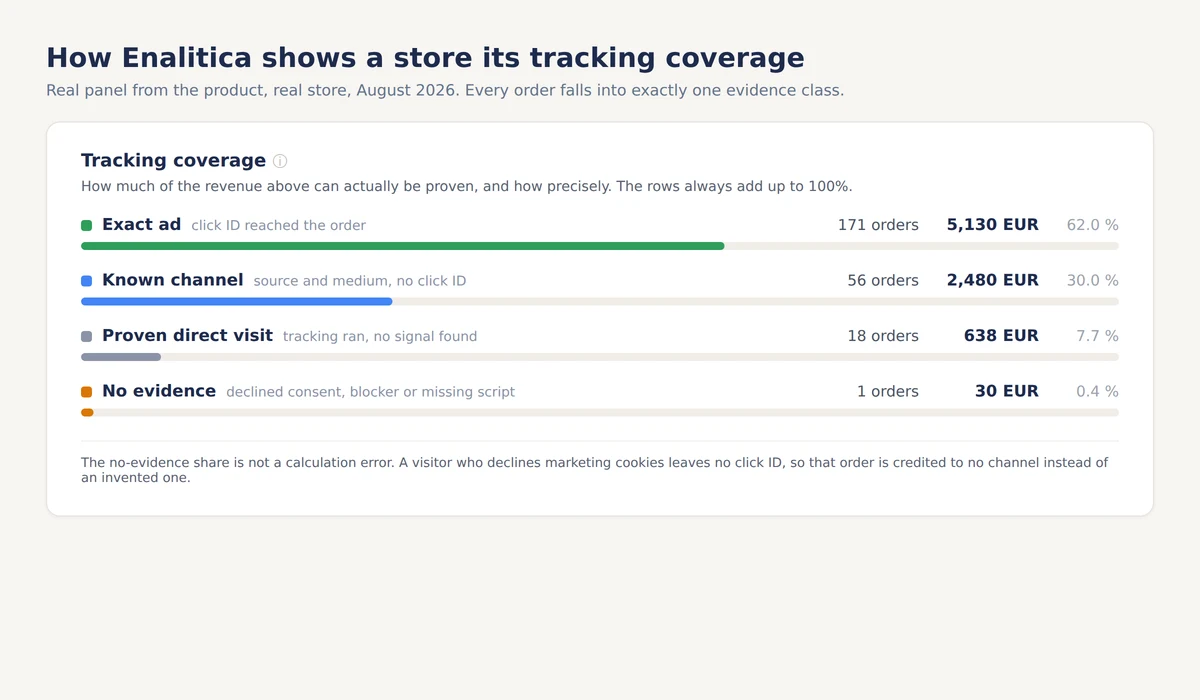
The four classes are the same evidence the audit asks for, read per order instead of per pixel event, and the "no evidence" row is the one to watch after every theme, checkout or banner change.
We show the "no evidence" row instead of hiding it. A tool that claims zero unknown orders is describing either a consent bypass or an invented number, and you deserve to know which.
WooCommerce tracking setup checklist: 30 minutes
- [ ] WooCommerce 8.5+ Order Attribution enabled (Settings, Advanced, Features)
- [ ] Click ID capture installed that includes
gbraid,wbraid,msclkidandttclid, not onlygclidandfbclid - [ ] Capture cookie is first-party and lives about 90 days, matching Google's click window
- [ ] Checkout writes click IDs into order meta, verified on a test order with
?gclid=TEST123 - [ ] Server-side purchase events carry an
event_idand deduplicate against the browser pixel - [ ] Consent banner is readable by your tracking tool, and declining actually stops capture
- [ ]
srsltidtraffic is not counted as paid Google traffic - [ ] Payment gateways are on the unwanted referrals list
- [ ] Admin and phone orders are excluded from attribution rates
- [ ] A real paid order from last week carries a stored click ID
Frequently Asked Questions
Does WooCommerce track conversions by default?
Partially. Since version 8.5, WooCommerce's built-in Order Attribution records UTM parameters, the referrer, the device and the session entry URL on every order, with no setup. It does not persist click IDs across sessions, so returning buyers are recorded as Direct, and it sends nothing to ad platforms.
Does WooCommerce Order Attribution require cookie consent?
WooCommerce classifies its Order Attribution cookies as necessary for the feature, but European regulators treat marketing attribution cookies as consent-requiring, so most compliant EU stores gate them behind the banner. Practically: if your consent tool blocks WooCommerce's inline scripts, Order Attribution stops too, which is worth checking after any banner change.
Why do half of my WooCommerce orders show as Direct?
Because Order Attribution's cookies are session-scoped: any buyer who clicked an ad in an earlier visit and returned directly is recorded as Direct. The full mechanism and the fixes are in why half your WooCommerce orders say Direct.
Does server-side tracking bypass the cookie banner?
No. Server-side delivery fixes ad blockers and browser restrictions eating your events, but a visitor who declined marketing cookies has declined this processing too. A compliant server-side setup does not forward their purchase, which is why honest tools report a match rate rather than 100 percent.
How do I check whether my store captures gclid?
Visit your store with ?gclid=TEST123 appended to any URL, accept the cookie banner, and place a test order. Then open the order in the admin and inspect its meta fields, or query wp_postmeta for _gclid and _wc_order_attribution_session_entry. If neither carries the value, the capture chain is broken before the order.
What share of orders should have a known source?
On the WooCommerce stores we track with full click ID capture, unattributed web orders typically fall to single digits; without capture, roughly half of web orders can lose their source. There is no universal number: in Enalitica's data, last 90 days to 28 September 2026, the Direct share ran from 13 to 48 percent of orders per store, and your consent rate and audience set the floor, and anything above roughly 30 percent unknown usually means broken capture rather than privacy-conscious customers.
Sources
The outside pages this article relies on. Links checked on 28 September 2026.
- WooCommerce 8.5 shipped Order Attribution in January 2024 (developer.woocommerce.com)
- treats a session as lasting 30 minutes (woocommerce.com)
- deduplicate the browser copy against the server copy (developers.facebook.com)
- click-to-conversion cycle under 90 days (support.google.com)
- appends an srsltid parameter to clicks on free product listings (support.google.com)
Figures marked "in Enalitica's data" are aggregates from the real orders of the stores we measure, with no names and no individual orders. How we measure.
See your real numbers
Import 30 days of orders or leads during a 5-minute onboarding. Works for e-commerce and service businesses.
See plans and pricing