
Assisted Conversions: Check Them Before You Pause a Campaign
Assisted conversions explained: why a low-ROAS campaign may be opening half your sales journeys, how to see assists in GA4, and the checklist before pausing.

Tilen Ledic
Written by
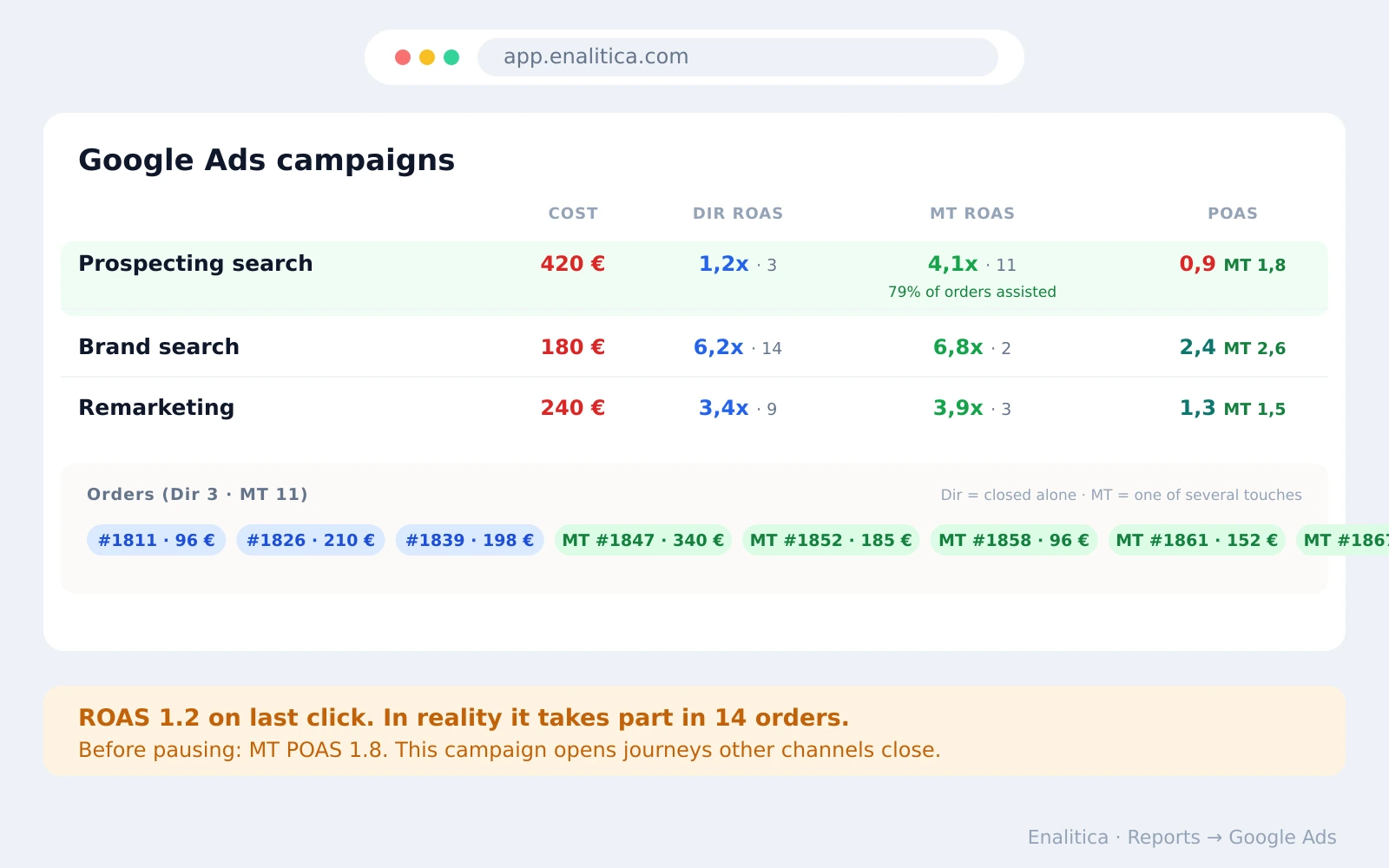
A campaign shows ROAS 1.2 and gets paused on a Friday afternoon. Six weeks later the "good" campaigns are down too, and nobody connects the two events. The paused campaign was not closing sales; it was opening them, and the only place that showed up was a report nobody checked.
Assisted conversions are the purchases a campaign helped along the way without getting the final click. This guide covers what assisted conversions are and why last-click ROAS hides them, how to see assists in GA4, what pausing really costs beyond the media budget, why assists must be judged on profit (POAS) with the same weight as revenue (ROAS), and the five-minute checklist to run before any campaign gets switched off.
What are assisted conversions?
An assisted conversion is a sale where the campaign was one of the touchpoints on the path but not the last one. The buyer clicked a Google ad on Tuesday, compared brands on Thursday, and bought through a Meta remarketing ad on Sunday: the Google campaign assisted, the Meta campaign closed.
Multi-channel paths are the norm, not the exception: a Harvard Business Review study of 46,000 shoppers found 73% used multiple channels on their journey. Last-click reporting hands the entire sale to the final touchpoint, so every earlier touch reads as zero. The campaigns doing the opening work (generic search terms, prospecting audiences, upper-funnel formats) are systematically the ones that look worst on a last-click screen, and the same blindness applies across whole channels, which is why multi-touch attribution exists.
Why last-click ROAS undervalues campaigns that open journeys
Because the roles in an account are not symmetrical. Brand search and remarketing stand at the end of journeys that something else started; they collect the last click almost by definition. Prospecting campaigns stand at the beginning, where nobody buys on the spot. Judge both groups on last-click ROAS and the closers look brilliant while the openers look like waste. Opening one order's timeline in customer journey tracking makes that division of labour visible in seconds.
The budget consequence compounds quietly. Cut the "weak" opener and for a few weeks nothing happens, because the pipeline it filled is still draining. Then remarketing audiences shrink, brand searches thin out, and the closers' ROAS sinks, with nothing on any dashboard pointing back at the pause. The damage is real but arrives late and lands on a different row of the report.
How to see assisted conversions in GA4
The old Universal Analytics report named "Assisted Conversions" is gone; in GA4 the same picture lives in the Advertising section. Two views do the work: Attribution paths shows early, middle and last touchpoints per conversion, and Compare models shows how credit shifts between last click and data-driven attribution. A channel that gains meaningfully when you switch models is assisting more than your default report admits.
Three limits to know. GA4 shows this at channel level, so "Paid Search assists a lot" is visible but "which campaign, and which orders" is not. Larger properties hit sampling in these reports, so numbers can wobble between runs. And the credit being shifted is revenue as GA4 measured it: no product costs, no returns, no VAT, which is exactly the gap between an interesting chart and a budget decision.
Click-assisted and impression-assisted conversions in Google Ads
Google Ads keeps its own assist metrics, separate from GA4, in the Assisted conversions attribution report (Goals, then Measurement, then Attribution). Today the report counts click and view assists: a click or an engaged view of your ad that sat on the conversion path but was not the interaction right before the conversion. Older reports and Search Ads 360 split the same idea into the columns Click-assisted conv. and Impr.-assisted conv., the second counting conversions where an ad was only shown before a later click converted. All of it is limited to Google's own ads: an assist from Meta, email or organic search never appears here.
The most useful reading is the ratio of assists to last-click conversions (Click-assisted conv. / last click conv. in the older column set). A value near 0 marks a closer (brand search, remarketing), a value above 1 marks an opener: a keyword that starts more journeys than it finishes, and exactly the kind of keyword a last-click report tells you to cut. Read impression assists more cautiously, because a shown ad proves nothing about influence, the same problem as view-through conversions in Meta.
Two practical limits remain. The columns use Google's own conversion count, including modeled and view-based conversions, rather than your store's orders, and they cannot tell you which orders were assisted or how profitable they were. That is why Enalitica takes the same idea one step further and shows each campaign's assisted orders as real order numbers with profit next to them, so the pause decision rests on money rather than on a ratio.
Pausing a Google Ads campaign: lag, learning and lost assists
Pausing costs more than the spend it saves, three ways. First, conversion lag: orders keep landing days after clicks, so a campaign judged on last week's numbers is judged mid-flight; evaluate 14 to 30 days before concluding anything. Second, Smart Bidding: a paused campaign stops feeding the bidding model, and on restart it re-enters learning instead of resuming where it left off. Third, the invisible part: every journey the campaign would have opened next month is gone, and that loss books itself under your other campaigns' results.
None of this means never pause. It means a pause is a real decision with lagged costs, so the evidence should be more than one bad last-click number. Often a budget cut, tightened negative keywords or excluded placements achieves the saving without resetting anything.
ROAS and POAS: judge assists on profit, not only revenue
An assisted order is only worth protecting if there is margin inside it. MT ROAS (revenue of all orders the campaign touched, divided by its spend) answers "does this campaign participate in sales". MT POAS (profit of those same orders after product costs, shipping, fees and returns, divided by spend) answers the question the pause decision actually needs: "are the journeys this campaign opens profitable".
The two can disagree hard. A campaign assisting orders full of low-margin, frequently-returned products can show MT ROAS 4.0 and still lose money end to end; one assisting high-margin orders can justify itself at half the revenue. That is the same ROAS versus POAS gap that applies to direct sales, applied to assists, and it is why both metrics deserve equal weight in the same table: revenue tells you the campaign matters, profit tells you whether to pay for it.
The assist check is one gate of a larger decision; the full framework, thresholds included, is in when to pause a Google Ads campaign.
How Enalitica shows assisted orders next to ROAS and POAS
Enalitica puts the assist check on the same row as the pause decision. Every campaign in the Google, Meta and LinkedIn tables carries Dir ROAS (orders the campaign closed alone), MT ROAS with the count of influenced orders and the share of its orders that came with an assist, and POAS next to MT POAS, so revenue and profit sit side by side at equal weight.
Click the row and the campaign expands into the actual orders behind the numbers: blue chips for orders it closed alone, green MT chips for orders where it was one of several touches, each with order number and amount. "This campaign assists a lot" stops being a model's opinion and becomes a list of receipts. The rule of thumb ships with the table: a campaign is a true pause candidate only when POAS and MT POAS are both below 1.0.
The same guard runs where it matters most: Enalitica's automatic campaign recommendations check assist-inclusive profit before ever proposing a pause, so a journey-opening campaign gets "improve" with an explanation instead of "kill". At keyword level, the click-history Assists column marks search terms that were a middle step in real purchases, and a keyword with assists is never labeled safe to exclude.
Book a demo and bring the campaign you are about to pause; we will open its assisted orders together first.
The five-minute checklist before pausing any campaign
- Look at influenced orders, not just direct. If MT numbers are a multiple of direct, the campaign is an opener; treat the last-click ROAS as the floor of its value, not the truth.
- Compare POAS and MT POAS. Both below 1.0 over a real window: legitimate pause candidate. MT POAS healthy: fix it (terms, bids, audiences), do not kill it.
- Open its orders. Journey positions and amounts tell you in one glance whether the assists are a handful of cheap orders or the backbone of the month.
- Respect the lag. Judge 14 to 30 days, never the last few days of a Smart Bidding campaign.
- Prefer the smaller knife. Budget down, negatives, placement exclusions; a pause resets learning and drains the pipeline for weeks.
Frequently Asked Questions
What is the difference between assisted conversions and last-click conversions?
A last-click conversion credits the sale to the final touchpoint before purchase; an assisted conversion records that a campaign appeared earlier on the same path. One order can therefore have one last-click credit and several assists, which is why assist counts across campaigns never sum to your order total.
Where is the assisted conversions report in GA4?
The Universal Analytics report of that name no longer exists. In GA4, open the Advertising section: Attribution paths shows early, middle and last touchpoints, and Compare models shows how credit moves between last click and data-driven attribution. Both work at channel level, not order level.
Should I pause a Google Ads campaign with a low ROAS?
Not on the last-click number alone. First check its assisted orders and its MT POAS over 14 to 30 days: a campaign that opens profitable journeys deserves fixing, not pausing. Pause when both direct and assist-inclusive profit are below break-even across a real window.
What is a good share of assisted conversions?
There is no universal benchmark: closers (brand search, remarketing) naturally run low assist shares, openers (generic search, prospecting) run high ones. The useful reading is the role each campaign plays and whether the journeys it participates in are profitable, not chasing a percentage.
See your real numbers
Import 30 days of orders or leads during a 5-minute onboarding. Works for e-commerce and service businesses.
See plans and pricing