
Negative Keywords in Google Ads: Stop Paying for Clicks That Never Buy
How to pick negative keywords that cut real waste without killing terms that quietly assist sales: a 10-minute audit, thresholds and three mistakes.

Tilen Ledic
Written by
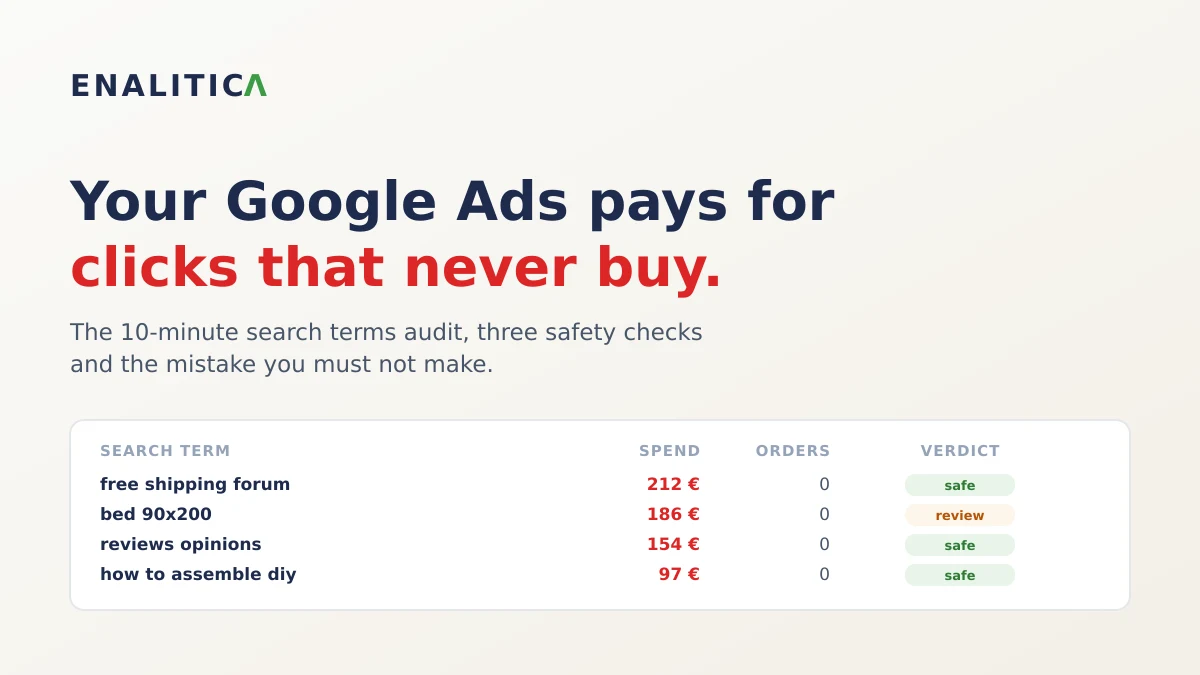
Every Google Ads account pays for some clicks that never turn into money. How much is up for debate: WordStream's 2026 study of 15,666 accounts put the average waste flagged by their grader at about $1,127 per month, and found 29% of accounts recorded zero conversions over 90 days. Optmyzr's counterpoint, from a vendor whose tool sells the fix, is more sober: its 2024 comparison of more than 7,000 Performance Max campaigns with and without account-level exclusions found a difference in conversion rate of a quarter of a percentage point, and its advice is that most accounts negate too broadly, not too little.
Both can be true. There is real money leaking through search terms that will never buy, and the leak is smaller than the scary ads make it sound. The bigger risk for most store owners is actually the opposite one: cutting a keyword that was quietly helping sales. Here is how to do the audit right.
The 10-Minute Google Ads Search Terms Report Audit
- In Google Ads, open Campaigns → Insights and reports → Search terms. This lists the actual phrases people typed, not the keywords you bought.
- Set the date range to the last 90 days. Shorter windows lack volume; year-old data reflects intent that may be gone.
- Add columns for Cost and Conversions, then sort by cost.
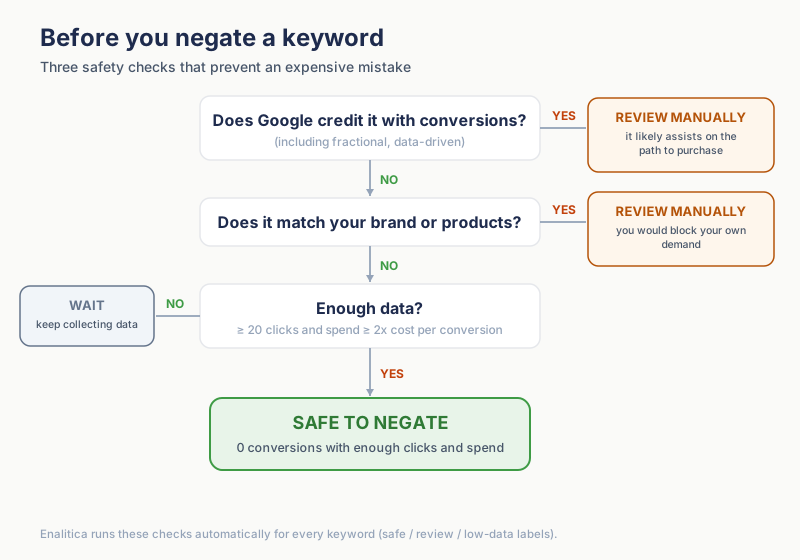
- Filter: Conversions = 0 and Cost greater than your threshold. The honest threshold is not a fixed number; use 2x your cost per conversion (if an order costs you 25 € of ads on average, judge terms that burned 50 € or more).
- Read each surviving term and ask the three questions below before adding it as a negative.
- Add negatives at the campaign level, or as account-level negative keywords if the same junk hits several campaigns (Google allows 1,000 per account, and they apply to Performance Max and Shopping as well). Phrase match is the usual default.
Ten minutes, once a month, is genuinely enough for most stores to keep wasted ad spend in check. The search terms report matters most where the keyword and the query drift apart: in Enalitica's data, last 90 days to 28 September 2026, the keyword that won the order was phrase match for 36% of Google Ads orders with a known keyword, exact match for 35% and broad match for 22%, so roughly six orders in ten came through a match type where the query can wander away from the keyword you bought.
The skill is not finding the terms; it is not killing the wrong ones.
Three Negative Keyword Mistakes That Cost More Than the Waste
Mistake 1: judging too early. A term with 40 € spent and 9 clicks is not "proven waste", it is noise. Professional tools bake this in: Adalysis's shipped default refuses to flag a term before 150 clicks with zero conversions in 90 days. You do not need to be that strict, but hold the line at a minimum click count and the 2x cost-per-conversion floor, and never judge spend from the current month alone (conversions lag clicks).
Mistake 2: last-click blindness. A search term can start a purchase it never finishes: someone researches "kids room ideas", clicks your ad, leaves, and buys three days later through a brand search. With data-driven attribution, Google shows this as fractional conversions: the term shows 0.31 conversions instead of zero. Before negating anything, check whether the conversions column shows a fraction. A term with 0.31 conversions is not waste; it is an assist, and negating it cuts the top of your funnel.
Mistake 3: negating your own demand. Category and product terms ("bed 90x200") sometimes have a bad quarter. Negating them because of one bad stretch blocks the searches your business exists for, and on DSA or Performance Max campaigns one broad negative can silence a whole category. The rule from Search Engine Land's 2026 strategy guide is the one to remember.
Remove proven irrelevance, not theoretical inefficiency.
The Hidden Search Terms Google Never Shows You
Since 2020 Google omits search terms without enough query activity from the report, citing privacy, and parks them in an unlabeled "other search terms" bucket. Seer Interactive measured the hidden share at 28% of paid search budgets; a 2025 analysis of $20M in spend put it around 51%, worst on phrase and broad match.
You cannot negate a query you cannot see.
The hidden bucket is only half of the blind spot. In Enalitica's data, last 90 days to 28 September 2026, the campaign is known for 95.8% of more than 1,700 Google Ads orders but the exact keyword for only 54.3%, and Performance Max, which discloses no search terms at all, delivered 30.5% of those orders. A per-term audit therefore covers about half of Google Ads revenue; the other half has to be judged at campaign level, on orders and margin.
The practical answer for the terms you can see is pattern-level thinking: if "free", "forum" and "how to" keep appearing across your visible junk terms, one phrase negative per pattern also blocks the hidden variations that share it.
Three mechanics worth knowing in 2026: negative keywords do not expand to close variants, so a negative "flower" does not block "flowers" and you must add plurals yourself; misspellings and casing, however, are covered automatically by the same rule (a change Google made in June 2024); and Performance Max now accepts up to 10,000 negative keywords per campaign, the same cap as Search since the limit rose from 100 in March 2025, so PMax is no longer an excuse for zero query hygiene. How negatives meet brand exclusions and the search terms report there is covered in our guide to Performance Max campaigns. And from September 2026 negatives have one more job: they are the only fence against the search term expansion that arrives with the automatic AI Max upgrade.
How Enalitica Decides Which Keywords Are Safe to Negate
The keyword analysis table in Enalitica (Poročila → Ključne besede) is this whole article as software: one table, every keyword, and three versions of the truth side by side.
- Orders (Enalitica): purchases our first-party tracking attributed to the term as the last paid click, matched by click ID over up to 12 months. Actual orders from your store, not a pixel's opinion.
- Google conv.: what Google's data-driven attribution credits the term with, fractions included. When this column disagrees with the orders column, that is the assist case from mistake 2, caught automatically.
- Assists: our tracking script remembers every Google ad click on a buyer's path, not just the last one. A term that was a mid-journey click on a real purchase gets counted here directly, and can never be labeled safe, no matter what the other columns say.
Every keyword gets a verdict: safe to negate (enough clicks, spend above 2x your real cost per conversion, zero credit in every column, no match with your brand, catalog, or campaign names), review (a conflicting signal, with the reason spelled out on hover), low data (too early to judge), or converting (brings orders, never touch it). "Select all" only ever picks the safe tier, and a built-in guide explains what to do with each verdict.
A second table hunts repeating patterns ("free", "forum", "how to") across your zero-conversion terms and negates them account-wide through a shared list, which also blocks the hidden variations Google never shows you. On every paid plan, selected negatives are written to Google Ads in one click, and every applied negative has an Undo button right in the table, so no decision is final.
Service businesses get the same table judged on inquiries instead of orders, with a twist we are especially proud of: each keyword shows which inquiries our own tracking tied to it, split by event, so you can see that a keyword brought two email clicks and a contact form even when Google reports zero for it.
Book a demo and we will run the audit live on your own search terms.
Frequently Asked Questions
How often should I audit Google Ads search terms?
Monthly is right for most stores; weekly only if you spend five figures. More important than frequency is consistency: the 90-day window means a monthly pass always sees every term with meaningful data.
Should I use negative phrase, exact, or broad match?
Phrase is the workhorse: it blocks any search containing your phrase in order. Exact negatives are for surgical cases (block "cheap beds" but keep "cheap bed frames with drawers" eligible). Broad negatives block any search containing all the words in any order; use them for words that are toxic in every combination ("free", "jobs", "torrent").
What about the conversions my store sees but Google does not?
The mirror problem of mistake 2: ad blockers and declined consent hide some real purchases from Google's conversion column, making decent terms look dead. This is why Enalitica judges terms against actual orders instead. If you run the audit manually, cross-check suspicious "losers" against your order list before negating.
Can Smart Bidding replace negative keywords?
Partially. Smart bidding learns to avoid non-converting auctions, but slowly and with your money as tuition. Negatives are also a statement of strategy that bidding cannot infer: search term data feeds smart bidding, so removing garbage sharpens what the algorithm learns from. Just do not over-negate; hundreds of theoretical negatives starve the same learning.
Sources
The outside pages this article relies on. Links checked on 28 September 2026.
- WordStream's 2026 study of 15,666 accounts (wordstream.com)
- Optmyzr's counterpoint (optmyzr.com)
- account-level negative keywords (support.google.com)
- Adalysis's shipped default (docs.adalysis.com)
- fractional conversions (jumpfly.com)
- Search Engine Land's 2026 strategy guide (searchengineland.com)
- omits search terms without enough query activity (support.google.com)
- Seer Interactive measured (seerinteractive.com)
- a 2025 analysis of $20M in spend (searchengineland.com)
- do not expand to close variants (support.google.com)
- in June 2024 (karooya.com)
- up to 10,000 negative keywords per campaign (support.google.com)
- rose from 100 in March 2025 (searchengineland.com)
Figures marked "in Enalitica's data" are aggregates from the real orders of the stores we measure, with no names and no individual orders. How we measure.
See your real numbers
Import 30 days of orders or leads during a 5-minute onboarding. Works for e-commerce and service businesses.
See plans and pricing