
AI Max for Search: What Switches On by Itself in September
AI Max for Search campaigns switches on automatically in September 2026. Which campaigns are affected, how to avoid the upgrade, and how to audit what it buys.

Tilen Ledic
Written by
AI Max for Search campaigns is Google's automation bundle that starts switching itself on inside a subset of existing Search campaigns on September 1, 2026. The black box that stores know from Performance Max is arriving in Search, the last campaign type with full control over which searches you buy. This guide explains what AI Max actually is, which campaigns the September wave catches and how to avoid the upgrade, which controls remain yours, and how to check from your orders what the expansion really bought. Facts verified on August 12, 2026; Google likes to move dates, so check the notifications in your own account too.
What Is AI Max for Search Campaigns
AI Max for Search campaigns is not a new campaign type. It is a bundle of three automations Google places inside an existing Search campaign: search term matching (the campaign also shows on searches your keywords do not cover), automatically created ad text, and final URL expansion (Google picks the landing page itself). The beta started in May 2025; general availability arrived on April 15, 2026.
Each of the three automations can be switched on or off separately, an important difference from Performance Max, where the bundle is take-it-or-leave-it. The story is part of a larger shift: Dynamic Search Ads are on the way out (no new ones can be created from January 2027, and in February 2027 the remaining ones migrate automatically), and Google's stated direction is that classic keywords become a starting point, not the boundary of the campaign.
AI Max Switches On by Itself in September 2026: How to Avoid It
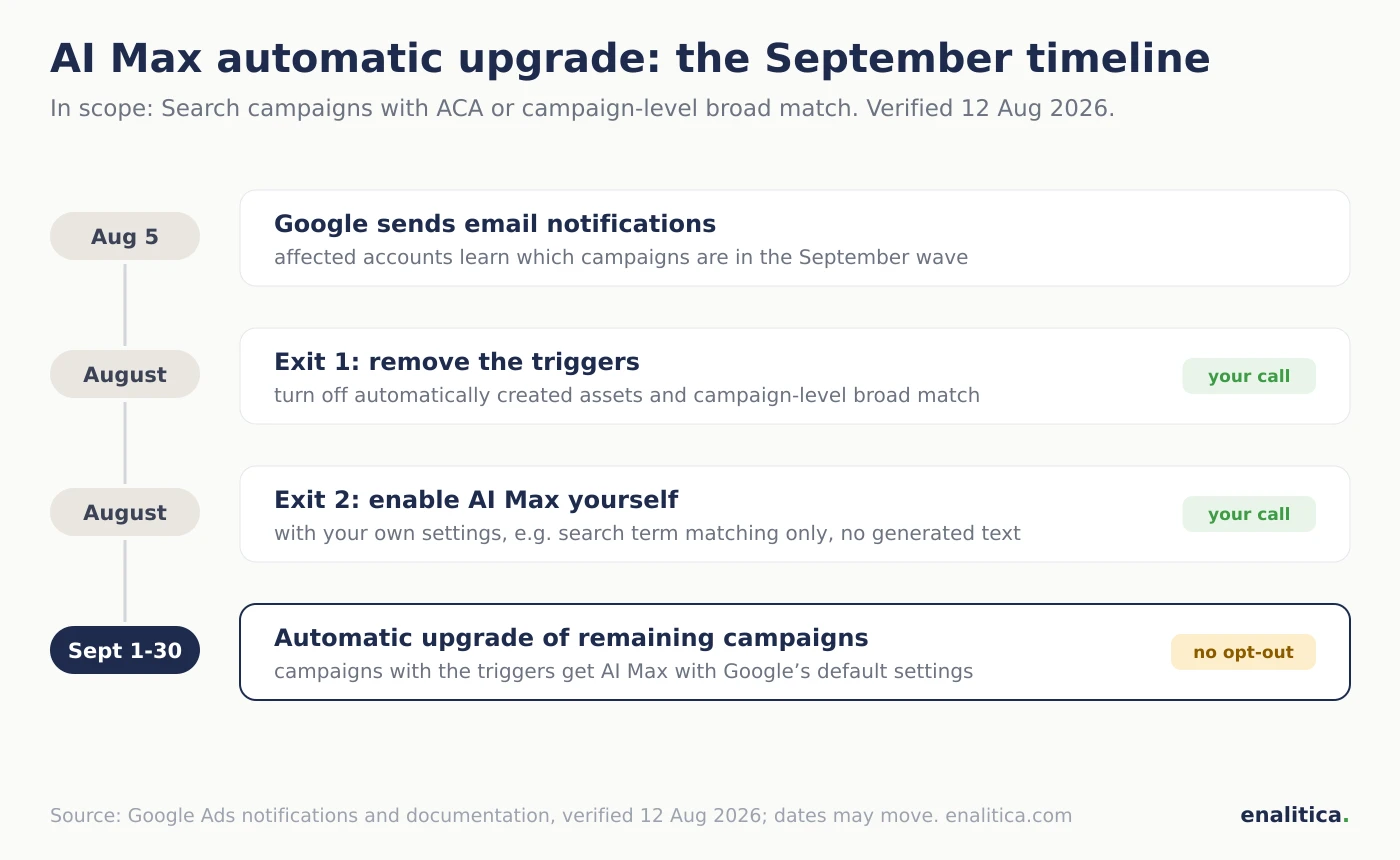
Between September 1 and 30, 2026, Google will automatically enable AI Max in Search campaigns that use automatically created assets (ACA, now "text customization") or campaign-level broad match; affected advertisers received an email notification on August 5, 2026. There is no opt-out switch, not in the interface and not through the API.
There are two ways to avoid the upgrade, both before September 1:
- Remove the triggers. Turn off automatically created assets and remove campaign-level broad match; a campaign without the triggers is not in the September wave.
- Enable AI Max yourself, with your own settings. The automatic upgrade brings Google's defaults; enabling it manually means you choose which of the three automations runs and which does not (for example search term matching only, without generated ad text).
Campaigns built on exact and phrase match keywords without ACA are outside the September scope; every campaign created with Enalitica is outside it too, because we build with phrase match and no ACA. The upgrade is not fate, but it is a deadline: after September the only question left is whether you picked the settings or Google did.
Which AI Max Controls Remain Yours?
Inside AI Max you still control each of the three automations separately, negative keywords, URL exclusions, brand lists and text guidelines; you do not control which searches the expansion covers, nor any individual generated ad text. The overview (verified August 12, 2026):
| Setting | Who decides |
|---|---|
| Each automation on or off separately (terms, text, URL) | ✓ you |
| Negative keywords (they also block the expansion) | ✓ you |
| URL exclusions and brand lists | ✓ you |
| Text guidelines for generated ad copy (up to 300 characters) | ✓ you |
| Search term matching off per ad group | ✓ you |
| Which searches the expansion covers | |
| The exact generated text at each impression | |
| Opting out of the September automatic upgrade | ✗ none exists |
The most important row is the second one: negative keywords also apply to searches the expansion buys. A campaign with clean negative hygiene has a fence; a campaign without one hands every boundary to Google. The same goes for your own brand: without an exclusion, the expansion can harvest your brand searches, the same trap as in Performance Max.
When Does AI Max Perform and When Does It Not?
AI Max performs on campaigns with conversion-based Smart Bidding (which is also the technical requirement: Maximize Conversions or Maximize Conversion Value, with or without targets), audited conversion tracking, and a catalog wide enough that new searches have something to find. Google quotes around 14 percent more conversions at a comparable cost from the beta (and up to 27 percent for campaigns that previously relied on exact and phrase match); those are Google's own numbers, not independent measurements. According to Google there is no minimum conversion count.
Caution is warranted in three cases. First, generated ad text: Google formally supports all languages, but nobody guarantees the quality in smaller ones, so for stores in smaller markets the sensible start is search term matching without generated text. Second, narrow niches and tight margins: the expansion buys new, unproven demand, and every euro of expansion brings back less than the previous one. Third, broken tracking: the automation learns from the conversions it sees, so run a conversion tracking audit before switching it on.
How Do You Check What AI Max Actually Bought?
You check what AI Max actually bought in the search terms report, where Google labels the match source since the AI Max rollout: a term was bought by your keyword or by the expansion (keywordless or campaign-level broad match). That is the key difference from Performance Max: with AI Max the new terms are named and you can judge them one by one.
A one-hour monthly routine: in the search terms report, filter the terms bought by the expansion and answer three questions for each. Is it relevant (if not, add a negative keyword)? Is it a search for your own brand (if yes, the expansion is harvesting demand that would have arrived anyway)? And do the highest-spend terms bring orders and profit, not just clicks? Only the third answer tells you whether the expansion is growing or just spending; without it, "more conversions" is as misleading as the highest ROAS in the account.
How Enalitica Creates and Measures AI Max Campaigns
Enalitica can create an AI Max campaign and then show from your orders what it is doing:
- Creation with a switch: the campaign builder creates a Search campaign with AI Max enabled, deliberately turning on search term matching only; generated ad text and URL expansion stay off until you enable them yourself in Google Ads. The campaign is created PAUSED, previewed through Google's own validation, and you start it.
- A label on what the expansion bought: in the keyword tables, terms bought by AI Max carry their own tag, separate from terms your keywords bought, next to the tag that says whether it is a search for your own brand.
- AI Max status on the campaign card: Campaign Health states for every Search campaign whether AI Max is on, and warns when it runs without any negative keywords at all, in other words without a fence.
- A verdict from orders: profit per campaign (POAS), new-customer share, returns and weekly verdicts apply to AI Max campaigns the same as to every other; the expansion is measured by what it actually brought to the till.
If you want to see what AI Max would mean on your numbers, see plans and pricing or book a live demo.
Checklist Before September 1
- Check the account email for Google's notification dated August 5, 2026.
- In every Search campaign, check the two triggers: automatically created assets and campaign-level broad match.
- Decide deliberately: remove the triggers, or enable AI Max yourself with your own settings.
- Clean up negative keywords now; after the switch they are the expansion's only fence.
- Protect your own brand with a brand list or negatives.
- Have conversion tracking audited; the automation learns from that data.
- Put a monthly search terms review, filtered by match source, in the calendar.
- Pick the judging number in advance: profit from orders, not conversion counts.
Frequently Asked Questions
Does AI Max switch on automatically?
For a subset of campaigns, yes: between September 1 and 30, 2026, Google automatically enables AI Max in Search campaigns that use automatically created assets or campaign-level broad match. Campaigns without those two settings are not in the September wave. There is no opt-out switch; the only ways out are removing the triggers or enabling it yourself before the deadline.
How do I avoid the automatic upgrade to AI Max?
Before September 1, 2026, turn off automatically created assets and remove campaign-level broad match, or enable AI Max yourself and thereby pick the settings on your own terms. Google offers no formal opt-out, neither in the interface nor through the API.
Does AI Max work in languages other than English?
Google's documentation states support for all Google Ads languages, including generated ad text. Nobody guarantees the quality of generated copy in smaller languages, so the careful start for stores in smaller markets is search term matching only, with generated text enabled later, once you have reviewed it, constrained by text guidelines if needed.
How is AI Max different from Performance Max?
AI Max is a bundle of automations inside a Search campaign; Performance Max is a standalone campaign type across all Google surfaces. Two practical differences: with AI Max each automation can be enabled separately, and search terms stay named with a labeled match source, while PMax does not disclose terms. AI Max is therefore more transparent, but it still expands beyond your keywords. Google's third automated type is Demand Gen campaigns, which do not answer searches at all but advertise in the YouTube, Discover and Gmail feeds.
How many conversions does AI Max need?
Google says there is no minimum conversion count; the technical requirement is conversion-based Smart Bidding (Maximize Conversions or Maximize Conversion Value). Common sense still applies: the expansion learns from conversions, so on a campaign with a handful of orders per month it has nothing to learn from, and every major change resets the learning.
What does "Total: AI Max expanded matches" mean in the search terms report?
"Total: AI Max expanded matches" is a summary row Google adds to the search terms report once AI Max is on: it sums the clicks, cost and conversions of every search term the expansion bought beyond your own keywords, so you can judge the expansion as one block before opening the individual terms. Read it next to the row for your own keywords; if the expanded block spends a large share but converts worse per euro, the audit routine above tells you which terms to negate, and the order-level view in Enalitica tells you whether those terms brought profit or only clicks.
See your real numbers
Import 30 days of orders or leads during a 5-minute onboarding. Works for e-commerce and service businesses.
See plans and pricing