
Customer Journey Tracking: Every Click From First Visit to Sale
Customer journey tracking on the level of one order or one enquiry: the first click, every session, the pages read, the time between touches and the outcome.

Tilen Ledic
Written by
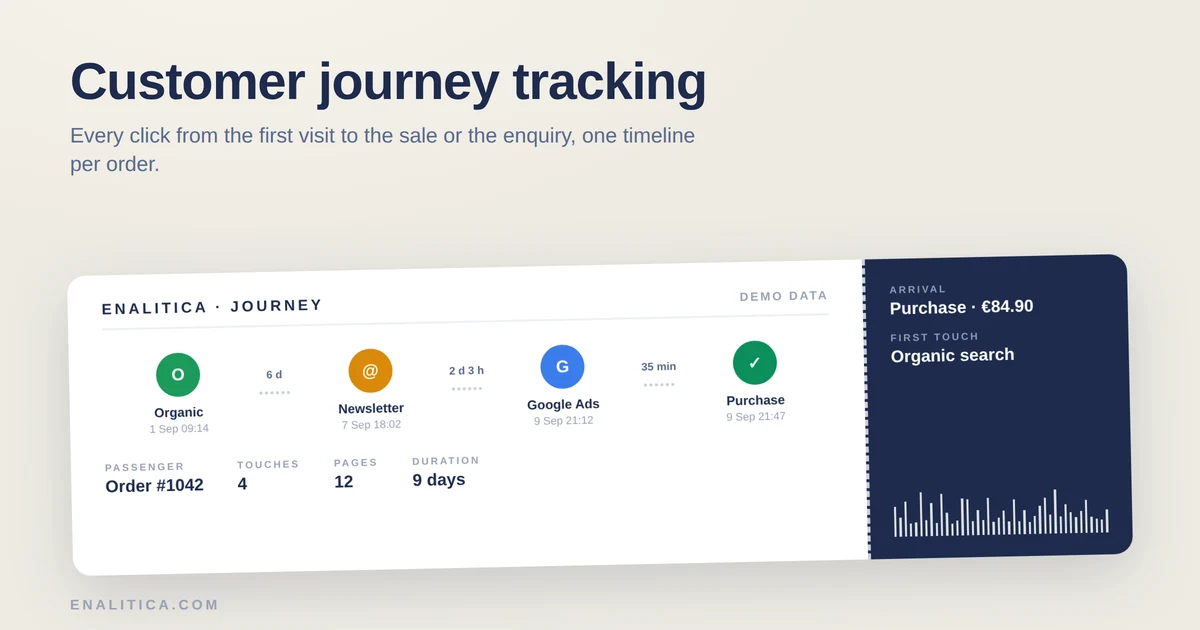
Your monthly report says Google Ads brought 41 orders. Useful, but it answers only one question: how much. It stays silent on how any single one of those sales actually happened, which ad was clicked first, what the buyer read in between, and how many days the decision took.
Customer journey tracking answers that second question. Instead of an aggregate table, you get one timeline per order: the first measured touch, every session with the pages viewed in it, the time between touches, and at the end the purchase. For a service business the same timeline ends differently, with an enquiry and, later, with the deal it turned into.
This article explains what such a timeline contains, why GA4 cannot draw it for a single buyer, how the same idea works for leads, and which limits any honest implementation has to admit.
What Is Customer Journey Tracking for a Single Order?
Customer journey tracking is the recording of every measured touchpoint of one buyer, anchored to one concrete conversion: an order in a shop, an enquiry on a service site. The anchor is what separates it from general web analytics, because every step in the timeline exists to explain that one sale.
A complete order timeline holds five kinds of evidence:
- The first touch: the earliest measured arrival of that visitor, with its channel (organic search, a Google Ads click, an e-mail, an AI assistant recommendation).
- Ad clicks with click IDs: a gclid, fbclid or LinkedIn click ID captured on arrival, often with the keyword or campaign that triggered it.
- Sessions with pages: which pages the buyer read during each visit, in order.
- Time gaps: how long the buyer waited between touches, from minutes to weeks.
- The conversion: the order with its amount, or the enquiry, stamped with its exact time.
A report that says Google Ads brought 41 orders answers how much. A journey answers how: which click came first, what the buyer read, and how long the decision took.
In Enalitica this timeline sits directly in the orders list: every order carries a "Pot" (journey) button that unfolds the full path inline, so checking a suspicious attribution takes one click, not an export.
Why GA4 Path Exploration Cannot Show One Buyer's Journey
GA4 does have a journey report, Path Exploration in the Explore section, but it works on aggregates: it shows that 3,120 anonymous users went from the home page to a category page, not what one specific buyer did before order #1042. Guides that teach the report, like Loves Data's walkthrough, map flows between events, never a named conversion.
Three properties make GA4 structurally unable to draw a per-order timeline:
- Aggregation: paths are grouped and counted; the individual sequence disappears. Practitioners who need journeys per user rebuild them in BigQuery precisely because the interface cannot show them.
- No order anchor: GA4's purchase event carries a transaction ID, but Path Exploration cannot start from one transaction and walk backwards.
- Sampling and thresholds: explorations sample large date ranges and hide rows below privacy thresholds, so rare paths, which is what a single order always is, vanish.
GA4 Path Exploration aggregates thousands of anonymous paths. A store owner disputing one refund, one review or one attribution needs the path of one specific order.
None of that is a bug. GA4 was built to describe traffic, and describing traffic is aggregation by definition. It just means the per-order question needs a tool whose unit of measurement is the order, which is the same argument we make about revenue in modeled conversions vs real orders.
Anatomy of an Order Timeline: First Click, Sessions, Pages
The demo timeline below is the actual Enalitica journey panel with demo data. Reading it from left to right tells the whole story of one order without a single query.
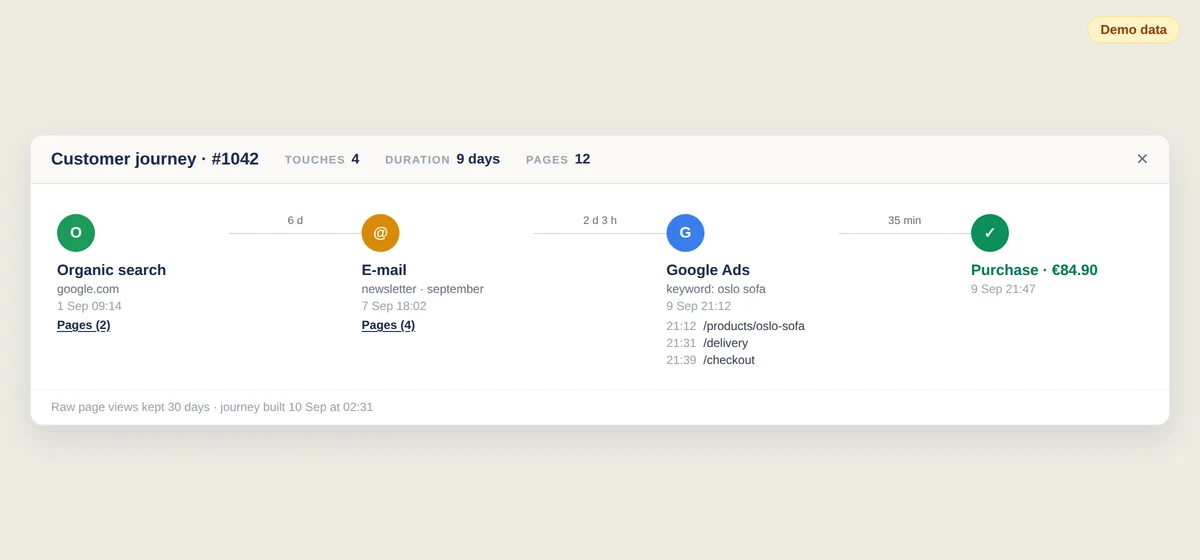
The first circle is the first touch, here an organic search visit that read two product pages. Then nothing for six days, which the timeline states plainly as a gap, because the silence between touches is data: it tells you how long your product stays in a buyer's head.
The next touch is a newsletter click, then two days later a Google Ads click on a brand keyword, the kind of journey where last-click attribution would hand the entire sale to the brand campaign. Seen as a timeline, the campaign obviously closed a sale that organic search and the newsletter built, which is the daily bread of multi-touch attribution and assisted conversions, shown here for one concrete order instead of as a model.
Under each dated touch sit the pages that session read. Which category pages, which product page, whether the delivery-terms page appeared right before checkout: this is content analytics attached to money, not to page views.
The last circle is the purchase, green, with the amount and the exact minute. A cancelled order gets a red storno step instead, so the timeline never pretends a refunded sale was a win.
How Does the Journey Work for Service Leads and Enquiries?
A service business has no checkout, so the timeline's anchor is the enquiry: a submitted form, a click on the phone number, a click on the e-mail address. Everything before it works exactly like the shop version, with the first touch, sessions, pages read and time gaps.
The service timeline adds one thing a shop cannot have: an outcome step that ends the story. An enquiry is not revenue yet. Weeks later it becomes a won deal with a value, a qualified lead, or a lost one, and the timeline shows that ending on the same line as the path that produced it.
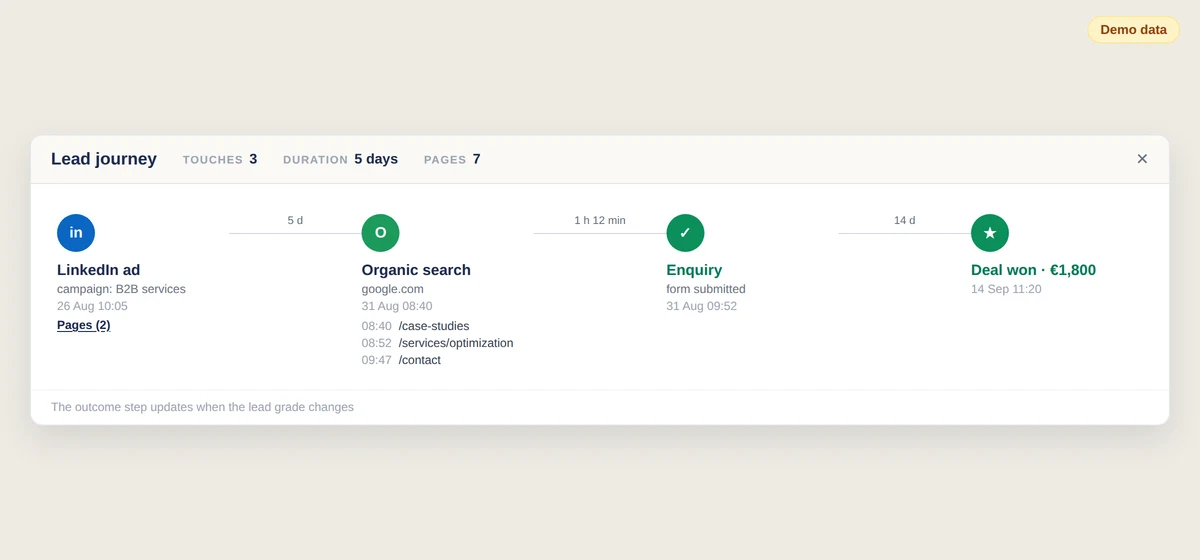
That combination is what makes the lead timeline more than a curiosity. When lead source tracking tells you a campaign brought 30 enquiries, the journeys of those 30 tell you which paths ended in "deal won" and which in "lost". If won deals consistently read the references page and lost ones never did, that is an argument about your website, not your ads, and no cost per qualified lead figure alone would have surfaced it.
In Enalitica the lead timeline lives in the lead-quality table, one "Pot" button per enquiry, and the outcome step updates when the grade of the lead changes.
Honest Limits of Journey Tracking: Sessions, Cookies, Retention
Every journey tool reconstructs the path from partial evidence, so the honest version names its assumptions. These are the ones behind the timelines above:
- A session ends after 30 minutes of silence. Page views are grouped into visits with a 30-minute inactivity rule, the same convention GA4 uses. A buyer who left a tab open over lunch counts as one session, not two.
- A click ID found at purchase proves the click, not its moment. When an ad click ID surfaces from a cookie at checkout and its capture time is unknown, the timeline shows the click without a timestamp instead of inventing one.
- Raw page views live 30 days; the built journey is permanent. Journeys are assembled nightly while the raw material exists, then stored with the order forever. The raw browsing log itself is deliberately short-lived.
- Paths only, never query strings. The timeline stores /category/sofas, not search terms or personal parameters.
- Consent decides what exists. Tracking runs only after the visitor's consent, so a journey can begin at the buyer's second visit because the first one was never measured. A shorter path shown honestly beats a complete-looking one that was partly modeled, which is the entire argument of our TrueROAS comparison.
- One browser, one journey. A buyer who researches on a phone and orders on a laptop appears as a shorter laptop journey. Cross-device stitching without logins would require fingerprinting, and we refuse that trade.
A journey timeline is reconstruction from evidence, and honest reconstruction names its rules: a 30-minute session boundary, click IDs without invented timestamps, and paths that begin where consent began.
How Enalitica Builds the Journey for Every Order and Enquiry
Enalitica assembles journeys automatically, with no setup beyond the tracking you already have. A nightly job builds the timeline for every new order and every new enquiry while the raw page views are fresh, and opening a journey that does not exist yet builds it on the spot.
Every channel the platform attributes is a possible step: Google Ads, Meta, Instagram, LinkedIn, Microsoft and TikTok ads, organic search, e-mail, SMS campaigns and AI assistant referrals (a buyer arriving from ChatGPT or Perplexity appears as its own violet AI step), affiliates, referrals, social and direct. When we add a channel to attribution, the journey learns it in the same release; the codebase enforces that pairing at compile time.
The timeline reuses the evidence the platform already captured for attribution: click IDs with their capture times, UTM parameters, Google's click history, keyword touches from search campaigns. Nothing is remodeled for display, so the journey and the attribution report never tell two different stories about the same order.
What Can You Learn From an Order's Path to Purchase?
Individual timelines pay off when they change a decision. Four uses come up the most:
- Judge content by revenue, not views. The pages that appear in journeys right before purchases are your sales pages, whatever your page-view report thinks. A guide that shows up in half of all won journeys earns its place.
- Set expectations for the decision window. When typical journeys take 9 days and three touches, a campaign judged after a weekend is being judged too early, an argument we walk through in when to pause a Google Ads campaign.
- Defend budgets for opening channels. Brand-search clicks that close journeys started by newsletters or organic content look invincible in last-click reports. Timelines show who actually opened the sale.
- Compare won and lost enquiry paths. For service businesses, the outcome step turns journeys into a comparison set: what did won deals read that lost ones did not?
None of these require reading every journey. The habit that works is checking the timeline whenever a number surprises you: an order from a paused campaign, an enquiry from a country you do not serve, a channel that suddenly doubles.
Frequently Asked Questions
What is customer journey tracking in ecommerce?
Customer journey tracking in ecommerce records every measured touchpoint of one buyer and anchors the sequence to a concrete order: first touch, ad clicks with click IDs, sessions with the pages viewed, time gaps between visits and the purchase itself. It answers how a specific sale happened, while standard reports only count how many sales a channel produced.
How is journey tracking different from multi-touch attribution?
Multi-touch attribution distributes credit for conversions across channels using a model, and reports the result as aggregate numbers. Journey tracking shows the raw sequence of one order's touches with timestamps and pages, no credit split applied. The two answer different questions: attribution decides budgets, journeys explain and verify individual sales. Enalitica shows both from the same underlying evidence.
Can you track the customer journey without cookies and consent?
No, not honestly. A journey is stitched from first-party measurements of repeat visits, which requires a consented identifier. Tools that promise complete cross-device journeys without consent are either fingerprinting, which EU regulators treat as requiring consent too, or modeling the gaps. An honest journey simply starts later when consent arrived, and says so.
How do you track the journey of a lead instead of a purchase?
A lead journey uses the enquiry as its anchor: the form submission, phone click or e-mail click takes the place of the order. The path before it is built the same way, from visits, pages and ad clicks of the same visitor. The lead timeline then adds an outcome step, won with a deal value, qualified, or lost, so the enquiry's path and its final result are read together.
See your real numbers
Import 30 days of orders or leads instantly during 5-minute onboarding. Works for e-commerce and service businesses.
Start free