
Lead Source Tracking: See the Campaign Behind Every Enquiry
Lead source tracking for service businesses: why GA4 and gut feel disagree, how to see the channel, campaign and keyword behind every enquiry and call.

Tilen Ledic
Written by
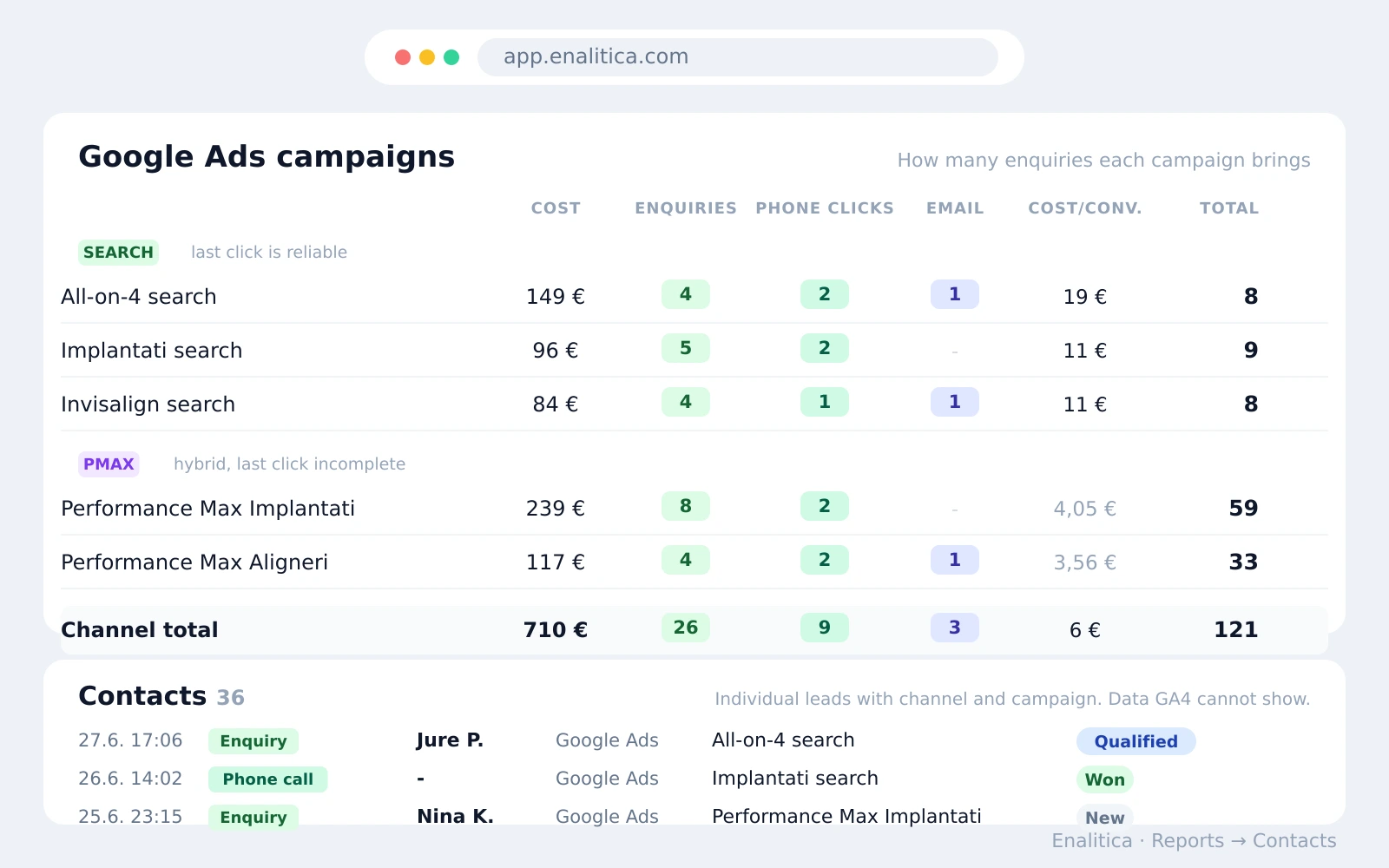
Thirty-six enquiries came in last month. The agency says the ads brought them. Your gut says most were referrals. The receptionist remembers "a lot of people mentioned Instagram". All three are guessing, because nobody can open a list where each enquiry sits next to the channel, campaign and keyword that produced it.
Lead source tracking is the practice of attaching that origin to every single lead: every form submission, every phone call, every email click. This guide covers why most service businesses genuinely do not know where their leads come from, what "how did you hear about us" can and cannot tell you, how to set up tracking without a developer, and what it looks like when the enquiry list finally answers the Monday-morning question by itself.
Why do businesses not know where their leads come from?
Because the standard tools each hold one piece and none holds the lead. GA4 counts events in aggregate: it can report that generate_lead fired 26 times, but Google's policies forbid sending it personal data such as names, emails and phone numbers, so it will never show that the enquiry at 17:06 on Tuesday was Jure from your spring promotion campaign. The CRM holds Jure, but its lead-source field says whatever someone typed into it, if anyone typed anything. Phone calls, often the highest-intent leads a service business gets, bypass the website analytics entirely.
The result is three parallel realities: analytics counts, CRM anecdotes and front-desk memory. Budget meetings then run on the loudest of the three, or on the ad platform's own report, which sees only its own clicks.
The fix for lead source tracking is not another report. It is stitching the origin onto the lead itself, at the moment the enquiry arrives.
In Enalitica's data, last 90 days to 28 September 2026 (nearly 8,000 leads), organic search brought 34% of leads, Google Ads 27%, direct visits 23%, Meta Ads 12% and AI assistants 1.6%.
Organic search, direct visits and AI assistants brought well over half of all enquiries in Enalitica's data, and no ad platform report shows any of them.
Does asking how did you hear about us still work?
Yes, and you should keep asking, but treat the answers as a signal rather than the record. Self-reported attribution catches what no software sees: a colleague's recommendation, a podcast mention, a post in a private group. The catch is precision. People answer from memory, and answers cluster into vague buckets like "Google", which could mean a paid ad, an organic result or a maps listing; three very different budget decisions.
The practical setup is both at once: tracked attribution for the measurable journey, one open question on the form for the invisible one.
Tracked journeys show why a single answer rarely tells the whole story: of more than 2,300 lead journeys in the same data, 44% had a paid ad click somewhere before the enquiry, 14% touched two or more channels, and 32% came in on a direct visit.
When tracked and self-reported sources disagree, that disagreement is information: it usually points at word of mouth doing work your dashboards credit to "Direct". How to ask the question well, and why an answer must never override a click, is in our guide to self-reported attribution.
How to set up lead source tracking without a developer
Lead source tracking needs three pieces, and none of them requires code if you pick the right tools:
- Tag everything that leaves your hands. Every ad, email and social link carries UTM parameters (we covered the naming rules in UTM tracking for email; the same discipline applies everywhere). Untagged links are how "Direct" becomes your biggest channel.
- Make GA4 count the right moments. Mark your enquiry events (
generate_lead,form_submit, phone and email clicks) as key events, so channels compare on enquiries instead of raw traffic. - Attach the origin to the lead, not just the pageview. This is the step most businesses miss. The visitor's source has to be captured when the form is submitted or the phone number is tapped, and stored with the lead's name, so the origin survives after the session is gone. Hidden form fields feeding the CRM, call tracking numbers, or a platform that does it automatically all solve this; a GA4 report alone never will.
The same applies to click IDs. In Enalitica's data 26% of leads carried a Google click ID and 12.7% a Meta click ID, and Google's own offline conversion import works only when that ID is saved with the lead.
Point three is the difference between "Paid Search sent 26 enquiries" and "these 26 people came from these campaigns"; the first is a chart, the second is a call list for tomorrow morning, which matters because speed decides who wins the lead.
Phone call leads: the enquiries your analytics never sees
For many service businesses the phone is the main door, and the analytics stack treats it like a side entrance. A call leaves no trace in the website analytics unless you set one up, so the channel that brought the caller is lost by default, often on the enquiries closest to a booking.
The tracking options, in increasing order of effort: count taps on your phone number as an event (every mobile visitor who taps to call gets recorded with their source); use dynamic number insertion, where a call-tracking service shows each visitor a different number so even calls dialed by hand get attributed (Google Ads offers this for its own clicks with Google forwarding numbers); or log calls manually against the CRM lead. The first option takes minutes, covers the mobile majority, and turns the most invisible lead type into a row with a source and a campaign next to it.
How Enalitica shows the source behind every enquiry and call
Enalitica gives a service business two views of the same truth. The campaign table shows every Google Ads campaign with its cost and its actual enquiry events side by side: submitted forms, pricelist downloads, phone clicks, email clicks, with cost per conversion for each campaign, and Search campaigns separated from Performance Max, with an honest note that Google does not disclose PMax's internal split, so last-click numbers there are a floor, not the full story. What Performance Max hides and what you still control is written up separately.
The Kontakti view goes where GA4 cannot: individual enquiries with a name, an email, a timestamp, and the channel and campaign that brought each one. A phone click at 14:22 from a Search campaign is a row, not a unit in a bar chart. Each lead carries a status (new, qualified, won), so a month later the table answers the better question: not which campaign sent the most enquiries, but which campaign sent the ones that became customers. The whole list exports to CSV for the CRM.
The same status grading feeds the next division: divide each campaign's spend by its qualified enquiries and you get cost per qualified lead, the number that regularly flips the channel ranking that raw lead counts suggest.
Setup is connecting GA4 and Google Ads; the enquiry events, the per-campaign breakdown and the contact list build themselves from there. And because every enquiry carries its arrival time, the same data feeds the enquiry-hours heatmap that shows when leads arrive relative to when your phone is actually answered.
Book a demo and bring last month's enquiry count; we will show you the campaigns and keywords behind it.
Frequently Asked Questions
What is the best way to track where leads come from?
Combine tracked and self-reported attribution: UTM-tag every link, mark enquiry events as key events in GA4, capture the source on the lead itself at submission time, and keep one open "how did you hear about us" question for the touchpoints software cannot see. Each method alone has a known blind spot; together they cover most of the journey. The full path behind each captured enquiry, ending with the deal it became, is what customer journey tracking then shows per lead.
Can GA4 show which campaign a specific lead came from?
No. GA4 reports aggregated event counts and Google's policies prohibit sending it personal data, so it can say 26 enquiries came from Paid Search but never which person came from which campaign. Lead-level source data has to be captured outside GA4, at the moment the enquiry happens; that is exactly the gap Enalitica's contact list fills.
How do I track leads that come by phone?
Start by recording taps on your phone number as an event with the visitor's source; on mobile, where most calls start, this attributes the majority of them in minutes. Dynamic number insertion services go further by showing each visitor a unique number, attributing even desktop calls dialed by hand.
Should I trust "how did you hear about us" answers?
Trust them for direction, not for measurement. Answers come from memory and cluster into vague labels like "Google", but they are the only window into referrals, communities and word of mouth. The reliable picture comes from reading them next to tracked sources and investigating where the two disagree.
Sources
The outside pages this article relies on. Links checked on 28 September 2026.
- policies forbid sending it personal data (support.google.com)
- UTM parameters (support.google.com)
- key events (support.google.com)
- offline conversion import (support.google.com)
- Google forwarding numbers (support.google.com)
Figures marked "in Enalitica's data" are aggregates from the real orders of the stores we measure, with no names and no individual orders. How we measure.
See your real numbers
Import 30 days of orders or leads during a 5-minute onboarding. Works for e-commerce and service businesses.
See plans and pricing