
Lead Response Time: Why the First 5 Minutes Win the Lead
Lead response time decides which enquiries become customers: what the 5-minute rule really says, when enquiries actually arrive, and how to see your own hours.

Tilen Ledic
Written by
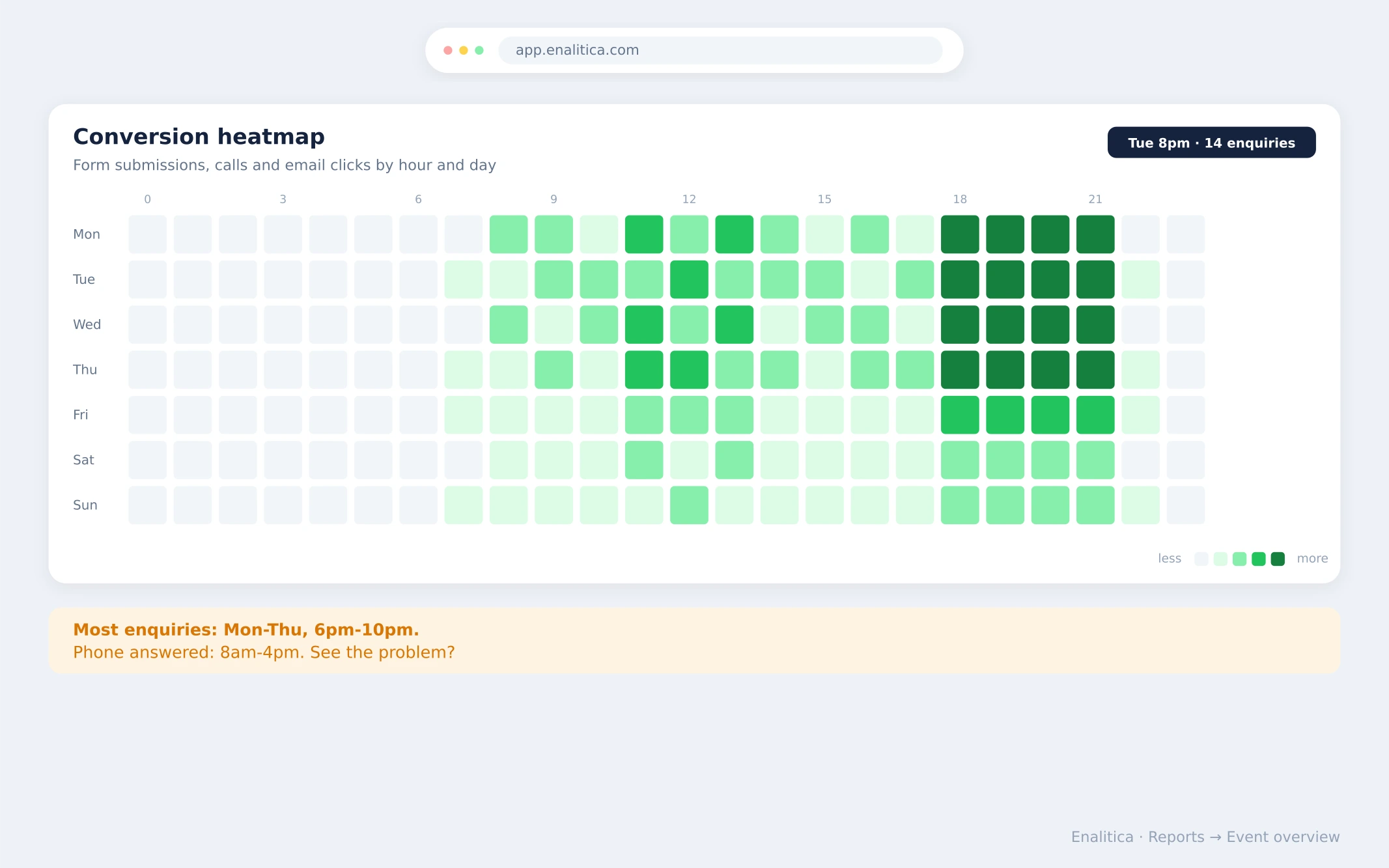
A physiotherapy clinic gets its enquiries at 8 in the evening. The phone is answered from 8 to 4. Nobody at the clinic knows this, because nobody has ever seen the enquiries laid out by hour.
Lead response time is the gap between an enquiry arriving and your first reply, and for service businesses it quietly decides which enquiries become customers. The research on this is old, famous and still ignored: call a lead within 5 minutes and you are about 21 times more likely to qualify them than if you wait 30 minutes. The average company takes 42 hours. This guide covers when enquiries actually arrive, what the response-time studies really say, how to see your own enquiry hours in GA4, and how to point your Google Ads budget at hours you can actually answer.
When do enquiries actually arrive during the week?
Mostly outside office hours. People research services when their own workday is over, so form submissions for clinics, contractors, law firms and agencies cluster on weekday evenings, typically between 18h and 22h, with a smaller lunchtime bump. The pattern is consistent enough that e-commerce sees the same shape: European shopping traffic peaks after 19h, and Adobe measured Cyber Monday's busiest window at 8 to 10 in the evening.
The exact hours differ per business, which is the point: a B2B consultancy peaks at 10 in the morning, an emergency plumber at midnight. You cannot schedule callbacks, staff the phone or plan ad budgets around a pattern you have never looked at. The heatmap of your own enquiries, hour by hour and day by day, is one of the cheapest pieces of marketing intelligence available, and most businesses have never seen theirs.
Why lead response time decides who wins the customer
Because a service enquiry is perishable. The person filling in your form is comparing three providers in one sitting; whoever answers first gets the conversation, and usually the job. Two studies put numbers on this:
- The MIT / InsideSales.com lead response study (Dr. James Oldroyd) found that calling a web lead within 5 minutes makes you roughly 21x more likely to qualify the lead than calling after 30 minutes, and about 100x more likely to actually reach them than waiting those 30 minutes.
- A Harvard Business Review audit of 2,241 US companies found the average response time to a web lead was 42 hours, 23% never responded at all, and firms responding within an hour were about 7x more likely to qualify the lead than those that waited even an hour longer.
Put the two findings together and the opportunity is plain: the bar is 42 hours. You do not need call-center discipline to beat it, you need to know when enquiries come in and have a plan for those hours.
The evening peak makes this concrete. If most enquiries land at 20h and the first callback happens at 10h the next morning, your real lead response time is 14 hours on your busiest hours, whatever your daytime average says.
How to see your enquiry hours in GA4
GA4 can show conversions by hour, but not in the standard reports; you need Explore. Steps:
- Open Explore and create a blank exploration.
- Add the dimensions Hour and Day of week, and the metric Key events (or Event count filtered to your enquiry event:
generate_lead,form_submit, a phone-click event). - Drag Hour into columns, Day of week into rows, and the metric into values. Apply cell heat styling to make the table readable.
Two caveats. GA4 reports hours in the property's timezone, so check that first or the whole grid shifts. And the exploration counts events, not people: if your form fires form_submit twice per submission, fix the tagging before trusting the pattern.
Also check the sources behind the hours. An evening enquiry from a paid click is a different budgeting question than one from organic search; seeing which campaign brought each enquiry is the other half of the same picture.
Google Ads scheduling: match ad hours to phone hours
Ad scheduling exists for exactly this mismatch, but the rules changed with Smart Bidding. With automated strategies like Maximize conversions or tROAS, Google Ads ignores manual time-of-day bid adjustments; Smart Bidding sets bids per auction on its own. What still works is the schedule itself, the on/off hours. Use it as a constraint, not a dial:
- Call-only campaigns and call assets: restrict to hours someone answers the phone. A call ad at 21h that rings into voicemail is money converted directly into a bad first impression.
- Form campaigns: leave them running in the evening peak. The form works at 22h; killing your highest-intent hours to match office hours starves the campaign. The fix for evening form leads is response, not scheduling: an automatic reply that sets expectations, and a callback before 9h.
- Do not micro-bid by hour. Smart Bidding already weighs time of day internally. Your job is only to exclude hours where a conversion has no value to you, the same budget-hygiene logic as cleaning wasted spend with negative keywords.
How Enalitica maps enquiry hours for service businesses
Enalitica's event overview for service businesses includes a conversion heatmap: a 24-by-7 grid of your actual conversion events (submitted forms, phone clicks, email clicks) by hour and day of week, built from your GA4 data with no Explore setup. Hovering any cell shows which events happened in that hour, and a channel filter answers the follow-up question: are the evening enquiries coming from paid campaigns or from organic search?
The same event view carries each enquiry's origin, so the heatmap plugs into the rest of the picture: which channel and which campaign brought the leads that arrive when nobody answers the phone. That is the number that turns "we should respond faster" from a resolution into a schedule.
A practical reading of a typical heatmap takes three steps: restrict call campaigns to staffed hours, set up an auto-reply plus next-morning callback for evening form leads, and start measuring response time itself, not just the number of enquiries. The step after counting enquiries is pricing them: the cost per qualified lead guide shows how the same graded leads turn into ROI per channel.
Book a demo and we will pull up your own enquiry heatmap on the call.
Frequently Asked Questions
What is a good lead response time?
Under 5 minutes is the gold standard from the MIT / InsideSales research, and under one hour still puts you roughly 7x ahead of slower competitors per the HBR study. Given that the average company takes 42 hours, responding the same morning already beats most of the market.
Should I pause Google Ads outside business hours?
Only for call-only campaigns and call assets, where an unanswered ring wastes the click. Form campaigns should usually keep running through evenings, because that is when service enquiries peak; pair them with an auto-reply and a fast morning callback instead of a paused schedule.
Can GA4 show what time of day conversions happen?
Yes, but only in Explore, not the standard reports: build an exploration with the Hour and Day of week dimensions against your key events. Watch the property timezone, and note that GA4 counts events rather than enquirers.
Why do evening enquiries convert worse than daytime ones?
Usually they do not convert worse, they get answered worse. An enquiry at 20h waits 14 hours for a callback at a business that responds "first thing in the morning", and by then the lead has often booked whoever replied within minutes.
Sources
The outside pages this article relies on. Links checked on 28 July 2026.
- Adobe measured Cyber Monday's busiest window at 8 to 10 in the evening (news.adobe.com)
- MIT / InsideSales.com lead response study (leadresponsemanagement.org)
- Harvard Business Review audit of 2,241 US companies (hbr.org)
See your real numbers
Import 30 days of orders or leads during a 5-minute onboarding. Works for e-commerce and service businesses.
See plans and pricing