
Ecommerce Morning Routine: The 5-Minute Daily Check
A 5-minute ecommerce morning routine: month-to-date revenue and MER against the same days of last month, ad spend against your own targets, and the campaigns that break their own range. Decisions stay weekly.

Tilen Ledic
Written by
Most store owners open five tabs every morning: the shop admin, Google Ads, Meta Ads Manager, GA4, the bank. An hour later they know a lot of numbers and still cannot answer the two questions that matter: is this month on pace, and is anything broken? An ecommerce morning routine should take 5 minutes, compare the running month with the same days of last month, and end with either "on track" or one concrete thing to investigate.
The key mistake the long version of this routine makes is comparing single days. Yesterday against any other day mostly measures paydays, weather and one large order, none of which marketing controls. This guide builds the routine around the comparison that does hold up: month to date against the same period of the previous month, read next to your own targets.
The 5-Minute Ecommerce Morning Routine at a Glance
A 5-minute ecommerce morning routine covers three looks: month-to-date revenue and orders against the same days of last month, cumulative ad spend with MER against your own break-even and targets, and the campaigns or channels that are breaking their own usual range. Everything else (budget moves, pausing, channel duels) waits for the weekly window.
| Minute | Look | Question it answers |
|---|---|---|
| 0-2 | Revenue and orders, month to date | Is the month ahead of or behind the last one? |
| 2-4 | Ad spend + MER, month to date | Is spend on plan and is MER above break-even? |
| 4-5 | Campaigns outside their range | Which campaign or channel deviates, and since when? |
Rule one: mornings are for understanding, not deciding
A morning look exists to understand the pace and spot deviations, never to change budgets. Daily ad-platform numbers are noisy and incomplete: Google Ads books conversions on click date and restates them for days backwards, so yesterday's ROAS will literally change by Thursday. The pattern to avoid is the 8:30 budget cut on one weak day, followed by the weekend conversions arriving on Tuesday and a healthy campaign having run throttled for nothing.
Check 1: month-to-date revenue against the same days of last month
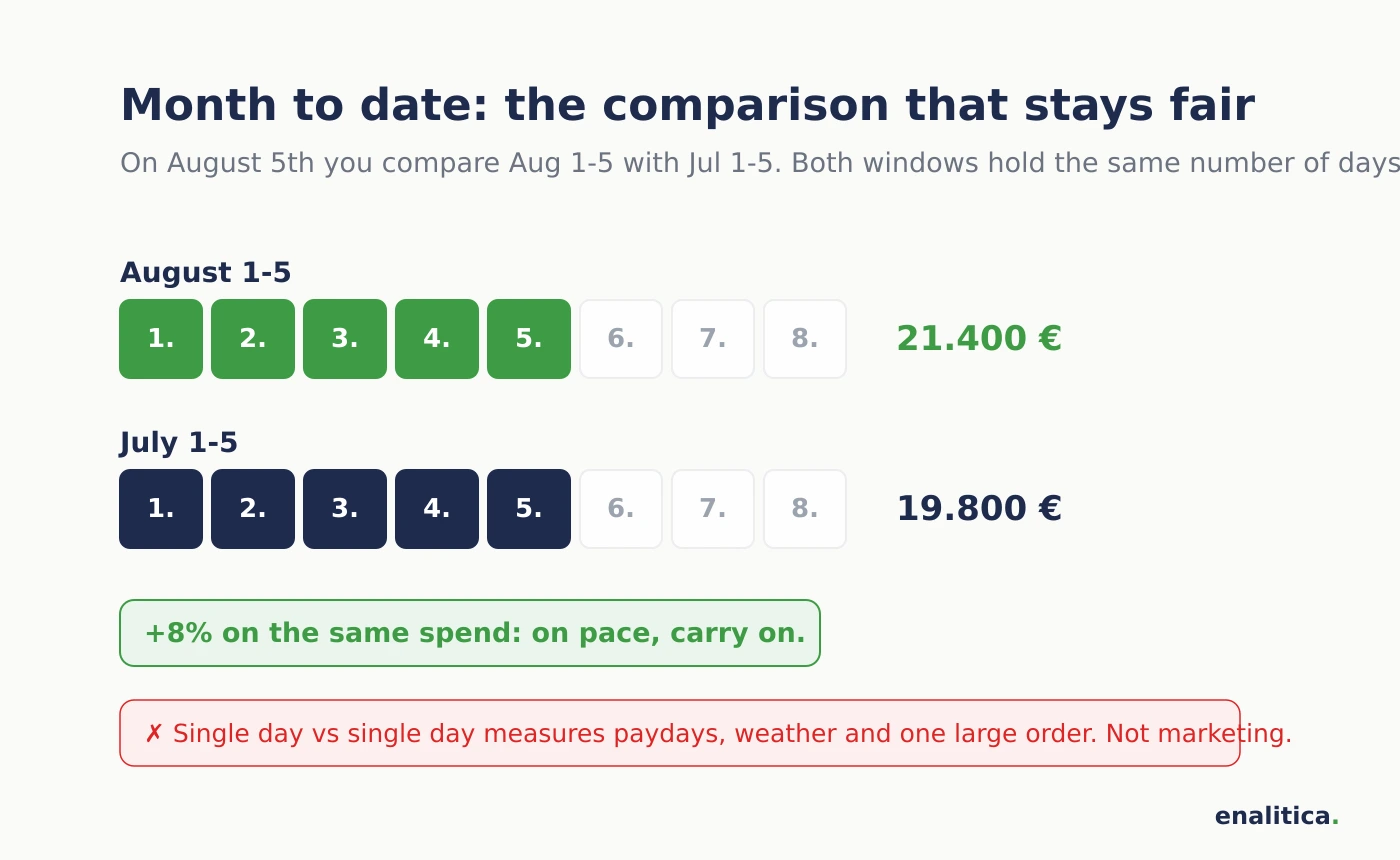
On the 5th of August, compare revenue and orders for August 1-5 with July 1-5. A single day tells you almost nothing: a payday, a heat wave or one €900 order moves it by half; the running month against the same slice of the previous month averages that noise out and answers the real question, whether the store is ahead or behind. A month-to-date gap of a few percent is normal variance. A month running 20% behind while ad spend stayed level is a real signal, and the follow-up question is immediately an attribution question: which channel or campaign is delivering less than last month?
Check 2: month-to-date ad spend and MER against your own targets
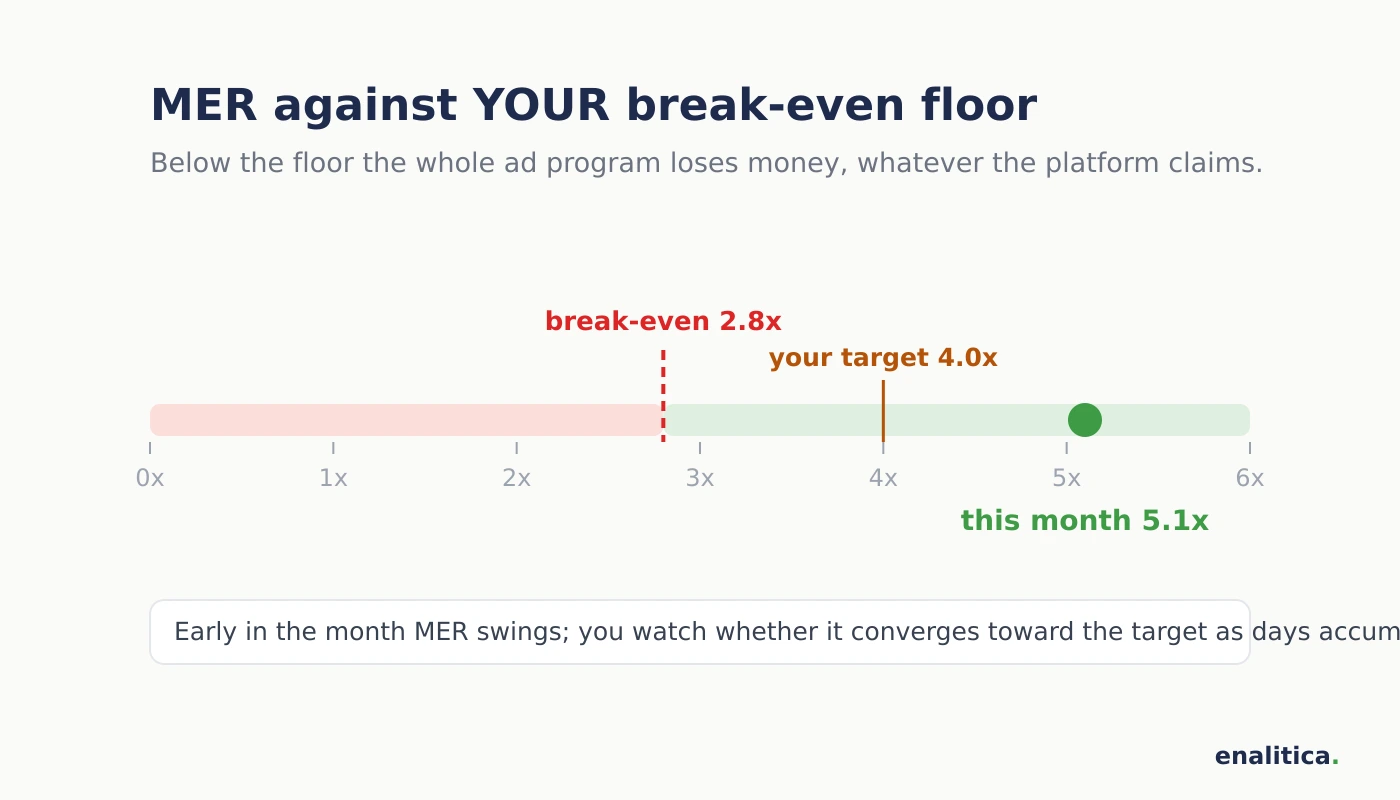
Read cumulative spend across every channel next to month-to-date revenue as one ratio: MER or blended ROAS. Two reference points make the number meaningful. First, your break-even MER, computed from your own margins: below it, the ad program as a whole loses money regardless of what any platform dashboard claims. Second, the target you set for the month. Early in the month MER swings; what you watch is whether it is converging toward the expected value as days accumulate. If by mid-month it is still well below target while spend is on plan, that is a weekly-review agenda item with data behind it, not a morning panic.
Platform dashboards cannot do this job, because Meta and Google each grade their own homework and produce three versions of the truth. Pacing runs on total spend against total revenue from real orders.
Check 3: which campaign or channel breaks its own range
The third look is pure attribution: not "is ROAS good", but "which campaign left its own usual range, and since when". A campaign that normally holds a 4x multitouch ROAS and shows 1.5x for three consecutive days deserves attention; a campaign that always oscillates between 2x and 6x showing 2.5x does not. This is also where the watch list from your monthly review lives. A good monthly report ends with instructions like "watch campaign X for two weeks; if ROAS stays below 2.5x, reduce the budget". The morning look is how those checkpoints actually get checked, with direct and assisted revenue read together so an assist-heavy campaign is not misjudged on last-click numbers alone.
What a single day is still good for: catching breakage
Yesterday against the same weekday last week keeps exactly one job: detecting outages. Revenue halved against its own weekday means a broken checkout, an expired payment certificate or a tracking drop, and a cluster of failed card attempts on one product means a technical fault. These are worth thirty seconds of the morning; they are repairs, not performance judgments, and they are the only case where the morning look turns into same-day action.
What should you not check every day?
Do not move budgets, do not pause campaigns, and do not compare platform dashboards against each other before coffee. One day is too small a sample for any of those decisions, and daily platform numbers get restated for days.
- No budget changes. A campaign's true performance lives in weekly profit per campaign (POAS), not in yesterday's ROAS.
- No campaign pauses on one bad day. If a campaign fails the weekly profit test, pause it Monday with a clear conscience.
- No Meta-vs-Google dashboard duels. They count differently; the comparison produces a feeling, not a decision.
Which ecommerce metrics belong to weekly and monthly reviews?
Weekly reviews judge campaigns and channels: POAS per campaign, marginal ROAS on scaled spend, search terms and negative keywords, and the verdicts on watch-list campaigns whose checkpoint arrived. Monthly reviews judge the business: CAC against your allowable CAC, aMER next to MER, LTV cohort curves by month and by channel, repeat rates and the four growth ceiling signals. The cadence matters because every decision needs a sample big enough to survive it: a budget shift needs a week of data, a pricing or acquisition call needs months.
How Enalitica puts the ecommerce morning routine on one page
Enalitica computes the whole routine from your orders and ad accounts automatically. The strip at the top of the Summary page shows month to date only: revenue, orders, spend and MER for days 1 to yesterday against the same days of the previous month, with MER read against the break-even floor computed from your own margins. Single days are deliberately not displayed; yesterday survives only inside the morning email's alarms as a silent outage check (a halved day, a cluster of failed card payments).
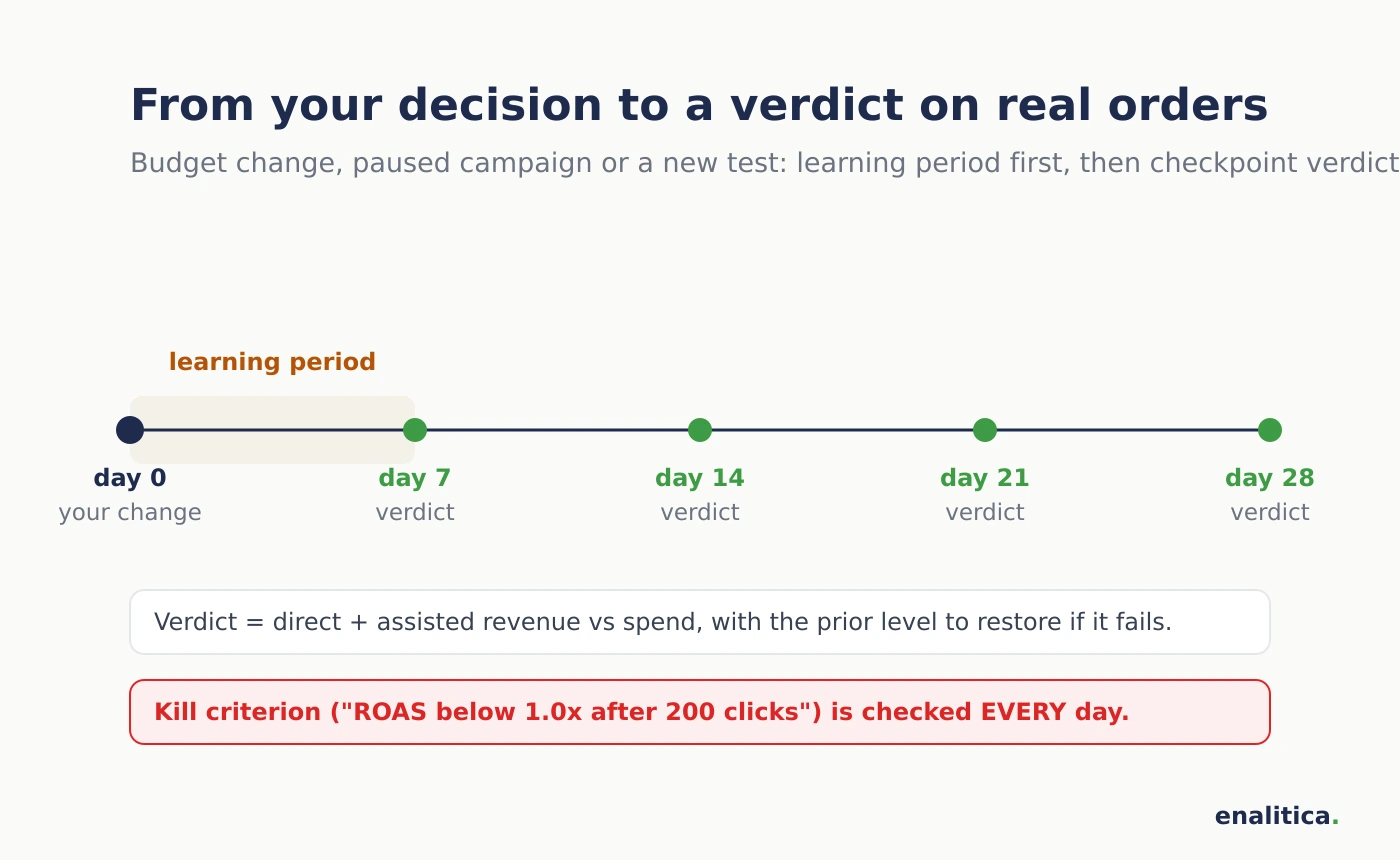
The 7:00 morning email opens with one sentence: whether the month is on pace, what a new customer currently costs, and whether anything is waiting for your decision. Below it come the month-to-date numbers (revenue, orders, spend, MER against the break-even floor, aMER and CAC against the same days of the previous month), then the verdicts on your decisions: a budget increase, a paused campaign, a new test campaign, even a change made directly inside Google Ads. Each gets its learning period and then a verdict on real orders, with the exact prior level to restore if it is not working; test-campaign kill criteria are checked every single day. Mondays add the weekly view: which campaign ran a week above or below its own usual range, which categories sold more this month and which less, rising categories with no campaign of their own, and calm monthly indicators; optionally a weekly AI reflection that connects decisions to outcomes.
Five minutes assumes five tools and manual cross-checking; with orders, spend and attribution in one place, the same routine takes under one. See plans and pricing or book a demo and bring tomorrow morning's coffee; we will run your routine together on your own numbers.
Frequently Asked Questions
Which ecommerce metrics should I check every day?
Three things: month-to-date revenue and orders against the same days of the previous month, cumulative ad spend with MER against your break-even and monthly target, and any campaign or channel that has left its own usual range. Single-day revenue matters only as an outage check against the same weekday. Performance judgments (POAS per campaign, CAC, LTV cohorts) need weekly and monthly windows.
Why compare month to date with the previous month instead of yesterday with another day?
A single day is moved by paydays, weather, weekends and individual large orders, none of which marketing controls, so day-against-day comparisons mostly measure noise. Month to date against the same day range of the previous month (August 1-5 against July 1-5) averages the noise and shows the actual pace of the business. The comparison also stays fair on every day of the month, because both windows always contain the same number of days.
When is it right to act on a daily number?
Only on breakage signals: revenue halved against the same weekday (broken checkout, expired payment certificate, tracking outage), a cluster of failed payments on one product, or a test campaign breaching the kill criterion that was written down in advance. Enalitica checks those criteria automatically every day and reports a breach the same morning. Pace deviations, even large ones, go on the weekly agenda with the data attached; they do not justify same-morning budget moves.
See your real numbers
Import 30 days of orders or leads during a 5-minute onboarding. Works for e-commerce and service businesses.
See plans and pricing