
Cost of Goods Sold: The One Field Almost No Online Store Fills In
Cost of goods sold is the field almost no online store fills in. Why the blank COGS field breaks margin, POAS and break-even ROAS, and the 15-minute fix.

Tilen Ledic
Written by
Every profit number your store can ever show you (gross margin, profit per order, POAS, break-even ROAS) stands on one humble input: cost of goods sold, what each product costs you. And that input lives in a field that almost nobody fills in.
Filling in the COGS field is the cheapest analytics upgrade that exists. No app, no subscription, no developer. Just a field, and about fifteen minutes.
Why the cost of goods sold field is empty in most stores
Shopify has had "Cost per item" on every product since 2018. It is optional, tucked into the pricing section, and nothing breaks if you skip it, so most merchants skip it: the shop launches, the field stays empty, and "we'll add costs later" becomes never.
WooCommerce is even more telling: the platform running millions of stores did not have a native cost field at all until October 2025, when WooCommerce 10.3 finally brought Cost of Goods Sold into core, and even now it is opt-in (Settings → Features → Cost of Goods Sold). For a decade, tracking costs on Woo meant buying a plugin, so the realistic fill rate among small and mid-size Woo stores was close to zero.
Our own onboarding data says the same thing: when stores connect to Enalitica, the most common state of purchase prices is not "messy". It is empty. Established stores, seven-figure stores, stores with agencies. Empty.
What breaks without cost prices: POAS, margin, break-even ROAS
Without cost prices, your analytics can only ever talk about revenue, never gross profit. That sounds survivable until you list what it actually breaks:
- No gross margin, no profit per order, no POAS. Every "profit" number anywhere is a guess.
- No break-even ROAS. The target you give Smart Bidding is folklore instead of arithmetic. Break-even ROAS is simply 1 divided by your gross margin; without costs, you do not know it.
- Campaigns get ranked by the wrong number. As we showed in the returns post, two campaigns with identical ROAS can deserve opposite decisions. But POAS can only exist if costs exist.
- Price changes fly blind. A 5% price cut on a 20% margin product halves your profit on it. Without the cost field, that arithmetic happens in your supplier's favor, silently.
The uncomfortable summary: a store without cost prices has no unit economics. It is optimizing revenue, and revenue is the one number you can grow while going broke.
How to add cost prices in Shopify and WooCommerce in 15 minutes
You do not need cost prices on all products. Revenue in a typical store is heavily concentrated, so your top 20 products by revenue usually cover most of the money. Start there, ignore the tail for now.
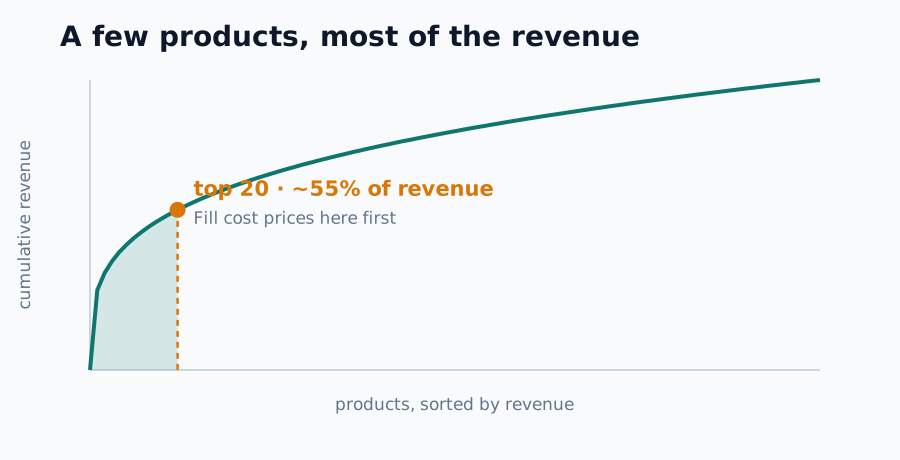
Shopify: Products → select your top sellers → Bulk edit → add the "Cost per item" column → type the numbers in one screen. For bigger catalogs, export products to CSV, fill the "Cost per item" column, re-import. Both are native, no app needed.
WooCommerce: update to 10.3+, enable Settings → Features → Cost of Goods Sold, and the cost field appears on every product's edit screen. If you already use a COGS plugin (SkyVerge/Kestrel, WPFactory, YITH, Booster, ATUM), your data is already there; keep it.
Which number goes in: what you pay your supplier per unit, without VAT. Do not overthink landed cost (freight allocation) on day one; a consistent supplier purchase price beats a perfect number you never enter.
For the tail: set a fallback margin (an honest average for everything without a cost) so the long tail is estimated instead of ignored, and clearly marked as estimated.
How Enalitica turns cost prices into POAS and profit reporting
- Costs sync automatically: Shopify Cost per item, WooCommerce native COGS and all five common plugin formats, Shopamine cost prices, plus Vasco ERP for stores that keep purchase prices there. Fill the field in your shop, and it flows through on the next sync; each order snapshots the cost at purchase time, so later price changes never rewrite history.
- The gaps find you: a fix-it queue lists products with revenue but no cost, sorted by revenue, so the fifteen minutes always go where the money is.
- Honesty is built in: every order carries a profit-quality flag (exact, partly estimated, unknown), so you always know how much of your profit number is measured and how much is the fallback margin.
- POAS switches on by itself: the moment the first purchase prices are detected, the Dobiček dashboard, POAS columns and profit tiles appear. No setup call, no toggle. One field in your store, and the profit layer wakes up.
Book a demo and we will show you the fix-it queue on your own catalog.
Once the field is filled, the cost price follows the product into the channel view too: which channel sells which product, at what margin, is the subject of our ecommerce product attribution guide.
Frequently Asked Questions
Do I need costs on 100% of products?
No. Cover your top revenue products exactly, give the rest a fallback margin, and improve coverage over time. Enalitica shows what share of orders is exact vs estimated, so you always know how solid the number is.
What about shipping, packaging and payment fees?
Those are separate cost settings, not part of the product's cost price. Keep the field clean: supplier price per unit. Per-order costs (shipping you absorb, payment fees, packaging) are configured once and applied to every order automatically.
My purchase prices change. Which one counts?
The one at the time of the order. Enalitica snapshots the cost onto each order item when it is created, and keeps a price history, so old months stay true when your supplier raises prices.
Is this worth it for a small store?
Small stores benefit most: with tight budgets, one unprofitable bestseller scaled by ROAS hurts far more than it hurts a big store. Fifteen minutes for the top 20 products is the best ratio of effort to insight in ecommerce analytics.
Sources
The outside pages this article relies on. Links checked on 26 July 2026.
- most merchants skip it (techresolve.blog)
- did not have a native cost field at all until October 2025 (developer.woocommerce.com)
Figures marked "in Enalitica's data" are aggregates from the real orders of the stores we measure, with no names and no individual orders. How we measure.
See your real numbers
Import 30 days of orders or leads during a 5-minute onboarding. Works for e-commerce and service businesses.
See plans and pricing