
How to Track AI Traffic in GA4 (ChatGPT, Gemini, Perplexity)
What GA4's AI Assistant channel changed, how to set up AI traffic tracking, the gaps that remain, and what an order-based view adds.

Tilen Ledic
Written by
Someone asks ChatGPT which standing desk to buy, gets three recommendations, clicks one, and places an order. That customer exists in your store today. The question is whether your analytics can see where they came from.
This guide shows how to track AI traffic in GA4 in four parts: what changed with the new AI Assistant channel, how to set everything up step by step, the main issues that remain even with a perfect setup, and what an order-based view adds on top for both e-commerce and service businesses.
What changed in GA4: the new AI Assistant channel
In May 2026, Google added "AI Assistant" as a default channel in GA4, with the rollout completing over the following weeks. You will find it in Reports → Acquisition → Traffic acquisition, next to Organic Search, Referral and the rest.
Under the hood it works like this: when a visit arrives from a referrer Google recognizes as an AI assistant, GA4 rewrites the traffic medium to ai-assistant and files the session under the new channel. Google's documentation names ChatGPT, Gemini, DeepSeek, Copilot and Grok as the sources, and states that the channel excludes Google's own AI Overviews and AI Mode.
If you see the channel in your reports, you already have baseline AI referral tracking without touching anything. The setup below makes it complete; the section after it explains where even a complete setup stops.
How big is the AI Assistant channel in practice? In Enalitica's data, last 90 days to 28 September 2026, it carried 0.5% of more than 1 million GA4 sessions. Measured on real orders the share is the same, about 1 order in 200 came from a ChatGPT, Perplexity or Copilot referrer, while among service businesses 1.6% of leads arrived from an AI assistant.
Setup 1: check AI traffic with a filter (no configuration)
The fastest way to see your AI traffic, including history and including LLM chatbots the new channel does not recognize:
- Open Reports → Acquisition → Traffic acquisition
- Change the primary dimension to Session source
- Click Add filter → Session source → matches regex and paste:
chatgpt\.com|chat\.openai\.com|perplexity\.ai|gemini\.google\.com|copilot\.microsoft\.com|claude\.ai|grok\.com|deepseek\.com|mistral\.ai|meta\.ai|poe\.com|you\.com
This works on any date range, because referrer domains were always recorded; only the channel label is new. Two mistakes to avoid, both common: GA4 regex is case-sensitive, so keep the pattern lowercase, and never use a shortcut like .*ai, which happily matches mail, domain and half the internet.
Setup 2: a custom channel group for Perplexity and Claude
The native channel cannot be edited, but you can build a better one beside it. In Admin → Data display → Channel groups, create or edit a group and add a channel with two conditions joined by OR:
- Session source matches the regex above (catches Perplexity, Claude and friends)
- Session medium exactly matches
ai-assistant(inherits everything Google's list already catches, including future additions)
Then the step everyone skips: in the group editor click Reorder and drag your AI channel above Referral (rows get a drag handle; drop the row higher up, then Apply and Save). GA4 assigns each session to the first channel whose definition it matches, top to bottom, and new custom channels get added near the bottom of the list. A visit from perplexity.ai matches two rules, yours and the built-in Referral.
If the custom AI channel sits below Referral in the GA4 channel group, Referral wins every time and the AI channel stays at zero forever, even though the rule itself is correct.
Setup 3: find out which pages AI assistants actually cite
Knowing the volume is nice; knowing which content earns the citations is actionable. In Explore, create a free-form report with dimension Landing page + query string, metric Sessions, and a filter on Session source using the same regex. The result is a ranked list of the pages ChatGPT and Perplexity send people to. These are disproportionately comparison pages, buying guides and product pages with very specific specifications, which tells you exactly what kind of content to write more of. That list is also the practical core of generative engine optimization (GEO): write more of what AI assistants already cite.
Where GA4's AI traffic measurement still falls short
1. Perplexity is not on Google's list. The most shopping-oriented AI assistant of them all is not among the sources Google names for the channel, so it lands in plain Referral unless your custom channel group from Setup 2 catches it.
2. The native channel is forward-only. Sessions recorded before the rollout keep their old classification forever. Your "AI Assistant" chart starts in May 2026 even if ChatGPT has been sending you buyers since 2023.
3. AI Overviews are invisible by design. Google excludes its own AI Overviews and AI Mode from the channel; those clicks carry regular Google referrers, so they land in Organic Search and cannot be separated inside GA4 at all. The channel measures third-party assistants, not Google's own AI answers. And a zero-click search, where the visitor reads the AI Overview and never visits your site at all, produces no session for any tool to count.
4. Apps and copy-paste turn AI visits into Direct. The ChatGPT mobile apps often open links without passing a referrer, and many users copy a recommended URL and paste it into the browser. Both arrive with no source at all and get filed under Direct, and no regex can match a source field that is simply empty. The partial exception: ChatGPT appends utm_source=chatgpt.com to many links, and because a UTM travels inside the URL itself it survives the app click; but it is not added to every link, and copied URLs usually lose it. Nobody can measure the invisible share precisely, but whatever your AI channel shows, the real number is higher.
5. It counts sessions on a last-click basis, and AI rarely gets the last click. An AI assistant usually opens a buying journey: the visitor gets a recommendation, clicks through, looks around, and comes back days later through Google or by typing the address directly. Last-click attribution hands the whole credit to that final visit, so the AI touch that made the buying decision disappears from every GA4 report.
Last-click reporting makes the AI channel look worthless exactly when it is working, because AI assistants open buying journeys that other channels close.
How Enalitica tracks AI traffic on real orders
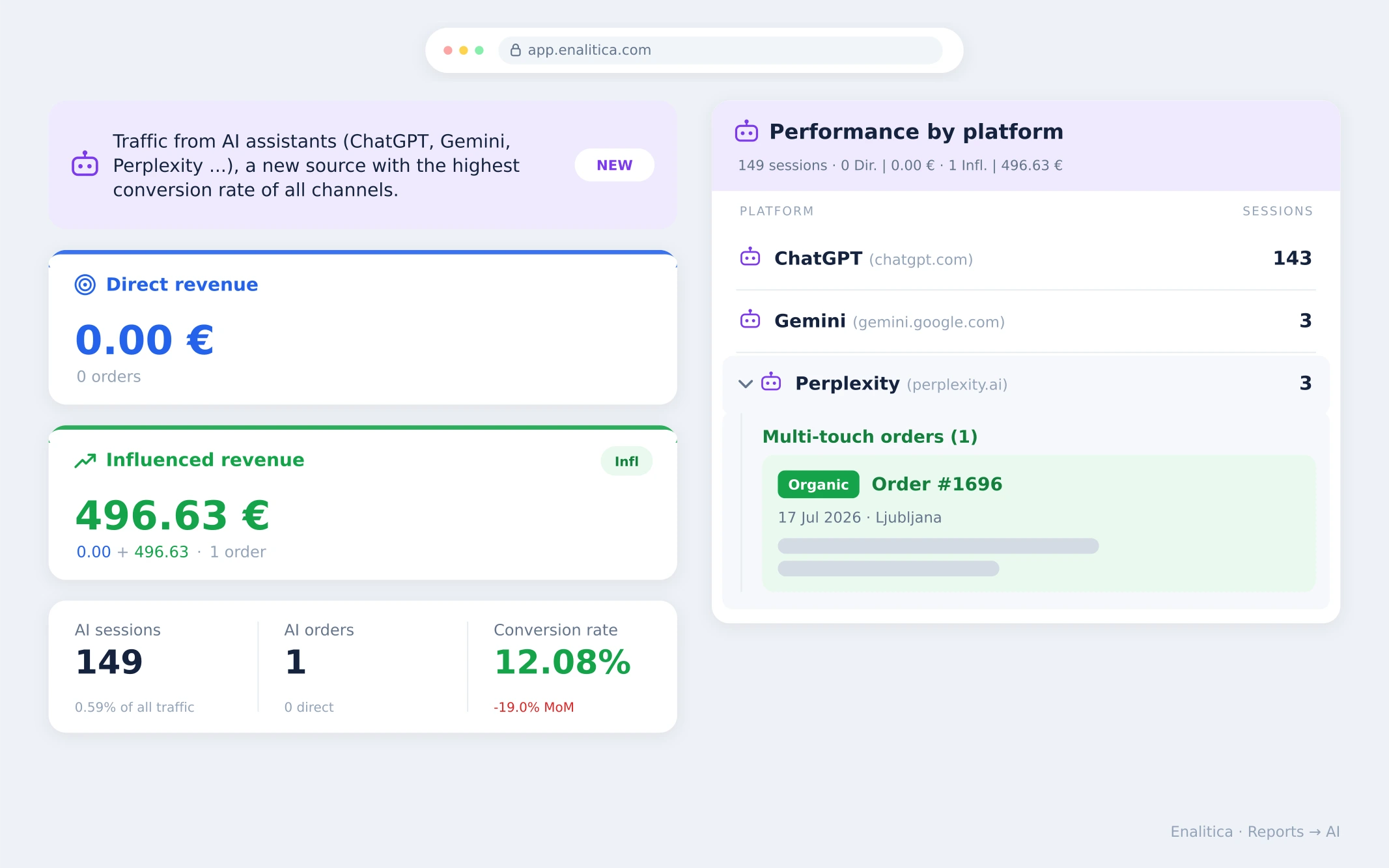
Enalitica does not classify sessions; it attributes orders. Every order from your store carries its full journey, so AI traffic is measured by what it sells, not by what it clicks. That closes the gaps above in one move: detection runs on 35+ AI domains including Perplexity (kept up to date for all clients at once), it works on your full history because it reads sources rather than Google's channel label, and last-click blindness is replaced by multi-touch attribution.
The report above is an illustrative example of what that looks like, and why the difference matters. Here is what you see that GA4 cannot show:
- Direct vs influenced revenue. Two numbers instead of one: revenue where AI was the last click, and revenue where AI appeared anywhere in the journey. In the illustrative example above, direct AI revenue is zero, but one influenced order started in Perplexity and closed through organic search days later. GA4's last-click view reports this exact situation as "AI does nothing".
- Orders, not sessions. Each multi-touch order is listed under the platform that touched it, with order number, date, products and the channel that closed the sale. You know what AI helps sell, not just that it sends visits.
- Per-platform performance. ChatGPT, Gemini, Perplexity and the rest, each with sessions, direct and influenced orders side by side, so you see which assistant actually recommends you.
- Conversion rate that includes influence. Counted with influenced orders, the AI channel converts far better than its last-click number suggests, which fits Adobe's finding that AI visitors arrive unusually ready to buy.
- For service businesses: events instead of orders. The same multi-touch logic runs on your conversion events. Every form submission, call click or booking appears with the journey that produced it and a clear flag showing whether an AI assistant triggered it, even when the conversion arrived through another channel days later. A law firm or clinic answers the same question a store does: not "did AI send visits" but "which enquiries did AI start".
Since September 2026 the AI channel holds only the free side. A click on a ChatGPT ad carries the oppref click id and is counted under ChatGPT Ads instead, so paid clicks never inflate the organic AI numbers; the ChatGPT ads attribution guide explains the split.
And once the AI channel is measured, you can also question it in plain language: over Enalitica MCP, ChatGPT, Claude or Gemini read these same order-based numbers directly, read-only and without customer personal data.
Book a demo and we will show you, on your own orders or leads, which journeys your AI channel has been quietly starting.
Frequently Asked Questions
Why does my ChatGPT traffic show up as Direct?
Because a large share of it genuinely arrives with no referrer: mobile app clicks, copied and pasted links, private browsing. ChatGPT does append utm_source=chatgpt.com to many links, which helps when present, but it is not universal. Treat an unexplained rise in Direct traffic that started alongside your AI mentions as a hint, not a coincidence.
Why is my AI traffic so small?
Two honest reasons. First, it genuinely is small for most stores today: in Enalitica's data about half a percent of sessions and of orders. Second, it is undercounted for all the reasons above.
The interesting part is not the volume but the quality. Adobe Analytics data on more than 1 trillion US retail visits shows AI-referred traffic grew 138 percent year over year in May 2026, and in the same month AI-referred visitors converted 54 percent better than traffic from non-AI sources, a reversal from a year earlier when they converted worse. Small stream, unusually ready to buy.
Do AI crawlers like GPTBot show up in GA4?
Normally not. Crawlers like GPTBot fetch your HTML to read it and generally do not run your analytics JavaScript, so they do not fire a GA4 tag. GA4 shows you humans arriving from AI answers; if you want to see the bots reading your catalog to build those answers, that lives in your server logs or CDN dashboard, not in analytics. (If automated sessions do show up in your reports, that is a different problem: how to detect and block bot traffic in GA4.)
Can I see AI traffic from before May 2026?
Yes, with Setup 1: the source-based regex works on any historical date range. Only the native channel label is forward-only.
Which assistants does the native channel recognize?
Google's channel definition names ChatGPT, Gemini, DeepSeek, Copilot and Grok. Perplexity, Claude and smaller assistants still classify as Referral, which is why the custom channel group in Setup 2 is worth five minutes.
Is AI traffic worth optimizing for at under 1% of sessions?
The share is small; the trend and the intent are not. Adobe measured 138 percent year-over-year growth in May 2026 and conversion 54 percent above non-AI traffic. The stores building AI visibility now are buying the cheap version of a channel that will not stay cheap.
Sources
The outside pages this article relies on. Links checked on 28 September 2026.
- added "AI Assistant" as a default channel (support.google.com)
- assigns each session to the first channel whose definition it matches (support.google.com)
- Adobe's finding (digitalcommerce360.com)
Figures marked "in Enalitica's data" are aggregates from the real orders of the stores we measure, with no names and no individual orders. How we measure.
See your real numbers
Import 30 days of orders or leads during a 5-minute onboarding. Works for e-commerce and service businesses.
See plans and pricing