Black Friday Tracking Checklist: What to Test Before 27 November
A dated Black Friday 2026 tracking checklist: test purchases, platform diagnostics, consent, caching, seasonality adjustments and what to do if tracking breaks.
 Tilen Ledic Written by
On this page
- Why tracking matters more on Black Friday than on any other day
- The timeline: what to do when
- 1. Run one real test purchase through every tool
- 2. Read the platforms' own diagnostics
- 3. Check what changed on your store this year
- 4. Test the consent banner both ways
- 5. Freeze changes from 20 November
- 6. Tell bidding about the spike, if you know it is coming
- 7. If something breaks anyway: exclude the broken days
- How Enalitica helps you get through Black Friday
- Black Friday tracking checklist
It is Friday 27 November, 9:40. Orders are coming in faster than any day this year. Then you open Meta Ads Manager: zero purchases since Tuesday. On Tuesday someone installed a new discount plugin, and the thank-you page it shows no longer loads the pixel. Meta's bidding has spent three days, the most expensive three days of the year, learning that your ads stopped selling. Nobody will notice until Monday.
None of this is rare, and almost all of it can be caught with a test purchase and twenty minutes, if the test happens before the traffic does. This is the checklist we run with stores before Black Friday, with dates. It is about measurement only. What discounts do to your profit afterwards is covered in the Black Friday ads guide.
Black Friday 2026 is Friday 27 November, Cyber Monday is Monday 30 November.
Why tracking matters more on Black Friday than on any other day
Two numbers from last year explain it.
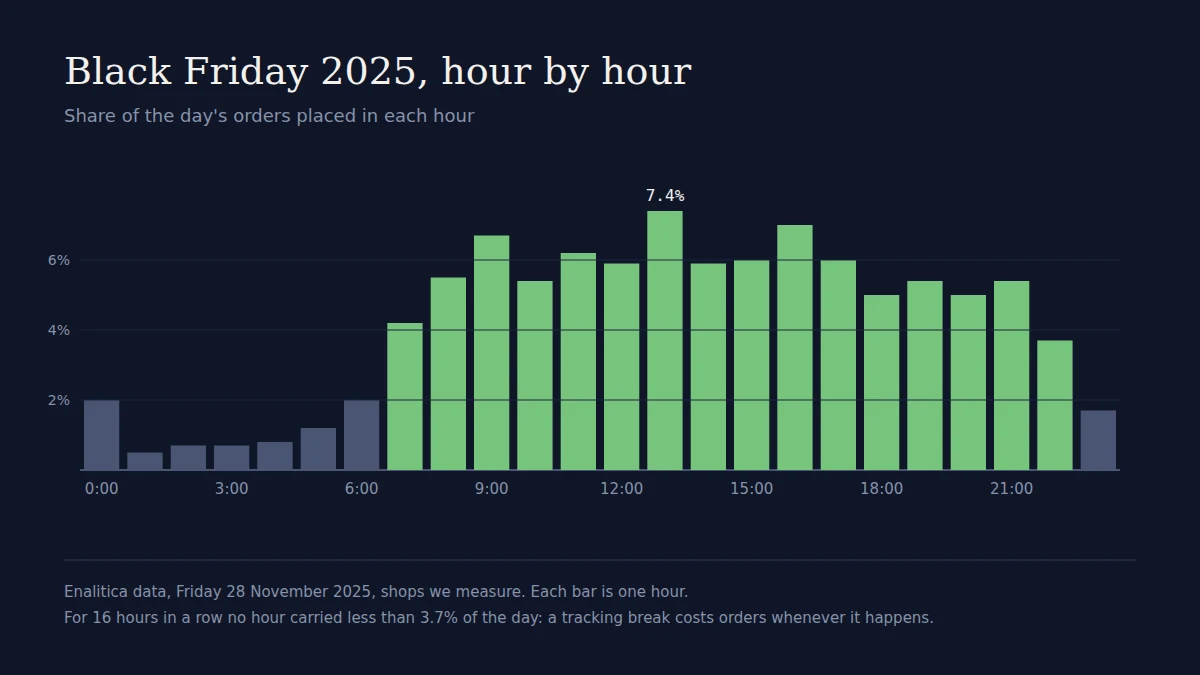
In Enalitica's data for Black Friday week 2025 (Black Friday week against three October weeks as the baseline), an average day of Black Friday week brought 3 times the orders of an average October day, and Black Friday itself 4.4 times. In the middle store the busiest hour of Black Friday carried about one order in eight.
So one broken hour on Black Friday loses as many conversions as half a normal day, and the orders do not wait for one quiet slot: for 16 hours in a row no hour carried less than 3.7% of the day. Worse, the loss does not stay in the report. Smart Bidding and Meta's delivery learn from what they receive, and a day that looks like "lots of clicks, no sales" pushes them away from the campaigns that were selling. Google built a tool specifically for this case, data exclusions, "to help you reduce the impact of conversion tracking issues in Smart Bidding". It is the repair kit. This checklist is about not needing it.
The timeline: what to do when
| When | What | Why then |
|---|---|---|
| Now to 6 November | Test purchase through every tool; fix what fails | Fixes need a deploy and a few days of clean data |
| By 13 November | Platform diagnostics green; consent banner tested | Diagnostics look back 7 days |
| By 20 November | Change freeze on checkout, theme, plugins and tags | Every change after this is untested on the biggest days |
| 26 November | Seasonality adjustment set, if you use one | It must cover the days the conversion rate jumps |
| 27 to 30 November | Morning check of yesterday's numbers against your orders | A break found on Friday morning costs one day, not four |
| From 1 December | Data exclusion for any broken days; returns in the numbers | Bidding should not learn from a broken day |
1. Run one real test purchase through every tool
A test order tells you more than any dashboard. Place a real order (a cheap product, refunded afterwards) the way a customer would: arrive from an ad link, add to cart, pay, land on the thank-you page. Then check each tool, in this order:
- GA4. The Realtime report shows activity of the last 30 minutes, including a "Key events by event name" card; the purchase should appear within a minute or two. For step-by-step detail use DebugView through Tag Assistant. GA4 deduplicates purchases with the same transaction ID, and also every purchase sent with an empty one, so check that your
transaction_idis the real order number and not blank. - Google Ads. Tag Assistant verifies a conversion action on your site: Goals, Summary, hover over the status, Troubleshoot. Google Ads may only process the first instance of a transaction ID, so a duplicate send is not counted, but a missing one is lost.
- Meta. Events Manager, your pixel, Test Events. If you send purchases from both the pixel and the Conversions API, the pixel's
eventIDmust match the server'sevent_id, and Meta only deduplicates events received within 48 hours of the first. - Your own orders. The order in the shop should carry the click id from the ad link (
gclid,fbclid,msclkid) and the landing page. If it does not, every report built on orders loses that sale's source. The click id capture guide shows where to look.
Do it on a phone too. Many buyers order from their phones, and mobile checkouts break differently (wallet payments, in-app browsers).
2. Read the platforms' own diagnostics
Each platform tells you when its tracking is unhealthy, but only if you look.
- Google Ads conversion status. Goals, Summary. Google's statuses are Active, Needs attention, Misconfigured ("conversions have stopped recording entirely due to a setup error or a broken tag") and Awaiting conversions (none in the last 7 days). Anything but Active on your purchase action is the first fix.
- Enhanced conversions. The Diagnostics tab rates the setup Excellent, Good or Needs attention. Below 20 conversions in 7 days it shows no alerts, so a small store gets no warning here.
- Meta Event Match Quality. Scored 1 to 10; Meta recommends aiming for 6.0 or higher. The Event Deduplication tab on the event shows whether pixel and server purchases are being merged.
Diagnostics look back seven days, which is why the deadline is 13 November: a fix made on the 20th still shows the old state on the 25th.
3. Check what changed on your store this year
Most Black Friday tracking failures are not new bugs. They are changes made in the months before that nobody tested against tracking.
- Shopify: the old thank-you scripts are gone. August 26, 2026 was the deadline for non-Plus stores to upgrade the Thank you and Order status pages, and script tags stopped running on the Order status page for all stores. Any conversion code that still lives in "additional scripts" fires nowhere this year. Tracking now belongs in app pixels or custom pixels.
- WooCommerce: caching. WooCommerce asks you to exclude Cart, Checkout and My Account from the cache. A caching plugin someone "tuned for speed" before the sale is a classic way to serve every buyer the same stale page.
- WooCommerce: built-in Order Attribution is short-lived. Its cookies last 30 minutes or the session and it gives the last interaction all the credit. Someone who clicked your ad on Tuesday and buys on Friday from a bookmark arrives as direct.
- New plugins and apps. Discount wheels, one-page checkouts, upsell pages, new payment methods. Each can replace or skip the thank-you page your tags fire on. Repeat the test purchase after every one.
4. Test the consent banner both ways
In the EEA, Google requires that you collect consent for the use of personal data to keep measurement and remarketing, and if you run your own banner, implement consent mode v2 with ad_user_data and ad_personalization. Run the test purchase twice: once accepting all cookies, once declining. Accepting should fire everything. Declining should fire nothing that needs consent, and the order should still exist in your shop with whatever it may legally keep. A banner that was restyled for the sale and now never sends the "accepted" signal costs you most of your measured conversions without a single error message.
5. Freeze changes from 20 November
Pick a date after which nothing on the checkout, theme, tag manager or plugins changes without a test purchase. 20 November gives a week of clean data before the Friday. Google's own advice for Performance Max and Shopping in peak season is to "avoid making budget/target changes during ramp up", to wait one to two conversion cycles between target changes, and to leave budget headroom of up to three times what you expect to spend.
6. Tell bidding about the spike, if you know it is coming
Seasonality adjustments inform Smart Bidding of an expected change in conversion rate. Google calls them "ideal for short events of 1–7 days" and warns they "may not work as well" over more than 14 days; they apply to Search, Shopping, Demand Gen and Display on Target ROAS or Target CPA, and to Performance Max on any strategy. You set them under Tools, Budgets and bidding, Adjustments, Seasonal, with your expected conversion rate change. Use one only if your Black Friday conversion rate is truly far above normal and you know roughly by how much; your 2025 orders against your 2025 sessions tell you. Bids return to normal after the end date on their own. Microsoft Advertising offers seasonality adjustments for Target ROAS and Target CPA too.
7. If something breaks anyway: exclude the broken days
Fix the tag first. Then add a data exclusion for the broken period, so Smart Bidding ignores it:
- exclude at least 90% of the clicks tied to the broken conversions;
- include your conversion delay: Google's example is a 5-day delay and an outage on 15 to 18 October, excluded from 10 to 18 October;
- do not remove an exclusion once applied, and do not use them often or for long periods;
- expect one to two conversion cycles of wobble if a week or more was affected.
Microsoft Advertising has data exclusions for its automated bidding as well, next to seasonality adjustments. Meta has no equivalent switch, which is one more reason to test before the traffic arrives.
How Enalitica helps you get through Black Friday
Everything above protects what the ad platforms learn. Enalitica protects what you learn, and it starts from the order, so a broken pixel does not erase the sale from your report.
Server-side sending does not depend on the thank-you page. Every order with a Google, Meta, Microsoft or ChatGPT ad click is sent to that platform from our server after it is imported from WooCommerce, Shopify, Shopamine or your own shop, with a daily catch-up for anything that failed. A theme change on Thursday cannot stop it. The cards in Report settings, Server-side tracking show, per platform, what was sent in the last 30 days and why anything was not; the ChatGPT Ads Conversions API guide shows the screen.
Tracking coverage is your morning check. On the reports summary, every order falls into exactly one row of evidence. On a normal day you know your proportions. On Black Friday morning, if the "No evidence" row has jumped, something in the browser broke overnight, and you know before the ad platforms tell you.
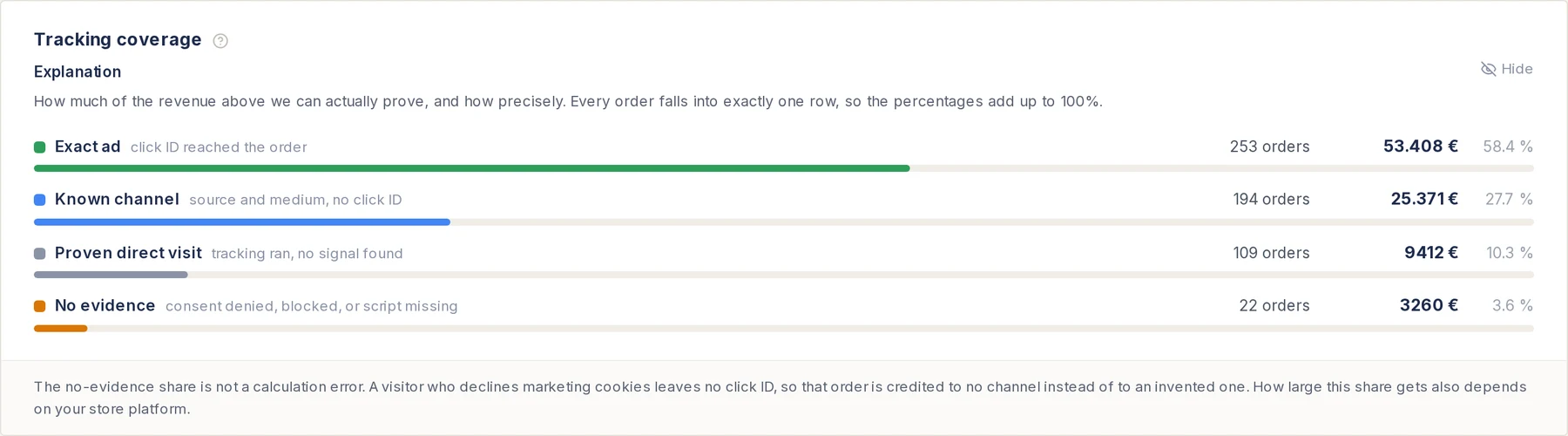
- 1Exact ad. The click id reached the order. If this share drops on Black Friday morning, click capture broke.
- 2Proven direct. Tracking ran and found no ad or campaign. Normal for bookmarks and typed visits.
- 3No evidence. Declined cookies, a blocker or a missing script. A sudden jump means a tag stopped firing.
Your own number for every channel, the same day. The reports count orders by click id: Google, Meta, Microsoft, ChatGPT, email, organic and direct, each order once. When Meta says zero and your orders show twelve Meta clicks that bought, you know the problem sits in Meta's tracking and the ads are still selling. If you connected Enalitica to ChatGPT or Claude, the morning check is one question: "How many orders did each channel bring yesterday, and how does that compare with Meta's and Google's own counts?"
After the weekend, profit. Returns arrive in December and January, and the Black Friday ads guide covers how to judge the weekend on profit, not ROAS. With cost prices loaded, Enalitica shows that per campaign.
If you want the checklist above run against your own store, start a 14-day trial now: connected in about five minutes, and the first coverage numbers are there the same day, well before the freeze.
Black Friday tracking checklist
- By 6 November: one test purchase through GA4, Google Ads, Meta and your shop, on desktop and phone. Transaction id is the real order number.
- By 13 November: Google Ads purchase action Active, enhanced conversions diagnostics checked, Meta Event Match Quality 6 or higher, pixel and server purchases deduplicated.
- By 13 November: consent banner tested accepting and declining.
- Before the freeze: Shopify conversion code moved out of additional scripts; WooCommerce cart, checkout and account pages excluded from cache.
- 20 November: change freeze on checkout, theme, plugins and tags. Budgets and targets set.
- 26 November: seasonality adjustment only if you know your conversion rate jump.
- 27 to 30 November: every morning, yesterday's orders per channel against each platform's count.
- From 1 December: data exclusions for any broken days; judge the weekend on profit after returns.
Frequently Asked Questions
Should I use a seasonality adjustment for the whole week from Black Friday to Cyber Monday?
Four days fits Google's 1 to 7 day guidance. Set it only if you expect the conversion rate, not just traffic, to jump; more clicks at the same rate need no adjustment, Smart Bidding sees them. A wrong guess pushes bids the wrong way for the days that matter most, so base the percentage on last year's orders divided by sessions.
Can I place a test order without polluting my reports?
Yes. Use a real but cheap product, note the order number, refund it, and mark it as a test or cancel it in the shop. Google Ads and GA4 keep the conversion, so the cost is one extra conversion in the platforms. That is a small price for knowing the whole chain works. Do not use Meta's test event code on a live purchase; it is for testing setups only.
Our developer is on holiday during Black Friday week. What is the minimum?
The test purchase before the freeze, and a written rollback for anything changed in November. During the weekend, the morning comparison of orders against platform counts needs no developer, only someone who notices a zero and turns off the last change.
Is it worth adding server-side tracking this close to Black Friday?
Adding a server-side send is lower risk than changing browser tags, because it does not touch the checkout. It must still be tested: an order sent twice, once from the pixel and once from the server, with different ids counts double. If you add it, add it before 20 November and check deduplication in each platform.
Our store is in Slovenia. Does Black Friday week behave the same?
The date is the same, and in our data the spike ran across the whole week, not one day. The difference is consent: under EU rules every visitor is asked before marketing cookies, and those who decline leave no click id in the browser. That makes the test with a declined banner essential, and server-side sending and order-based reporting worth more than in markets without the question.
Sources
The outside pages this article relies on. Links checked on 1 November 2026.
- data exclusions (support.google.com)
- Realtime report (support.google.com)
- DebugView (support.google.com)
- deduplicates purchases with the same transaction ID (support.google.com)
- Tag Assistant (support.google.com)
- may only process the first instance of a transaction ID (support.google.com)
- Test Events (developers.facebook.com)
- deduplicates events received within 48 hours (developers.facebook.com)
- Google's statuses (support.google.com)
- Diagnostics tab (support.google.com)
- recommends aiming for 6.0 or higher (developers.facebook.com)
- August 26, 2026 was the deadline (help.shopify.com)
- script tags stopped running on the Order status page (shopify.dev)
- custom pixels (help.shopify.com)
- exclude Cart, Checkout and My Account from the cache (developer.woocommerce.com)
- last 30 minutes or the session (woocommerce.com)
- collect consent for the use of personal data (support.google.com)
- implement consent mode v2 (support.google.com)
- "avoid making budget/target changes during ramp up" (support.google.com)
- Seasonality adjustments (support.google.com)
- offers seasonality adjustments (about.ads.microsoft.com)
- data exclusion (support.google.com)
- data exclusions (about.ads.microsoft.com)
Figures marked "in Enalitica's data" are aggregates from the real orders of the stores we measure, with no names and no individual orders. How we measure.

See your real numbers
Import 30 days of orders or leads during a 5-minute onboarding. Works for e-commerce and service businesses.
See plans and pricing