ChatGPT Ads Conversions API: Send Your Orders to OpenAI
How the ChatGPT Ads Conversions API works, how it differs from the pixel, OpenAI's 7-day rule, deduplication, and how a store sends orders without code.
 Tilen Ledic Written by
On this page
Your ChatGPT ads campaign has run for two weeks. Your store has seven orders that came from a ChatGPT ad click, you can see the click id on each of them. Ads Manager shows three conversions. The other four bought on a phone with a content blocker, or declined cookies, or paid by bank transfer and finished on the confirmation page a day later, after the pixel had nothing left to fire on. OpenAI's bidding learns from the three. Your budget pays for all seven clicks.
The ChatGPT Ads Conversions API exists for exactly this gap. It lets your server tell OpenAI about a purchase directly, without waiting for a script in the customer's browser. This guide explains what it is, what OpenAI requires, where it differs from the pixel, the one rule that causes double counting, and how a store sends its orders without writing code.
What is the ChatGPT Ads Conversions API?
OpenAI measures ChatGPT ads with two tools. The Measurement Pixel is a JavaScript snippet on your site: it reads the oppref click id from the landing URL, keeps it in a first-party __oppref cookie for 30 days, and reports events such as a page view or a purchase from the visitor's browser. The Conversions API does the same from your server. OpenAI's own wording: the Conversions API "sends conversion events directly from your server to OpenAI... It complements the Measurement Pixel."
The difference is where the message starts. A pixel event exists only if the browser loaded the script, the visitor allowed it and the thank-you page actually rendered. A server event exists because the order exists. That is the same reason Meta has a Conversions API and Google has enhanced conversions: the browser is an unreliable messenger for the one event that pays the bills.
Three facts from OpenAI's documentation shape everything below:
- You still need a Pixel ID, even without the browser pixel. OpenAI says "a server-only integration still needs a Pixel ID, but does not require installing the browser Pixel." Both the Pixel ID and the Conversions API key are created on the Conversions tab in Ads Manager.
- The API does not find the click for you. "Unlike the pixel, the API does not capture
oppreffor you." Your shop has to keep the click id from the landing URL until the order exists, and send it along. - Events expire fast. "The timestamp must be within the last 7 days and no more than 10 minutes in the future." An order you report on day eight is rejected.
How one €100 order reaches OpenAI
A customer asks ChatGPT which espresso grinder fits a small kitchen, sees your sponsored answer and clicks. The landing URL carries oppref=.... Three days later the customer comes back from a bookmark and buys for €100. Here is what a correct server event for that order contains, field by field, against what OpenAI's event reference asks for.
| Field | Value for the €100 order | OpenAI's rule |
|---|---|---|
type | order_created | the purchase event, one of 13 supported events |
id | a stable id for this order, e.g. 48213_purchase | used for deduplication; must be identical on every retry |
timestamp_ms | the time of the order, in milliseconds | within the last 7 days, at most 10 minutes ahead |
oppref | the click id kept since landing | "pass the original string without modification" |
amount + currency | 10000 and EUR | amount in the currency's minor unit (cents), currency required with it |
source_url | the landing page, e.g. https://shop.example/grinders | required when action_source is web |
| email, phone | SHA-256 of the normalised value | never raw; lowercase hex; at most 3 values per field |
| IP, user agent, city, country | sent as is | not hashed |
Two details trip up most hand-built integrations. The amount is an integer in cents, so €100 is 10000, not 100.00; send 100 and OpenAI records one euro. And the phone number is normalised differently from what most developers expect: keep the country code, strip spaces and symbols, then "remove a leading + and any leading zeroes" before hashing. Microsoft and Google expect E.164 with the +. The same customer hashed by the wrong rule matches nobody.
Pixel, Conversions API, or both?
| Pixel only | Conversions API only | Both | |
|---|---|---|---|
Captures oppref by itself | ✓ | ✗ (your shop must keep it) | ✓ |
| Survives blocked scripts and declined cookies | ✗ | ✓ | ✓ |
| Counts orders confirmed later (bank transfer, manual approval) | ✗ | ✓ | ✓ |
| Reports page views and add-to-cart without extra work | ✓ | ✗ | ✓ |
| Needs a developer or a connector | snippet on the site | ✓ | ✓ |
| Risk of counting one purchase twice | ✗ | ✗ | ✓ unless the ids match |
OpenAI's guidance is to run both and deduplicate: "reuse the same value as the API id and pixel event_id. Send both events with the same Pixel ID... OpenAI uses the first event it receives for a matching key and ignores later duplicates." The key is the Pixel ID, the event name and the id. Nothing else: OpenAI documents no fallback that matches on email, amount or time. If your thank-you page fires order_created with your order number and your server sends the same order with a different id, the order is counted twice and the bidding learns from a sale that never happened.
The simplest safe setup for a store: the pixel reports browsing (page views, add to cart, checkout started), the server reports the purchase. One source per event, nothing to match. If you do want the pixel to report the purchase too, both sides need the same id, and the natural one is the order id your shop already has, the same one GA4 receives as transaction_id.
How much does the browser miss?
You do not have to guess how many purchases a browser script misses in your store, but most owners have never measured it. We measured it with the browser tag every store already runs.
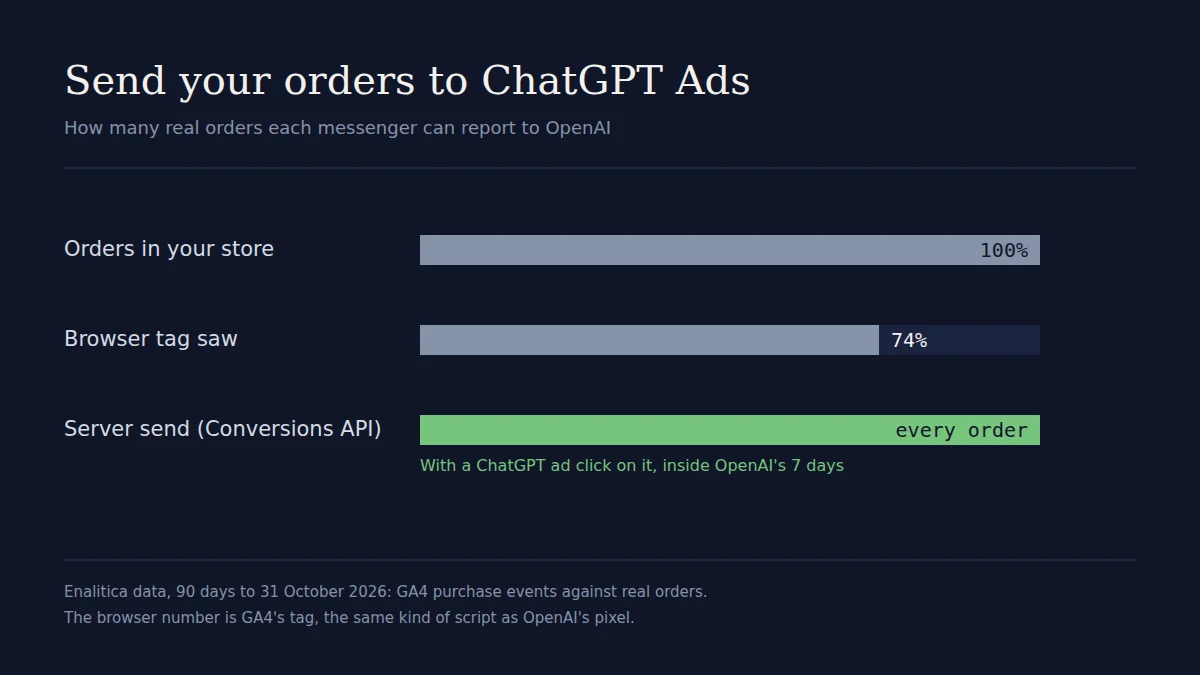
In Enalitica's data, 90 days to 31 October 2026 (stores where we also read Google Analytics), GA4's browser tag recorded a purchase for 74% of the real orders. The middle store saw about 70%; the best 96%, the worst 49%.
GA4 is not OpenAI's pixel, but it is the same kind of messenger: JavaScript in the customer's browser, subject to the same consent banners, blockers and thank-you pages that never load. Roughly one purchase in four never reached it. A ChatGPT ads campaign judged and optimised on the pixel alone starts from the same handicap, on a channel where every conversion signal counts because the volumes are still small.
One more fact from the same data: ChatGPT ad clicks did not yet appear on its orders in that window. The channel is new, accounts are small, and a campaign that sends OpenAI five purchases a week instead of three gives its bidding two thirds more to learn from.
What the Conversions API changes in OpenAI's reports and bidding
- Conversions columns. Server events land in the same conversion reporting as pixel events. OpenAI asks you to "allow at least one day for conversion data to appear".
- Click first, views separately. A conversion within the click window (7, 14 or 30 days, default 30) goes to the click; otherwise a fixed one-day view-through window applies. OpenAI states that CPA, bidding, billing and conversion optimisation remain click-through-based.
- Conversion-optimised bidding. OpenAI's oCPC, which "optimize[s] delivery toward one tracked conversion event while continuing to pay for valid clicks", is in open beta and adds that the Conversions API "is a more reliable tracking source than the pixel alone". Custom events cannot be the optimisation goal;
order_createdcan. - View-through needs all orders. OpenAI recommends "sending all conversion events, not just those with an
oppref, to incorporate view-through conversions", so it can match people who saw an ad and bought without clicking.
That last point is a choice every store has to make for itself. Sending every order hands OpenAI hashed contact details of customers who never clicked an ad, so it can claim the ones who saw one. It raises OpenAI's conversion count; it does not make your own count more accurate, because a view leaves no trace on the order. We cover why view-through inflates platform numbers in the view-through guide.
Limitations worth knowing before you start
- Seven days, hard. A purchase confirmed after a week (a bank transfer, a B2B order approved by hand) can never be reported. Send within hours, not at month end.
- No click id, no click credit. If your shop did not keep
oppreffrom the landing URL, the server event carries only hashed contact data and OpenAI can match it at most as a view. - One batch error fails the batch. The API accepts up to 1,000 events per call, and "if one event in the batch fails, the full batch fails". A single malformed order can hold back a day of good ones in a careless integration.
- Deduplication by id only. Covered above: pixel and server must share the id, or only one of them may report purchases.
- No official store plugin. OpenAI documents the pixel, an image tag and the API. Shopify, WooCommerce and tag-manager integrations are third-party.
- Consent is your job. OpenAI's pixel initialises consent as granted unless you set it to false. In the EU your banner has to tell it otherwise, and your server send has to respect the same choice.
How Enalitica sends your orders to OpenAI
Enalitica starts from the order, which is exactly what the Conversions API wants. Our tracking script keeps the oppref from the landing URL in a first-party cookie and writes it onto the order at checkout, the same way it handles gclid and fbclid; the ChatGPT ads attribution guide explains the capture. Once an order with an oppref is imported from WooCommerce, Shopify, Shopamine or a custom shop, it goes to OpenAI right after the import.
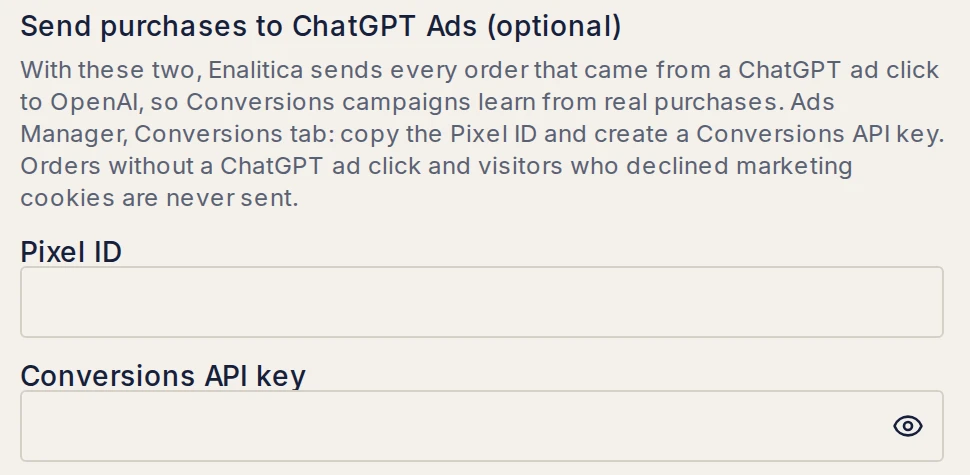
- 1Optional, on the same connection. The Advertiser API key reads spend; these two fields add the purchase send.
- 2Pixel ID. From the Conversions tab in Ads Manager. No browser pixel needed.
- 3Conversions API key. A separate key from the reporting one. Test checks both with a validate-only event, so nothing is saved at OpenAI.
What happens for each order, in the order it happens:
- Only orders with a ChatGPT ad click are sent. Cancelled, refunded and failed orders never are, and neither are orders where the visitor explicitly declined marketing cookies.
- The event follows OpenAI's rules to the letter:
order_created, an id built from your shop's own order id (1234_purchasefor order 1234), so a retry is never a second sale and a pixel that sends the same id is merged with it, the real order value in cents, the storedoppref, the landing page without its query string assource_url, the products, and email, phone and name hashed by OpenAI's normalisation (phone without the+). - A daily catch-up at 4 am resends anything that failed while it is still inside OpenAI's seven days. A refused key or a temporary error is retried; an order too old or without a click is marked skipped with the reason.
- Your own numbers do not change. The ChatGPT Ads tab still counts your orders by click, direct and multi-touch apart. What OpenAI receives only improves what OpenAI learns from.
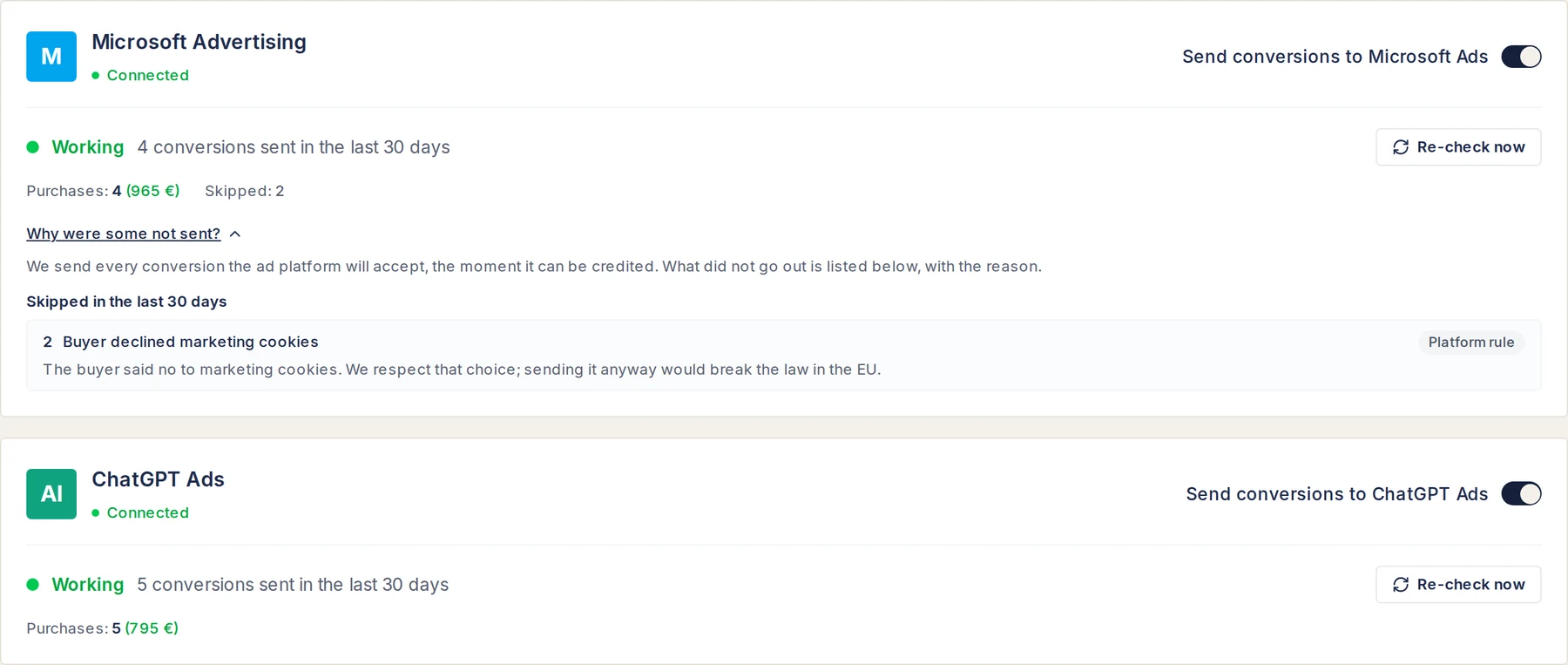
- 1What did not go, and why. On the Microsoft card two buyers declined marketing cookies, so their orders stayed home. ChatGPT follows the same rule.
- 2One switch per platform. On when the keys are there, off with one click.
- 3What went out. Purchases sent to OpenAI in the last 30 days, with their value.
The same screen shows Google, Meta, LinkedIn and Microsoft Advertising, so one page answers the question an agency asks first: is every platform getting the sales it paid for? Microsoft works the same way through its offline conversions; the Microsoft Ads attribution guide covers the details.
If you are deciding whether ChatGPT ads are worth testing at all, start with the ChatGPT ads calculator and connect the purchase send before the first euro is spent, so OpenAI learns from every sale from day one. Start a 14-day trial or book a demo and we will connect it with you.
Setup checklist
- Create the Pixel ID and a Conversions API key in ChatGPT Ads Manager, Conversions tab. The Conversions API key is not the Advertiser API key.
- Make sure
opprefsurvives to the order. Click your own ad once (or add?oppref=testto a landing URL), place a test order and check that the click id is stored on it. - Pick one source for purchases, or give the pixel the same id as the server. With Enalitica that is your shop's order id plus
_purchase. - Send amounts in cents and phones without the
+, if you build it yourself. Validate withvalidate_only: truefirst. - Send within hours, retry daily, and stop at seven days.
- Respect declined consent in the server send, not only in the banner.
Frequently Asked Questions
Can I send leads or sign-ups instead of orders?
Yes, the API supports lead_created, registration_completed, appointment_scheduled and more. For a store the purchase is the right goal, because oCPC optimises toward one event and you want it to be the one that brings money. Enalitica sends orders to OpenAI; enquiries from service businesses go to Google, Meta and LinkedIn today.
Do I need the ChatGPT Ads pixel if I use the Conversions API?
No. OpenAI requires a Pixel ID for server events but not the browser snippet. The pixel is still useful for page views and add-to-cart, which a server only sees if your shop reports them. If you install it, leave the purchase to one source.
Is the Conversions API available for stores in Slovenia and Croatia?
The Pixel ID and the Conversions API key are created in Ads Manager, so they come with the ad account. Self-serve ChatGPT ads opened in 31 European markets on 31 August 2026, Slovenia and Croatia among them.
What happens to a refunded order already sent to OpenAI?
Nothing yet. We found no retraction or adjustment for a sent conversion in OpenAI's Conversions API documentation (November 2026), unlike Google, where Enalitica retracts cancelled and returned orders every night. Because the event goes out as soon as the order is imported, a refund a week later stays in OpenAI's count; your own report in Enalitica drops it.
Does sending hashed emails to OpenAI comply with GDPR?
Hashing is pseudonymisation, not anonymisation, so the data is still personal data and needs a legal basis, usually the visitor's marketing consent. OpenAI states it "does not currently use data collected via the Conversions API for user-level personalization". Mention OpenAI as a recipient in your privacy policy, and do not send orders from visitors who declined.
How is this different from connecting ChatGPT to my store data?
They point in opposite directions. The Conversions API sends your orders to OpenAI's ad system so the bidding learns. Connecting ChatGPT to your store data through MCP lets you ask ChatGPT questions about your own reports; nothing goes to the ad system.
Sources
The outside pages this article relies on. Links checked on 1 November 2026.
- 30 days (developers.openai.com)
- "sends conversion events directly from your server to OpenAI... It complements the Measurement Pixel." (developers.openai.com)
- "a server-only integration still needs a Pixel ID, but does not require installing the browser Pixel." (developers.openai.com)
- supported events (developers.openai.com)
- "allow at least one day for conversion data to appear" (developers.openai.com)
Figures marked "in Enalitica's data" are aggregates from the real orders of the stores we measure, with no names and no individual orders. How we measure.

See your real numbers
Import 30 days of orders or leads during a 5-minute onboarding. Works for e-commerce and service businesses.
See plans and pricing