
Shopify Attribution: What the Order Knows and What It Never Will
Shopify attribution writes the channel onto every order by itself, but rarely the campaign or click ID. What Shopify knows, the 30-day limit, the full picture.

Tilen Ledic
Written by
Shopify attribution is better than it gets credit for, and worse than the apps promise. Shopify writes onto every order which site the customer came from, and for a same-session purchase even the landing URL with the click ID in it; it does not write the campaign, a click from three days ago, or anything from another device. This guide explains what a Shopify order already knows about attribution, where the limits of Shopify's own reporting model are, which traps a migration to Shopify brings, and what has to be added for the full picture by campaign and keyword. Verified on August 14, 2026, and checked again on September 28, 2026.
What Shopify Attribution Writes onto Every Order
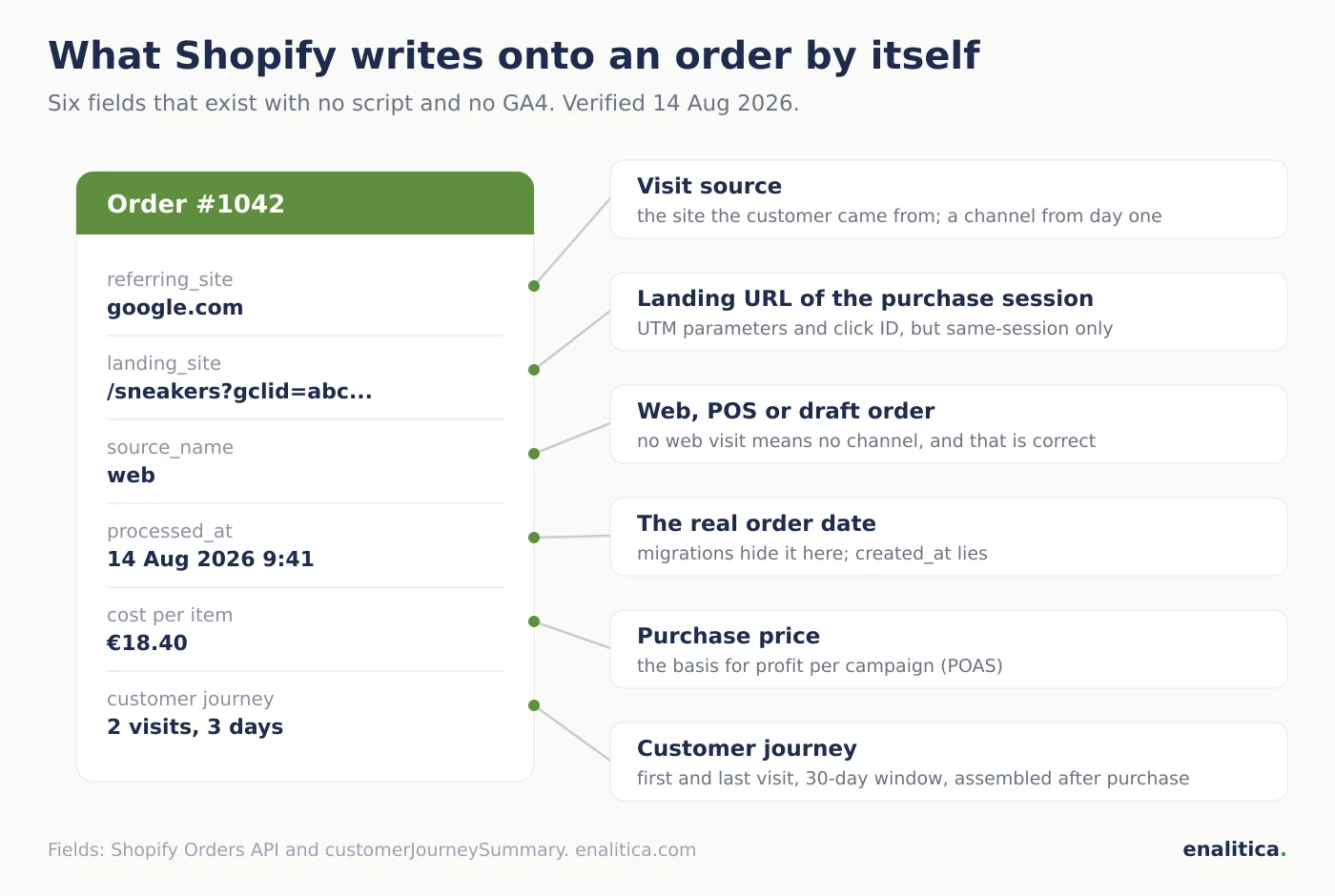
Shopify attribution starts with data the platform itself writes onto the order: referring_site (the site the customer arrived from), landing_site (the first URL of the session in which the order was placed, including any UTM parameters and click IDs), and source_name (web store, POS, draft order). On top of that, Shopify assembles a customer journey summary for each order: first visit, last visit and days to conversion, with a 30-day window.
That is more than most people expect, and exactly in the direction we argue for: the order is the source of truth, not a session in an analytics tool. But mind three limits. Shopify does not write the campaign onto the order; UTM parameters survive only if they were in the landing URL of that same session. The customer journey reaches at most 30 days back and is assembled only after the purchase, sometimes late or not at all. And all of it applies from the moment the order is created in Shopify; history imported from elsewhere carries none of it.
When Does Shopify Capture a Click ID and When Does It Lose It?
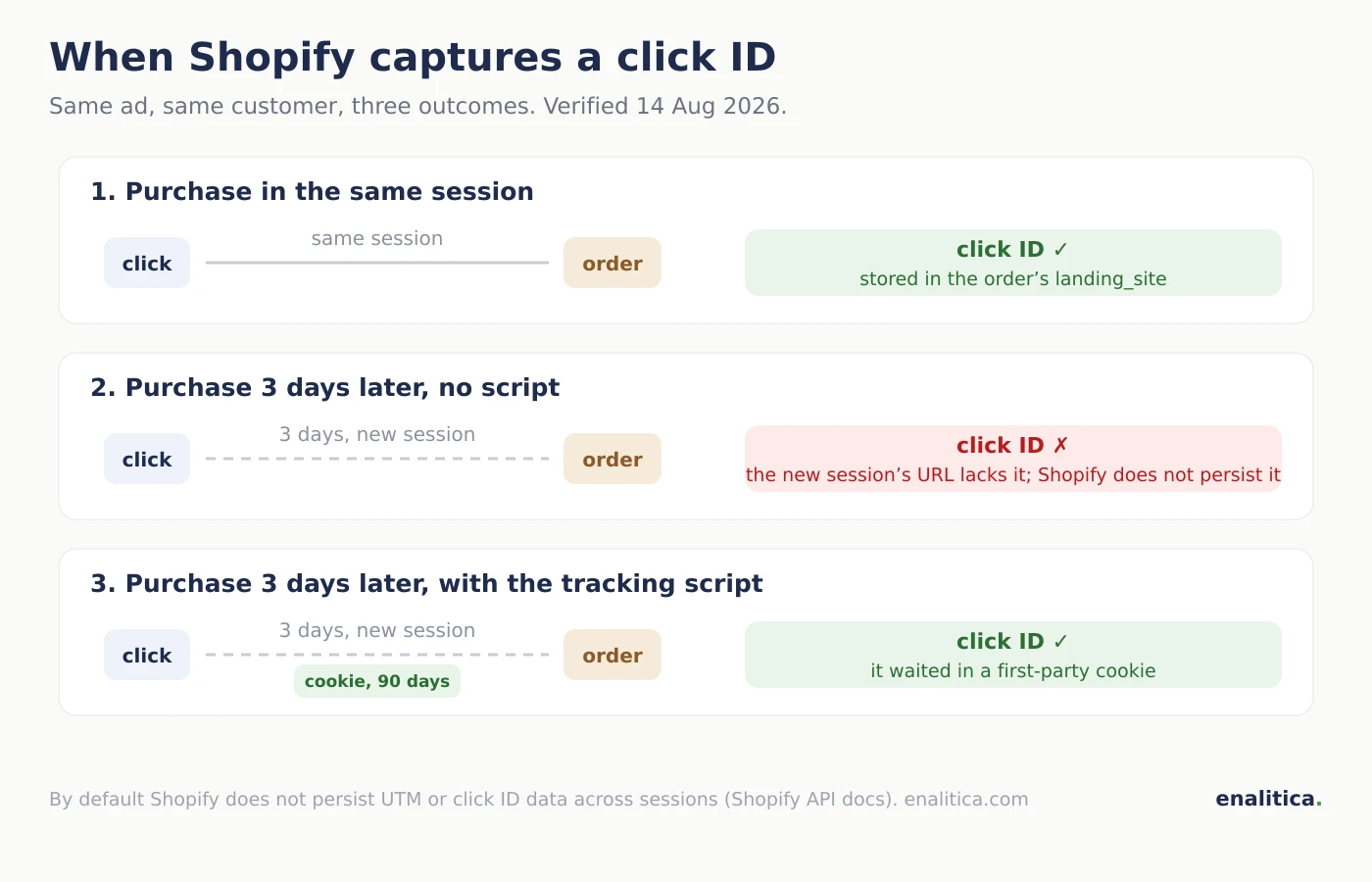
Shopify captures a click ID (gclid, fbclid and their siblings) in exactly one case: the customer clicks the ad and places the order in the same session, so the click ID is part of the landing URL that Shopify stores in landing_site and in the customer journey. It loses the click ID in every other case: the customer clicks today and buys in three days from a bookmark, compares on the phone and buys on the laptop, or comes back through a search for your brand. By default Shopify does not persist UTM or click ID data across sessions; whatever is not in the URL of the final session is gone.
How much the same-session rule misses is measurable. In Enalitica's data (more than 6,500 order journeys, last 90 days to 28 September 2026), 12.4% of orders were spread over two or more visit days, and those are exactly the orders where the landing URL of the final session no longer carries the click.
In Enalitica's data, 29.5% of orders with a paid ad click were placed more than a day after the click and 9.3% more than a week after. Shopify's same-session capture loses the click ID on every one of them.
In integrations, before our tracking script is installed, we typically see the same picture: the channel is known on nearly every order (the referrer is free and always there), the campaign on a handful (where UTMs survived the same session), and a click ID almost never, because more than one session usually passes between click and purchase. The consequence hurts: a store can spend on Google Ads, Google Ads reports healthy conversions, and without persistent capture almost nothing is attributed on the orders themselves. The tracking script fixes exactly this: it stores the click ID in a first-party cookie on the first visit, so an order a week later still knows which click brought it. One caveat on iPhone: Safari caps cookies written by JavaScript, down to 24 hours after a click with a click ID in the URL, which is why new Enalitica connections add a Shopify Web Pixel (more on that below).
Why Do Shopify Reports Disagree with GA4 and Ad Platforms?
Shopify reports use their own attribution model: last non-direct click with a 30-day window that cannot be changed (you can switch the view between first click, last click, any click and linear, but not the window). GA4 defaults to a data-driven model with different windows, and each ad platform counts its own way, including view-through conversions. Three systems, three models, three different numbers for the same month; we broke them down in our comparison of how Meta, Google and Enalitica count conversions. The fixed 30-day window itself costs little: in the same Enalitica data only 1.4% of orders with an ad click came more than 30 days after the click.
The practical takeaway for a Shopify store: the report under Growth is useful for rough direction by channel, but it is not comparable to GA4 or Ads Manager, and the gap between them comes from different counting rules, so there is nothing to fix.
Instead of reconciling three opinions, put the truth on the Shopify order itself: channel, campaign and click ID on every order, then count orders.
We gave the same advice for WooCommerce; Shopify actually ships better foundations for it.
Migrating to Shopify: Four Data Traps on Orders
A store that moves to Shopify from another platform inherits four traps that fresh stores never see. We observe all four on migrated stores we connect:
- The order date is not the import date. A migration creates every historical order on the day it runs, so reports show one giant spike instead of years of sales. The real date survives in the
processed_atfield, which migrations back-date; imports must read that one. - An order can arrive with no money on it. Migrated orders can carry 0.00 in every order-level figure while the line items hold real prices. Revenue then has to be derived from the line items, or reports dramatically understate it.
- GA4 will never match the old orders. The previous platform sent its own transaction IDs to GA4, and Shopify assigns migrated orders new ones. The two sets never overlap; expect matching from the go-live date forward.
- There is a hole around the cutover. The migration export ends before the switch, Shopify goes live later, and the orders in between exist only on the old platform. Those weeks need a separate import, or at least a mental footnote before comparing reports to accounting.
How Enalitica Turns Shopify Orders into Full Attribution
Enalitica reads the Shopify data to the end first, and only then adds its own:
- Channel from day one:
referring_siteandsource_namefrom the orders give channel reports at connection time, with no script and no GA4; POS and draft orders stay without a channel because there was no web visit. - Click IDs from every source: collected from
landing_site, from the customer journey's landing pages and, with the script, from a first-party cookie with 90-day retention. Stores connected since late September 2026 also get a Shopify Web Pixel installed by the Enalitica app at connect (it shows under Settings > Customer events), which ties each ad click to Shopify's own visitor ID and keeps it on Enalitica's server for 90 days, so a purchase a week later on an iPhone can still find its click. Thesrsltidparameter is deliberately excluded: Google appends it to free Shopping listings and organic results too, so it proves a visit from Google, not a paid click (in the same 90-day data it sat on 2.4% of orders). - Campaign and keyword: an order with a gclid gets the campaign, keyword and CPC through the Google Ads API; from there on, per-campaign reports, negative keywords and verdicts have something to stand on.
- Profit, not just revenue: Shopify's Cost per item is read as the purchase price for POAS, refunds reduce the order's revenue, and the migration traps from the previous section are already handled in the import (processed_at, line-item money).
- Email channels: Klaviyo and Brevo connect directly, so email campaigns get their own orders instead of one generic "email" row; how generously Klaviyo hands out credit is a chapter of its own.
If you run a Shopify store and want to see what your orders already know, see plans and pricing or book a live demo; connecting is one button in the admin.
Shopify Store Attribution Checklist
- Check what your orders already carry: the referrer, landing URL and order source are visible on every order in the admin.
- Install a tracking script in the theme, because only persistent click ID capture ties orders to campaigns across sessions.
- Add UTM parameters to every paid and email link; Shopify keeps them only if they arrive in the landing URL.
- Enter Cost per item, or there is no profit per campaign.
- On a migrated store, verify order dates (processed_at), the money on migrated orders, and the cutover hole.
- Read Shopify's Growth report as one view with its own model, not as the truth; a tracking audit tells you how much of the journey you see at all.
Frequently Asked Questions
Which attribution model does Shopify use?
Shopify reports default to last non-direct click with a 30-day window; the window cannot be changed, but the view can be switched to first click, last click, any click or linear. The model applies to Shopify's own reports under Growth and differs from GA4 and the ad platforms, which is why the numbers never quite agree across systems.
Does Shopify store where an order came from?
Yes, partially. Every web order carries the referrer (referring_site) and the landing URL of the session in which it was placed (landing_site), plus a customer journey summary with the first and last visit within 30 days. Shopify does not store the campaign or a click ID from earlier sessions; that requires persistent first-party capture.
Does Shopify capture the gclid?
Only when the customer clicks the ad and places the order in the same session; the gclid is then part of the landing URL Shopify stores. If the customer buys later or on another device, the gclid is no longer reachable without a tracking script, which is why most orders on stores without a script carry no click ID.
Why do Shopify and GA4 numbers not match?
Because the systems use different models and windows: Shopify last non-direct click over 30 days, GA4 a data-driven default with different windows, and GA4 additionally misses part of the orders to consent and ad blockers. The gap is expected; what matters is knowing which number to use for which decision.
Do I need GA4 if I have Shopify?
Not for basic channel reports; Shopify covers those itself through the referrer. GA4 adds what Shopify does not have: sessions and conversion rate, device, country and pre-purchase behavior. For attribution by campaign, though, neither is enough without UTM parameters and persistent click ID capture.
How do the _shopify_s and _shopify_sa_t cookies work for attribution?
Shopify sets first-party cookies that feed its own analytics: according to Shopify's cookie policy, _shopify_s marks the browser session (30 minutes, rolling) and _shopify_y identifies the browser for a year. The _shopify_sa_t and _shopify_sa_p cookies that older guides describe as holding the marketing parameters of the attributed visit are no longer on that list. They exist only in the browser that received them, Safari clears or shortens them like any other cookie, and Shopify does not expose their content on the order; you see the outcome as referring_site, landing_site and the customer journey summary. For attribution you can audit, an order needs the click ID written onto it, which is what Enalitica's tracking script (and, on new connections, its Web Pixel) adds on top.
Why is an order marked Direct when the customer logged in from a new browser?
Because Shopify attributes a visit, not a person. A customer who clicked an ad on their phone and later logged in on a laptop to complete the purchase arrives in a browser that carries no referrer, no UTM and no click ID, so Shopify files the order as Direct even though the account is the same; logging in does not import the marketing cookies from the other device. Enalitica marks the same order as a proven Direct visit only when its own evidence trail is empty too, and because it keeps the channel of every customer's first order, the earlier ad click stays visible on the customer even when it is missing on this order.
Sources
The outside pages this article relies on. Links checked on 28 September 2026.
- customer journey summary (help.shopify.com)
- 24 hours after a click with a click ID in the URL (webkit.org)
- last non-direct click with a 30-day window (help.shopify.com)
- Shopify Web Pixel (shopify.dev)
- Shopify's cookie policy (shopify.com)
Figures marked "in Enalitica's data" are aggregates from the real orders of the stores we measure, with no names and no individual orders. How we measure.
See your real numbers
Import 30 days of orders or leads during a 5-minute onboarding. Works for e-commerce and service businesses.
See plans and pricing