
Why Is My Direct Traffic So High? The Real Sources
Why is my direct traffic so high? Because GA4 files every session without a source as Direct: dark social, in-app browsers, untagged email, QR codes. The fixes.

Tilen Ledic
Written by
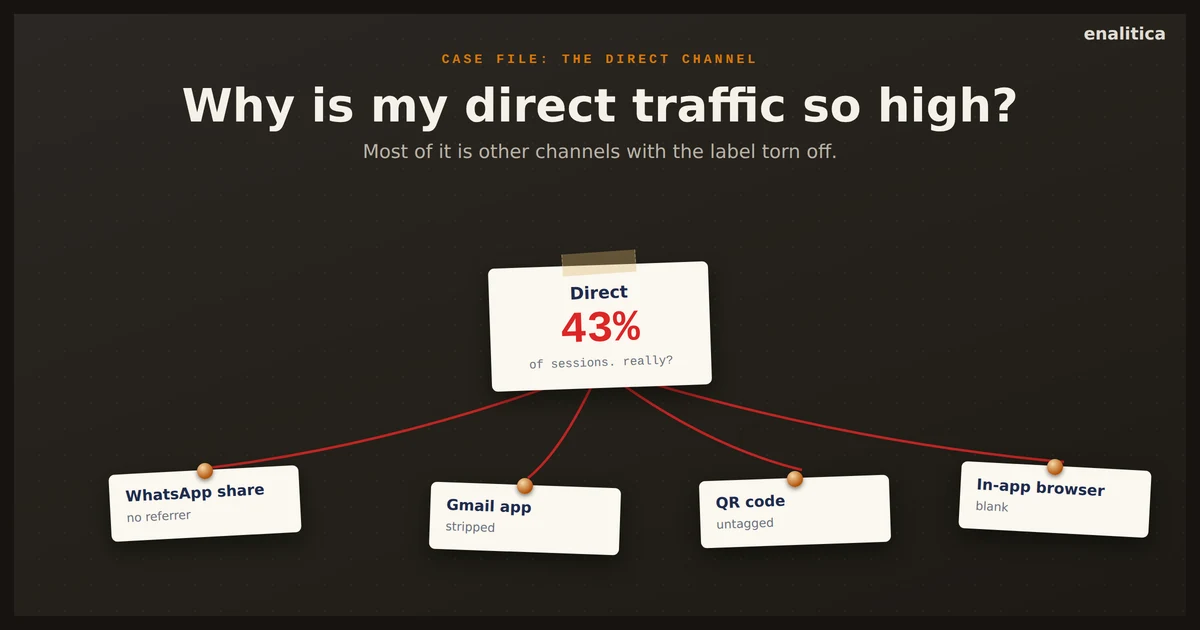
Open your GA4 acquisition report and there it sits: Direct, often the second biggest channel, sometimes the biggest. If you are asking "why is my direct traffic so high", the honest answer has two parts. Part of that direct traffic is real, people who know your brand and come back on their own, and part is other channels with the label torn off. The trick is knowing which part is which, and in our data the real part is bigger than most guides admit.
Direct is where GA4 puts every session it cannot explain, so real loyalty shares a row with your paid and organic work coming back unlabeled: links opened in messaging apps, untagged newsletter clicks, in-app browsers that strip the referrer.
This guide walks through what the Direct channel really contains, how much is normal for an online store, and how to shrink the inflated part. It ends with the approach Enalitica takes: treating Direct as something that must be proven, not assumed.
What Direct Traffic in GA4 Actually Means
Direct traffic in GA4 is a fallback classification, not a measured channel. A session lands in Direct when its source is exactly "(direct)" and its medium is "(none)" or "(not set)", which is how Google defines the channel: no referrer, no UTM parameter, no click ID, every pocket checked and found empty. The label describes missing information, not visitor behavior.
That distinction changes how you should read the number. "Organic Search: 4,000 sessions" means GA4 saw google.com hand over 4,000 visitors. "Direct: 3,000 sessions" means GA4 has no idea where 3,000 visitors came from and filed them under the least wrong name available.
Direct in GA4 is not a traffic source. It is the measurement of how much information your tracking lost.
Some of those sessions genuinely are typed URLs and bookmarks, and those are gold: people who remember your brand. The problem is that they share a row with every session whose real origin got stripped along the way.
Do Direct Visitors Really Type Your Store's URL?
More of them than the usual advice admits. In Enalitica's data, last 90 days to 28 September 2026, across more than 6,500 order journeys, 24.4% of orders ended on a direct visit, and only about 1 in 9 of those direct orders showed another channel earlier in the journey that our 90-day first-party memory could see. An earlier paid ad click was rarer still: 4.4% of direct orders.
Typed URLs, bookmarks and browser autocomplete are real direct visits, and for an established brand they are a healthy sign of recall. The remainder is what analysts call dark traffic: visits from identifiable channels whose referrer information never survived the journey.
The browser is the weak link. A referrer only reaches GA4 if the previous app or page passes it along, and a growing share of the modern web deliberately does not. Messaging apps, native email clients, PDFs and many in-app browsers send visitors out with a clean slate.
So before you celebrate brand strength or panic about a spike, break the channel apart. The next section lists the seven sources that hide inside it.
Seven Real Sources Hiding Inside the Direct Channel
The Direct channel typically hides seven identifiable sources: dark social shares, in-app browsers, untagged email, QR codes, HTTPS downgrades, session-splitting payment gateways and bots. Each one strips or loses the referrer in its own way, and each has its own fix. Let us take them one by one.
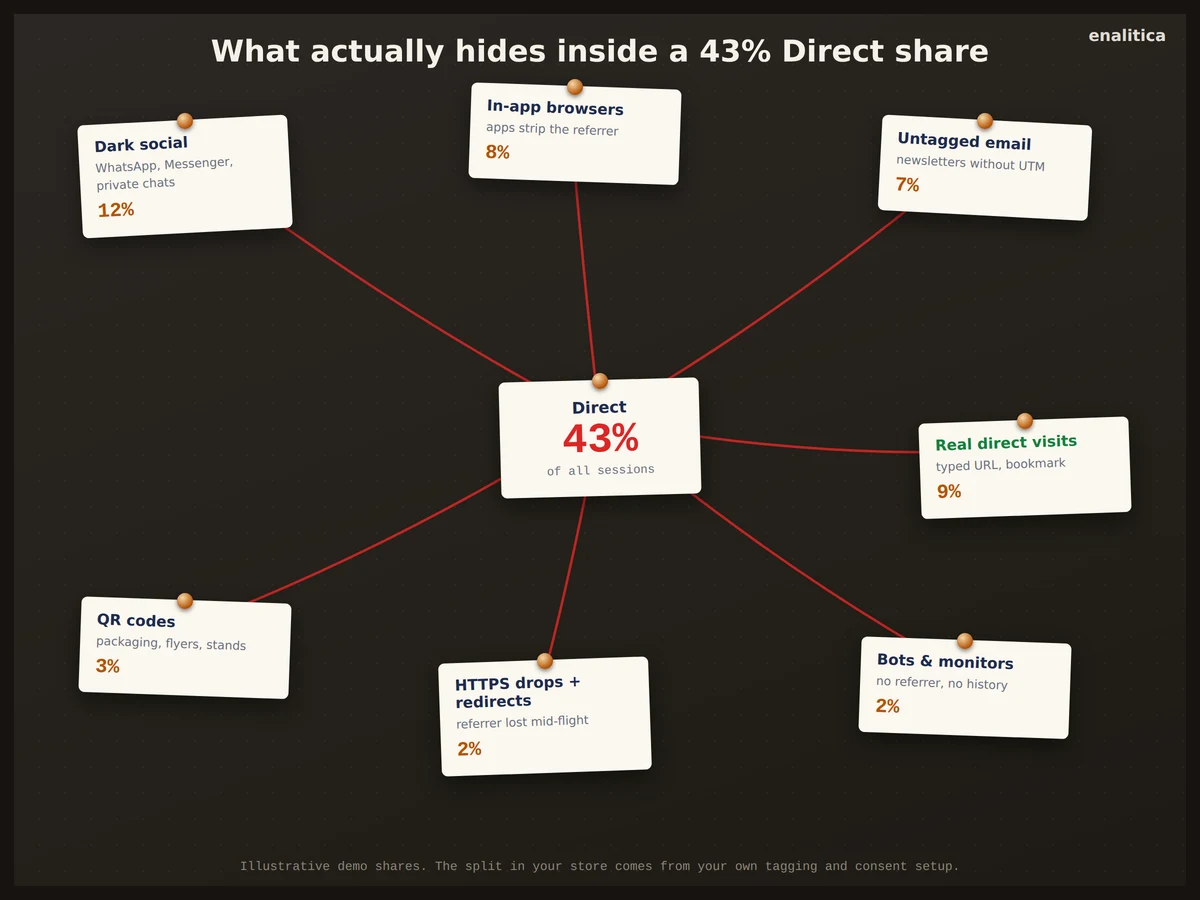
1. Dark social and messaging apps
When a customer pastes your product link into WhatsApp, Viber, Messenger or a private Discord, the click that follows carries no referrer. Virtually all of it lands in Direct, and no GA4 report can tell you how large that slice is, because the evidence was never sent. Your most enthusiastic word of mouth is invisible by default.
2. In-app browsers and app referrers
Android apps identify themselves by package name instead of a web referrer, and analytics tools handle each differently. Enalitica's classifier reclassifies them by what they really are: com.google.android.gm is the Gmail app, so it counts as email; Instagram, TikTok and Facebook packages count as social. Visits from com.android.chrome and other plain browser packages carry no origin at all, so they stay direct. iOS apps are worse: they usually pass nothing, so the visit looks typed-in.
3. Untagged email
Every newsletter or transactional email link without UTM parameters produces a Direct session when opened in a desktop or native mail client. German webmail providers add a twist: a click from GMX or WEB.DE passes through a dereferrer host such as deref-gmx.net, so the session lands in Referral under that host instead of Email, and the newsletter still gets no credit. The fix is mechanical tagging discipline, covered in our guide to UTM parameters for email.
4. QR codes and offline media
A QR code on packaging, a flyer or a trade-fair stand opens your site with no referrer. Untagged, every scan is a Direct session, and your offline investment reports as nothing. Add UTM parameters to the destination URL and the same scan becomes a measured channel.
5. HTTPS to HTTP and broken redirects
Browsers drop the referrer when a secure page links to an insecure one (Chrome's default referrer policy, strict-origin-when-cross-origin since version 85, sends none on an HTTPS to HTTP request), and some redirect chains (URL shorteners, old vanity domains) lose it too. The visitor came from a real channel; the handoff destroyed the evidence mid-flight.
6. Payment gateways splitting sessions
The return from PayPal, Klarna or a bank 3-D Secure page can start a new GA4 session credited to the gateway, cutting the original visit short. This one inflates Referral rather than Direct, but it distorts the same report; the fix is GA4's list of unwanted referrals, and the full repair list lives in our post on unwanted payment-gateway referrals in GA4.
7. Bots and monitoring tools
Uptime checkers, scrapers and script-driven visits often arrive with no referrer and no JavaScript history, landing in Direct or Unassigned. A sudden Direct spike with zero revenue attached is the classic signature; our guide to detecting bot traffic in GA4 shows how to confirm it.
How Much Direct Share Is Normal for an Online Store?
For most ecommerce stores a Direct share of 15 to 25% of sessions is ordinary, and strong brands earn more. In Enalitica's data, last 90 days to 28 September 2026, GA4 filed 23.7% of more than 1 million sessions under Direct; at order level the direct share ran from 13% to 48% per store, with the median store near 19%. The alarm signal is the trend, not the absolute number: a sudden jump with no brand campaign behind it, or a share far above that range, almost always means misattribution, a consent-banner change or broken tagging rather than a surge of loyal typists.
One more split keeps the number honest: new versus returning. A returning customer who arrives direct is loyalty working as intended; they found you through a paid or organic channel months ago. A brand-new visitor arriving "direct" is far more likely to be a stripped referrer.
A returning Direct visitor is your marketing paying off late. A new Direct visitor is usually a measurement failure.
Checking your own share takes minutes and belongs in a regular conversion tracking audit.
Direct, Unassigned and Unknown: Three Different Data Gaps
GA4 actually has two junk drawers, and order-level analytics adds a third. They fail in different ways, so lumping them together hides the fix:
| Bucket | What it means | Typical cause |
|---|---|---|
| Direct | Session seen, source empty | Stripped referrer, typed URL, QR |
| Unassigned | Source seen, no channel rule matches | Broken or non-standard UTM values |
| Unknown (order-level) | No session data at all | Declined consent, phone or ERP orders |
Direct means tracking worked and found nothing. Unassigned means tracking delivered values GA4 could not classify, usually a typo like utm_medium=Email-Newsletter; we mapped that whole bucket in our guide to unassigned traffic in GA4. Unknown, the bucket Enalitica reports separately, means the order has no analytics row at all, most often because the customer declined cookies; our privacy-safe attribution stack explains how much can still be measured lawfully around it.
The size of that third gap surprises people. Take the stores in our data where both the shop and GA4 are connected, more than 10,000 orders in the same window: GA4 logged a purchase event for 76.6% of them, and the median store did worse, at 68.5%.
The three need different medicine: Direct needs tagging discipline, Unassigned needs UTM cleanup, Unknown needs consented first-party capture or an honest question at checkout.
How to Reduce a Bloated Direct Channel: UTM Checklist
You cannot eliminate Direct, and you should not want to; real brand recall lives there. You can remove the pollution:
- Tag every link you control. Newsletters, transactional emails, QR codes, social bios, PDF price lists, marketplace profiles. If you publish the link, it carries UTM parameters.
- Standardize UTM values. Lowercase everything, one spelling per channel (
email, neverEmailandE-mail), documented in a shared sheet following a UTM naming convention. Inconsistency feeds Unassigned. - Keep the whole funnel on HTTPS and retire redirect chains that drop referrers.
- Add payment gateways to GA4's unwanted referrals list so checkout returns stop splitting sessions.
- Filter known bots and your own office IPs.
- Review the share monthly, split by new versus returning, and investigate jumps instead of averaging them away.
On WooCommerce there is a seventh, platform-specific leak: the built-in Order Attribution feature keeps a six-month first-touch cookie next to a per-session one, and when the current visit has no referrer the order is written as "Direct" even for a buyer whose first visit came from an ad. We took that apart in why WooCommerce orders say Direct.
How Enalitica Proves a Direct Visit Instead of Assuming It
Enalitica's attribution rule for the Direct channel is one sentence: Direct is only ever proven direct. An order earns the Direct label when the tracking script demonstrably ran on the buyer's visit, with consent, and captured no click ID, no UTM parameter and no outside referrer. That is a witnessed clean visit.
An order with no evidence at all gets the opposite treatment. No session data, no click ID, no referrer record: it is reported as Unknown, never quietly filed under Direct. Absence of proof is not proof of a typed URL.
An analytics tool that cannot show you the difference between "we saw a clean visit" and "we saw nothing" is guessing with your marketing budget.
The distinction is visible in the Tracking coverage block of the Enalitica reports overview, shown below with demo numbers. Every order falls into exactly one evidence row: exact ad (a click ID reached the order), known channel, proven direct visit, or no evidence, and the rows add up to 100%. You always know how solid the ground under your numbers is. GA4 groups that Google adds without warning are mapped explicitly too, because every unmapped group used to leak straight into Direct.
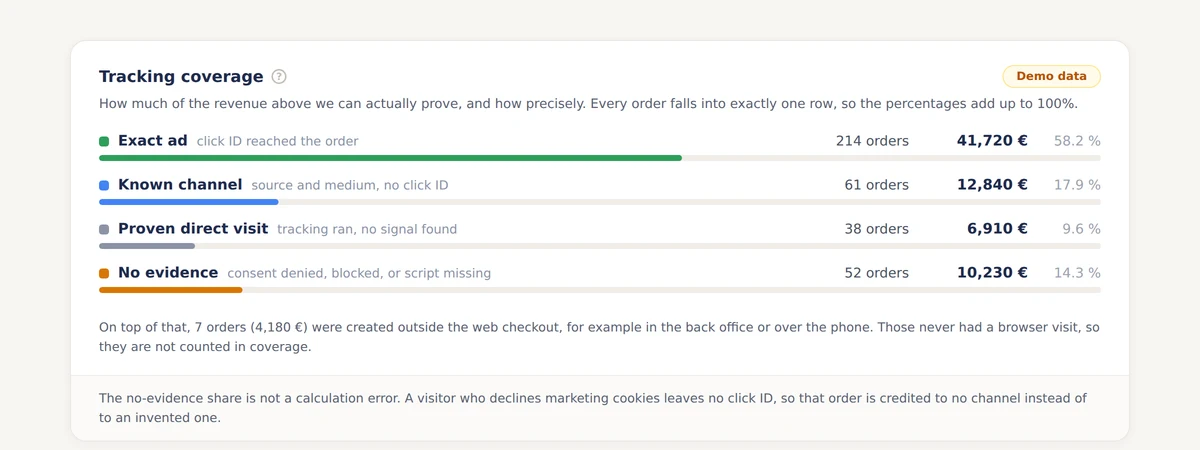
The result is a Direct number you can defend in a meeting: smaller than GA4's, and true.
Ask the Customers Your Tracking Cannot See
For the orders that stay Unknown, and for offline channels like billboards and TV that never produce a referrer, the most honest instrument is also the simplest: ask the customer. One optional question at checkout ("Where did you hear about us?") converts a slice of the dark into labeled, first-party data.
Asked correctly, it targets only orders that carry no marketing evidence, so shoppers who clicked an ad are never bothered. We covered the method, the wording and the five rules that keep answers usable in our post on self-reported attribution.
Combined with proven direct, declared answers turn the scariest column in your report into three honest ones: measured, witnessed clean, and stated by the customer.
Frequently Asked Questions
Is high direct traffic bad for an ecommerce store?
Not by itself. Direct contains your most loyal visitors, and a strong brand should see it grow slowly alongside other channels. It becomes a problem when the share sits far above what comparable stores show (in Enalitica's data the median store is near 19% of orders), jumps suddenly, or consists mostly of new visitors: those patterns point to stripped referrers, tagging gaps or consent changes, not brand strength.
Why did my direct traffic suddenly spike?
Check four suspects in order: a recently sent untagged email campaign, a consent-banner or cookie change that cut off source data, a new redirect or HTTPS misconfiguration, and bot activity. A genuine brand surge (TV, PR, viral moment) also lifts branded search at the same time; a spike in Direct alone is almost always technical.
Do QR code scans count as direct traffic?
Yes, unless you tag them. A QR code opens the browser with no referrer, so untagged scans are indistinguishable from typed URLs. Encode the destination as a URL with UTM parameters (for example utm_source=packaging&utm_medium=qr) and every scan reports as its own measurable channel.
Does dark social show up as direct traffic?
Almost entirely. Links shared in WhatsApp, Messenger, Viber, Discord or SMS pass no referrer when clicked, so GA4 files those sessions under Direct. You cannot recover past dark social visits, but share buttons that append UTM parameters and campaign-specific short links make future ones measurable.
How does Enalitica report direct traffic differently from GA4?
Enalitica separates proven direct visits (the tracking script ran with consent and found no marketing signal) from Unknown orders (no evidence at all, usually declined consent). GA4 has no such split; every unexplained session lands in one Direct row. The separation keeps Direct small, defensible and impossible to confuse with tracking failure.
Sources
The outside pages this article relies on. Links checked on 3 October 2026.
- Google defines the channel (support.google.com)
- Chrome's default referrer policy (developer.chrome.com)
- list of unwanted referrals (support.google.com)
Figures marked "in Enalitica's data" are aggregates from the real orders of the stores we measure, with no names and no individual orders. How we measure.
See your real numbers
Import 30 days of orders or leads during a 5-minute onboarding. Works for e-commerce and service businesses.
See plans and pricing